
Highlight Stack Items on Hover in Mac OS X Dock
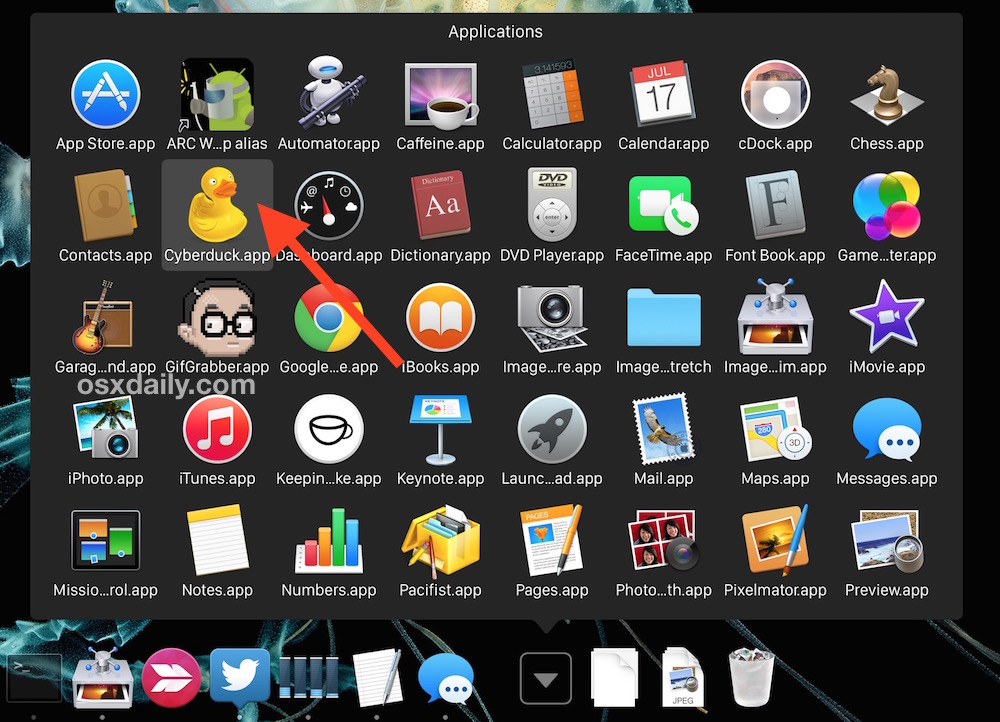
A little known hidden trick allows for a nice cursor hover effect to follow your mouse as it goes over an application, folder, or item within an opened Dock stack of Mac OS X.
This makes navigating within Dock folder items a whole lot easier on the Mac and only takes a moment to turn on. To enable the secret option yourself with a defaults command, so here’s how to activate it.
Enable the Hovering Highlights for Dock Stacks in OS X
Launch the Terminal and enter the following command string exactly followed by the return key:
defaults write com.apple.dock mouse-over-hilite-stack -boolean yes;killall Dock
The command will both enable the hidden stacks highlighter, plus it will restart the Dock immediately upon completion, it’s all in one as long as your syntax is on a single line and entered properly.
Now just open a Dock Stack and move your mouse cursor over an item to see the effect.
Turn Off Highlighting Cursor Hovers for Dock Stacks in Mac OS X
To disable the Stack hover highlight effects in OS X, use the following defaults string:
defaults write com.apple.dock mouse-over-hilite-stack -boolean no;killall Dock
I find Stacks Grid view to be much more useful with this enabled, but try it yourself, and yes it works on the Recent Items stacks if they’re in Grid view too. Why this isn’t enabled by default is a little curious to me, maybe not everyone will like it though.






I googled:
“osx+hover+dock+pop+out+descriptions+highlighted+background+color”
which brought me here.
I was getting all kinds of artifacts on my screen that looked like I was dragging the mouse to highlight text randomly and regularly.
I used the ‘turn off’ part of your tip to fix this annoyance I’ve had for YEARS. Thank you
[…] Highlight Stack items on mouseover – from 10.5 […]
There´s a typing fault in the command
This should be “hilite” not “hilte”
defaults write com.apple.dock mouse-over-hilite-stack -boolean YES
killall Dock
Working fine on Snow Leopard 10.6.x
Thanks for catching that!
[…] osxdaily, […]
[…] go to: osxdaily, macosxhints Dieser Artikel wurde veröffentlicht in Dock und mit defaults, dock, stacks, […]
anyone get this to work in snow leopard? seems like it would be ON by default in this OS.
wn, but then stopped with 10.6.1. I used your solution, but it didn’t work. At further glance, I noticed that the word “hilite” was spelled as “hilte”. I edited the plist file to spell the word as “hilite” and it worked right away.
This started working on it’s own, but then stopped with 10.6.1. I used your solution, but it didn’t work. At further glance, I noticed that the word “hilite” was spelled as “hilte”. I edited the plist file to spell the word as “hilite” and it worked right away.
[…] Highlight on Hover in Leopard Stacks, makes viewing apps and docs more noticeable […]
[…] Highlight on Hover in Leopard Stacks, makes viewing apps and docs more noticeable […]
Thank you so much for the hint. That REALLY MAKES the Stacks feature much easier to use.
[…] cool deze vond ik erg geslaagd. misschien dat anderen het ook wel aardig vinden https://osxdaily.com/2008/01/07/highl…tems-on-hover/ — Jo! […]
Why don’t you just press the TAB key in the stack… ;-)
[…] Via: OS X Daily Related posts […]
[…] [From Highlight Stack Items on Hover – OS X Daily] […]
What is Terminal?
Yep, works here fine. Just have to set to grid view. Would be nice if they did this also in fan view.
Yeah it didn’t work for me either…. at first. I did just as the poster said didn’t notice any for like a day and then it just started working…
(I assume I had restarted or something within that time period.. works now though…)
It didn’t work for me either until I noticed that it’s not ‘hilite’ but ‘hilte’ in the command listed above.
[…] Highlight Stack Items on Hover […]
It only works on GRID view.
SWEET!
It doesn’t work for me either.
to the comment above, no it doesnt go away it stas on untill you say other wise
This works great and I agree this should be turned on by default.
When I restart rather it goes away and I have to do it again, any way to prevent that?
works for me, nice tip
This does not work.
Are you sure about this one?