
Quickly execute new Terminal command from the Dock
If you have the Terminal application stored in your Dock on Mac OS X, you can quickly execute any new command by right-clicking (or control clicking) on the Dock icon and navigating up to “New Command” in the popup menu.
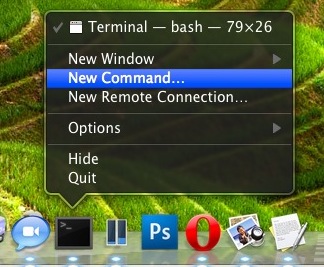
This will prompt you for a command to run, which then launches into a terminal window specifically for that command. This is particularly nice for monitoring and analysis commands, like top, htop, dtrace, wireshark, etc.
Note that this will only execute the command you specified and will not leave you with a command line prompt afterwards by default, though you can check the box to run in a shell if you want to.
If you’re looking to continue to use the Terminal, just select ‘New Window’ instead.
Note that you must have the Terminal app already running to get these menu items available, thank you Michael for pointing this out!






[…] on the Terminals Dock icon has several other features, including the ability to execute new commands directly from the Dock […]
I tried this; but when I re-enter Safari, the tooltips are stil there AND the command has deleted itself.
How do I get it to execute – and stay executed?
Thanks you guy. This is really helpful to me.
This seems to work only if terminal app is already running. As soon as you quit the app those menu entries aren’t there anymore…
At least that’s the way the terminal app behaves on my MacBook running a german version of 10.6.2
Regards,
Michael