
Name Mangler is a Batch Rename File Utility for Mac OS X

If you have a bunch of files you need renamed on your Mac, and the computer isn’t new enough to have the built-in batch rename feature, then Name Mangler is a decent solution in a fairly crowded field. With a good interface that is intuitive to use, you can easily batch rename tons and tons of files just by dragging and dropping them into the application.
Name Mangler goes beyond just renaming something from file1 to file2 though, there are many more advanced batch renaming capabilities including some of the following types of situations:
* Find and Replace (find all instances of Blah in filename_Blah and replace with Wow)
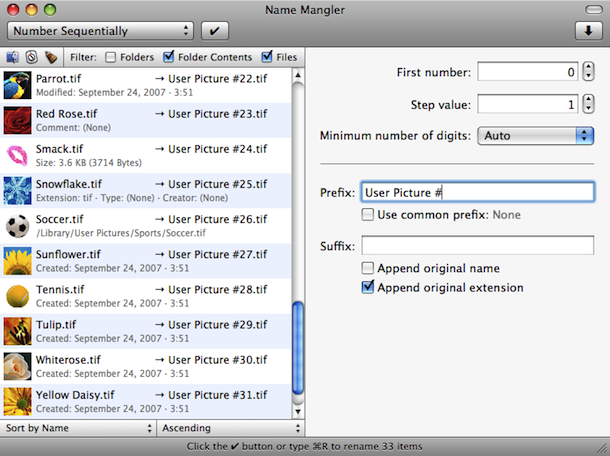
* Number Sequentially (file1, file2, file3)
* Change Case (caps to lowercase, vice versa)
* Set an Extension (make all files .txt or the like)
* Add a Prefix or Suffix (Filename.jpg to Filename-trip.jpg)
* Remove or Insert Characters
* and more in the advanced settings…
Name Mangler is free to download and try out, and it’s payware if you decide to have the full feature set, costing about $10. You can still download a free trial of Name Mangler though, and if you like the app it may very well be a worthwhile purchase for you.
If you’re interested in NameMangler, which can be a great solution for Macs running prior releases of OS X that do not have Automator or Finder Rename native, then you can get it from the developer here:
The interface is pretty straightforward, and it works in modern versions of OS X too:
Another similar utility worth checking out is a free tool called Name Changer, which is a donationware app instead of a paid program. It’s also a great utility that serves more or less the same function, but which app you prefer to use may be a matter of personal preference. Another option would be to build your own re-namer tool with Automator without downloading anything else, it’s built all into OS X.
What do you think? Do you prefer Name Mangler or NameChanger? Do you think there’s a difference in the quality of the apps, being paid vs free?






Use a bash (or tcsh, … ) do loop. The following script changes filenames ending in .dat to filenames ending in .txt. You can type it as is into the command line or put it in text file and execute it. This might work in bash; a quick search will reveal how to do it in other shells. If you learn a little scripting you don’t have to look for a separate app (and then bitch and moan when the developer wants to be compensated for his work!) for each small task. The power of the pc lies in its programmability. Take the power for yourself!
for oldfile in *.dat
do
newfile=`echo $file | sed ‘s/dat/txt/’`
echo “$oldfile –> $newfile”
mv $oldfile $newfile
done
[…] yes, we did a prior post on software to batch rename files in Mac OS X but the developer decided to turn the once donationware software into a paid solution. For now […]
This is a nice software but it is can Add a Prefix or Suffix (Filename.jpg to Filename-trip.jpg). Remove or Insert Characters? Here’s a Windows solution:
FileRenamer – no mac version
Here’s a link to NameChanger’s website where you can download it for free: http://web.mac.com/mickeyroberson/MRR_Software/NameChanger.html
You can also try NameChanger, it has many of the same features.
Automator already does all of this and it comes with the mac OS.
name mangler gone $$ some time ago, i’ve been using it for some time. update came up and asked me to pay. :/ i just don’t update and it works.
as alternative try builtin automator.
or http://search.macupdate.com/search.php?keywords=rename&os=mac
One reason why I never check automatic update in preferences for the vast majority of apps … another reason is to avoid the unexpected hassles apps have with OS upgrades. In short, if it ain’t broke why upgrade it ?
I bet the developer saw the link and wanted a quick buck, LOL! Since this isn’t free anymore, what is a good free batch renaming solution? I’d love to rename my picture imports to something more meaningful rather than the standard IMG_912.JPG names that mean nothing to anyone. I know you can do this with Automator but that seems overly complex.
sorry to brag, but when was the last time you visited developers site?
that big “Buy Now 10$” button doesn’t say ‘freeware’ to me :)