
How to Change the Desktop Background Picture in Mac OS X
 Making your Mac desktop background look attractive goes beyond just eye candy, it can help to improve your focus or give some inspiration. We’re going to show you how you can easily change the wallpaper on your Mac, and you can set the desktop background to any picture you want.
Whether you’re a minimalist and just like simple solid color or gradients wallpapers, or you want a great looking sunset, or maybe just a family picture as the background, it’s all a piece of cake to set and customize the wallpaper to your preferences.
This applies to all versions of Mac OS X system software, so it doesn’t matter what version of Mac OS X is running on the Mac, you can customize the background pictures the same way using any method. We’re going to focus on the three primary methods of changing the Mac desktops background wallpaper in Mac OS . First, from an image file on the Mac desktop or elsewhere in the Finder, second will cover changing to a default or other option from System Preferences, and finally, using Safari with an image you found on the web to set as the Macs wallpaper.
How to Change Mac Desktop Background Picture to an Image File
Have a picture file you want to use as the wallpaper? That’s a piece of cake:
- Navigate to the picture you want to use as the wallpaper in the Mac OS X Finder
- Right-click on the image you want to use as the Mac’s background picture
- Scroll down to the bottom of the contextual menu to ‘Set Desktop Picture’
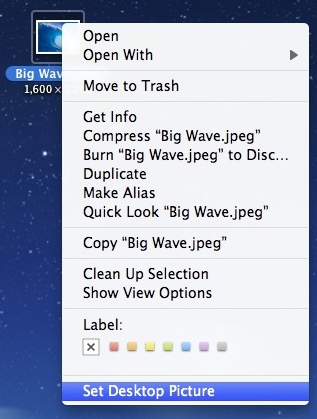
This is my preferred method if you have an image file in the Finder that you want to use as the wallpaper image.
How to Change the Mac Wallpaper Desktop Background with System Preferences
Want to use one of the Apple default wallpapers, or choose a desktop background from a folder?
- Go to the Apple menu and select ‘System Preferences’
- Click on the “Desktop & Screen Saver” icon
- Click the “Desktop” tab
- Select any image from the folders on the left side of Desktop to set as the wallpaper, these folders are the default images that come with Mac OS X
- OR: Alternatively, you can now drag & drop a picture into the little preview window and it will set automatically to that image
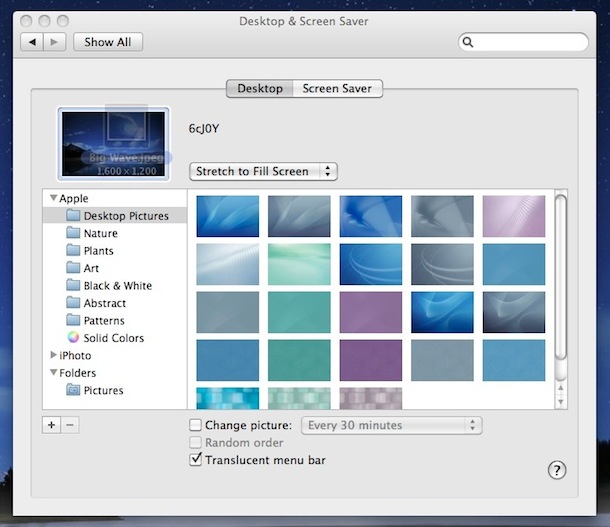
Mac OS X has plenty of great looking wallpapers to choose from, this method allows you to browse through them and pick one you want.
By the way, if you want some great wallpapers, browse through our collection of them.
Setting Mac OS X Desktop Wallpaper from Pictures on the Web with Safari
If you happen across an image on the web and you are using the Safari browser, you can just:
- Right-click on that picture, then choose to “Use as Desktop Picture”
This is the easiest way to set a wallpaper using pictures found on the web. Safari has this ability built in, while other browsers will need to save the image locally and then set the wallpaper manually using one of the other tricks above.
That right click method is also what you’d want to do for using images that are already stored on your Mac desktop or within the Finder.






Can I set desktop images to cycle periodically? If so, how?
All of a sudden, my pictures in my picture folder, when I try to use them as my desktop picture, are bigger than they have been before (this is pretty much all of them) and so the whole picture is cut off by the edges of the screen. version is 10.12.4 Beta. How can I reset the pictures in my pictures file in the desktop/screen saver file so that they fit? Thank you.
[…] have to manually adjust the settings opacity a bit to get things right depending on your choice of desktop background. I find the darker background pictures work fine with hiding it completely, but if you have a […]
For 10.6.6 and above: under ‘Label’ you should see ‘Services’ – look in there, that’s where it is on mine.
Both methods work just fine on my 10.6.7
This doesn’t work with Mac 10.6.6. There’s no option for Set Desktop Picture.
This does work in Mac OS X 10.6.6, you have to select an image.
If you don’t select an image and just right-click on the desktop, you will get the option to “Change Desktop Background”
Both methods work as described.
not anymore in 10.6.7 though. It’s kinda annoying when you’ve been using it throughout 10.6.6 and it suddenly disappears.
I am using Mac OS X 10.5.8 .. and i do not see the “Set Desktop Picture” option after righ clicking the pic!!