
Use Mail to Track Flights in Mac OS X
 One of the Mac Mail apps many talents is the ability to automatically detect when a flight number is present in an email, and then give you the option to view the flights status by using the flight tracking Dashboard widget in OS X.
Yes seriously, the Mac eMail app can track flights! This doesn’t even require a plug-in, it’s all built into Mail for Mac, which passes the appropriate data onto the Flight Tracker tool to then gather more details and display the flight on a map.
How to Track Airplane Flights from Mail in Mac OS X
You don’t have to do much to utilize this tip. The next time you receive an email with some flight data in it, like a flight number, here’s what you’ll want to do:
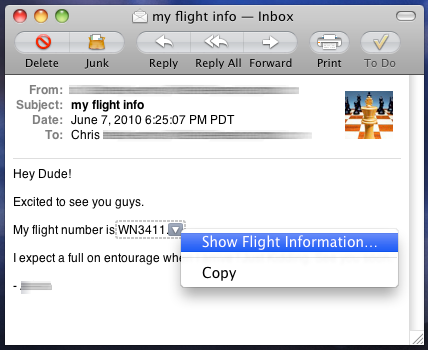
- Hover the mouse cursor over the flight number within the email, as shown in the attached screenshot
- When the triangle appears, pull down the menu bar item and choose “Show Flight Information”
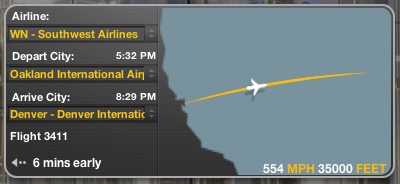
Assuming all is working as planned and you have internet access, Mail app will instantly launch into the Dashboard of OS X, and automatically carry over the flight number to open up and display the status of the flight, including its departure airport, arrival airport, and current location. This looks like something like the following:
How nice is that? This is a great way to get information on flights if you’re waiting to pick someone up from the airport, or even if you’re just curious about when a flight will arrive in a given city or airport.
Whether tracking your own flight details by sending yourself an email with some data, or using the OS X data-detectors to grab the flight number from an official flight check-in email from an airline, all Mac users can use this immediately. You can also use the same type of mouse-hovering data detection trick to track shipments and packages in OS X and iOS too.
This works in all versions of Mac OS X that support Dashboard, including OS X Mavericks. (Article updated on 3/20/2014 for accuracy and clarification)






The same can be done by typing the flight into the Notes IOS app. But I can’t seem to get it to work on the Mac Notes.