
Transfer Photos from iPhone to Computer
You can easily transfer Photos from your iPhone to your computer, and the process is very similar whether you are on a Mac or PC. The Mac treats the iPhone like a digital camera, and Windows can treat the iPhone as either a digital camera or a file system, depending on how the photos are accessed. Regardless of what OS you are using, to get started you will need your iPhone, the included USB cable, and a computer to plug the device into.
If you want to jump directly to the transferring photo guides on this page for Mac OS X or PC, use these links:
There are a few means of copying pictures from iOS to computers, we’ll cover more than one each so that you can decide which method is appropriate for you. We’ll cover the Mac OS X methods of how to copy pictures from an iPhone to a Mac first, and then how to copy pictures from iPhone to Windows methods second.
Before beginning, make sure the iPhone is unlocked.
How to Transfer Photos from iPhone to Mac
For Mac OS X, the fastest and simplest way to copy pictures from an iPhone to a Mac is with Image Capture and Preview. We’ll discuss how with both apps.

Using Image Capture to Import Photos in Mac OS X
Image Capture is a fast and efficient way to pull photos off the iPhone, which treats the device as a digital camera:
- Open Image Capture from the /Applications/ directory (or through Launchpad)
- Connect the iPhone to the Mac through USB
- Select a folder from the menu (default is Pictures folder) and then click “Import All”
- OR: Select individual photos, and click “Import” to only copy those pictures over
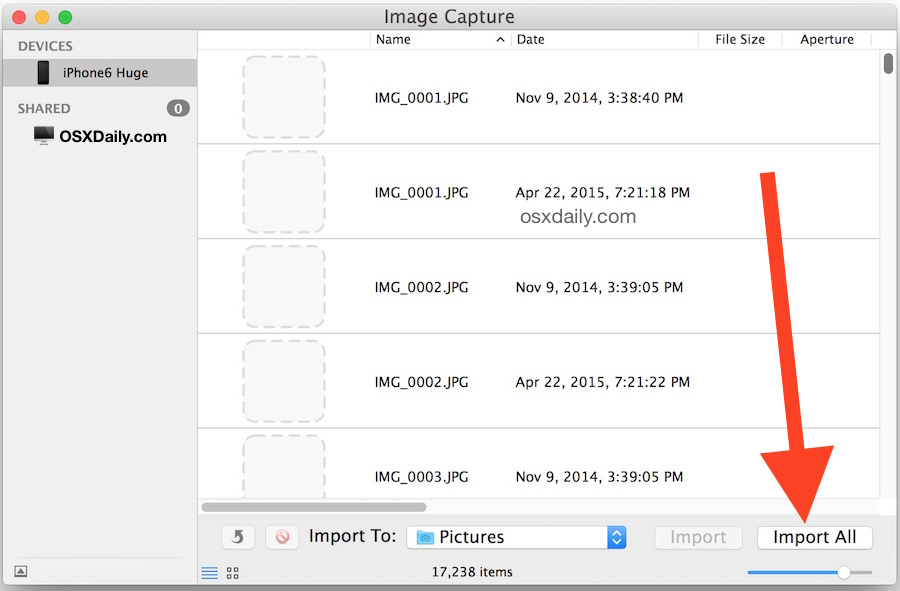
Image Capture is my preferred method because it’s fast, efficient, no frills, and allows users to quickly and easily copy the images from an iPhone (or iPad, or any camera), directly to the Mac. You simply choose where in the file system to copy the pictures, and it transfers them for you.
You can also transfer pictures to your Mac with Photos app, iPhoto, or Preview, which is just as simple and actually has a virtually identical interface for initiating the transfer. Here is how to import with Preview:
Copying Photos to the Mac with Preview in Mac OS X
Though Preview is usually thought of as an image viewer, it can also serve as a fast importer:
- Plug your iPhone into your Mac
- Launch Preview
- From the File menu navigate down and select “Import from iPhone…”
- Select “Import All” to get all the pictures, otherwise individually select pictures and click ‘Import’
- Look in your ~/Pictures/ folder for the photos from your iPhone
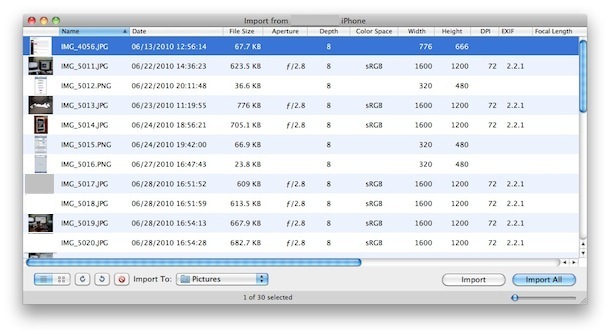
Optionally: Click the checkbox with “Delete after import” if you want to delete the photos after they have been copied over to the computer.
The benefit of using either Preview or Image Capture is that these apps are on virtually every version of Mac OS X since from the very beginning of the OS, so you won’t find a Mac version without them. iPhoto on the other hand is generally limited to the consumer model Macs, thus making it not always available on pro models, but it does work as well, and iPhoto will also serve as a photo manager of sorts.
How to Transfer Photos from iPhone to PC
On a Windows PC the easiest way to get pictures from your iPhone is to just use Windows Explorer, but there are two ways to go about this. In either case, unlock the iPhone before beginning, or else the photos may not be visible.

Using Windows Plug & Play to Transfer Pictures from iPhone to Computer
This utilizes the AutoPlay pop-up that shows by default in Windows when a device is connected to the computer by way of USB. This is the easiest way to access and copy pictures from iPhone to a Windows PC:
- Plugin your iPhone to the computer without iTunes running
- Wait for the AutoPlay popup asking you what you want to do with the device
- Select “View Content” or choose a device option like ‘Import pictures and videos’
- Find your photos through the folders that are displayed
- Copy the images from Windows as usual
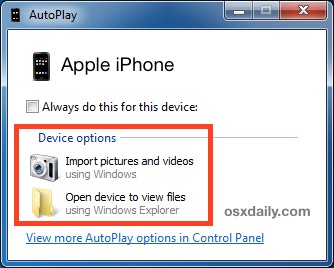
Note that in Windows 10, Windows 7, and Windows 8, you will often find the iPhone mounted under “Portable Devices” but it can also be found listed under “Digital Camera”. Opening either will work to copy the pictures over, but typically Digital Camera opens directly to the DCIM directory whereas Portable Devices will sometimes require minor navigation within the folder to copy the files.
Using iPhone as Digital Camera in Windows Explorer to Transfer Images
If your iPhone is already plugged into the PC, you can also try this method:
- Open “My Computer”
- Find the iPhone, it will appear as any other camera would
- Open iPhone to find your Photos
- Select the pictures you want to copy to your computer and copy/paste them into the desired location on your PC
 The Windows approach treats the iPhone more like a file system, just like it does with standard digital cameras that are connected to a PC. That generally makes Windows even easier for moving pictures back and forth if you like to cut & paste things directly from one folder to another in My Pictures or My Documents. Nonetheless, you can also use your favorite photo importing application to pull the pictures from the device as well.
Remember, if the iPhone pictures are not showing up in Windows, make sure the iPhone is unlocked first. Otherwise the iPhone will be found in ‘My Computer’ but all of the content on it will be invisible and inaccessible. If you run into that, all you need to do is touch the iPhone, unlock the screen and enter the passcode, and all of your stuff will be visible as expected.
Finally, you can also sync your photos using just iTunes on either Mac OS or Windows but that is more for iPhone backup purposes and doesn’t really serve as a means of accessing individual pictures.






Thanks so much, this helped me get it to work!!
Guys, just do us all a favor: if you have a mac you know that procedures are different from a windows pc/any pc. Therefore, it’s helpful for those on a mac to avoid instructions/remedies for pcs because it’s simply not the same! So get over it, and say PC if it’s not a mac, and say mac if it is a mac!!!!
Yes anne, if you read this article you will find there are different procedures for transferring photos from iPhone to a Mac versus to a PC. You have to READ THE ARTICLE to find that though, not just comment.
https://osxdaily.com/2010/07/10/transfer-photos-from-iphone-to-computer/
I had a old I phone 6s that I lost but when I bought a new I phone 7 all the old photos from that phone came up on new phone but when I plug the new phone into computer it only recognises the photos taken on the new phone not old photos
Thank you so much! New Mac owner, was being driven to distraction by the horrible articles Mac had on the subject. No, I do not want my photos stored in a “library” file, I want access to my actual image files so I can access them regardless of OS. These instructions worked to get the actual files transferred over. You rule.
Many times, I plugged into my iPhone but Windows autoplay didn’t pop up and no iPhone icon appeared in Windows Explorer even though I refreshed over and over.
So, I tried third-party photo transfer app. WinX MediaTrans is what I’m using now. It works well. Every photo can be copied to my PC easily.
After I transferred my pictures from my iPhone to my PC they display sideways on my screen. How can I fix this?
Instruction step #1:Open Image Capture from the /Applications/ directory (or through Launchpad)
WHAT and WHERE the hell is ^^^?!
but I have tried it and its not working
Either.
Maybe I should use some transfer tools. Please recommend some tools which can transfer photos from iPhone to PC, so far I just find the FonePaw iOS Transfer. Er… It’s OK enough. But I want much tools for instead.
Is there a software that will automatically download photos from any phone plugged into my mac?
Yes the Photos app will attempt to import all photos from an iPhone or camera into the Mac, all you do is connect it then click on the Import button
when I plug my phone into my laptop the auto play isn’t popping up and i go into “my computer” and my iPhone isn’t popping up
I have recently transferred my photos from my computer to my iPhone but I can’t take them back off my iPhone and put them on my computer it only shows photos in my camera roll
someone please help.
I’ve done all this. I have too many pictures and need them off pronto. I’ve “unlocked the phone” and plugged it in and tried to “close itunes” but it automatically pops up every time my iphone is plugged in. I can’t open the device in documents and I’m so confused for what to do. I’ve tried for hours.
Thanks for posting this, so easy. Didn’t know there was such a thing as image transfer in osx. Even for a long time mac user. Always used iPhoto but this is so much easier!
Great tip!
My phone is plugged in and unlocked but doesn’t show up at all when I go into “Computer” I followed another websites advice by having my phone plugged in, and opening windows live photo gallery and choosing the option to import photos but once again my phone does not show up as a device I can import from, only my printer shows up.. Is there anything I’m doing wrong or haven’t done so that it will work?
Plug the iPhone to computer and begin transferring photos to PC by treating the iPhone as a moveable disk is the easiest way!
But if you don’t bring the data cable, what should you do? To transfer the photos from iPhone/iPad/iPod without cable, Dropbox is a good tool to help.
The steps are:
1. Install Dropbox app onto both your iPhone and your PC.
2. Then open the Dropbox app on your iPhone and switch to the Uploads tab.
3. Press the + icon at the top left corner and select the photos you need to transfer.
Family sends me photos in messages. Please send me the steps to get these photos off my iPhone/iPad onto my iMac computer. Thanks you.
Wow!! You can’t Imagine how grateful I am for learning an easy method without having to go through the hilarious world of iTunes
THANK YOU
THANKYOU
What do you mean with “Make sure iPhone is unlocked”
If the iPhone has a password locking the device it may need to be unlocked before the photos can be transferred. This depends on your security settings of course.
Hi,thanks so much,
it is very useful.
I realy need this info.
[…] by unplugging it and you won’t have to plug it in again unless you want to manually backup or transfer photos, HD video, or music from […]
thanks for this Info.
[…] and if you’re running low on storage, oftentimes photos are one of the easiest things to transfer to a computer, then free up space on an iOS device by deleting them all so you can make room for new stuff, […]
You can use Dr.fone to recover lost data/photos/contacts from your iPhone.
I’m trying to transfer the photos stored in the iPhone folders OTHER than the “Camera Roll” folder.
The thousands (literally) of photos I need transferring from my old iPhone 3 to my PC, are all in separate folders.
Is this possible?
PC to iPhone photo transfer is easy, but I can’t fathom how to reverse it when the photos aren’t located in the Camera Roll.
As far as I can tell, you can’t even move the photos from the separate folders to the iPh 3 Camera Roll , or am I wrong?
My iPhone is unlocked when connecting to my Windows PC, and I can see all the pics in my Camera Roll, but not the pics in the other folder.
I hope there is a way to solve this, as these photos are very sentimental to me.
Any assistance greatly appreciated.
nerds r us ^^^
i am having trouble with my pics on my iphone, i am trying to import them to my computer to open up more room on my phone, but i am not having any luck what so ever, i thought i was doing it right but then after i thought i was successful i looked at my phone in the camera area and i saw it copied my pics and then added them back in like triple and copies, and it isnt letting me delete the ones it added what do i do?? please any advice would help me out greatly.
i did the second option but it says no pics
[…] find that with the exception of the AFT app, these are the same methods used when copying pictures from an iPhone, iPod touch, or iPad to a computer as […]
This really helped. Quickest and simplest solution EVER!
Thank you….. It was very big help…
Great advice. Couldn’t understand why I was unable to perform this directly from iTunes (where it syncs). But preview was exactly what was needed. Thanks!
I gotta tell ya, I am frustrated….I took a bunch of photo’s of our church after I decorated it for Christmas, plus a few Christmas Block Parties we did for the kids in the neighborhood, now I can’t get them off of my phone so I can print them and put them in our photo album. My computer is recognising the phone, but it is not showing any of the photo’s I have in my gallery. How do I fix this? I don’t want to lose these pics!!!!!!!!!Someone please help.
Follow these simple instructions to copy pictures from the iPhone to your computer
https://osxdaily.com/2010/07/10/transfer-photos-from-iphone-to-computer/
[…] proceeding, you’ll probably want to transfer all pictures from the iPhone to the computer beforehand, otherwise you won’t have any backups stored on the computer or the iPhone itself. If […]
what can I do if by plugging to my comp my iphone directly opens itunes, and my iphone device is not being showed in my computer??
Iphones are dumb
Hi, I have a quick question; maybe my “Preview” program is not quite up to date. Rather than “Import from iPhone” it says “Import images,” which is obviously not a problem, but it was my first clue that something would be slightly different. More importantly, I see no “Select all” option and I cannot use the command or shift keys to select multiple images. Am I really going to have to import only one image at a time??
Thanks!
When I plug my iphone into my computer. a pop doesn’t come up. The first time I ever plugged it in, a pop up did show, but then a day or so later I plugged it in again wanting to save photo’s but there was no pop up? and there still is no pop up coming up??
i have that problem to i am trying to attach a picture to an email and its not working
Fantastic! Thank you so much!
Thanks! I looked at another website and it required to download some app or something, but your suggestion literally took seconds!
My iPhone automatically goes to the document to place photos because it set itself to do that and I have no clue how to unset it. and it’s always blank when I open it via the “my computer” settings even if it is unlocked D: how do i fix this T_T
this advice works very well.. been longing how to do this and this advice helped me a lot.. Thanks!
Great advice!! Works like a Charm thanks for sharing!!
Perfect advice! Attached to pc, opened my computer, simply copied all to a folder…entire process took less than a minute! Thanks for the great advice!
Mel
omg – This was so dang simple I can’t believe how much time I’ve spent cursing Apple and looking for a way to save photos taken with my iPhone.
I use Windows Explorer constantly for other things … don’t know why this didn’t occur to me. Solved a big problem, now non-existent. THANK YOUUUUUUUUUUUUUU!
Thanks for keeping it plain and simple!!!
how can i transfer a photo from iphone 4S to my pc without a USB data cable..???
The easiest way I found to transfer as many photos as I want from Iphone into mac is to connect the phone. Then, you need to launch the Preview application, go to file and export as many photos as you want to a specific file. Hope this helps.
Thank you for advice..after trying for a few days i found this post ant really worked wonders…
I needed to remove 450 photos from my iphone to my computer. I plugged in my iphone and via windows ( I followed the instruction on the box that poped up and cliked to erase pictures from iphone when download was completed.) I cannot find my pictures on the computer and they are no longer in my iphone. Can you help to find my pictures?
best of the best
thanks for ur helpful simple guide…
appreciate
Thank you sooo much! The best instruction i’ve researched!
Easiest way is to have a dropbox account. (Dropbox.com) once u set up an account u can put the app on your iphone. Its great cause u never have to connect your phone to your computer. It will just transfer you photos into a folder on your computer automatically when you want it to. Its kinda like icloud but u can store lots more and its easy acess to them on your computer.
are u mad i need to transfer my image through i tunes …..apps tel me some other idea …..
GREAAATT – Thank you – i was so sick of waiting for iphoto to load and freeze after 3 hours of transfer!
If the device is locked how do I find it manually to open it and find the pix
superub easy step to get my job done
when i plug my iphone in it does not show up in my computer….help
Tried moving videos from my 4S to my Mac using the tip give, but kept getting an error message: . Any help?
I have Windows XP so I can’t use iCloud. How do I copy my videos from Camera Roll to my XP computer? Is there are 3rd party app for that? I have no problem with photos, just the videos.
Thank you so much. I had all these pictures and was concerned that they would be lost.
A Mac is a small hamburger (without the Big) a PC is a British Policeman (Police Constable) a computer is an instrument that prints money for the late Steve Jobs and Bill Gates. A computer nerd is a semi human drowning in a sea of information
[…] Copy the images over if desired (recommended!) and then hit Command+A to select all […]
I saved my iPhone photos to my Mac using the directions above. Came back later hoping to save subsequent files in the same way, but all that appears in the box are the photos I had previously saved. Why don’t I see the newer ones?
Thanks, 2nd option worked without iTunes for windows OS.
Really it was very useful!!..
Thanks,
Karthik
This was COMPLETELY helpful!! :D
than-you!!
i got a q. my pc says there are no new photos to import. i know this to be a lie. why is it lying to me?
Thank you for sharing this info :) It really did help :)
This is all fine and dandy, but trying to delete photos from the iPad is a nightmare. Have researched on the web extensively and not found any method that will work for a large number of photos.
Just tried the article suggestion to upload my iPhone pix using Preview, but it only allowed me to load one photo at a time. I had 268, so I tried iPhoto on my Mac, and it automatically recognized my “camera” so I clicked “Import All.”
This worked, except when the phone locked, so I had to keep unlocking my phone to continue uploading the pix. One solution to this would be to extend the time for auto-locking the phone.
I wanted to avoid using the iTunes setup since I think you have to sign up for iCloud first or some other kind of extra steps – too complicated. Plus, I don’t want to have my photos floating around in cyberspace – no privacy.
Conclusion: iPhoto works great, just make sure to keep your phone unlocked or it pauses during the uploading process. Good luck, everyone!
thanks so much, you are the best!
ATT could not help me, Apple wanted 29.00
You are a life saver thank you !!!!
I tried the simple way using USB cable to transfer photo from iphone to my PC but as i open my computer the camera do also appear but no nothing appear in that folder. pls help me suggest what to do.?
[…] do find yourself embarrassed by some of the pictures in your iCloud stream, do yourself a favor and transfer the photos from the iOS device and then delete them all from Photo Stream. […]
Why does it show “0 items” on the iPhone when there are photos there? Please help.
You guys are all idiots…it’s just a distinction…so they can give you instructions on how to download pics from iPhone to either a Mac computer or a PC! Geez Louise!
This is great! Worked perfectly from my iPhone 4S to my Mac. Thank you. :)
Have taken the advice and when the photos folder opens it only shows photos i have taken with my phone and not the other photos i transferred onto my phone after a recent laptop crash.
How do i transfer those to my laptop?.
OK- have tried as directed (to copy photos on iphone from PC) but when opening IPhone file from a PC – the file displayed nothing – nothing in file… no photos, etc… although I have 300 photos on iphone.
Do I need to change a setting on the iphone?
Everyone here has been putting in their two cents about these terms. Here are the facts. Macs are easy to use. They are for people who are stupid. PC’s are for smart people.
Those are the facts.
Those are not facts. That’s pure ignorance.
Because something is more difficult to use doesn’t make it for “smart people”. In fact, if you were a smart person, and you had the choice between 2 machines, one being easier to use, you would certainly choose the easier machine. That’s really just common sense.
Opting for something that’s more difficult solely for the sake of it being more difficult is stupid. That is what a stupid person would do.
By the way, I use both Mac and PC. So I don’t really care. I’m just saying whoever wrote this comment is pretty dumb.
To get in on the debate on the use of the term PC. I realize that PC stands for Personal Computer. But it actually is short for IBM PC, which was a specific brand. Unlike Apple (Mac), which was proprietary, IBM opened up it’s technology and therefore there were IBM PC-compatible computers, which was shortened to PC-compatible, then to PC. So based on the history of the term, that is why a PC & a Mac are actually considered 2 different things.
Wow. Finally able to move my pictures off. That was way too difficult. Well okay only minorly difficult, but it should be simple. And still most of the phots are rotated the wrong way.
Thanks Apple.
PS Apples are pc not PC. No matter what the fanboys say.
It says ‘ no pictures found on this devise’, any idea what to do? I definitely have pics there
Yet another endorsement for the Mac’s greatest and most unsung app.. Preview!
good
[…] (or thousand) of photos, you’ll quickly eat up storage space. The best thing to do is to regularly transfer photos from the iOS device to a computer and use the computer as a primary backup, and then delete the pictures from the iPad. Signing up […]
Mine doesn’t come up in “My Computer” though ? :/
[…] you need to do the reverse and get pictures off of an iPad or iPhone, transferring photos from iOS to a computer is also simple and can be done entirely outside of […]
thanks so much! :D
OMG! I was going crazy already! The app I downloaded didn’t do much! I am so glad I found your site! THANK YOU so much!
You talk about Windows like it’s completey inferior to the Mac
where is the import all button? having a hard time! haha thanks <3
alwys connect it after unlock ,..,
it wont popup if ur cell is locked., !!
This is great , THX!
I was doing it so difficult the ftp way…
THX!
Thanks sooooooooooooo much!!!!! This really helped
MAC: My Actual Computer
PC: Personal Computer
lol
Or should I say:
MAC: My Awesome Computer??
has anyone found out how to get pictures from photo library onto pc??? i can do camera roll but not library
Thanks for the advice(: worked great!
And P.S. For all you who think you’re so smart and can argue and call people names over the dang web, hiding behind a computer screen, you’re all stupid. Let’s think about this and grow up.
Jeez, all you turds debating what a PC is or isn’t are just well… turds and while its a good laugh it takes away from what this post was meant for and that is to help people. Get a life!
How to import the photos from other albums(not camera roll)?
Your guidance is very helpful. This is the best advice on the net.
thank you for the help i’ve recently got an iphone and it’s the first time i’m using one :)
thanks for the helpful post. this was so much easier to understand and do than some of the other advice out there for photo imports from an iphone to any computer.
I have an iPhone, and a Mac. I’m trying to get my photos off my iPhone. I’ve tried your directions in Preview three times already. Nothing happens after I select all my photos, and click import. Am I doing something wrong?
I’m getting kind of frustrated with Apple, seems like they often sacrifice the functionality of their products for look. Why the hell is it so hard to get my photos off of my phone?
You sure you didn’t already import them and they’re in your Pictures folder?
Use iPhoto – it will recognize your phone, select all or some of the photos you want to transfer and hit import button. Preview did not work for me either.
Thanks!!!! This was a great help!
My issue is I have a windows xp home edition and before I wiped my computer I took all the photos and added them to my iphone now I am trying to take them off and I cant! I need to update my iphone and cant do it or it will wipe all my photo’s!!! So when I go into my photos on my iphone 4 there are 2 albums one from when I imported the pics from my computer called photo library and the other one holds the pics from what I take from my phone called camera roll. It made 2 separate folders in my one photo album. HELP! I need to get off 3391 photos from my phone!
Thanks
It is helpful !
Thank you for the tip! :)
Hi there, which version of preview is what u put up the screen shot of`?
i Have version 4.2 (469.5)
but this one doesnt have a select all option neither a transfer to option…
thanks!
OMG! I was petrified about saving my photos! You are a lifesaver. Now if iTunes would just stop syncing genius data for my purchase transfers, I could complete the process. :) Thank you again!
Thanks! Very helpful!!! LOVE MACS! make life so easy :)
Thanks for the info. It was very helpful.
Too bad you have to put up with all the fools on this site.
You people must be having fun with this non-issue. You either have a Mac PC or a Windows PC or even a Linux PC. Get it ?????????????????????
I agree this is a non-issue, and I agree that a Mac is a type of PC. However, nobody ever actually SAYS “a Mac PC” do they? And the common usage of “PC” to mean “PC which is not a Mac” has probably earned the status of secondary definition by now.
Thanks J.J.
Finally working!!!!
This might work for some of you running windows 7 / 64, Start>open devices and printers, right click for properties of either of (Apple iPhone) under Devices or (Apple Mobile) under Unspecified, Hardware>properties>Driver>Uninstall then replug your iPhone/USB and let the driver install alone, worked for me…. good luck to you all
Thanks JJ- That finally fixed my problem of not being able to see the pictures in the folder even though I could see the iphone itself!
Thank you so much for the article :)
Great, works like a charm! You saved my life, today… :)
Can you people be more civlized and not call each other names like idiots and morons and the like. Even if you are smarter and know the answers. Some are trying to help and may not be exactly right.
You save me a LOT of time, good article.
[…] can easily transfer Photos from your Phone [COLOR=#0072bc !important][COLOR=#0072bc !important][/COLOR][/COLOR] to your computer, the process is very similar whether you are on a Mac or PC. Regardless of what OS […]
how to down load pics from i phone,do i need any special software which i have to run in my Pc,pls sugget in step by step process,as im unble to load it
who cares, seems like you fella’s how plenty time to waste. Either Windows, Linux, Mac based PC will do.
[…] are also the same regardless of the device the pictures originated from, whether it’s from an iPhone or a digital […]
Ive always connected usb cable from ipod touch to Win 7 to copy off photos, but today when i did it, it shows the original 520 photos, but doesnt show the most recent 30 at all as if they dont exist, yet they do exist on the itouch and work perfectly. What could be happening? Anyone have this problem? What is the fix? Ive been testing and it seems that NO NEW photos added to my itouch can be copied off ever again. Really sad. Im starting to hate Apple. Any suggestions?
iphone is reconised in windows xp click on it shows no pictures right click and go to get pictures i get an error right click and go to properties i get an error if i open itunes it dosent show photos under the device if i click on device it allowes me to inport pics to the phone but not export from the phone. pissing me off any help please first time phone was connect poped up do u want to import pictures now it dosent do it. can it be a setting i click on the computer to block this
Thank you!! Wow, that was easy!!! Why doesn’t Apple tell us these things?????!!!
On my iPhone 4 I have around 14,000 photos and now I would like to get them copies/transferred to my new iMac computer. Due to earlier copying/importing to another PC about 11,000 of the photos are filed in “albums” on my iPhone and those photos are not visible on neither my iMac or Windows PC, so I can’t transfer them. Help!
(only the about 3000 photos on the “camera roll” can be found and transferred to the iMac and Windows PC).
Thanks
Thank you!! This was so much help =D
ok, when i go to Preview > file , there isnt an Import photos from iPhone option. am i just stupid, or….?
ps I have 2,755 photos on my 3g iPhone camera roll. i cant even sync an app to my phone. had to delete 50+ pics just to download a song. I cant do anything until i GET THESE STUPID PHOTOS OUT OF MY PHONE. …ugh…
I am running 10.6.8
If you go to Preview > File you should see “Import From Scanner” and “Take Screen Shot”.
The command you are looking for is above these two and on my machine it says: “Import from Steve’s…” where “Steve’s” is the name of my iPhone.
I did notice that prior to connecting the iPhone it was greyed out and said “Import From Camera…” so I would suggest that if it still says that after you connect your Iphone it is a connection issue.
I had the same problem. I made sure to have itunes closed when I plugged in my iphone and the option showed up.
Just tried it the way suggested, but no preview is showing up in the launch. Do you launch I-tunes? Couldn’t find it there either?
Launch? Sorry don’t understand what you mean. When you connect the iPhone nothing launches. You have to open Preview.
No you don’t open iTunes.
I just got an I-phone 4 and synched it for the first time to my Mac. I didn’t take the photos from my phone and put in I-tunes, it took the photos on my mac and put on my phone. Now I have 2000 photos on phone that I can’t get rid of. Anyone know how to switch the sync and delete the photos? There is not trashcan with the imported photos…
I am having the SAME problem but I am running windows xp home and dont know how to get them off!!
Thank you, this was extremely easy. I didn’t even needed to finish reading :)
Super cool! Never knew you could import photos with Preview. Thanks a ton!
Thanks it did work.. :D
worked perfectly, Thanks!!
i HATE this 3gs. tried all suggestions. computer does not show any sign of iphone. help please.
I plug in my iPhone to my PC-
There comes a noise acknowledging the connection but I don’t see any symbol in ‘My Computer’ indicating that the iPhone is actually connected!!!
How can I dowload pictures from the iPhone to my PC????? (iTunes can’t help me there either!!!)
thanks…..very helpful……
I am becoming extremely bored trolling through arguments, that are basically semantic, in order to have someone confirm an idea i have (wether large or small) is this an age thing? Though i have now strayed from the topic myself now i was feeling desperate to tell you all to leave it out. It is not useful and even less entertaining. We know PC means Personal Computer but we also know that when someone says Mac or PC they dont mean Mac or Toenail, Egg or armchair or any somesuch. Lets get on with it, shall we?
my dcim folder in Iphone3 folder is empty when iphone is plugged into pc…
Wow. What a pain in the ass
After all that it turned out to be that I just needed to unlock my phone and take off all restrictions so that I could view it in “My Computer”.
Thanks very much Diana and dunaskme.
how to unlock your iphone:
go to settings,
general,
auto-lock select never.
passcode lock select off.
restrictions select off
that’s the important part to unlock the phone… thank you so much….
plug in my iphone cun detect on my computer.
go to computer only (C:), (D:) & (E:) theres no iphone found?
have try not to lock my iphone also nothing case out?
funny is when open itune my iphone found in itund.
also my iphone is charging but cun detect from computer even adobe photo album to retrieve iphone also cun b found?
what if i synched an album from a friends computer and i now want to access those pics? they arent showing up at all!
HELP!
I followed these directions provided early on in this set of posts and was able to get my photos off my iphone. However, I had previously deleted photos after “backing up” my iphone through itunes thinking that transferred the photos onto my computer. I cannot find them. So, does this mean that the “backup” is not accessible unless I restore the phone?
I have tried all of these sugestions. I used to pull photos off of my 3G through windows explorer all the time, but none of this has worked on my new i4.
Stupid phone!!!
The iPhone configuration will not even open on my computer. Any other suggestions out there????
I want to transfer pics form I phone 3 gs to sanding galaxy s 2 help !
Hello Everyone,
I don’t know if anyone can help, but I have a few questions:
1. I have a 3GS I-phone that isn’t connected to a subscript ion and I would like to download my pictures. Is it impossible or must I have a subscription?
2. When I plugged in my 3GS I-phone, my computer doesn’t recognize the I-phone. Is there anyway of getting around this?
3. Diana (see above) indicated that you must unlock the phone but did not indicate how you unlock it. Can you tell me how its done? (When I click on start and try to find my phone, it shows everything except my camera (I-phone). What gives?
4. When I type quickly on my laptop, my cursor jumps to another field (area) on the computer. Is it case sensitive or is there something that I’m doing (clicking on a comma, for example) that activates another command? It is quite frustrating because I cannot type as fast as I’d like because I find out later that my cursor is on another sentence.
Thanks,
SVL
Dear SVL
I also have a 3G Iphone.
if your computer does not recognize the iphone it is probabably the USB chord that you are using.
Please keep in mind they dont last long. I can not tell you how many times I have had to replace mine, also I keep extra by my laptop.
I have had many issues in the past with my Ipod and Iphone in terms of my computer not recognizing my devices.
Try replacing your USB chord and see if that works. It worked for me.
Good luck darlin.
Melissa
how to unlock your iphone:
go to settings,
general,
auto-lock select never.
passcode lock select off.
restrictions select off
this should unlock your iphone all the time just like computer screen saver mode turn off inorder to stay on the main screen …..
Thanks so much….I wasn’t sure how to unlock the iphone, you explained it very well and it WORKED! Thanks again!
Super Easy. Plug iphone into pc, click on my computer, right click on iphone, select import photos. Saves photos to Windows Photo Gallery. This was an iphone4 to Windows Vista
I have Windows 7. Open Windows Explorer then ->computer then ->iPhone. RIGHT CLICK on iPhone and choose “import pictures”. Then a pop up box will appear and give you the option to erase them from your phone after copying to computer. What a backwards way to import them. Apple needs to fix this.
I have an iphone 4 & a mac g5.
There is no import from iphone in the preview menu.
Help, please.
Can’t believe how HARD Apple has made it for us to do something so simple.
I was able to transfer photos easily from a phone to a computer 5 YEARS ago! No hassles.
It’s 2011 ….. Why are they making it so difficult???
O another thing, it says ‘no new pictures or videos found’. But I have lots of pictures and videos and some of those are new too, i.e. never been downloaded before. Thanks.
I can’t download my pics. I have thousands of pics in my iphone but when connected to my pc, it has nothing on it. Help!
When I imported the pics and video from my iphone 4 to my laptop, all of the videos flipped to their side– thus making watching them less than enjoyable… They were taken right side up — I swear… Anyone know what I can do to flip them back to up & down?!
Thanks! It worked perfectly and i was able to upload all 750 photos is 2 minutes.
thank you so much diana…i wasn’t able 2 copy d pics unless i read ur tip…really thanks
Thank you so much, I am new to the iphone and this is good information. :)
Much appreciated.
C.
how to unlock iphone?
The ‘import all’ feature flat out does not work on my preview. It reads the iPhone just fine but it only imports one image at at time, and it eliminates the file name forcing me to create a name for the document rather than using the existing IMG_000.JPG name the file already had.
ok i have a problem.. my iphone is plugged in bt my computer doesnt have afile for it.. where else or what other method can i use to tranfer my pictures to the computer??
Thanks for your tip Diane to unlock the iphone4 first before plugging to pc. This solved my problem on why I could not see my iphone in my pc.
Thanks Diana
You are brilliant.
thank you so much, been trying to transfer my pics for so long and its so easy when you know how. Diana that tip was amazing, reconnected whilst the phone was unlocked and bish bash bosh…. done :D
This was REALLY helpful! thanks guys ! (:
thank u … very easy..
Wow, thanks for this tip. I usually import into iPhoto and leave them on my iPhone. I never thought to look in Preview to do this. Over the years, I’ve accumulated photos I no longer want and using Preview to delete them is quick and easy. If you open the camera roll on the phone while using Preview to delete, you can watch them disappear.
what if nothing appears on : My computer??
i have 3gs. i have windows 7. when i plug iphone into pc.. nothing happens except that it says my driver isn’t installed properly.. my friend gave me this pc.. i don’t know why this error comes up.. but if i wan to i can open and use itunes with no problem..
when i look through explorer i can’t find the iphone anywhere.. it’s plugged it.. it’s charging.. why can’t i locate it..
i want to take pics off the iphone.. please advise. thanks.
I can’t download my pics what so ever. I don’t have mac and I am using windows 2000…I think.
PLEASE help! I have over 3ooo pics, help!!!
my home PC has died with all my personal photos…they are synched to my iphone…anyone know how i can copy all photos (not just those from my cameral roll) from my iphone to another PC that is authorized under my itunes account?
Hi just out of curiosity, i was wondering if anyone got back to you on this, as exactly the same thing happened to me, and i don’t want to lose the pics in the albums on my phone. I can get the pics from the camera roll no problem, but can’t seem to get the albums.
same here ! Please let me know if u cud figure out a solution for transferring the (not just the camera roll) albums to ur pc from iphone !!
Try using DiskAid. You can you use it for free for 14 days. then you can youtube on how to transfer. I did it with my music. They tell you step by step and I am telling you I had no issues at all.
Thanks so much – Never took the time to learn how to get the photos from the iphone to the mac. It’s so easy, a very big DUR moment :) again thanks for sharing.
Transferring photos from iPhone to computer:
I tried this method and it works!
Connect iPhone to computer
Start > Programs > iPhone Configuration utility > iPhone Configuration utility
Select ‘Provisioning Profiles’
Click ‘Add’ on the top right corner.
It will open up a new window:
> select ‘Computer’ icon on the right
> under Portable devices: double click on your iPhone name
You will see ‘Internal Storage’ > double click on it
> you will see the folder ‘DCIM’ > double click on it
> you will then see the folder ‘800AAAAA’ (note: not sure if your folder’s name is the same but it should be fine even if name is different)
> Under ‘Files of type:’ select All files
double click on the folder ‘800AAAAA’, you will see all the photos on the iPhone
> Copy and paste to where you wish to store the pics.
Hope that helps.
Sagi
I have an iPhone 4 and am using a virtualized desktop (no laptop, no desktop, just a thin client). I’ve connected my phone to the Wyse thin client, and opened Windows to download photos from my iPhone, but cannot see the photos anywhere. Are the instructions below for someone using a Mac or PC? If a PC, I should be able to follow these instrucitons on my thin client but I don’t see “iphone configuration utility.” Can anyone help me download these 200 photos? Windows tells me there are no photos on the phone but I see them clear as day.
Hi… every time I try to copy and paste the pics from my iPhone (in the correct folders and file), it gives me the pop-up that the ‘access was refused’. How to sort this out? This way I haven’t managed to copy any of my pics yet. :-S
I don’t have any “iphone configuration utility” on my laptop start menu/ programs. How’d you get that?!
I was able to get the scanner and camera wizard to appear, but it says that I don’t have any images on my camera. I obviously do. Does anyone have a suggestion for this issue?
Thanks in advance.
I’m able to import all photos directly from my iPhone 4 camera roll previously, but not anymore. Unlocking my iPhone & connecting to my PC isn’t helping also. Only iTunes indicates the connection now only, but not the desktop auto-wizard & My Computer folder. Why?
I have this exact problem down to every detail you described!! Was working perfectly fine automatically synching now suddenly only appears in Itunes, etc., can’t get the pic’s off. Did you find a solution?
this was incredibly helpful.. thanks for sharing!
thank you for a really helpful tip.
One important thing to note- make sure your iphone is unlocked when connecting to the PC. When it’s locked, computer won’t recognize it, even though the iphone will be charging.
This is a VERY important note! lol … thank you, thank you, thank you for posting this :)
Agreed, couldn’t see my iphone until I unlocked it. Excellent, thanks!
Diana, that is called genius you have smart brain! great help thanks.
thank you i just figured it out. make sure that it is unlocked! haha thanks :))
Same! ha ha!
Thanks. You saved my life!!! I was trying for hours to copy some photos from my iPhone to the computer and the computer wouldn’t recognize the iPhone until I unlocked it.
thanks Diana. your tip really did it for me. i couldn’t figure why my iphone was invisible to the PC
@Diana
Thank you very much . This information help lot of ppl even I was tryed couple of days but failed bc My phone was unlocked & try but not working.
Thanks a lot for your kind information sharing.
Thanks again
Thumbs up for Diana !!
I happened to stumble upon this ‘solution’ when I was doing something else (checking the songs on my iPh’ I think) and a pop-up appeared and ‘spilled the beans’. So I thought : “WTF? maybe that goes for the photo’s too… and Eureka!”
I wonder how many people get stuck just because of this (lack of) information ?? Quite hillarious actually, except for those who can’t find it…
Goes to show… usually it’s not the one you pay that helps you the most!
ILY
Thanks for the tip! I didn’t know you could use Preview. iPhoto and Image Capture stopped working for me because I had too many pictures in my Camera Roll.
thanks for sharing this! I couldn’t figure out how to do…
On my iPhone(4) The import all button isn’t there. I’m trying to import about 600 pictures and I can’t highlight them all. On image capture it just stops and says a number. eg. 534 remaining. Please help!!!
just press ctrl + A
i want to be able to just select specfic photos from my iphone on to my desktop of my powerbook , how the hell can i do that , before i lose my mind . I have to keep importing all photos , cus thats the only option that comes up …wtf
Does anyone know if the Preview import also works for transferring HD videos from the iphone4?
I haven’t tried it for iPhone 4 yet but both Preview and Image Capture will download the movies from 3GS
Yes, Preview can import HD videos from the iPhone.
This is what I’ve been doing for years. Super fast and efficient.
They need to build upon this program and integrate it with itunes to make photo files able to be transfered both ways.
Kindof like how you can see your pages and apps in itunes, they really need to make a desktop viewer of your iphone’s photos. Drag and drop into albums, create albums, etc. Expecting people to sync through iphoto or build folders and sync those is seriously absurd.
That should be their next major priority, not a iOS update, but a serious overhaul in how you manage its files with itunes.
Amen Brother. I havent had an Iphone long and was surprised that is not a part of ITunes. Thank you for saying!
Transferring photos to a Mac is transferring photos to a PC. Get it right people.
Rich get it right you knob,
PC represents intel to most people.
you goose.
PC still stands for personal computer. So both Mac and Windows are PCs. Rich got it right. The rest of you just don’t get it!
WHAT A NERD HAHA……………………
pc – Windows
mac – OSX
Only an apple user would incorrectly assume they have a pc.
You’re an idiot.
We do not welcome rude and sour people
how very rude you are. Do you talk to people like this all the time? Bet you don’t have many friends!
So you would think. But I think if you ever call your MAC a PC, the MAC purist is going to kill you.
hahaha thats funny. and true
so true
lol thankkzzzzz was really helpful
No, rich got it wrong. Consider Mac’s own advertising campaign against all non mac machines… they’re referred to as PC’s…! Even Mac makes the distinction between itself and pc’s… I think we all comprehend the fact that the acronym “PC” literally stands for “personal computer”, however, in the portion of the public sphere that is not stupid, we who have normal reasoning capabilities are able to connect the dots between the usage of the term “PC” and its correlation to non-mac computers.
jus’ sayin…
“we who have normal reasoning capabilities are able to connect the dots between the usage of the term “PC” and its correlation to non-mac computers. ”
F you,
If I made a car called dyorkisamoron, then advertised it as “It’s not a car, it’s a dyorkisamoron” it would still be a car. A Mac uses the same components as any other personal computer, it does the same thing as any other personal computer, and it is, by definition, a personal computer.
Of course Apple wants us to think of their machine as a category for itself, it makes it sound way more exclusive. If you tell me that you’ve bought a new mac, then I’ll know that it sure wasn’t Asus. If you tell me that you’ve bought a new PC, I’ll wonder if it was an Apple machine, or an Acer machine, etc. A PC can run MacOS, Windows, Linux, or it can have no OS at all. A PC can be big as a fridge, or fit in your pocket.
So it is not only technically that mac is a PC – we who actually know what we’re talking about use the term PC for any PC, because it is a PC.
Just like a potato is a potato,
and the Bamberg potato is one of the many different types of potatoes.
You are one of the millions of people who got trapped in Steve’s Reality Distortion Field!
Jenna = wrong
A Mac is NOT a PC.
Not even Apple refer to their products as PC and male the distinction in all their comparative marketing.
Apple Macintosh originated from different hardware and was always incompatible by design. The term PC was coined when IBM Personal Computers and their clones were available. At no time was the term PC ever used in reference to an Apple product because it was not IBM Compatible. You cannot simply start referring to an Apple as a PC now that it has an Intel chipset or because it is a personal computer.
That’s just stupid.
IBM coined “PC” much the same as Kimberly-Clark coined “Kleenex.” Kleenex is not the same as Puffs – they are both facial tissues, but everyone calls them Kleenex by default because Kleenex used to be the only brand around.
Hence, a Mac is not a PC, but they are both micro computers.
He also said that PC represents intel but don’t all the new Mac’s use intel processors? LOL
then why do the MAC official commercials say this is mac and this is a PC, just saying OFFICIALLY they are different according to APPLE so im going with what they say OFFICIALLY not anyone spouting comments
It’s not PC to call a Mac user a PC user. Just sayin…
Most new Macs have Intel Core processors…
Actually, Macs have intel chips as well, and many “PCs” use AMD chips. The common view is that “PC” means either anything not Mac OS based OR anything Windows based, depending on who you ask. But technically, Macs ARE PCs if you use the literal translation of the term.
You are not from around here are you?
A Mac is NOT a PC.
Apple Macintosh originated from different hardware and was always incompatible by design. The term PC was coined when IBM Personal Computers and their clones were available. At no time was the term PC ever used in reference to an Apple product because it was not IBM Compatible. You cannot simply start referring to an Apple as a PC now that it has an Intel chipset or because it is a personal computer.
That’s just stupid.
IT IS YOU VINIE, WHO ARE STUPID!
A PC means Personal Computer… it is a computer built around a microprocessor for use by an individual, as in an office or at home or school or anywhere else a person would want to use it. A MAC is not an exemption to this…
it uses the same specs as of any pc in the world… the only difference is the program or software(OS) that runs it…. MORON!
Wat a dik
A Mac is a computer. Any other kind of “computer” is a piece of trash.
wtf do u know?!
Snow Leopard, that is quite the unsupported opinion you are spewing. I feel as though the inclusion of your opinion here is completely unhelpful in this situation. I’m sure many people would prefer if you would just keep your uninformed opinion to yourself, seeing as your complete ignorance is distracting to those trying to work towards a solution. Please just continue beating off to a picture of a half-eaten apple, since that seems to be what you enjoy doing (given the wording of your opinion, of course).
you have a right to your opinion, but not the right to push it on others.
If you were of an age to remember, you would know that Apple INVENTED personal computers with the Apples I & II. However, coming late to the game, IBM launched their offering and called it the IBM PC (notice the capitalization!) Of course, it was meant to denote that they had invented the personal computer (notice the UNcapitalization). Since then anything (and I do mean anything) that followed the same open (wide open) architecture, has taken on the hybrid name Personal Computer (note the capitalization).
When Steve acquired the rights from Xerox to adapt the desktop analogy to personal computers, Apple called them Macintoshes (or Macs) so that no one would mistake them for PCs with all their shortcomings, as YOU did.
Bill Gates and MS, as they have always done, then copied a good thing, the desktop analogy to create Windows. This saved the PC world from imploding to the superior Macs.
But any idiot that insists that a Mac is a Personal Computer is just WRONG. Certainly a Mac is a personal computer, in fact more so than any Windows machine… they are as impersonal as any device can be.
Why would you not just drag & drop from the iPhone ?
Best advice I get from here was…MAKE SURE IPHONE IS UNLOCKED..yay it was easy after that
THANK YOU SO MUCH… I was trying for AGES and it did not work until I read your wonderful bit of advice. Voila it has now worked! Thanks again :)
Hah. I used the FonePaw iOS Transfer and it worked well!
YES!! unlocked. Great advice.
Thank you Mikey for repeating the advice here. I do not know where you read it from originally, but after I read yours, it works for mine too.” Make sure IPhone is unlocked.” just as simple. thanks to all who shares information.
I don’t kow what it means to have “camera unlocked”.
Because you are stupid
And you are very rude!!
You must be cute
Sorry! I meant: how do I know my iphone is “unlocked.”
I too had the same problem but connecting I phone with camera on condition helped. Then it appears on win 7. The iphone shall have to unlocked for camera to be on, incase there is password to unlock it, for some users.
My phone somehow locked me out & I never created a password. Is there a way to download the photos onto my computer. Itunes is not accepting it. Apple tech support says they have to wipe everything out on my phone. I must keep my photos! Any ideas. Apple tech says there may be a 3rd party means to do it, but they just can’t approve it.
yeah ur right bro..thanks much..helped me alot…
Unlocking doesn’t work. It ask me to trust or don’t trust this computer. When I select trust or don’t trust still no connection. Unlocking before hookup and after hookup no response. Any suggestions?
Hi, i am unable to transfer photos from my iphone to my laptop…i cnnected both via data cable..opened my computer…i could view iphone camera..i opened it internal storage and than DCIM…but it shows 0 items…but if i right click and view properties it show some space used…can anyone help how do i transfer my iphone photos to laptop…thanks…
Hi, I encountered the same problem. Make sure you unlock your phone first before plugging it to your computer. It works!
It seems so ridiculous, but this was it. The phone has to be unlocked BEFORE you attach it to the computer. Wow, that was a frustrating 15 minutes. Thanks Cairu!!
How do you “unlock” the phone…..sorry, a bit challenged!
Tnx it worked!
thank you Arun for the question..Thank you so much Cairu for your answer..i did as advised n it worked iv bn struggling for months to import pics.
it still does not show any photos into Computer\Apple iPhone\Internal Storage\DCIM. my iPhone was unlocked before i connected it to laptop.
One would think clicking and dragging would work but it doesn’t??? There is not a folder in itunes for pictures? I read you can also u
Sorry my computer posted before I was finished. I read on another forum that you can use iphoto? But the method above worked great for me! It was very helpful. I even found the debate on PC verses Mac below entertaining. Although I’m pretty oblivious…I thought PC stood for “politically correct”? Who knew! ;-)
Mine says the file is empty. Can you tell me why? :(