
Find Out Where a File was Downloaded From in Mac OS X
 Ever wanted to know where exactly a specific file came from? Perhaps some document that appeared in the Downloads folder of a Mac, or maybe a weird file that’s laying on your desktop, what is the origin of that file? Maybe it’s an archive file, maybe its an mp3 or m4a file that you want to know it’s origin server or download URL, maybe a text document or PDF that you absolutely must recall where it originated from, a dmg for installing, whatever the document or file was, if it was downloaded from somewhere on the internet, you can probably get the details of origin right in Mac OS X with this little-known but incredibly useful trick.
How to Find Where a Downloaded Files Origin URL Was in Mac OS X
You can quickly find out where any file was downloaded from by using the Mac Finder ‘Get Info’ command. This will literally give you the exact download URL of the file itself, and if that URL was linked to from somewhere else, it will tell you that URL as well.
- Select the file in question within the Finder of the Mac OS X
- Now go to Get Info on the file (File menu, choose “Get Info” or hit Command+i)
- From the Get Info window, click on ‘More Info’ to see where you downloaded the file under “Where from:”
For example, here’s a dmg file downloaded from Apple.com, and the exact URL of where it was downloaded is shown:
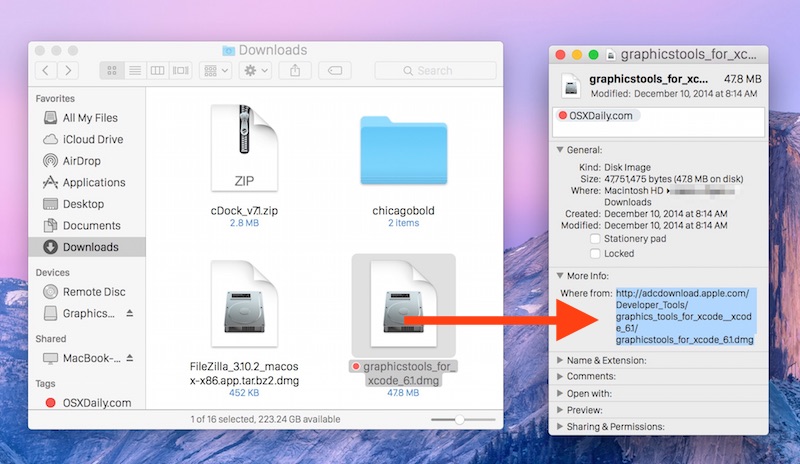
You can actually copy that URL to re-download the file if you want, or to send someone else a direct download link of the exact same item.
You may notice two URL’s listed as the ‘where from’ source, this is because the file was linked by one URL and downloaded from another. In the example screenshot below, the file was linked to from a rcrdlbl.com URL (a music site) but the file itself was stored on Amazon’s S3 service, so both links are listed.
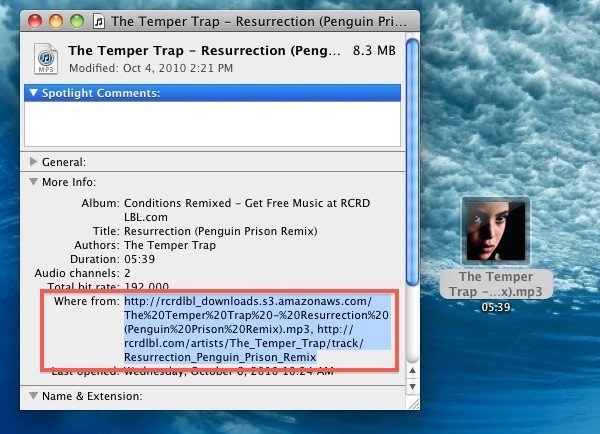
This is a really handy trick if you can’t recall where you downloaded certain files from, it’s made even better by the fact that you can select the URL’s from the window and visit them again or share easily too. I use this trick all the time for re-discovering music remixes from the huge network of new music blogs, but it works well for literally anything downloaded. Try it out yourself by exploring your Downloads folder with the Get Info command. Of course this is also infinitely useful for troubleshooting and tracking down the origins of mystery files on your Mac or someone elses.
This works in all versions of MacOS and Mac OS X, you’ll always find it in the “Where From” section of Get Info, so look there to locate the download origin.
By the way, if you want to re-download something now that you know where it originated from, just plug that copied URL into your web browser of choice, or feed it into curl to download it via the command line, and the file will download again. This is kind of a secret tip in Mac OS X but it’s very useful given the amount of things that average users download from the web and elsewhere these days.






This works great and I make use of this often but I really wish it would do the same for image files downloaded as I need to reference them often. Any ideas on how to add this feature for downloaded images?
Real good tips
[…] you know you downloaded a file but you can’t quite pinpoint where you got it from and the “Get Info” trick didn’t work. Or maybe you are trying to track down a file that has been placed on a system […]
[…] you didn’t download a file through Safari you can often find out where a file was downloaded from within the Mac OS X Finder as […]
@wanchai:
Maybe try Tineye.com to trace the image.
If you’re comfortable digging into javascript source files, it’s possible to modify Firefox’s Download Statusbar extension to add the WhereFrom data: http://hmmaha.wordpress.com/2009/01/09/add-where-from-to-firefox-downloads-mac-os-x/
is there a solution that works with firefox? or any other way of finding out where a file was downloaded from. i have a lovely low res jpeg which i saved late one night a couple of months ago and want to find the artist. name is blurred, file name searched in no good as the filename is too generic.
Any help suggestions appreciated
Commandline equivalent:
> mdls filename
not sure why others are having problems, everything in my downloads folder shows the source like this
OK I just tested downloading with Safari, Chrome and Firefox. Both Safari and Chrome add the “Where from” field, but Firefox doesn’t. So this tip only works if you’re not using Firefox.
Does not work. I’m running 10.6 and have tried this on a variety of downloaded files with no luck. Is the OP using some kind of plugin or hidden setting?
Definitely no plugin, be sure to check under “More info”
I just verified it again with a JPG that I dragged out of Safari to the desktop. Perhaps it is only Safari that encodes the info?
I tried to follow this tip. Got nowhere — ‘More info’ didn’t say a thing about where the file was downloaded from.
Disappointing — wish you’d check your tips better.
I would suggest looking at a few other file types, particularly commonly downloaded package types.
I just double-checked Paul’s tip and it works on files I have recently downloaded in the following formats:
avi, mov, rar, tar, gz, zip, dmg, mp3, m4a, m4r
This may be a 10.6 Snow Leopard only tip however, and it does not appear to work on app or sql files.
– Manish
ha! rcrdlbl is a great site, handy tip too