
Undo Moving a File to Trash in Mac OS X
 If you accidentally sent a file to the Trash can on a Mac, you can undo that file or multiple files movement into the Trash with one of two easy tricks to essentially undo that file action.
You can use either method below to accomplish this, with the “Undo” command working if the trash action was the most recent, otherwise you’d want to rely on the “Put Back” method to restore a files location and undo the Trash move.
Try the “Undo” Command to Move a File From Trash in Mac OS X
The first to try is a simple Mac keyboard shortcut for Undo, Command + Z, this works to “Undo” the file trashing if it just happened and was the most recent action on the Mac.
For example, if you just now put a file in the Trash, hit Command+Z and it will “Undo” it and move the file back out of the Trash.
But the Undo command only works if it was the last activity, so if the file was sent to the Trash a while ago you can use the Put Back trick instead.
How to Use “Put Back” to Undo an Accidentally Trashed File on the Mac
The Put Back command returns the file(s) to their location in Mac OS X Finder prior to deletion. This only works if the file is located in the Trash, not if the Trash has been emptied.
- Open the Trash can
- Select the file(s) you want to put back in their original location
- Right-click on the file(s)
- Choose “Put Back” to send the file to its original location within the Finder
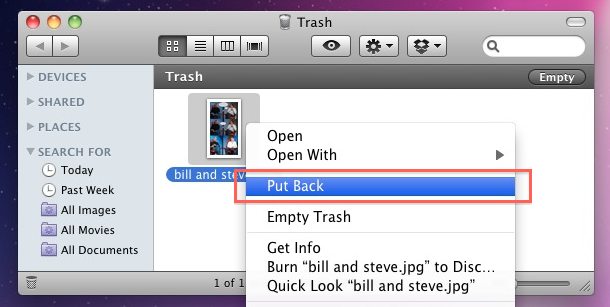
You can also do this with a keyboard shortcut from the Trash can.
Select the files within the Trash and hit Command+Delete and it will also move them back to their original location before they were sent to Trash.
You may recall that Command+Delete normally sends files to the Trash from within the Finder, but if you’re within the Trash and a file in that Trash folder is selected, the functionality is reversed.






Followed instructions till right click on files. NO PUT BACK in list. How old is your version of OS X?
If you emptied the trash, the deleted file is still being recovered because you delete a file, the file itself still remains on the drive, the thing you “deleted” is just the space of it. The computer operating system is just free up the space of this file so that the new file can be put on the drive.
So remember this, after file deletion is happened, don’t put any new files on the drive which the lost files were stored before ’cause this will lead to data overwritten situation. Once this happens, you will lose the chance for lost file rescue.
If you stop using the drive it’s possible to recover deleted files that have not been overwritten by using recovery software.
on 10.6.8 had to do one by one also. Had no put back option for
folder Recover Files, Word Work File S_.tmp. but did drag it to Applications, per screen instruction.
How to undo multiple deleted items? I accidentally deleted part of the “all my documents” section when I thought it was on the “downloads” section and need to put it back where the items were. Command + Z does not work; command + delete works but only one by one and not all of them; “left clicking” and choosing “put back” option is available on one by one and not multiples. Thank you!
This only works on files deleted using finder, files deleted using itunes etc won’t have this option.
On my Snow Leopard there is no option between “Open with” and “Empty Trash” as your screen shot shows.
Command Z has no effect.
Is there some hidden preference we have to enable, perhaps? Does this work solely if you have only just put something in the rubbish, not discovered later that there is something there that you inadvertently deleted and you want to return to it’s original location?
Command + Z does the same thing and you don’t need the trash open to do it.
in Snow Leopard there isn’t this option
False, I have not the option with Right-click = “Put Back”
Mac OS X version 10.5.8
or the option is in Snow Leopard????
This feature has been in Mac OS for years, it may be labeled as something else like “Send to Original Location” prior to Snow Leopard.
I’m in SL so I can’t tell you though but I recall using this even in Mac OS 9!
same. there is no “Put Back” option. my mac 10.5.8. even any word that have a same function.