
Flip Through a PDF in the Finder of OS X
 This is a really cool trick that is not well known; many documents are a bit interactive in the Finder of Mac OS X, without ever having to open the file in another application, or even having to use Quick Look. In this case, a PDF file that is multiple pages long can be flipped through, right in the Finder, even if the icon size is set to really small.
All you need to do is hover the mouse cursor over any multi-page PDF file within the Finder to reveal a set of arrows.
The two navigational arrows pop up over the documents icon, one pointing to the left, and one pointing to the right, and if you click these arrows, you can flip through the entire PDF right on your Macs desktop.
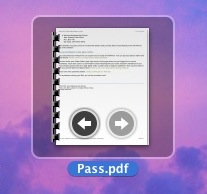
This tip is obviously a bit more useful when your icons are displayed larger, since it reveals more details of the PDF file.
This expands beyond just PDF files of course. On a similar note, you can also play audio files and play movies directly in the Finder by hovering over them as well, using this same basic idea.
This is a fun tip that shows off the attention to detail in Mac OS X, for even some relatively minor details are not only interactive, but useful. I hope we continue to see more neat little tricks like this in the upcoming versions of the operating system as they get released.






[…] same kind of hover action allows you to flip through PDF documents and even play movies in the […]