
Quickly Remove Finder Toolbar Icons
 Customizing the Mac Finder window toolbars can be a good way to gain quicker access to features you use often, and to help navigate around the file system of OS X , but what if you overdo it and the toolbar becomes cluttered with way too many buttons and doo-dads, resulting in a toolbar that looks more like a nightmare from MS Office circa Windows 95 with every toolbar enabled? Great mental picture, huh? Ok, if you end up in that situation and you want to strip out some of the toolbar clutter, it’s not sweat.
Users can quickly remove Mac OS X Finder window toolbar icons with a simple drag and drop removal trick.
All you need to do is start by holding down the Command key and then clicking on the icon you want to remove, continue to hold the click and drag the icon out of the toolbar, where you can release the click. When you’re dragging the item out, you’ll see little tiny boxes draw in the toolbar window, this demonstrates that the icons can be moved around, or, in this case, out.
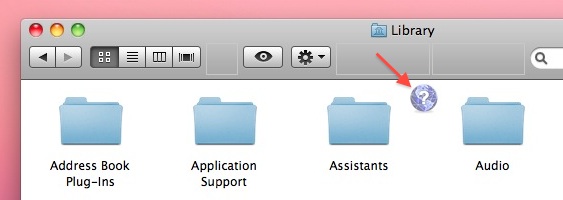
The toolbar icon will disappear in a puff of smoke, just like dragging icons out of the Dock or menubar.
If you’re wondering why my Finder windows don’t have a sidebar, you can remove it with a keyboard shortcut.






awesome… it works like a charm…
THANK YOU!!!!
thank YOU!!!
Nice answer..
Thanks
Thanks, Was a Pain in the Ass!
Works like a charm. Thanks :)
Works..! love ya :-*
Very useful. Thank you very much.
Very useful.
Works like a charm, thank you for the tip/tutorial
Thanks for your tips, I drop here by Google.
Just what I needed. Thanks!
THANK YOU!
Works a treat
Thanks
I’ve had random icons hanging there for years. Finally gone. Nice and tidy now!
[…] you don’t want folders in the Finder window toolbar anymore, just drag them off while holding the Command key. stLight.options({ publisher:'fe5e0a84-1fac-40de-8014-9f89fc1cbe6a' […]