
Open the Home Directory as New Window Default in Mac OS X Finder
 When a new Finder window is opened on the Mac desktop, the user defaults to seeing the new “All My Files” folder, rather than the users home directory. This is a change that arrived with the latest versions of OS X (began in Lion, but continues on through Mavericks), and while it can be useful for those who don’t manage their files, it’s not for everyone. Fortunately, you can change the setting back to the original Mac behavior of opening directly to the users Home Folder.
How to Make New Mac Finder Windows Open to the User Home Directory
Opening a New Window to the Home Directory rather than All My Files folder is done with a simple adjustment to preferences within Finder. This may go overlooked by many users, but it’s easy to set:
- From the Mac OS X desktop, pull down the “Finder” menu and open “Preferences”
- Pull down the menu under “New Finder windows show:” and select you user name
- Close out Finder Preferences
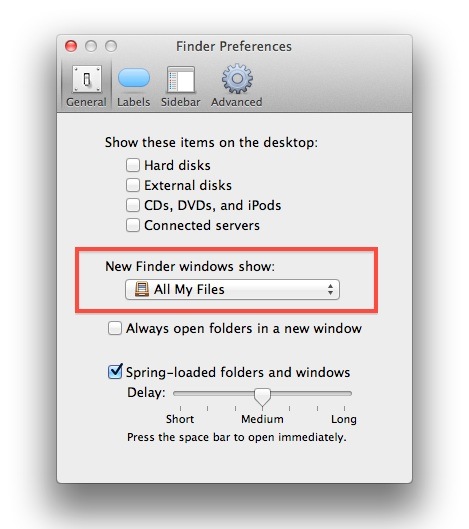
To verify the change has taken place, open a new Finder window, or hit the “Command+N” keyboard shortcut to open a new window. This will now open to the user Home folder (~/) rather than All My Files, just like it did in prior versions of OS X.
The ‘All My Files’ is probably the start of a broader change of making it easier to access your stuff in Mac OS X, but if you have tons of files it can get very crowded very fast, and keeping things sorted with the home directory is the easiest solution to managing tons of documents.
For what it’s worth “All My Files” is actually a saved search that looks for files, and is not a standard folder. That’s why users can’t directly interact with files and documents the same way from All My Files as they can with other directories.






This hasn’t worked for me, it just reverts back. I want to ditch ‘All My Files’ – am on OS Sierra 10.12.3 – can anyone help?
Yes it’s in Mac OS Sierra it is exactly the same.
Thank you! Very helpful.
Thanks!
This did not work for me on a new MBkPro running Mtn Lion. It still shows All MY Files no matter how many times I add the Home folder??????
[…] “All My Files” from the OS X Finder, unless set otherwise this is the default new finder […]
[…] you don’t use “All My Files”, remember that you can set the New Window default to show the user Home directory again, which was the default behavior in Mac OS X 10.6 Snow Leopard. […]
[…] OSXDaily Tags: Finder, Home, 找回默认的用户, 目录 Comments RSS […]
Thanks for the tip, but it is old news. This option has been around since at least Tiger. It used to be called “Open New Finder Window in” and you could select the drive from the drop-down menu in Finder Preferences/General.
I prefer cmd+shift+H
All My Files is just a smart folder you know, you can set it to anything you want…
I found that when I changed this setting. It always reverted to the ‘all my files’ option after restarting my MBP.
Strange; it works for me just fine. Both on a Desktop and a MBP…
It happens to me too. Changes back every time I restart.
This is one of the first things I changed in the Lion upgrade, I fear we won’t have a choice in the next big cat.