
Enable Private Browsing on iPad & iPhone with Safari in iOS 6
 iOS allows you to enable private browsing in Safari for the iPhone, iPad, and iPod touch. This feature is sometimes called “Incognito Mode” with other browsers, and essentially this lets you browse the web and visit web sites without saving a record of any browser history, cache, logins, or searches, and it prevents cookies from being stored on the device.
Private Browsing is an excellent way to maintain some secrecy for web activity in iOS, because whatever would normally be visible by whoever comes across the iOS device is no longer stored in any way on the device, and that will stay in effect for all sites as long as Private Browsing is left on.
This article focuses on the feature in prior releases of iOS, if you’re on a newer version you’ll want to learn how to use Private Browsing in iOS 7, iOS 8, iOS 9 here. Otherwise, here is how to use this feature on any iOS device running iOS 6 or earlier:
Use Private Browsing in Safari on iPad, iPhone, or iPod touch with iOS 6 & iOS 5
- Open the “Settings” app and then navigate to and choose “Safari”
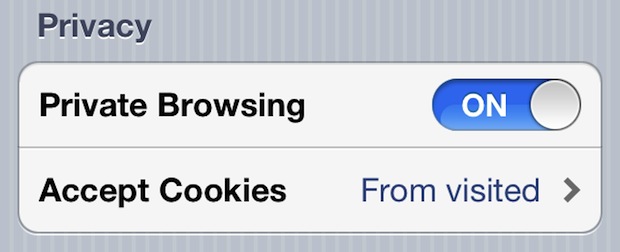
- Look under ‘Privacy’ and then slide the switch next to “Private Browsing” so that it displays “ON”
If you have currently active Safari browser windows open, it will ask if you want to keep or discard the existing web sites. We generally recommend choosing “Keep All” so you don’t accidentally close a browser window you wanted to keep open, but because it converts existing browser windows to Private Browsing versions, any saved data or cookies that have existed for that site will be missing after the refresh.
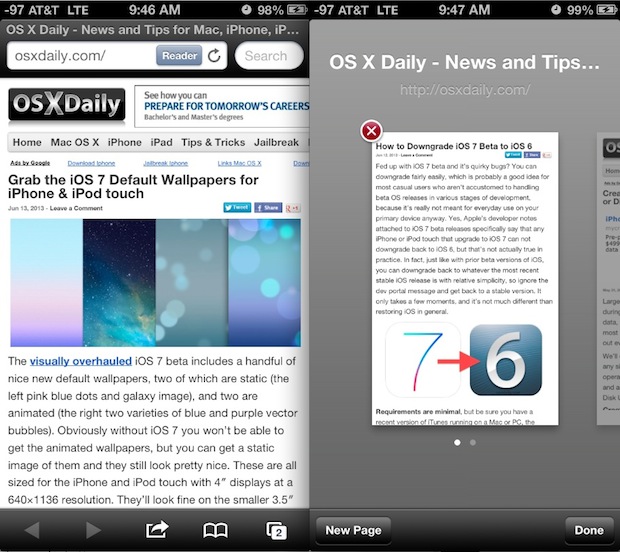
Now go back to Safari and you will discover that the windows are darkened, signifying that private browsing is active. Here is how this looks on an iPhone:
At any point you can disable private browsing and go back to the normal browsing method, simply by revisiting Safari Settings to the same menu and sliding ‘ON’ to “OFF” again.
You can further tweak the Safari privacy by adjusting cookie behavior in the same menu, though if you want to delete specific site cookies you need to do that through the “Advanced” options in Safari.
If you do any online gift shopping, check a unique email account that is otherwise hidden, or a variety of other things on the web that you want kept private and don’t want others to discover, this is a great feature to get used to enabling. Other than losing the convenience of saved logins, some minor site customizations, and cookies, there is no harm with leaving private mode enabled all the time, and some users prefer to do this because of the privacy benefits, or even just because they prefer the darkened appearance of browsing in Private mode.






I usually appreciate your “Related Articles” section at the bottom of pieces, but some of these are way out of date—don’t apply to current releases. Barring getting someone to do the tedious task of pruning, is there any way to automatically associate OS X and/or iOS version numbers with each link, along with article date?
In general, very helpful website! Thank you!
Hi Friends , I’m using Iphone 4s installed the Private browser , I have download the more than 20 videos . When open the videos option I was wondering there was no file in the videos folder.Please help me how to Retrieve those files.
Pls call me 9952030120 help required.
If i was to turn private browsing on can the gov still trace my ip address?
Private Browsing does not obfuscate your IP address, it simply prevents the storing of cookies and caches on device. It is not a VPN or a spoofer, it is client side privacy. Thus if someone else were you to pick up your iPhone, they could not see your activity. It has no impact on your IP address.
I have iOS 8.2 installed sadly and now I am somehow into private browsing. I want to get off private browsing and back to the regular one to two stores my history I cannot find the tab to fix this please help
In iOS 8.2 you just have to tap on the Tabs button, then tap on PRIVATE to either enter into the private browsing mode, or exit out of private browsing mode.
The tabs button looks like a square, iOS used to be intuitive but then came Jony Ive to fix that.
I dnt have this option on my ipad mini. Why Dont I have it and how can i get the option to turn private browsing on?
Somehow private browsing was enabled on my iPad, but when I go to settings/safari, there isn’t anywhere to turn off private browsing. What do I do?
[…] you are looking to just briefly avoid cookies for some reason, another option is to temporarily use Private Browsing mode so that no cookies, history, or caches are stored on the device. This has the same effect as […]
If you’re connected to a wireless router, will the router still pick up te websites you’ve viewed? And thereby potentially still allowing someone to check your iPhone history?
[…] prevent Safari from keeping track of web browsing history, the easiest way to do that is to simply turn on Private Browsing in iOS, a feature readily available on the iPhone and iPad, which will prevent any history from […]
Can people still see what you are looking at?
If ur on the same iCloud as someone in ur family will they be able to look at ur stuff with there devises with the private browsing?
Makes looking at pr0 a whole lot easier!
No more erasing history and having to retype websites
[…] better than nothing. The Do Not Track feature isn’t yet available on iPhone and iPad, but you can enable Private Browsing in iOS for the time being while you’re on the […]
[…] Incognito mode is separate from standard browsing and can be opened as a new tab (vs enabling manually in Safari) […]
Unless it is p*rn in which case it saves everything and zips it up and sends it to your Mum.
Hahahhahahahaha
Alex Hussein covet’s thy neighbors wife
So there is no possible way while in private mode for anyone to view the websites I have visited in the past?
Sites viewed while in private mode are not stored or cached, correct
They should have this for the Mac version as well.
They do. They always did. Just look under the “Safari” menu.
You can also browse privately in Firefox — under the Tools Menu.
I am trying to turn off private browsing in iOS 7 on my iPad, but there is no “PRIVATE” showing in the lower left-hand corner and THERE IS NO “PRIVATE BROWSING” SELECTOR IN SAFARI SETTINGS! What is going on? They update the OS, but not the instructions! Can you tell I’m a little frustrated?
Here is how to use private browsing with iOS 7 on your iPad:
https://osxdaily.com/2013/10/19/private-browsing-safari-ios/
[…] Enable Private Browsing on iPad & iPhone with Safari in iOS 5 Enable Private Browsing on iPad & iPhone with Safari in iOS 5… Source: osxdaily.com […]
aka pron mode