
Delete Songs Directly on iPhone, iPad, or iPod touch
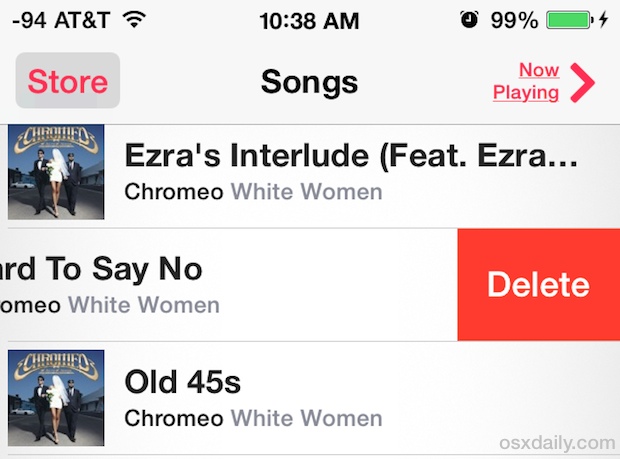
You can now delete songs directly from the Music app on your iPad, iPhone, or iPod touch. The music removal action is achieved directly on the iOS device without having to re-sync to iTunes, allowing you to rapidly clear out music or songs you don’t want stored on the device.
How to Delete a Song with a Swipe in iOS Music App
Using the song removal trick is very easy and intuitive, working the same on all iOS devices including the iPhone and iPad:
- Launch the Music app and access the music library as usual
- Tap through to any song, album, or the general music library list
- Slide sideways with a swipe gesture on the track / song name to bring up a red “Delete” button
- Tap the delete button to remove the song, repeat as necessary with additional music if desired to trash more songs
To delete another song or a ton of music, just repeat the process.
The swipe gestures makes it very fast and you can quickly clear out an entire album this way or a collection of music you no longer want on the iOS device. That’s really all there is to it, a surprisingly easy tip that is yet another nice addition to the iOS platform that lets you manage data on an iOS device without having to connect it to a computer or deal with iTunes if you don’t want to.
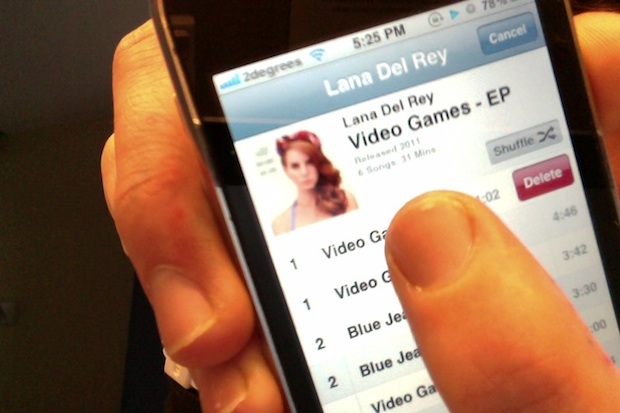
This in-app track specific removal feature was introduced to iOS in the 5th major release and has since been improved with each additional major iOS release, functioning the same but looking slightly different from say version 6 to iOS 9 and beyond. All in all it’s a huge improvement to what existed before, and prior to the release of iOS 5, songs had to be deleted through iTunes on the device itself, and then resynced, all while connecting the iPhone, iPod, or iPad to a computer. So a big thank you Apple for simplifying the post-PC process!
Oh, and if you’re thinking about clearing your device of all songs, albums, artists, and every other piece of local music, you can delete all music from iOS with this trick too.
Thanks for sending in the tip idea Loic! On a quick side note, this can be a really great way to clear up some capacity on an iPhone if you’re running low on storage for taking photos, so just trash a couple of songs and keep shooting pictures if need be, you can always get the deleted songs back onto the device later by re-syncing or re-downloading from iTunes.






nothing happens when I swipe across the name as instructed- no delete prompt. Can’t remove items and my list is now full.
I deleted a song a while ago, now I want it back on my phone but no matter what I do it won’t show up in iTunes… Does anyone know what to do, how do I put it back on?
Why won’t this work on iphone4??
That is the main reason I am
leaving all Apple products..
It’s like u gotta be an apple tech to use this dam phone
Bad enough everybody has to have the same ringtone cause it’s a freaking process and a waste of time trying to create your own.apple should give me a paycheck I feel like trying to do stuff on this phone is to much work
I’ve tried going to the music app swiping each individual song and still nothing wtf this dam phone updates every month im at os 8.0.2 and I don’t know why all the software updates when they can’t even add simple features to erase shit off your phone
So what’s the answer then – I have the same problem. Can’t delete them – I have no idea where they’re coming from. They’re not on my Mac (iTunes) yet they get put on my phone!
What the hell is Apple doing???
If it’s the U2 album just delete it, or the other music, from your iPhone.
It would be nice if this feature worked, but I simply cannot swipe left on some songs/albums, for seemingly no reason. Useless!
I have the same issue…I have my itunes on my Mac set up to only sync songs that are checked..but there are about 30 more songs on my iPad 2 than I have checked in iTunes on my Mac. When I try to delete them, I do not have the swipe option. It is so frustrating.
I swiped to delete all songs from one particular artist on my iPhone but when I got to play songs on phone…they still play on my shuffle of my music.
Thank you sooooo much for showing this simple but yet so hard to know…
Anyone who says iOS is intuitive is on *crack*. Who in their right mind would ever have figured this out on their own? 2 of us spent 15 minutes trying everything under the sun. Apple = easy-to-use, my ass.
And thank you for providing the solution. :)
Thanks for the help…much appreciated
tnks
I cannot delete songs on my iPad with the music icon.
If it only deletes the name of the song and not the entire file it is pointless. I am taking my Iphone to Europe and want to use it for photos, but also wanted to store songs on it for the long flight then delete them when I got there to make room for photos. I guess the brilliant minds at Apple have made these two things useless for me.
I deleted an album off of my Iphone and I can’t get it back on. It’s still in my Itunes. I’ve made sure it’s checked. It sincs new music but I still have no access to this album on my phone as far as I can tell.
What I did (I have a mac) is plug in the ipod and go to itunes.
1)Under “Devices” select my ipod, then select Summary from the options across the top.
2) Scroll down to Options and check Manually Manage Music
3)Click “Apply”
4)Drag the music to the ipod
5)Make sure that the in the Music section, there is nothing clicked that will avoid that artist or album, and then unclick Manually Manage Music
You get a warning that says everything will be replaced or something like that, but it appears to just resync. The music should be there now.
I forgot to mention in step 5, click Apply again.
Guess what … the next time you sync, it puts the song(s) right back on your IPhone. And I don’t even have these songs, artists or albums checked. Sigh.
For some reason, the IPhone is pulling these from the latest backup instead of from my ITunes library.
You need to manually manage the song list, it’s an option in iTunes.
Agh! Finally!!! This has been driving me crazy! Thank you thank you thank you!
[…] probably know by now that you can delete songs on an iPhone, iPad, or iPod touch, just by swiping on a song and tapping “Delete”, but […]
is there any way i can UNDO the delete WITHOUT having to go on itunes and syncing it? because, like someone mentioned, I think its still actually there on the hard drive, but just not available.
OMFG I LOVE YOU!
I like how it only deletes the music file off the iphone/ipod touch/ipad.
It would really suck to have a unintended incident that deleted the file and/or cleared a playlist for good, knowing you can’t just sync from computer for backup restore.
It doesn’t even really delete it off the iphone. It removes the file from the library list on it so if you manually manage music you now just have a music file taking up space. (HOW WORTHLESS APPLE) It is a hugely needed function and would make music management better than on itunes but alas they would rather taunt us then give us a useable function, oh and if you don’t manually manage then it will just reappear next time you sync. Thanks the big F-U apple
Its a huge tease and to be honest it’s useless!! I was so excited when i realized i could delete from my phone but whats the point if it still takes up the space and still syncs back?? Pointless!!
[…] swipe-to-delete gesture is seen elsewhere after iOS 5, including when deleting a song from iTunes on an iPhone, iPad, or iPod touch. stLight.options({ […]
Does anyone know a way that you can sync the iPod with iTunes so that the songs you deleted on the iPod will be removed from your iTunes library?
[…] Delete Songs Directly on iPhone, iPad, or iPod touch Delete Songs Directly on iPhone, iPad, or iPod touch… Source: osxdaily.com […]
Interesting. If I delete a song from the phone this way, will it get replaced the next time I sync?
You can also delete entire albums.
You can also delete individual calls from your call history as well… Finally!!
Unfortunately, next time you sync to iTunes, the deleted song comes back unless you uncheck it. Unless there is another trick to it, I don’t see a way around that. Any advice?
But we still can’t delete photos from Photostream….
Go on iclouds and turn photostream off
If I delete a song on the iPhone, what happen to iTunes library?
…It deletes off the phone. That’s all.
Funny, we’ve been able to do that with movies for awhile (I remember wanting to download an app and being told there was not enough free space, went in to the video app, swiped across one of the movies in the list and up popped a Delete button)…
i delete 2 videos from my ipod and now i can sync those videos again, what can i do ??!
HALLELUJAH!!!
Gosh I was waiting for it for 3.5 years, you would think for such a basic feature all mp3 players have
You can now delete songs directly from the Music app on your iPad, iPhone, or iPod touch, This is achieved directly on the iOS device without having to re-sync to iTunes