
iTunes Match Icons Explained
Nov 22, 2011 - Leave a Comment
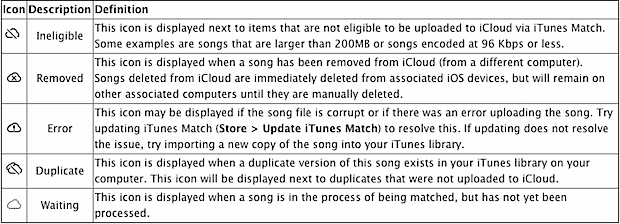
If you signed up for iTunes Match and you’re seeing some peculiar icons in your music library alongside track names, don’t miss this chart put together by Apple that explains what each icon means, helping you troubleshoot the problem.
The icons include:
- Cloud with a slash through it – ineligible for iTunes Match
- X’ed out cloud – removed from iCloud
- Cloud with an exclamation point – error uploading the song
- Double cloud with a slash through it – duplicate song exists
- Empty cloud – song is waiting to be processed
Why the cloud icons anyway? Because iTunes Match is part of iCloud, of course.





