
Open Files from Quick Look in Default App or Other Applications on Mac
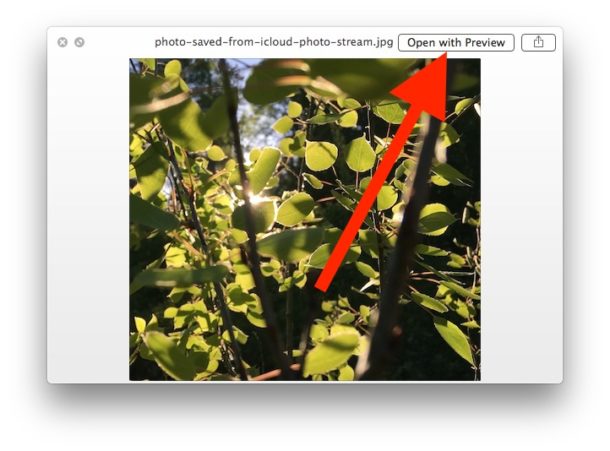
Did you know you can launch a file directly into its default app, right from a Quick Look preview on Mac?
And you can open the files from Quick Look preview into other compatible Mac apps too.
Quick Look in Mac (from Mac OS X Lion and later) includes a “Open with [Application Name]” button in the upper right corner of the windows, that makes it nice and easy to quickly open the file you are quick looking into the app it defaults to be associated with.
Open a File in Default App Directly from Quick Look
Try it yourself:
- Select a file in the Finder of Mac OS X and then press Spacebar to open the Quick Look preview
- Look for the “Open in (app name)” button and click that button to open the file from Quick Look directly into the application named
By the way, the recommended app in ‘Open with App Name’ will be the same as the default app associated with that file type on the Mac, which you can change that if you want to.
Opening File from Quick Look in Other Mac Apps
But you’re not limited to launching the file in only that app that is shown in the corner.
Right-Click on the suggested application name to show a contextual menu where you can select to open the file in another compatible app, this menu is very much like the Finders “Open With” menu that pops up with right-click.
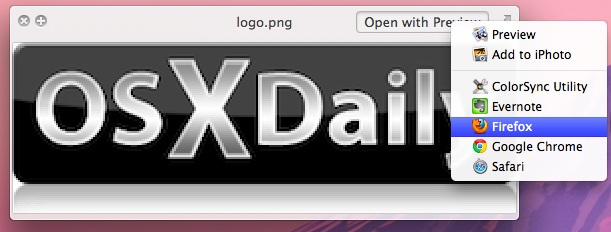
If you’re not familiar with Quick Look, select a file or folder in the Mac OS X Finder and then hit the Spacebar. The resulting window will give you a preview of images, text and pdf documents, and more.
Quick Look is also further customizable through third party plugins.






[…] a la derecha se irá a la imagen siguiente, a la izquierda a la anterior, hacia abajo…Abrir con una aplicación diferente a la sugerida por defecto también es posible en Vista Rápida. Para ello activemos la vista en algún elemento, […]
Right clicking a button doesn’t seem like it would fit the HIG
[…] | OSXDaily […]