
iPhone Not in iTunes? Fixing It Is Probably Easier Than You Think
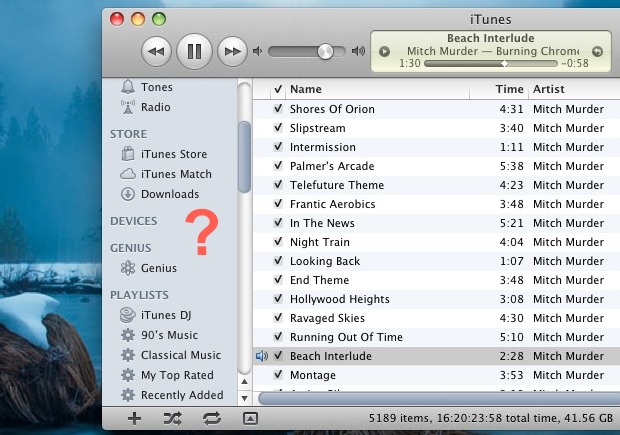
The iPhone is connected to a computer with it’s USB cable, you launch iTunes and… the iPhone isn’t shown in iTunes. What gives? Fixing this problem is probably a lot easier than you think, and after fielding a call about this I found the simplest explanation was the solution as to why someones iPhone wasn’t appearing in iTunes.
If you don’t see an iPhone or other iOS device within the iTunes app, try this:
- Ensure the iPhone is connected to the computer with a functioning USB cable
- Launch iTunes
- Hover over the “DEVICES” item in the sidebar until the “Show” button appears and click on it
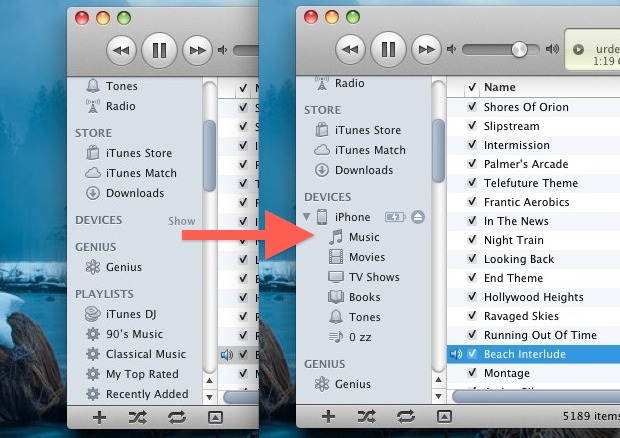
This obviously requires the iTunes sidebar to be visible.
The iPhone will now be visible, as technically it was always in iTunes it was just hidden. It seems like the “Hide” button can be clicked accidentally, which can lead users to believe they have a more serious problem than there is. Save yourself some work and try this first the next time the iPhone isn’t in iTunes devices list.
If you attempted this and the iPhone (or iPad or iPod touch) still isn’t showing up in iTunes, you may need to reinstall iTunes itself.






I have reinstalled itunes, restarted my phone, it connects to my computer but there is no way to get it on itunes even though it was working just a few days ago. I have been at this for multiple days now and I am very frustrated with this problem. Nothing seems to work and my phone has me “trust the computer” every single time i plug it in and yet nothing works. PLEASE HELP
Have had this problem repeatedly, but easily solved in my case by just quitting & relaunching iTunes.
I am not seeing the devices in the left hand corner. what do I do?
I have uninstalled and re-installed itunes and still no icon, no devices showing in left hand menu etc. Downloaded drivers and yet still no icon. I am at a loss as to how to get my phone icon back into itunes. Was showing up fine before the lastest update.
how very irritating, its now 2:30 am and i have been at this since 7pm.
i have been in and out of directories looking for drivers, shutting things down, reloading, switching cables, turning computer and phone off….absolutely nothing.
i read this and noticed my side bar was absent, i looked in the little box in the top left and kapow, there it was. under devices i found my phone, pressed sync and it was done.
this really should be the first thing apple suggests. strange it is not suggested elsewhere.
thank you so very much, i am off to sleep while the phone and the music syncs to each other!
My phone shows up in iTunes but none of my folders are showing. The icons appear to be all loose even though the phone itself shows the icons in folders. I just jailbroke it recently – is this normal?
I have had this happen to me, however slightly different. My iPhone would appear in iTunes only while connected with the usb cable. In other words, there was no wifi syncing, only connected syncing. The fix was to reboot my iMac. It has happened twice and I’m not sure what is causing it.
Yea unfortunately wi-fi syncing doesn’t really work as you’d think, that’s not a bug it’s just the way it’s implemented.