
Maintain File Ownership & Privileges When Copying With Duplicate Exactly in Mac OS X
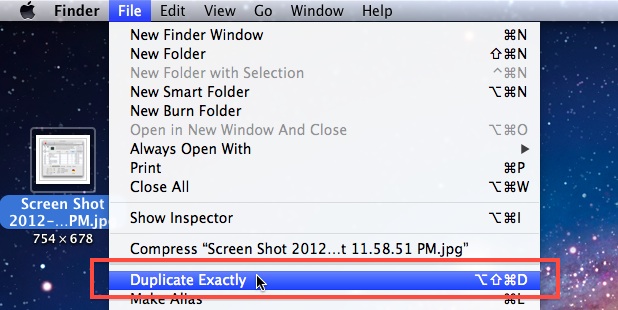
Modern versions of Mac OS X include a nice new ability to be able to duplicate and paste files exactly. Basically this means that if a file is owned by another user, Duplicate Exactly and Paste Exactly will preserve the files original ownership and permissions, rather than copy the file with the current user becoming the new owner.
This is a useful feature for administrators, network admins, file sharing, and multi-use Macs, but it has other helpful purposes as well. Let’s cover how to use the Duplicate Exactly and Paste Exactly features in Mac OS.
How to Use Duplicate Exactly on Mac
Duplicate Exactly is accessed through the Finder.
Select a file or folder within the Finder and hit Command+Option+Shift+D to perform an exact duplication.
You will be presented with a window to authenticate the copy to allow the ownership state to maintain consistency.
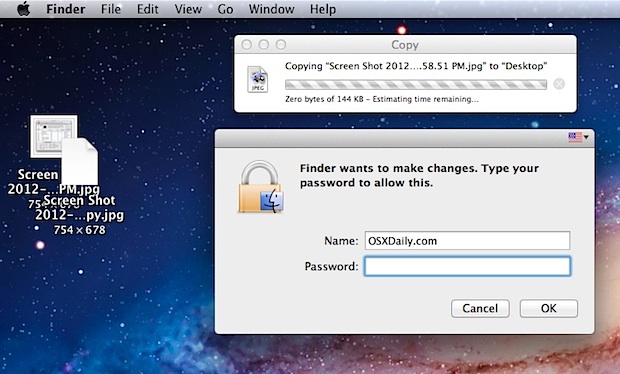
The duplicate will be placed alongside the original, maintaining ownership integrity.
You can also access “Duplicate Exactly” through the Finder “File” menu by holding down the Option/Alt key.
How to Use Paste Exactly on Mac
Similarly, there is also a new feature that lets you Paste Exactly, maintaining the same ownership and permissions when using cut and paste in the Mac OS X Finder.
Paste Exactly is accessed through the Finder file system, and is activated with Command+Shift+Option+V after a file or folder has already been placed in the clipboard buffer.
You can also access “Paste Exactly” through the Finder “File” menu by holding down the Option/Alt key when pulling down the menu options.
These two tips are geared for more advanced users and administrators who are altering another users files or directories. Try them out the next time you are editing another users files or folders, and save yourself a potential headache if the file or directory permissions change.
Note that the Duplicate Exactly and Paste Exactly features require a Mac OS or Mac OS X release beyond 10.8, and all newer versions of system software will support the capabilities.






I’ve recently run into serious system errors requiring a TimeMachine backup/fix. This was due to customizing icons in the extensions folder’s IO series of kext packages (IOCD, IODVD, etc). Someone on the Apple community board responded to my question about my new problem/occurrence by saying that some sys files/xtensions are “codesigned” and can’t be modified as before. My question to you is, does this new c/v method you’ve posted here solve this issue? If not, ss there another way you know? If so please explain. Thanks in advance,
William
Great tip!! Thx!!
Hmm… Is Apple doing too much these days? Next thing you know, I’ll be installing custom drivers and debugging stuff…