
Disable “Top Sites” in Safari for Mac OS X
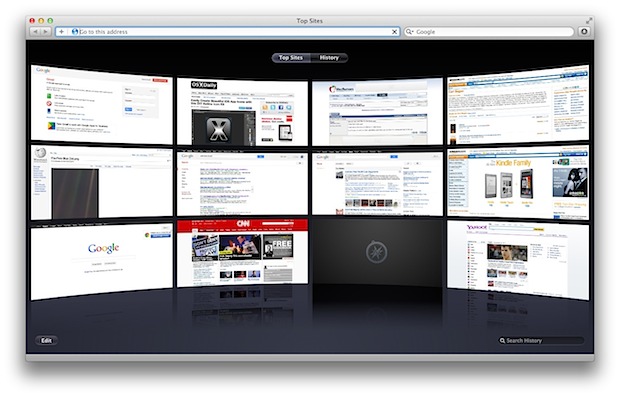
New windows and tabs in Safari default to displaying a 3×4 grid of “Top Sites”, representing the web sites you visit the most often with Safari. This can make for a nice home page, but sometimes it will display sites you don’t want showing up, and it can also slow down Safari on older computers.
We’ll show you how to disable Top Sites in Safari, hiding it completely, and also how to reset the previews in the feature.
For those that use Safari as their default browser, you can speed it up and avoid any potential embarrassment by disabling “Top Sites” from appearing in new windows and tabs.
How to Hide & Remove “Top Sites” From Safari
This will completely hide the Top Sites feature from appearing on Safari launch or when a new window opens.
- Pull down the Safari menu and choose “Preferences”
- Under the “General” tab look for “New windows open with:” and choose “Homepage” or any option other than Top Sites
- Directly below, find “New tabs open with:” and choose “Empty Page” or any option other than Top Sites
- Close out of Preferences
If you want Safari to be as fast as possible, choose “Empty Page” as both options, though we certainly won’t complain if you set https://osxdaily.com as your home page, since we know it’s your new favorite web site, right?
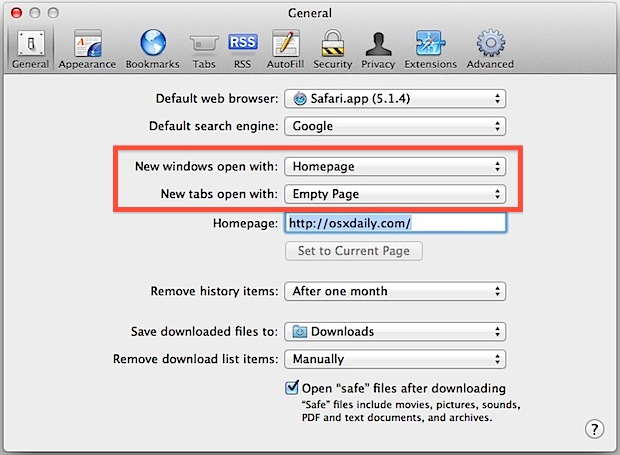
Now, to verify that Top Sites is no longer there, go ahead and open a new tab or window in Safari to confirm the change has taken place.
Removing Existing “Top Sites” Images & Previews in Safari
To delete any already existing Top Sites previews and images you can reset the feature:
- Pull down the “Safari” menu and choose “Reset Safari”
- Be sure that “Reset Top Sites” is checked, then click ‘Reset’
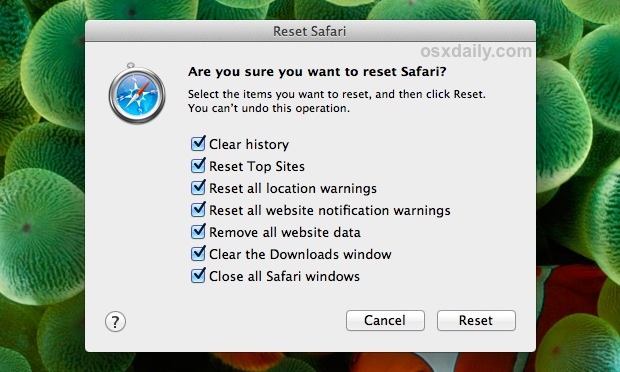
Now if someone was to enable Top Sites, any existing sites wouldn’t be included in the list.
You can always get ‘Top Sites’ back and visible again by selecting it in the same preference panel of Safari, however.
This works the same in Safari for Mac OS X and for Windows.






Yosemite, Safari does not have reset menu
Hi
I tried your tip about getting rid of the top sites loading when you start up Safari.My OS is Leopard and the hated top sites still load,I also tried Shirley Allan suggestions with out success,Is my Safari stuck or is it me that isn’t fallowing your instructions.Also what a great site and I do have osX Daily site set on my home page and find the site better than anything Apple could hope for,I hope they see and read you.
help when you can.
Thanks
I actually was wondering how to do this. I am using Safari on a Windows Machine and it worked like a charm! Thanks so much for this article!
To get rid of the already accumulated images, go to Safari>Reset Safari. Select “Remove all webpage preview images” and “Remove all website icons” and click the reset button.
To stop Safari from gathering more images, in Finder, go to the Go menu and press the Option key to get to your Library. Find Caches and then com.apple.Safari>Webpage Previews. Select this folder and press Command I (Get Info). In the Get Info window, check the Lock button. With the folder locked, Safari can no longer save images to it.
Great tip.
Yeah – thx!
safari>webpage previews doesn’t present itself by any indication you provide
Macbook (yosimite update)
Top Sites is humiliation waiting to happen, I disable it immediately!