
Change a Login Name in Mac OS X
Mar 28, 2012 - 6 Comments

Want to change a user name that appears at the login screen of Mac OS X? It’s very easy to do:
- Open System Preferences and click on “Users & Groups”
- Select the users name you wish to change from the left side
- Look for “Full Name” on the right side options and click in the box, enter the administrator password to authenticate the name change
- Type the new name as you want it to appear at the login screen
- Exit out of System Preferences
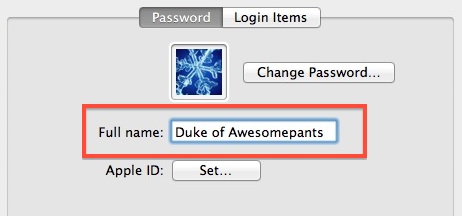
Confirm the login name change took place by logging out or by locking the screen, both of which will bring you to the standard OS X login window. This is the same for OS X 10.7 Lion and OS X 10.8 Mountain Lion.
The full name/login name is not to be confused with the short user name of an account, which controls the directory name and SSH logins.






We have had some interest in these kinds of promotional items and had some graphics created by another business. Is it viable to use the same graphics? The graphics company is Concord Signs & Banners 3568 Kimball Way Concord, CA 94518 – 925-808-3817. I am not sure if the art files will be compatible.
[…] Effettuate un logout e a seguire in login controllando che i cambiamenti abbiamo avuto effetto con successo. Via | OSXDaily […]
Not sure why you’d want to do this but cool anyway.
Duke of Awesomepants? Is that an official designation?
No, it’s just a description (we can only imagine . . . ). If it was an official designation it’d be Duke Awesomepants. :)
does this change the location of where the documents of the new named account are stored in the home folder (ex to another home folder)? thnx a lot