
When Was Your Mac Built? How to Find The Make & Model Year of a Mac
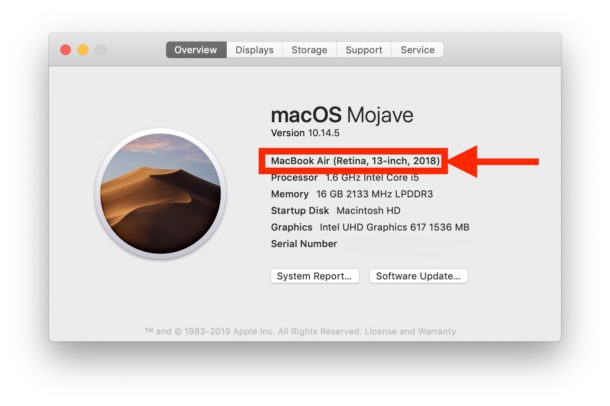
You’ll often hear Mac users reference their machines by a model and the build year (for example, Mac Mini 2010, or MacBook Pro 2016), or by a timeline within the year it was released (iMac mid-2011 model). Sure some Mac users just have an amazing memory for this stuff, but everyone else can retrieve the model year and build date of their Mac by looking under the About This Mac screen in new versions of macOS and Mac OS X.
This tutorial will show you exactly how to find the model year of any Mac so that you’ll know when it was built. This can be invaluable information to know before seeking out hardware upgrades, warranty details, software compatibility, and much more.
How to Find Make & Model Year of Any Mac
Here is where you can quickly find the particular model make, and model year, of any Macintosh computer:
- Pull down the Apple menu from the upper left corner of the screen, and select “About This Mac”
- At the “Overview” screen, look under the Macs model name to find the specific model and model year in the subheader
What you’re looking for is a text that says something like “MacBook Pro (Retina, 15-inch, Mid 2015)”, as that spells out exactly the model name, the model specifics and the model year of that Mac.
The example screenshot above shows the About This Mac screen displaying the Mac model year and computer model name in MacOS Mojave, it looks the same in MacOS Catalina too.
Note that newer Mac OS versions will immediately go to an “Overview” screen where this is visible right away, whereas older versions of Mac OS X will need to click on the “More Info” button to reveal the expanded information to find the model year of a Mac computer.
If you aren’t sure what version of Mac OS you are running you will also find that information in the same panel.
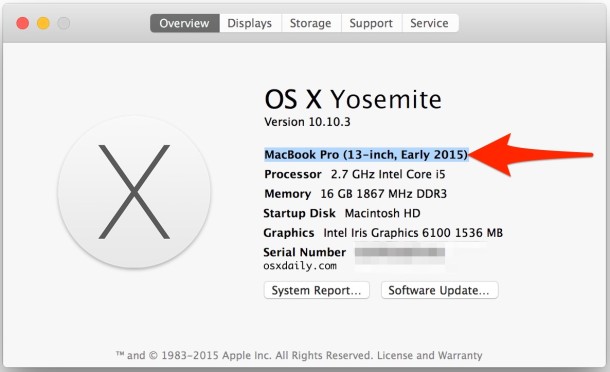
For example, here’s the About This Mac screen in Yosemite:
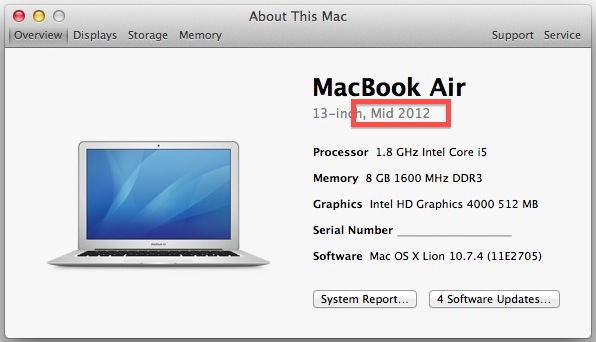
And here’s the About This Mac screen in Mountain Lion:
These hardware build dates are used to determine system requirements and compatibility for Mac OS upgrades like macOS Catalina, or to check for compatibility with other macOS system software releases, as well as to help determine support for specific features like AirPlay and many others, and even to determine eligibility for the rare recall if there’s a hardware fault with a specific Mac model.
You can see why the Mac model year information is pretty important to know as it is often relied on for determining these aspects of software compatibility and hardware features, whether for upgrading, updating, warranty repairs, and much more.
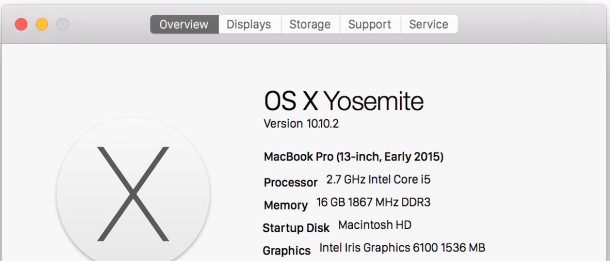
Note that all modern versions of Mac OS including MacOS Catalina, macOS Mojave, macOS High Sierra, macOS Sierra, OS X El Capitan, Mac OS x Yosemite, OS X Mavericks, Mountain Lion and Lion include the improved About This Mac screen, though Macs running Mac OS X Snow Leopard or before will have to find the build date through System Profiler, and some pre-2008 Macs will need to go based on the “Model Identifier” instead of a direct date reference.
If you have any questions or thoughts about discovering what your Mac model and Mac model year of build are, let us know in the comments below!






Hi I have a MacBook Pro 5,3 15″ Mid 2009 2.6, 8GB and NVIDIA Geforce 9400M. The install went fine but the patch is not holding. So as soon as i start watching any video it crashes. So am I missing a step?
Warren
The model year is NOT necessarily when the mac was manufactured. I have an iMac that I bought new in January 2017 and Apple says it was manufactured in 2017 just before I bought it. About This Mac says it’s model “iMac (Retina 5K, 27-inch, Late 2015).” The model is the year that it was first designed and released.
Should i update my MAC to macOS Catalina latest version, I am hearing people are facing many issues after updating.
My MAC specs:
Model Name: MacBook Pro
Model Identifier: MacBookPro11,1
Processor Name: Dual-Core Intel Core i5
Processor Speed: 2.4 GHz
Number of Processors: 1
Total Number of Cores: 2
L2 Cache (per Core): 256 KB
L3 Cache: 3 MB
Hyper-Threading Technology: Enabled
Memory: 8 GB
Boot ROM Version: 157.0.0.0.0
SMC Version (system): 2.16f68
Does your Mac work right now for what you need to use it for? If so, why risk a problem?
I have a 2013 Macbook Pro 10,1 running Catalina no problems, I have 2 Macbook Pro 2011 one i5 and one i7 both unsupported running Catalina with patch no problems, I also have Macbook Pro 2009 intel duo core 2.0gig cpu running Catalina with patch no problems.
Is it possible to upgrade my imac to mac Os catalina
iMac (21.5-inch, Late 2009)
3.06 GHz Intel Core 2 Duo
14 GB 1067 MHz DDR3
NVIDIA GeForce 9400 256 MB
Is a mackbook mid 2010 core2duo 13″2.4 MHz compatible with mac catalina
My computer is old, but I can’t find the actual date. Here is the info it gives:
Model Name: MacBook Pro
Model Identifier: MacBookPro5,2
Processor Name: Intel Core 2 Duo
Processor Speed: 2.8 GHz
Number Of Processors: 1
Total Number Of Cores: 2
L2 Cache: 6 MB
Memory: 4 GB
Bus Speed: 1.07 GHz
Boot ROM Version: MBP52.008E.B05
SMC Version (system): 1.42f4
What year is it and can it be updated to the latest operating system or do I need a new computer. Browsers are saying they don’t support my operating system, so I can’t upgrade to the browsers’ latest versions. Any info/ help would be much appreciated.
In your case the model is “MacBookPro5,2″ but you should be able to get the simple information, including date it was created from ‘About This Mac’ from the APPLE menu.
But stepping back, I think a better question is, what are you trying to do? And are you trying to do something that is not possible on that computer?
As for your question; it appears that MacBookPro5,2 is a MacBook Pro 17” from 2009, which Apple considers to be outdated. It will not run the latest operating systems. But for many people that’s OK though, you don’t necessarily need to run the latest anything. If your computer works for you, there is no need to upgrade unless you feel like buying a new computer anyway, or unless it is no longer getting the job done that you require. That’s my personal attitude anyway. I personally have a lot of older Macs and I use them every day, even with outdated software versions. It works for me. Remember the old adage: “If it ain’t broke, don’t fix it!”
Except that when I click on “About this Mac” and the “Overview” screen appears, it doesn’t say when my MacBook Pro was built. I suspect 2007-08 but am unsure. If I am correct, then my MacBook Pro is too old, I can’t use the new iOS, and I can’t get iMovie. :-(
Ever since I installed Sierra the trash sound has stopped working!!! I empty the trash and there is NO sound!!!
System Profiler….? OK, how?
I have the same model macbook air 2012 Core i5 with HD 4000 but i don’t have 512Mo VRAM i just have 384Mo Of VRAM ???
What’s Wrong ?
You only have 4GB of ram, only the 8GB models come with 512MB VRAM.
Mine shows “15-inch 2.4/2.2GHz”
I bought my Mac November 1, 2007.
Mine says the same
NOt on my mac mini I believe i got it mid 2009 though Its an intel core 2 duo