
Move a File to iCloud from Mac OS
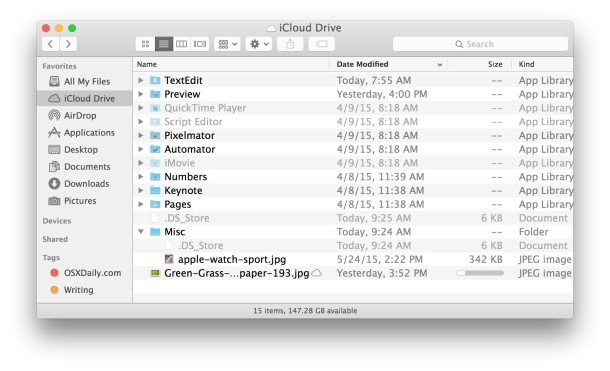
The latest versions of Mac OS let you move files directly into iCloud from your Mac, these files can then be opened on any other Mac or iOS device set up with the same iCloud account. This is extremely convenient if you want to quickly move a file around but don’t want to copy it manually or with a USB drive, particularly when text documents that are lightweight and easily sent around through the cloud.
It’s important to remember that by moving a file to iCloud Drive, you are uploading it to iCloud Drive from the Mac, and then removing it from the local Mac. That is why it’s moving the file to iCloud, rather than copying. You can also copy files to iCloud if need be, but it’s a different process.
How to Move Files Into iCloud the Easy Way from Mac OS X Finder
Of course the easiest way is to to simply drag and drop a file into the iCloud Drive window of Mac OS X Finder, that will move the file to iCloud Drive (not copy it, a distinct difference).
- Open a Finder window in Mac OS
- Select “iCloud Drive” from the sidebar
- Drag and drop a file into the appropriate iCloud Drive folder to move it (again, this does not copy, it moves it from local storage to iCloud)
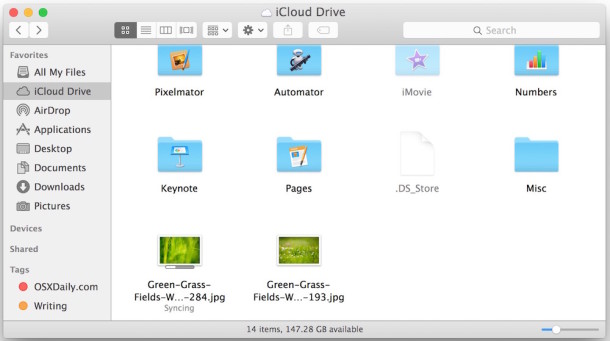
But not all versions of Mac OS are High Sierra, Sierra, Yosemite and El Capitan with direct iCloud Drive access.
Not all apps and not all versions of Mac OS X support the feature yet, so rather than just showing you how to do it with the the Mac Finder in modern versions of Mac OS, we’ll also how cover to do move files to iCloud with all apps that are iCloud equipped. For this example we’ll use TextEdit, but you could use Pages, Preview, Numbers, etc. With older versions of OS X you can still move files to iCloud, but you do it through an application instead. That application approach works in modern MacOS and OS X versions too, however, but for prior versions it’s the only way to move items to iCloud.
Moving Files to iCloud Drive from an Application in Mac OS X
You can also move files to iCloud Drive via applications.
- Click the file name in the title bar to pull down the contextual submenu and choose “Move to iCloud”
- Confirm the move from your hard drive into iCloud by clicking “Move Document”
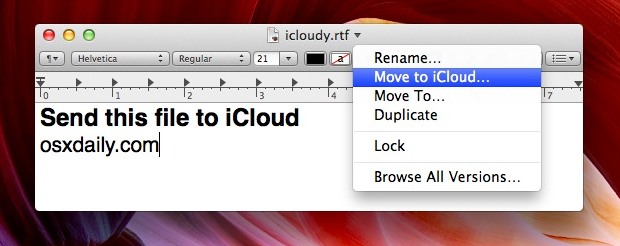
Of course, some apps now choose iCloud as the default save location, a setting which can be changed back to local storage if you don’t like it. Whether or not that’s enabled though, you can still move current local documents to the cloud and the method above is the easiest way to do so. You can also pull down the “File” menu and select “Move To…” and choose iCloud as the destination, however.
Assuming you’re online it will be sent to iCloud immediately. You can verify the document is there by looking at the “Open” menu in apps that support iCloud storage, which will default to to showing you the iCloud file list of items compatible with that app.
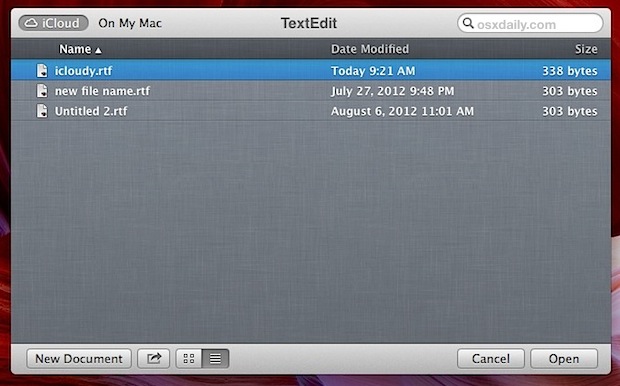
Once the file is in iCloud, you’ll be able to open it from anywhere else configured with the same iCloud account. Any changes made to the document will also reflect everywhere else you use the file, so you can make a quick change on the go with your iPad and it’ll be the same when you get home to your Mac.
Not all apps support the iCloud storage feature yet, but with how integrated iCloud is becoming to iOS and Mac OS X you can bet the supported app list will only grow.






this helped.
I want to save my mailboxes to iCloud but I just found out that won’t work :-( Any suggestions on how to save those emails on iCloud?
I learned today that you can also attach documents stored in iCloud to emails. Click the paper clip and you’ll see iCloud as a storage location.
Moving files to the cloud is good via Lion but 1 problem is you are unable to open textedit files and pdf’s on ipad / iphone. There is IOS apps for pages, numbers and keynote but not text edit and Preview. Maybe IOS 6 will solve this!
you can simply Drag and drop the Files from Finder to any of the icloud boxes that come when you open any icloud enabled application (I tried with keynote).
Is there a way of saving a batch of document files (pages, numbers etc..) from mac to icloud without having to go into each individual document and re-saving? calso an you create file structures in iCloud as i would like to group documents by project for ease of reference. Thanks