
How to Generate & Change a MAC Address in OS X the Easy Way
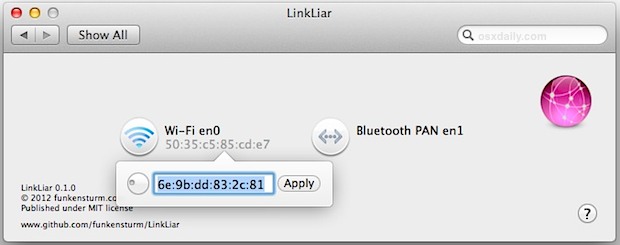
If you need to change a computers MAC address (the unique ID attached to a physical network interface), but aren’t comfortable with the command line approaches that we’ve discussed before, an excellent free preference panel called LinkLiar makes it easy. Not only does LinkLiar make changing MAC addresses remarkably simple for any network interface on the Mac, it also randomly generates new ones, insuring a conflict-free MAC address in the end.
Download LinkLiar from GitHub, then most users will need to right-click the .prefpane and choose “Open” to get around the GateKeeper security warning. System Preferences will automatically open and give you the option to install it for the current user or all users on the Mac.
Once in LinkLiar, click an available network interface, and either enter an address on your own, or turn the wheel to generate random new addresses on the fly. Click “Apply” and enter the admin password to make the changes.
LinkLiar is without a doubt the easiest way to change MAC addresses in OS X, the only complaint with LinkLiar is there is no ‘revert back to default’ option, so you’ll probably want to find and make note of an interfaces default MAC address before making any changes to it.






Note that there is a new version out optimized for Yosemite. It’s a status menu app, though. Not a preference pane any more. The advantage is that you don’t have to enter your root password all the time.
Works great on 10.9.2. Original MAC still shows up in About this mac but fools the wireless network (at least at my workplace)
I was able to change the mac address with no problem, and in the pref panel it shows the ‘new’ mac address but when I go into the Wi-Fi settings, it still shows the default mac under Wi-Fi Address… does this mean that linkliar didn’t work properly or does that not matter? do I have to restart after using it or?
The Network preference pane always shows the hardware MAC address, regardless of what is actually used on the network. You don’t have to restart anything.
Using Mountain Lion. Error message is… does not support Intel Macs. Do I have to download Xcode before I can install LinkLiar?
You don’t need Xcode to run LinkLiar. The preference panes on Mountain Lion have use 64bits that’s why you get the warning. There has been a new release to fix that issue.
Ok, and once “installed” how do you get it to operate? There is nothing in my apps that looks anything like LinkLiar.
Nm. It might be a good thing to make a note in the instructions about what os this app works with. This is for Lion and Mountain Lion. I bet quite a few people might appreciate knowing that.
This “solution” is only for wireless card? Or can I change the wired lan card Mac Address?
Can you get this to work for an Airport Extreme?
both the zip and tar.gz bringing up a LinkLiar-master folder instead of app.
You have to run it in Xcode before it gets installed on your mac.
Incase you don’t have Xcode or are too lazy here you go
Error says it does not support Intel Macs and will not load on a 2010 MB Air.However it worked fine on a 2011 MB Pro. Interesting.
I downloaded the files from GitHub but there is no file .prefpane
Am I missing something here.
click on LinkLiar-0.1.0.zip — 0.1.0 link under Download Package. You will get a zip with only the app inside.
If you use the “Download as zip” or “Download as tar.gz” you something else.
Thanks (feeling kinda stupid)
If LinkLiar works anything like the command line (ifconfig ether … ) then the MAC address will revert back to default after a reboot.
Yes, It calls ifconfig.