
How to Determine if iPhone is GSM or CDMA
Most of us geekier folks instantly know if our iPhones are CDMA or GSM models, but not everyone pays as much attention to the largely insignificant technical details of their phones. Not to worry, it’s extremely easy to find out if an iPhone is GSM or CDMA, all you need to do is look at the model number of the device.
To find out if the phone is CDMA or GSM, flip the iPhone over and look at the back. Locate the string number alongside “Model” as highlighted in this image, and then and compare it against the list below:
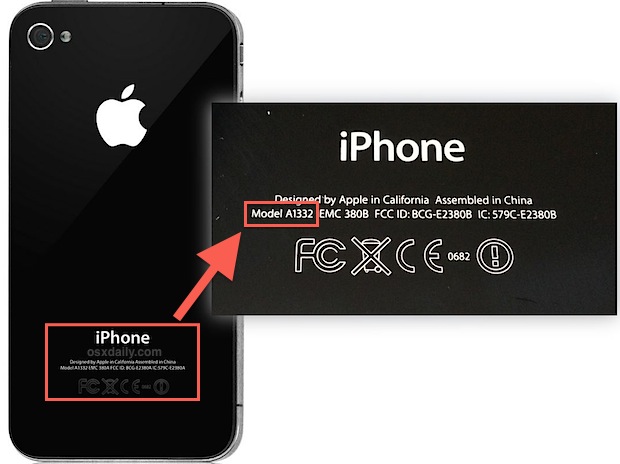
Once you have made note of the model shown on the back of the phone, you can determine if it’s GSM or CDMA by matching it:
iPhone GSM Model Numbers
- iPhone 5: A1429 (* World GSM & CDMA)
- iPhone 5: A1428
- iPhone 4S: A1387 (* dual band CDMA & GSM world phone)
- iPhone 4S: A1531 (GSM China)
- iPhone 4: A1332
- iPhone 3GS: A1325 (GSM China)
- iPhone 3GS: A1303
- iPhone 3G: A1324 (GSM China)
- iPhone 3G: A1241
- iPhone 1: A1203
iPhone CDMA Model Numbers
- iPhone 5: A1429 (* World GSM & CDMA)
- iPhone 4S: A1387 (* dual band CDMA & GSM world phone)
- iPhone 4: A1349
Knowing the model numbers is guaranteed and is pretty quick, and it’s also the best way to determine what model an iPhone is that won’t turn on. For customers in the USA, another easy way to tell if it’s GSM or CDMA is just to find out what cell carrier the iPhone uses. AT&T is always GSM, T-Mobile is always GSM, while Verizon and Sprint are always CDMA. You can also generally assume that if it uses a SIM card to get online, it’s a GSM iPhone, though some iPhone models like the iPhone 4S have both CDMA and GSM capabilities. The cell carrier isn’t always a reliable method though, because sometimes an iPhone won’t turn on, is out of battery or just plain dead, or it could even be a dualband world phone like the 4S.
What if the iPhone Model Number is Rubbed Off?
If the model number isn’t entirely clear, or it has worn off, you can still identify the device through iTunes to find similar information about the phone.
If that isn’t an option, you can also check on the device itself by opening Settings, tap General then “About”, and look under “Network” or “Carrier” instead, you’ll then need to just figure out of the carrier is GSM (AT&T, T-Mobile) or CDMA (Sprint, Verizon).
Why Does it Matter?
For the vast majority of iPhone users, it doesn’t, they’ll never need to know or care about their device being GSM or CDMA. This is really mostly helpful to those who use IPSW (IPSW is iOS firmware, basically the iPhone system software) to either update a device manually, for jailbreaking purposes, or for restoring a device in the event of a significant software failure. In that case, knowing which model a device is important when downloading IPSW files for iPhones.
Thanks for the tip jlfafi!






Hello
Elizabeth from Canada here,my iPhone 5s
A1533
Is it GMS or CDMA?
Please n Thank you
We have a A1633 iPhone 6s. Is it a GSM or cdma?
IF YOU WERE TOBUY LIKE A IPHONE 8+FROM SPRINT CAN THAT BE USED WITH A TRACPHONE KIT SINCE IT WOULD BE A CDMA DEVICE?
If the iPhone is unlocked it can usually be used on any network that it is compatible with. First you’d need to know if the Sprint iPhone is unlocked (an unlock can usually be requested from the mobile provider after the iPhone is paid in full), and second if it’s compatible with Tracphone.
I’m wondering if I have cd Ma unlock for T-Mobile? Looking into buying an 8 plus
My iphone 5 is model A1533
Tell me please, it is gsm or cdma
Thanks
ITS A GSM
How about an iPhone Edition?
Brians need to know is enlarging
What about A1507 its iPhone 5c is it gsm or cdma??
wow so good is more interesting to kw hw ur iPhone or iPad is been sort.
What about A1530?
I don’t mean to be a bother but I have a bit of a dilemma and I know one of you can help. I have an iPhone 6 and I’m trying to figure out if it’s a GSM or CDMA? The model number is A1549. Please HELP!
I have iphone 5. On the back of this A1429 Model number is display but, in setting model no A1428 is display. Kindly tell me the reason of changing these number and same is the case with BCG and fcc I’d numbers.
I’m from India , I have iPhone 4s ,model no.A1387 from Germany, I want to know ,is it cdma or gsm or both .if it’s both then tell 2 me how I use it just like CDMA phone
Hi,
I have I phone 5c model A 1529. Can I use both sim (GSM & CDMA).
What about iPhone 5c A1456??
its cdma, same as mine
I’m another person with a Verison 4s A1387. MY question is: what is a “world phone” and what makes it any different from the other iphones?
Thanks!
just click on other/ i don’t know from this link: http://www.straighttalk.com/wps/portal/home/h/BringYourOwnPhone/carrierselection
then say you already have an activation kit and the form will say “enter xyz” card from your kit.
Hi I am also having the same problem as Kathy. I have a verizon iPhone 4s and am currently trying to activate it on straight talk but they seem to be havig problems
dont use the LTE SIM as it wont work on those frequencies anyway. To use the LTE services, you need an iPhone 5c or higher. I have a Verizon 5c and have used ST AT&T and ST Tmobile SIMs, getting LTE, as well as am currently using ST Verizon LTE service. i’ve had great luck with both CDMA and GSM technologies on my 5c. Good Luck.
You are absolutely right. I bought my phone from Verizon because it is unlocked. I have used a South Korean sims card in it, a Philippine sims card in it, and now I am using a Cricket sims card in it. I haven’t found a network yet that wont work in it. The iPhone 5s is an awesome phone. It can be used on pretty much any network anywhere in the world.
Hi,
I have the iPhone 4S: A1387 (* dual band CDMA & GSM world phone). The original owner purchased the phone through Verizon. When I purchased the phone from him it had a SIM Verizon card in it. Will I be able to use this phone with a different carrier? I am confused about the CDMA and GSM networks. I am trying to use it with Straight Talk and I am receiving conflicting messages from Straight Talk regarding its usage. According to the Straight Talk Bring Your Own Phone plan it is compatible with a 4GLite?? I would appreciate anyone’s feedback. Thank you.
I have been using ST BYOP since they started the program. you can register your Verizon iPhone 4s with a Network Access Code and get 3G and it will say 4G also, depending on your location. Unfortunately the 4s doesn’t use/operate on the Verizon LTE frequencies. Neither does the iPhone 5. If you want to use the Verizon LTE services on ST, you’ll have to upgrade to the 5c, 5s, 6, or 6+. Verizon doesn’t lock their devices, so you should be able to use the GSM part of the 4s by purchasing a ST BYOP GSM SIM activation kit, register and activate it, and throw it in the SIM slot. I own a Verizon iPhone 5c and have used it for months with both, ST AT&T and Tmobile SIMs. ST just started offering CDMA LTE service recently and now I use the Verizon LTE SIM with excellent reception up in Washington State.
As far as the 4s, though, the service is still quite fast. I have a Verizon 4s also, but prefer to use it with a ST AT&T SIM. it seems to be more reliable and faster, at least for me in my area.
Hope this helps. Enjoy your 4s!
I have an iphone 5c, verizon model A1532-is not listed in here. how can I know if is cdma or gsm? has the sim slot
Verizon iPhone is a CDMA model
I hav iphone 5 A1429
How to determine its CDMA aur GSM?
Or it Supports both CDMA nd GSM?
My phone is a Verizon phone but according to the Apple site my model # (A1532) is GSM or CDMA?? http://support.apple.com/kb/HT3939
(2nd try to re-do formatting…)
You can also find the model number directly via navigating down through the settings menus: Settings, General, About, Legal*, Regulatory
*(Legal is way down at the bottom)
This displays a screen showing the info that is on the back of the phone and then some – including the Model number.
You can also find the model number directly via: / / / /
This displays a screen showing the info that is on the back of the phone and then some – including the Model number.
I have iphone 3g and recently i updated the software to 4.2.1 have tried all the solutions but it gets stuck on waiting for reboot
1) have tried to uninstalla and reinstall the driver
2) i checked from the site its GSM set so i downloaded the required file of iPhone1,2_4.2.1_8C148_Restore would anyone plz tell me how to use this file to make my phone unlock…..
Wow I must have ordered my iPhone 5 so early that when i took it out of my case right now and looked at the back i just noticed that it only says iPhone on the back and no other information whatsoever. I like it!!!
LOL, you can check if you have a sim tray
come on guys!! dont give wrong information. No info is better than wrong info.
http://www.apple.com/iphone/LTE/
A1429 is cdma in US and GSM worldwide.
Oops, typo! Sorry about that, thanks for catching.
Iphone 4 is DEFINATELY NOT GSM. GSM requires a SIM card, there is absolutely NO slot on the 4 for a SIM. Bad information!
I am commenting on your Post because you posted about bad info..
Actually there are many iPhone 4 models with SIM card slots, like most US models. AT&T, etc.
Guys,
iPhone 5 – A1429 is worldwide GSM and not CDMA.
Or you can just know what cell phone provider you have… That’s probably an easier way.