
The MacOS Sierra Compatibility List
The next version of Mac system software is called macOS Sierra, it’s versioned as Mac OS X 10.12, and it will be available as a free download for all compatible Macs in the fall. Of course this begs the question, which Macs are compatible with macOS Sierra? What Mac hardware can run the new operating system and enjoy features like Siri, Continuity Clipboard, and more?
If the Mac is fairly new it will certainly support macOS Sierra, but many older Macs are getting cut off from the compatibility list, including any Mac made before late 2009. That means many Macs that support the current versions of Mac OS X system software won’t be able to run MacOS Sierra at all, and instead will be stuck staying on an earlier software release.
List of Macs Compatible with MacOS Sierra 10.12
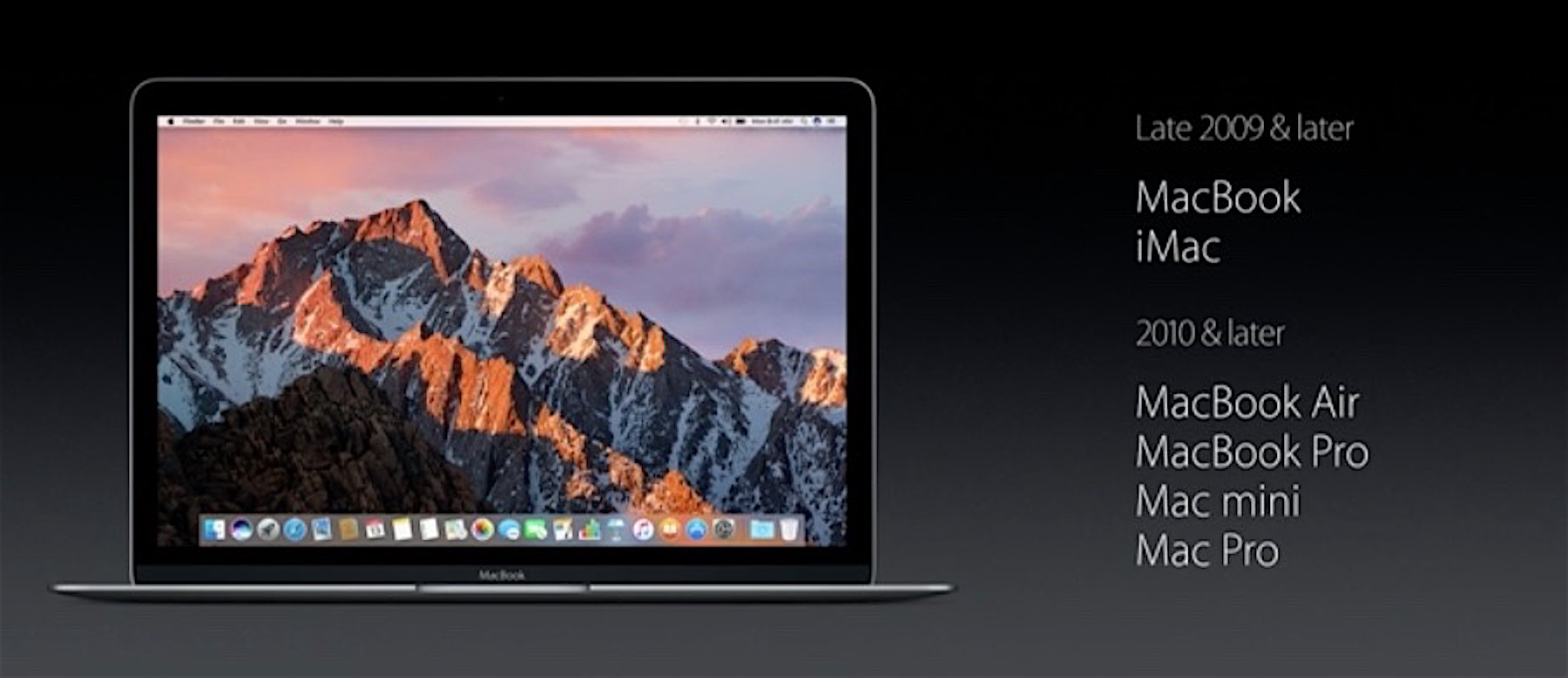
According to Apple, the official compatible hardware list of Macs capable of running Mac OS Sierra 10.12 is as follows:
- MacBook Pro (2010 and later)
- MacBook Air (2010 and later)
- Mac Mini (2010 and later)
- Mac Pro (2010 and later)
- MacBook (Late 2009 and later)
- iMac (Late 2009 and later)
This list of supported Macs is offered directly from Apple, shown during the MacOS Sierra debut presentation at WWDC 2016 conference. The still from that presentation is shown below with the same compatibility list:
How to Check Your Mac for MacOS Sierra Compatibility
The simplest way to determine if your Mac is compatible with MacOS Sierra is to check the model make and model year, here is how to do that:
- Open the Apple menu in the upper left corner and choose “About This Mac”
- From the “Overview” tab, look under the current system software version and for the computer model and year
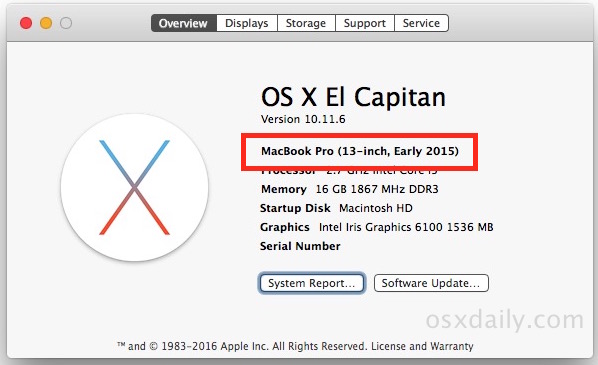
If the Mac is the same or a later model year than what is shown in the macOS Sierra compatibility list above, the Mac is compatible with 10.12.
You may notice the compatibility list for MacOS Sierra 10.12 is a little curious because some of the Macs that are incompatible have better hardware than some of the hardware that is included in the compatible list. It’s unclear why this is, but this does suggest that support for MacOS Sierra is not just a matter of hardware specs alone, as the minimum system requirements for macOS Sierra are not clearly defined by minimum CPU type or speed, RAM, GPU, or disk capacity. That makes macOS Sierra a little unusual compared to some of the other Mac OS X releases from years past, but as time goes on we may get a clearer picture as to why this is.
Developers can download MacOS Sierra right now from the App Store and developer center, whereas the general public will have to wait until the fall to get their hands on the final version.
Of course it’s not just MacOS that is getting an update this fall, and for mobile users, you can check the iOS 10 compatibility list of supported iPhone and iPad models too.






Macbook pro 2020 model can install Sierra Is it possible
I intend trying upgrade my existing macbook pro (2013) to Sierra but have concern that some of the applications will not be supported (Microsoft Office 2011, Adobe Create Suite 6). So can I re-install back to Yosemite if the problems arise?
Thanks in advance.
Thinking about the Sierra upgrade now (May 29, 2017), the bugs SHOULD be completely gone by now, may of them at least. I upgraded last Memorial Day to El Capitan on my mid 2010 iMac and it works fine. I did have Mavericks on it before El Cap. (I upgraded to Yosemite in 2015 which caused the iMac to run painfully slow, bizarre issue of “waking up” randomly from Sleep Mode, or totally rebooting out the blue. 2 weeks later I downgraded back to Mavericks.)
Question always runs through my mind though – “why fix it if it ain’t broke?”
After 30 years of using Apple and MAC’s for my personal use and my business — I’ve had it with Apple’s selective updates. We own quite a few desktops and laptops that are no longer upgradable and worse yet are no longer safe to use on the internet if you can get on the internet at all. The machines run perfectly fine, except that Apple has purposely made them obsolete. There are a bunch of jerks running that company now. Their only interest is making money – not building a good product. This is why you hear stories of the Apple employees using 15 year old machines. Goodbye Apple – Hello Dell!
That’s exactly right. They are irresponsible jerks who practically force OS updates on you that break the software you need. Also if you rely on about 8 programs and hardware drivers etc the probability that ANY version of their OS will satisfy all of them approaches roughly zero. An honest company would devote attention to maintaining software and hardware compatibility. If they had any decent competition (I don’t count Microsoft as such for they are subhuman) they would be gone overnight for such heinous disregard for the user. I even wrote about this on discussions.apple.com, and it was deleted. Shame on you Apple.
I am a professional photographer running 3 iMacs (2016), a macbook pro (2010) and an amazing early 2008 2×2.8 GHz Quad core with 18GB of memory and a 500GB SSD. Iran Yosemite on this and it’s very quick with the new SSD drive – altogether a wonderful machine. If it’s no longer supported I’d have to spend around £5,000 to buy the new Mac Pro and there’s no way I’ll be doing that as there’s nothing wrong with the one I have. I’ve spent a lot of money with Apple over the years, but like one of the earlier commentators I bought the Mac Pro for its much-vaunted upgradeability. Shame on you, Apple!
Hi again, i forgot to say that i am based in the UK and have no technical knowledge. Thanks again for all replies.
Hi all, i have a late 2006 Imac, running OS X tm and (c) 1983 to 2012, Safari Version 6.1.6 (7537.78.2). if and how would i update the OS to Mac OS Sierra and Safari to the latest version. Thanks for all replies.
Hi Sheryl, it looked like you have got a pretty old iMAc and it wont run fast with the latest upgrade of the OS and Safari. I am using a late 2013 iMac and I tell you, i format and installed my original OS Maverick 5 times. Imagine that. The whole Sierra update really slowed my machine down. every click is a rainbow ball! I switched back to the old OS and it is running fine.
Running late 2008 IMAC w/4 gb ram. did not make the cut…..:{{
Hi,
I just made something stupid…I have a 2011 macbook pro that was running pretty good on OS 10.7.5. Never updated to Yosemite, Capitan etc because I was afraid it would get slow.
But last week I “accidentally” updated my iPhone iOS only to discover that it was no longer compatible with the latest version of iTunes that I can have on OS 10.7.5. I was mad not to be able to do backups and sync my calendars (don’t want to pay for a big iCloud storage) so I stupidely installed Sierra on my macbook in order to get the latest iTunes.
Now of course my laptop is slow as f***
Is there anything I can do except go to Apple store and beg them to reinstall an older OS on it???
Thanks for you help
Hi all i work with photoshop cc2015.5 and have upgraded to macOS Sierra, i am trying to use the oil filter which i have been doing before i purchased PS cc.
this is my issue (Note: If your video card does not support OpenCL v1.1 or higher, you may need to purchase an upgraded video card that supports OpenCL v1.1 or higher to gain access to the Oil Paint filter.
I have a Macbook pro 17″Mid 2010 2.66 GHz Intel Core i7
8 GB 1067 MHz DDR3 NVIDIA GeForce GT 330M 512 MB
Intel HD Graphics 288 MB What do i need to do to get this tool working again.
When answering please use simple language as my computer literacy is all double dutch to me. Is it a Hardware issue or a software issue. Thanks i hope someone out there can help me.
Here is a link to what i have found tried doing what they suggest but still not working.
I used a Firmware tweak on my Early 2009 Mac Pro 4.1 to change it to 5.1. Sierra was than available in App Store to download. I need to re-enter email passwords but runs fine – only issue I’m told could be Wifi, but I don’t have a card installed.
Where do to get the firmware tweak from
When Apple stops supporting older macs (my MacBook 2008) they are driving people into Linux. While I may buy a new MacBook, my old machine will be upgraded with a Linux varient (probably Ubuntu) and will join all the hardware I play with that runs Ubuntu, including Raspberry Pi’s. Apple needs to get a clue that unless they start supporting their product line, the world will move to OS’s that aren’t hooked to the margin on hardware sales. They need to make the OS a separate company entity that isn’t hooked to hardware sales. The era of hardware coupled to software is going away. Features unique to their OS should be made into revenue generating add-ons to other OS’s or else spinoff the OS.
Anyone seeing compatibility issues with VGA dongles? I have MacBook Pro Retina (2012) and can only connect to one projector with Apple VGA adapter. LogiLink CV 0038 won’t work when Apple’s adapter does. This has me smelling Apple only accessory detection baked into Sierra? Any other evidence of this?
Stop whining.
I am running the release version of Sierra on my early 2008 MacBook Pro.
It seems to perform very well in 4G of ram. The machine does have an upgrade HD, but no SSD (yet).
I used Dosdude1’s patching util, which makes the process super slick.
That said, I am wondering about getting a working WIFI setup? Anyone out there used a USB WIFI dongle with Sierra that really works well? Or perhaps some internal upgrade of the WIFI card in my old beastie?
Thanks in advance.
“Stop whining”?!?!
Seriously…. Gonna get all rude? You felt that was necessary? May you encounter the same type of person as yourself when you actually find yourself in need of advise somewhere down the line… And with a hack job OS install, that’s quite likely. May you be told to “stop whining”, too.
Jerk!
OK… So a 2009 MacBook makes the cut, but my 3.06GHz MacBook Pro (a custom order at the time, no less, with the dual video cards) which is far more capable doesn’t make it? What idiot decided this? One thing’s for sure, Apple will not be forcing me to buy a new machine from them (I’d sooner buy a newer, but pre-owned Mac from somewhere else)… Especially when they got rid of the truly pro MacBooks when they decided to stop making the 17″ models. What designer wants to work on a 15″ screen? Seriously? My 3.06GHz, 8GB RAM, 10K RPM HD is actually faster than machines years younger! I dunno what they’re basing the cutoff on, but it doesn’t seem to be logic. Fact of the matter is, there isn’t such a huge difference between El Capitan and Sierra to exclude models that could run El Capitan. Heck, I just upgraded a client’s 17″ MacBook Pro 2.6GHz [6GB RAM] machine to El Capitan — removed all the excessive, useless stuff like language packages, useless architectures, unnecessary extensions, junk fonts, and so on — and the machine runs flawlessly…. Even better than it did with 10.9.5. It boots in mere seconds!
Sorry for the rant….. Felt good to get it all out, though ;) As I’m sure many who own machines that would run the new OS without a struggle, but are off the list. The patch tool looks doable….
Simple its all about money. The Pro cost more, therefore the cut-off is earlier
Free Upgrade only for Mac’s less than 7 Years old and some people want to complain their older macs are not included ? What is funny is people are comparing it to windows 10…
Remember that Microsoft provided a free Upgrade to Windows 10 only from Windows 7 or Later. Earlier (but capable) hardware had to pay for an O/S upgrade at some time.
Release Date for Windows 7 22 Oct 2009
Hmm 5.75 Years previously – up to 6.75 when the offer ended…
I’ll just keep on running Snow Leopard thank you.
In every version of the public beta, and now the GM candidate, my external Apple iSight camera is not recognized by the system.
Has anyone else seen this? I’ve submitted reports in each release, but it’s still not working.
in a way I’m kind of glad my early 2009 imac has now been thrown out of the loop, Having to reinstall everything periodically only to find out that it runs worse than before was really getting quite boring, and el capitan works ok now I have more RAM,
I am running Sierra. I am pretty sure that Home Sharing is not working with my 3rd Gen Apple TV and my iPad2. It is working on two iPhone 6’s so I assume the problem is not in the set up which is the same for all 4.
Anyone else have this problem or some idea as to how to fix it. Have powered both devices on and off.
Thanks
Only incompatibility I have found so far:
DishAnywhere via Safari (returns incompatible OS/Browser combination).
While I’m excited to see that they’re releasing a new OS system, I’m a bit bummed because my 2009 Macbook did not make the cut for the upgrade. It might be time to consider getting a new Macbook. Thanks for sharing!
I have the Mid 2009 MacBook Pro. The specs are pretty good. I maxed out the RAM and cache, and have a solid state HD in it. I was going to try the beta but was told that this OS won’t run on my Mac! As far as Macs go, it’s not that old! I WAS planning on upgrading later this year when(?) they announce new MacBook Pros, and also hopefully a Mac Mini. And I was finally going to try my luck with Bootcamp and see what version of Windows I can get on here. I was hoping to do that with an external drive, but the current version of Bootcamp wouldn’t allow that. I was told Sierra WOULD, which is why I wanted to get it on here. Of course, now it’s too late to get the free upgrade to Windows 10….. Grrrrr……
I own a macbook late 2008 which is still running very well, only upgraded to a ssd. This is the first time it appears I won’t be able to upgrade my OSX with Sierra. Oh well, have had a good 8 year run so far. Still a pity though!
Will updates work on the patched macOS Sierra?
My MS office 2016 is not compatible with MacOS Sierra. Whenever I Launch a file, it crashes and sends me to the error window.
But your Mac is compatible with macOS Sierra because your Mac is running macOS Sierra.
Too bad – my MacBooks Pro (late 2008 and late 2009) seem to be left behind the Sierra upgrade.
Even if there’s a lot of work at MacRumors about getting these Books upgradable I thinks I’ll stick with ‘El Capitan’ since Sierra doesn’t offer any essential upgrade for me.
During the last two year I bought some old Apple computers just for the hell of it and they made me learn to go a slower pace, when it comes to the upgrade-distress…
For most casual work my ‘new’ old PowerPCs (CubeG4, Gooseneck G4, iBookG4, PowerBookG4 all with Tiger or Leopard) or white intel iMacs with c2duo but only 32bit-Efi and Lion as the last OSX to run) are really handsome and made me “Think different” about missing the Sierra-update. For heavy work all these old machines might also log into a faster Mac and run in the background via screen-sharing.
My sister just got a 13″ late 2009 MacBook Pro so she could have something that would be supported better than her previous 2007 a1181. I upgraded the RAM and installed an SSD, and we were hoping to get a few years out of it. This was just last month. Now we find out that the computer we just put a ton of money into, and is VERY FAST won’t get an upgrade, even though cheap plastic MacBooks from the same time will.
Seriously? You are upset because you bought a 7 year old computer and it can’t be upgraded to an OS that isn’t even released yet? It’ll run El Cap fine. Buy a machine for what it can do now, not what it can do 7 years down the road. Why would even put a “ton” of money into a 7 year old machine?
But you are in luck anyway, see previous posts in this thread about a firmware update.
I know. My main machine is a Mid 2015 Retina MacBook Pro, R9 graphics, 16GB RAM, 512GB SSD. Nobody’s upset.
But Macs all the way back to Mid-2007 run El Capitan. And then they bring the threshold ALL THE WAY to 2010. Kind of disappointing.
I have a similar experience with a relatives MacBook Pro with recent RAM upgrade etc, it is also not supported my MacOS Sierra. I actually installed Mac OS X Snow Leopard on the machine, and it is very fast and stable, works perfect for their needs. I would consider Mavericks on it otherwise, as that is perhaps the next speediest Mac OS X release for that hardware line. My personal experience with Yosemite, El Capitan, and Sierra, have shown lesser performance on some of the older hardware, but that likely doesn’t apply to everyone.
The 2009 Mac Pro (4,1) will run Sierra natively after a simple firmware upgrade, effectively making it a 2010 Mac Pro (5,1) — which machine also then accommodates CPU upgrades and faster RAM.
Is this possible with a Mac Pro 3.1 (early 2008) too?
Could you share a link or more infos?
Thanks,
Silv
Negative — the firmware upgrade is for 2009 Mac Pro only. But you might be able to get your Mac Pro 3,1 to run Sierra by using a bootROM hack (and you will probably need to upgrade the stock GPU for this to work). There are several websites dedicated to getting ‘unsupported’ (32-bit EFI) Macs to run post-Lion versions of OSX. Try this discussion thread http://forums.macrumors.com/threads/macos-10-12-sierra-unsupported-macs-thread.1977128/
Those ROM hacks are great. I use my 2006 Mac Pro with El Capitan every day. And yes, you do have to upgrade the Video Card.
Where can I dl the firmware tool? Mac Pro 2009 with 32 GB RAM running El Capitan flawless (well not full continuity support of course)
uh guys its much easier than this. almost all of the computers after 2007 will run el capitan, i have 2 different models doing it. you just run the computer in target disk mode using firewire or thunderbolt cable off of a computer that has supported hardware. you start the upgrade app, and it takes a couple of hours longer to download, but you can get the latest os on unsupported macs without having to tweak the whole os. My computer runs el cap fairly slowly but with no glitches. i love tweaking them lol. super easy to.
Looks like I can update my MacBook Pro to macOS this year. I don’t know how it is going to perform for me, but let’s just hope for the best. :D
Is there any way to get macOS now without dev account?
If you can get the “Install 10.12” app file or the Sierra DMG, maybe from a friend with a dev account, it will install fine on any supported Mac.
It’s buggy though, not sure I would recommend it.
It’s pretty simple they want the money. Whether my machine will run it is irrelevant. Apple makes decent machines but you pay a hefty premium. I’m sorry to the folks saying their PC’s of same age don’t run latest Windows. Not true, I have tones of core2duo’s in service running free Windows 10 like a champ. Cutting off a 2007 imac that is essentially the same specs as the 2009 imac you are supporting is wrong. They should support a minimum spec period. It was understandable when the EFI 32 bit issue came along, but clever endusers figured out a way around that and proved it could easily be done. Apple wants you to keep buying expensive computers, period.
No complaints here. My mid-2009 MBP runs El Capitan well enough (with a 3rd party SSD and 8GB RAM on board). It won’t run Sierra – but it will have another two years of support. That means I will get 8 years out of a laptop. Not bad.
Why are they dropping? My theory is that it doesn’t have native encryption support in the old Core 2 Duo CPU – and I think that the new Apple File System will require it, with encryption built in.
Well then why does the late 2009 white MacBook get the update? It has the same core2duo processor and can be upgraded with a SSD and RAM, hell it even uses the SATA II interface like the mid 2009 MacBook pro 13 inch. I think its crap how Apple wont the higher end Mac (for its time) receive the update but will let the plastic Mac receive it. I have both late 2009 white MacBook and mid 2009 13 inch MacBook pro both with SSD’s and 8GB of ram and I notice no speed improvements between the two. Both still run the newest OS (10.11) very well for how old it is. Hope Apple will change the compatibility list
My 2010 MacBook Pro is still on the list. Good to see I can get, at least, another year out of it (if I want to keep up-to-date with the “current” OS). For a six year old machine, it’s still running like a champ. No need to upgrade if it’s, still, capable of doing what I need it to do.
My mid 2010 iMac is still chugging along… seems to get slower with every OS update. MS office and all browsers have been so slow since upgrade to el Capitan.
I lashed out 5 grand (GB£) six years ago, for my 2009, 8 Core Mac Pro. Not being particularly computer savvy, I’d like to know if it can be modified to take Sierra. At the time, they were said to be “the most upgradable of Macs”.
I neither have to cash, nor the inclination to buy a new one.
http://dosdude1.com/sierrapatch.html
What a shame, my iMac is from early 2009 :p But then again, I am saving up to buy a new system, this one can stay on El Capitan :) Sierra looks very smexy though, still wish I could get it running on it.
It’s a shame. And it’s ridiculous. Meanwhile Mac users are conditioned to have to be happy when their overpriced Macs were still supported by a newer OS-Version. They have already paid the extra price for the combination Mac/OS – and the implied deadline of support. Hardware is ok, everything is ok – but Apple cuts it off.
My Macbook Pro Late 2008 works fine. But Apples Concept of planned obsolescence will explain me why I should buy new hardware. And brainwashed Apple fans will naturally agree… Only Apple-Fans? No… Anyone, who accept this brainwash-culture as normal.
“Apple syndrome”
When I bought Macbook pro (late 2008 version) I maxed mem to 8gb. Last year I got 500gb SSD and El Capitan works swimmingly.
I am N O T buying new Macbook pro. Are you listening, Apple?
I am going to try Sierra once it comes out.
The Macbook Pro late 2008 didn’t support 8GB before an EFI update years later.
Totally agree… the irony when you look up the apple site for Recycling/Sustainability their statement goes:
Recycling an Apple product should be as easy as using one.
The Apple Renew programme lets you recycle your device at an Apple Store or online.1 We’ll make sure it’s recycled responsibly or given a chance to be used again.
Meanwhile I have a 2007 Xeon tower with loads of RAM, a top notch Graphics card and 1 tb motherboad, absolutely excellent and as quick as anything. But I cannot get any updates to any of my software or buy new ones. I run Mac OS X 10.6.8 But… low and behold I still cannot update and nowhere can I see which modification I need to do, I just get that Mac is not supported.
I might give that patch a try, I’ve got nothing to loose. I’m going to buy a PC, not change my entire set-up. for something new and flimsy, like an overheating laptop, or that bit of exhaust pipe they offer at present. Rant over
I think a lot of very capable hardware was cut off needlessly.
I hope they reconsider the list and at least include anything from 2009 and up. Set a core system requirement RAM and GPU limit if you must, but to exclude entire machines that are more than powerful is a little discouraging.
I guess I will get nagged forever for this upgrade?
I deleted iTunes, and now I am constantly nagged to download it. I have tried thd command line tricks. They are ineffective.
I would like to know why the early 2009 models aren’t supported? Have an early 17″ MacBook Pro and a Early 2009 Mac Pro and can’t use either with Sierra. Granted they are 7 years old, but still run fine with upgrades like SSD and not seeing much of a difference between El Capitan and Sierra for a need to remove compatibility.
I’m excited to try this on my “unsupported” Macs…
http://dosdude1.com/sierrapatch.html
I have a mid 2009 Macbook Pro. I had Snow Leopard running on it with 8GB ram and SSD 512. Went to Yosemite earlier this year. Only problem is I cannot upgrade iPhoto. This, am told is, because I didn’t upgrade as new OS became available. I intend to install El Capitan with a CCC clone just-in-case. Would like this great Mac to able to continue to be upgradable to Sierra. This especially if the macOS Sierra is really good. Perhaps I will have to buy a reconditioned 2011 or 2012 Macbook Pro which are still upgradable.
So that’s why non-upgradable Macs have such expensive upgrades: it’s to discourage commitments, and make a lot of money on the side. :)
? Why is a Late 2009 Macbook covered and the 2009 Macbook Pro not? Almost if not the same specs.
My theory: 2009 Macbook’s we made for teachers and I imagine there are a lot of MacBooks out there in education and Apple wanted to keep the education support.
Wow. They dropped a ton of macs this time. What about the late-2009 MacBook pros? Those are perfectly capable machines. I don’t understand how they can support the late 2009 MacBook but not the MacBook pro of the same age.
I agree, the 2009 MacBook Pro is still a great Mac, they’re quite fast if you max out the RAM and put an SSD in too.
I completely agree.
The 2009 MacBooks Made it
The 2009 iMacs made it
The 2009 MacBook Air didn’t get in, but that’s understandable because they aren’t easily upgraded.
But the 2009 MacBook Pros??? Seriously? The top-of-the-line notebook computer at that time doesn’t get an update that a plastic laptop from the same era gets? Very frustrating. I hope somebody at Apple thinks this through and they change the system requirements. They were supporting machines all the way back to 2007 with El Capitan.
I feel the very same way about the Mac Pros.
I have heard from multiple people that the old style cheesegrater Mac Pro is still very popular on the Apple corporate campus. So even the employees still like them, despite being quite old.
Whatever that means.
I love my 2006 Mac Pro. It’s one of the only truly upgradeable macs. Mine is Running El Capitan, 32GB RAM, multiple hard drives. Its not slow. Absolutely no reason why it can’t run this macOS Sierra.
I’m hoping someone will make a tool for it like they did El Capitan.
Look at this:
http://dosdude1.com/sierrapatch.html
Totally agree with all the comments about the mid 2009 MBP. I upgraded mine to a 120 gb SSD from OWC a year or so ago and also upgraded the memory to 8 gb. Have been running all versions of El Capitan and my MACHINE works PERFECTLY and with the upgrades I’ve made my mid 2009 MBP IS faster and more reliable than a friend of mine’s 2014 OEM MacBook. I’m quite disturbed by this BAIT AND SWITCH tactic now being strictly enforced by Apple as I’m not able to download the new OS Sierra, although my machine is obviously MORE than capable of running the new OS. My entire family is pro Apple, and we’ve been through all iPhone’s, iPods, several iPads and Apple is now basically telling me they could care less about how loyal I’ve been and even though my MBP has been upgraded I’m still being forced to essentially purchase a new MacBook so I can run the latest OS. Well, if this is how Apple is going to treat it’s loyal customers that spend THOUSANDS of dollars every year or two then maybe some of us should really consider if this kind of “support” is truly worth having all the great Apple products. I purchase all of these devices only for Apple to restrict me from being able to utilize the new OS just because of the year associated with my MBP, without considering the fact that MANY of us have upgraded our devices in such a way that they work just as well, are just as fast and just as reliable as the newer models. I’ll definitely rethink my next purchase for sure as this simply is not how ANY company should treat such a loyal customer base!!!
I own the late 2009 mini mac and it says. This version of macOS 10.12 cannot be installed on this computer. =(
Jeff, same message here. Please read my post above regarding this exact same issue I’m having with my mid 2009 MBP that I’ve upgraded to a 120 gb SSD (with 75 gb currently free on the unit) along with upgrading the memory to 8 gb. Apple could care less as I just had a formal “chat” session with one of their service agents. Nothing but Apple now being extremely aggressive with their so-called “non-compitable” devices without ANY regard to how much you, as an Apple customer, have spent with them and also regardless of how many devices you currently run with them. Basic BAIT AND SWITCH tactics so people like us will run out and buy a brand new laptop, spending yet another thousand dollars with them. Absolutely ridiculous and the agent provided me with an official website to post my comment so that someone “with more access to assist me” could see the comment and make an official response. I’m going to most definitely post this situation on this site I was provided and am also currently on hold with Apple Support as I have Apple Care support currently on 3 devices. I’ll definitely come back and update this should I find out anything new. One thing I’m going to try is having a friend download the new OS on a thumb drive and then I’m going to try to download the new software via the thumb drive instead of going through the App Store. Yes, this is a major pain in the you know what and will take quite a bit of time to download, however it is possibly a solution for those of us that are certain our upgraded machines will be able to handle the new OS.
Just did a SSD and video card upgrade to a dual quad core 2008 MacPro, I will not be upgrading to Sierra, and I’m not sure that I’ll be sad about that. I do hope Apple keeps El Cap security updates going for a least a few more years.
Same here – Just upgraded it last year. Kind of sad, but not enough to chuck it.
I have a pair of 2008 pro’s ( with GPU & SSD upgrades ) running 10 and 12 GB of ram – these machines have been running 24/7 since 2008 literally, without even a minor problem… It would be a real shame if Apple is cutting support for these computers only to force me to upgrade hardware.
Totally agree. These things are workhorses. Mines been running for several years, even with glitches in Yosemite that finally got ironed out.
Mark
I’m curious – what OS you are running? I am on a 2010 Mac Pro – and considering an upgrade…and I’m still on OS 10.6.8 because I’ve been afraid to download El Capitan because I heard it causes problems with video files. Did you have any issues with video files being screwed up when you went to El Capitan?
I upgraded my macbookpro 2010 to SSD and 8 GB ram.. installed el capitan with no problem as such…
I wonder if Apple thinks its users want to continuously update their Mac’s all the time? I just want to use my Mac and not have to worry if the next OS version is going to break something or kill performance. How about a new OS every five years and just do security updates when needed? That would be nice.
Yes, you are fully expected to buy a new machine every couple of years. This is why most of Apple’s desktops and portables are practically un-upgradable – even the RAM.
I’m running El Capitan on a 2007 Mac Quad Pro (albeit with a 32 bit boot.efi) and it is blazingly fast. I only have 16 Gb of RAM and 8 Tb of SATA HDD. I have El Capitan OS X11.5 on a 1Tb SDD.
I’m fairly sure I can get Sierra up and running but will wait until the final release or or at least at the Golden Master version. If there’s a technical obstacle there is always a technical fix to get round it.
I’m hoping that my Mac Pro Tower early 2008 with 12GB of Ram that currently screams on El Cap will continue to run under Sierra. No reason it can’t with it’s 12 Core 2.8ghz Xeon processors. I can upgrade to 32GB of RAM, but want to make sure it’s worth it. Perhaps I will checkout the developer version to see if it will run. I will keep tabs on your progress too.
Mark
There are people who are attempting to install MacOS Sierra on unsupported Macs, some are having mixed success but it seems to depend on the Mac in question. Some machines they can force the installer to run but wi-fi doesn’t work, for example, which would mean they’d have to use ethernet or a USB wi-fi device. Some machines won’t boot at all. This thread on MacRumo Forums shows some current work on the matter.
I think there is some hope for unsupported Macs to run Mac OS Sierra, but it may be similar to the process of Hackintosh, meaning it’s a little tedious and can require some unusual level of maintenance. I do hope Apple adjusts the compatible Mac list and includes more hardware, your machine and many other Macs are more than capable, your Xeon Mac is probably 2x as fast as my 13″ MacBook Pro!
I have the 2×2.8GHz Quad Core with 16GB RAM and regular 7200 RPM drives and El Capitan 10.11.6 is super slow.
Do you have a SSD for your OS in 1 bay and regular drives for data in the other bays along with a Time Machine dedicated drive…?
So I have 8 cores…how do you get 12 cores…?
How did you get 11.5 to run on your 32 bit boot.efi? I thought it required the 64 bit version? thanks
t
I never had a Windows computer or laptop that could run the latest version of Windows smoothly and effectively seven years after the manufacture date of that computer without any major modifications. Apple supports it’s devices far longer than most manufacturers do, which is why the total cost of ownership for both of my 2009 Macs has been far lower than any of the computers I owned in the 20 years prior to buying Apple hardware. I am extremely pleased with the longevity of my Apple hardware.
I disagree. I have dell PCs from around 2005 that happily run Windows 10 and surprisingly work much faster than my MacBook Pro 2009 with Yosemite or El Capitan. I love Mac OS X but I feel Windows is becoming extremely fast recently. I vote for Apple to focus on performance (and they won’t, they want us to buy new, latest machine that will be fast rather than reusing old macs they can’t get any money from).
I agree with Pawel, If you pay the same amount for a PC as an Apple it will last just as long and you will be able to install the latest OS without any frigs.
Apples and oranges. Apple is primarily a hardware developer, and Microsoft is primarily a software developer. Apple may support its devices far longer than most manufacturers, but Apple’s support of its own system software is nowhere near Microsoft, the vendor used for most other manufacturer’s hardware. (XP was supported for nearly 13 full years, from landing on store shelves in Oct 2001 til the final discontinuation of support in Apr 2014!)
there is a reason Microsoft supported XP for so long. They had to keep the business and government clients happy and Vista was an ugly upgrade. Until Windows 7 came out, XP remained the premier OS for Windows. Thus, Microsoft had to maintain support for so long.
That is interesting as my Mac Pro (2009) runs Windows 10 VERY well yet (without hacking and losing wifi) will not run macOS 10.12. My conclusion is that you were buying cheap and / or outdated PCs.
Huh? I have a 2011 MBP and it was easy to upgrade the RAM and hard drive. Swapped out the HD for a 512 gb SSD so reboot times and app launch times are really fast. I’m still running Snow Leopard though since it does what I need and is still really fast. Probably will not change to a newer OS until either most of the apps I need will no longer run on SL or I desire a new Mac.
I agree, 200%
Sick of spending time and effort worrying about what will be broken with the next upgrade, which usually adds more and more bloatware, which I neither need nor want.
Case in point: Siri.Don’t need it, don’t want it.
So fine, we check and discover that our Mac made the cut and we can upgrade to Sierra.
But what about all of the features of Sierra? When El Capitan came out, we discovered that not all of its features were available on some of our older Macs. What’s the deal with Sierra? Can I do PIP on my mid-2011 iMac? What about Continuity? Will that work?
I don’t know about the other features you listed, but if your Mac does not support Continuity under Yosemite or El Capitan, it almost certainly won’t support it under Sierra either.
My Mac is on the list, but the big question to me is what Mac Sierra performance is going to be like.
I’m running macOS Sierra on my mid-2011 MacBook Pro (2.3ghz i5)with 8GB Ram and a 256GB SSD. Performance is almost identical to El Capitan at the moment. So far, only minor graphical glitches and some Siri misunderstandings.
So, other than some small bugs that are to be expected with the first developer release, I can say with pretty good certainty that if your Mac runs El Capitan fine now, you should be good come fall when macOS Sierra comes out.
Ryan…You just prevented my Late 2009 iMac from peeing it’s pants! Thank you my friend. That’s terrific news!
Hey, did it run well well on your iMac?
My late 2007 15″ MBP with a non-standard 6GB RAM runs El Cap rather slowly. Much more slowly than the 10.9.5 I upgraded it from, and in some ways I wish I hadn’t upgraded it. They have to draw a line somewhere.
For me the biggest issue is memory, and I really wish they’d add a 32GB option to the MBP line because 16GB isn’t going to be sufficient within the lifetime of a new machine. I’ve already been regularly seeing 24+GB allocated on my work MBP for a few years now, and things just get slower and slower…
Replace your old spinning hard drive with a solid state drive. I did that with my early 2008 macbook pro and it runs better and faster than my friends brand new 2016 macbook air. The new OS’s from Apple seem to be very hard drive centric. SSD’s are a easy and relatively inexpensive super good upgrade for older macs
For my late 2009 MacBook, El Capitan has made the beachball show up, and slowed down a few things. It’s thus iffy if I’m going to update to Sierra. (I haven’t had any problems in the past.)
Buddy me too have the same MacBook late 2009! Did you upgraded the RAM or still running at 2 GB.
I too face this sucking beach ball each time when launching an App. Are you going to update to Sierra ? If so let me know how is the performance…
I have a MacBook late 2009 which I upgraded the RAM to 4GB and it was still becoming slow running El Captain… But then I replaced the SATA HDD with an SSD of similar size (240GB). Since then the disk access speed has greatly improved overall performance and feel confident to take the plunge when Sierra comes out.
I have a MBA 13″ 2010. The amount of times I actually see the beachball on my 4GB machine has actually dropped for me. I feel I’ve gotten better performance on the 10.12 beta than 10.11.6
hey ryan
do all of the components of the new OS work on your mid 2011? I have the early 2011 macbook pro and was hoping things like universal clipboard and siri would work on mine. Handoff didn’t work because i think my wireless card is outdated