Subscribe to OSXDaily

Subscribe to RSS Subscribe to Twitter Feed Follow on Facebook Subscribe to eMail Updates

Shared on Facebook

Shop at Amazon

Ad

OSXDaily on Facebook

Search Apple.com

Steve Jobs casually visiting an Apple Store

Apr 9, 2010 - 11 Comments

Here’s something you don’t see every day: the CEO of a major corporation completely dressed down and hanging around their storefronts. Apparently Steve Jobs occasionally pops into Apple Store’s for various reasons, although this particular picture was supposedly taken on the iPad launch day.

steve jobs visiting apple store

Thanks to Damien for sending us the picture and story from TwitPic.

Apple is successful because they sell an experience

Mar 5, 2010 - 3 Comments

apple sells experience

Why is Apple so successful? Look at what, and how, they sell.

* You walk into a beautiful Apple Store

* You’re presented with amazingly attractive machines

* The packaging is clean, minimal, and enticing

* The operating system is simple to use yet amazingly powerful

I came across a post simplifying this on MinimalMac and found myself completely agreeing. Buying an Apple product, especially a Mac, is an experience from the start to the finish.

It’s an experience I’ve never been able to replicate when buying a PC, which typically comes from a loud and generic electronics store with product overload, and that sensory overload never ends: open the PC box and you have stacks of paper warranties and user manuals, various driver disks, promotional offers for this and that, a ton of cables and cords haphazardly thrown in a box. Then you finally boot the thing up just to be overwhelmed with a Windows install that has been bloated up a storm with OEM garbageware and 20 icons on your desktop… there is just no comparison, you don’t get that from Apple and you never will.

This is exactly why they’re so successful, Apple just gets it.

Now, MinimalMac does a more elegant job of telling the story than I do via fewer words and a few pictures, so be sure to scroll through them, it’ll only take a second and for four pictures, it does a good job of capturing the Apple buying experience.

MinimalMac: What Apple Sells

Get a free copy of Mac OS X Server for evaluation

Jan 22, 2010 - 2 Comments

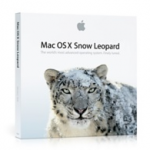
mac os x server box Mac OS X Server is infinitely better equipped, more stable, and just generally more pleasant than any of Windows offerings (yes I am biased, but it’s true), if you’re needing a server I highly recommend checking out Apple’s offering. Instead of shelling out the $499 for a copy though, you can get a free evaluation copy! If you’re a large corporation, small business, nonprofit organization, government agency, or educational institution, you can get a free and fully functional evaluation copy of Mac OS X Server directly from Apple. I just found out about this and I think it’s a pretty great thing for Apple to do, so if you qualify for a copy, check it out and you will be impressed.

Apple: Snow Leopard Server Evaluation

If Apple.com was in 1983

Dec 17, 2009 - 2 Comments

old apple website

Ever wonder what Apple.com would look like in 1983? It would be promoting the Apple Lisa which ran at a blazing 5mhz, had 1mb of RAM, and cost $9,995 (which is $21,335 in inflation adjusted dollars!). Designer Dave Lawrence designed the mockup and it’s a good laugh, he’s also a huge fan of the Apple Newton and has managed to connect one to Snow Leopard… don’t ask why.

via Flickr

Get 20 Free Christmas songs from Apple iTunes!

Dec 15, 2009 - 3 Comments

free christmas songs It’s that time of year again, the holiday season is upon us! What better way to celebrate than to download a hoard of free Christmas songs from Apple, courtesy of iTunes?

From Barry Manilow to Amy Grant to Weezer to Aretha Franklin, this is quite a diverse set of holiday songs that are sure to get you in the spirit. Head on over to Apple, launch the link in iTunes, and enjoy your free music!

Apple iTunes: Holiday Sampler Album – 20 free songs

iPhone Tip: Set an “If Found” note as your iPhone’s Background Picture

Dec 13, 2009 - 7 Comments

iphone-background Here’s a great tip from Apple regarding your iPhone… set a custom background image on your iPhone with a message like:

If found, please return to
Your Name
1234 Infinite Loop
Cupertino, California 95014
415-555-1212

it’s definitely relying on the goodwill of others, but if you ever lose your iPhone it just might work to get it back!

[ tip and iPhone image via Apple ]

Holiday shopping just got easier, Reserve & Pick Up Service from Apple

Dec 1, 2009 - 1 Comment

reserve and pickup I’m a procrastinator with holiday shopping, and anything I can do online makes my life easier. Unfortunately when waiting until the last minute, you often lose out on having things shipped in time, but thankfully Apple has a new service that will help this situation. Between December 15 and December 24, you can order products online with Apple and pick them up at an Apple store, even having them gift wrapped for you. Cool!

Apple.com: Reserve & Pick Up

XSS Exploit found on Apple iTunes site… again

Nov 18, 2009 - 2 Comments

xss apple login

Update: Apple has fixed the exploit, the below link is preserved for posterity but no longer works to display anything abnormal.

A few weeks ago, there was an active XSS Exploit on Apple.com with their iTunes site. Well, a tipster sent us the exact same cross site scripting exploit found again on the Apple iTunes site (UK in this case). As a result, there are some rather amusing variations of the Apple iTunes page appearing, and again some very frightening ones, as the above screenshot demonstrates a login page that accepts username and password information, stores this login data on a foreign server, then sends you back to Apple.com. The most annoying variation sent to us tried to stuff about 100 cookies onto my machine, initiated an endless loop of javascript pop-ups with Flash files embedded in each of them, and iframed about 20 other iframes, all while playing some really awful music.

Here’s a relatively harmless variation of the XSS capable URL, it iframes Google.com:

http://www.apple.com/uk/itunes/affiliates/download/?artistName=Apple%20%3Cbr/%3E%20%3Ciframe%20src=http%3A//www.google.com/%20width=600%20height=200%3E%3C/iframe%3E&thumbnailUrl=http%3A//images.apple.com/home/images/promo_mac_ads_20091022.jpg&itmsUrl=http%3A%2F%2Fitunes.apple.com%2FWebObjects%2FMZStore.woa%2Fwa%2FviewAlbum%3Fid%3D330407877%26s%3D143444%26ign-mscache%3D1&albumName=a%20wide-open%20HTML%20injection%20hole

It doesn’t take much effort to do your own version. Anyway, let’s hope Apple fixes this quick.

Attached are a few more screenshots of links sent in by tipster “WhaleNinja” (great name by the way)

apple xss hack
apple xss 2

apple xss 3

Want to work at the NYC Apple Store? It’s easier to get accepted into Harvard University

Nov 14, 2009 - 3 Comments

apple broadway nyc store

Apple’s newest snazzy NYC store got 10,000 job applications and just over 200 were hired, making a 2% acceptance rate. BusinessInsider points out this is lower than the 7% acceptance rate at Harvard University. I imagine the economic situation contributes to the slew of resumes, but even still, those are some pretty remarkable statistics.

Source: BusinessInsider: Harvard is easier than Apple

How to type the Apple Logo

Nov 6, 2009 - 35 Comments

Typing the Apple Logo is a fun little trick that’s easy to do and looks pretty cool:

So how do you do it with your Mac keyboard?

Option+Shift+K will type the Apple logo as so: 

I have no idea what this is displayed like to a Windows user, so don’t be surprised if it looks like something totally different, but on Mac you will see the Apple logo in all it’s glory.

Note: see the comments below for how to type the Apple logo on various world keyboards. Thank you to our readers for supplying this information!