Subscribe to OSXDaily

Subscribe to RSS Subscribe to Twitter Feed Follow on Facebook Subscribe to eMail Updates

Shared on Facebook

Shop at Amazon

Ad

OSXDaily on Facebook

Search unlock

Buying an iPhone 4S Without a Contract Makes it Unlocked

Oct 25, 2011 - 90 Comments

Apple iPhone 4S in white

Anyone can buy an unlocked iPhone 4S right now if you are willing to pay the full price of the device, meaning the lower carrier subsidized contract 4S prices do not apply. The unlock applies to both the GSM and CDMA carriers currently being sold, available at the following price points:

  • iPhone 4S 16 GB – $649
  • iPhone 4S 32 GB – $749
  • iPhone 4S 64 GB – $849

The iPhone 4S GSM SIM card slot is unlocked when the full retail price is paid at an Apple Store. In the case of the CDMA carriers selling the device like US carriers Sprint and Verizon, the Micro SIM card slot is also unlocked and will support other GSM carriers. The carrier unlock allows the iPhone to be used on another US carrier like T-Mobile, or allows for cheap roaming abroad with the purchase of a local SIM card, with the other benefit being that you are not tied to a contract with any single US cell provider.

You can verify the unlock immediately when the iPhone 4S is first connected to iTunes, where the following message is displayed:

unlocked iPhone 4S message in iTunes

Initial reports indicated the unlocked 4S would be sold in November, which may suggest a change in policy at some point when paying the full out-of-contract price.

Buying an unlocked iPhone at full price is typical outside of the USA, but in the USA was somewhat of an anomaly until earlier this year when Apple started selling the iPhone 4 unlocked at the full retail price. That has since translated to the iPhone 4S, and presumably will carry on with future iPhone releases as well.

Unlocked iPhone 4S Available, Costs $649 and Up

Oct 7, 2011 - 10 Comments
black iPhone 4S

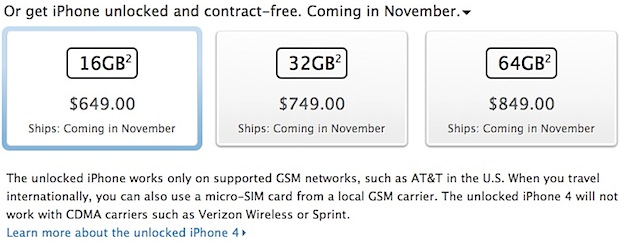
Apple has announced that unlocked iPhone 4S models will be available starting in November, slightly later than the general 4S availability for both the US and other countries. These phones will work on any GSM carrier worldwide, you simply need to pop in a local GSM providers micro-SIM card and follow the onscreen activation instructions. The dependence on SIM cards does mean that the unlocked iPhone 4S will not work on CDMA carriers, however.

Unlocked iPhone 4S

Unlocked iPhones are ideal for users who travel internationally on a regular basis and need to be able to utilize local carriers, this offers a significantly cheaper option than paying the roaming overage charges through a home carrier like AT&T. Unlocked phones also provide a pre-paid option, allowing you to use GoPhone, T-Mobile, or other pre-paid GSM choices.

The downside to an unlocked device is the costs. The price of the iPhone 4S contract-free is quite a bit higher than the subsidized price through a carrier, with the 16GB model starting at $649, the 32GB model costing $749, and the 64GB model coming in at $849.

Unlocked iPhone 4 Now for Sale in USA

Jun 14, 2011 - 9 Comments

Unlocked iPhone 4 models for sale in USA

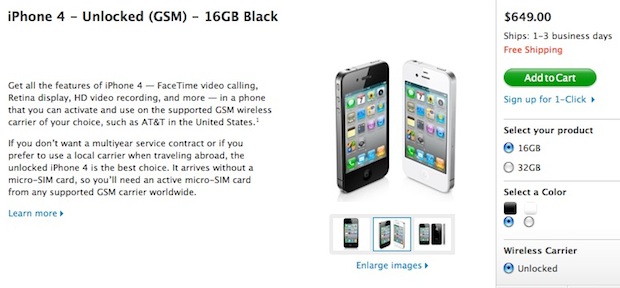
Apple is now selling carrier unlocked iPhone 4 GSM models in the USA, making it the first time the devices have been legitimately offered through the primary market in the country. An unlocked iPhone can be used on any other GSM network, in the USA or otherwise, assuming you have an active micro-SIM card for that network.

How Much Do the Unlocked iPhones Cost?

Unlocked iPhones don’t come cheap in the USA or anywhere else for that matter. The price is the same for both black or white models, the cost differentiation relates to storage capacity:

  • Unlocked iPhone 4 16GB – $649
  • Unlocked iPhone 4 32GB – $749

If you’re wondering why the prices are high, Apple answers:

Carriers typically subsidize the purchase price of the phone when purchased with a service contract. By purchasing your iPhone unlocked, you are not committing to a service contract up front, so you can use any micro-SIM card from a supported GSM carrier, including your current one.

What are the Advantages to an Unlocked iPhone?

There are several answers to this, but the primary reasons to own a factory unlocked iPhone are:

  • No Carrier Contract – you pay full price for the phone, but the iPhone is not bound to a carrier contract, meaning you can start and stop service at will without any penalties
  • Move from Carrier to Carrier – want to use T-Mobile? No problem. AT&T have better reception? Switch. There’s no hassle, no fees, nothing that voids the warranty, just plug in a new carriers SIM card and go
  • International Travel – the same carrier transportation mentioned above applies to international travel, forget about roaming charges and instead grab a local SIM card

All you need is an active compatible micro-SIM card from a GSM carrier and the phone will use that network.

Why Now? AT&T & T-Mobile Merger or Another Jailbreak Killer?
Carrier unlocked phones are somewhat of an anomaly in the United States, but they are ubiquitous elsewhere in the world. It’s not clear why Apple is choosing to sell the unlocked devices at this point, but there is some speculation that this move is intended as preparation for the AT&T and T-Mobile USA merger. Others are suggesting this is intended as another blow to the jailbreaking scene, since carrier unlocks are a popular reason for users to jailbreak their iPhones.

Nice find by MacRumors!

Is Apple Going to Kill Jailbreaking with iOS 5?

May 27, 2011 - 24 Comments

Apple killing jailbreaking possibilities

Is Apple going to kill the jailbreak community as we know it with iOS 5? If this sounds crazy, consider some of the tweaks, rumors, and expected features in iOS 5 and iPhone 5:

  • Revamped iOS notification and all new widget system – who needs to use the hacks when Apple offers the real thing?
  • Rumors of Expose-style iOS multitasking – if Apple builds a superior multitasking feature, why bother with a 3rd party solution?
  • Cheaper & Pay-Go iPhones – a common reason to jailbreak an iPhone abroad is so that you can use it as a pay-go phone, Apple is reportedly interested in expanding directly into this market
  • More iPhone Carriers – one of the many reasons people jailbreak and unlock their phones is so they can use them on networks unsupported by Apple, but Apple is rumored to be planning to expand the iPhone to many more carriers
  • Over-the-Air automatic iOS updates – each new iOS update breaks existing jailbreaks, if Apple can push updates to your phone remotely, your jailbreak will become unusable anyway
  • Newer Hardware is Harder to Jailbreak – jailbreaking is getting harder on newer hardware, proof of this is the iPad 2, which still isn’t jailbroken despite being out for months. The next iPhone is expected to have the same internal hardware as the iPad 2, meaning it will be just as difficult to jailbreak

Remember, some of these features were once only possible with jailbroken hardware, but if Apple offers them natively through iOS 5 and new iPhones, what’s the point of jailbreaking and unlocking? If Apple is going to provide in iOS 5 and iPhone 5 what you now jailbreak for, why bother with the headaches of jailbreaking?

More evidence comes from an anonymous tipster sent a message to iDB that indicated that Apple is going to shake up the jailbreak community:

bad timing for jailbreak developers especially those working on notification. im not working on that but i know we are about to take the jb community by surprise

This was prior to TechCrunch publishing their report on the notification changes, but more interesting is that there’s an obvious hint of a broader agenda in that message.

This was followed quickly by another post at iDB that mentions a renowned jailbreaker just now giving up on the development of his revamped iOS notification system, they go on to speculate that he may have even been offered a job at Apple to develop the notifications for them directly.

Furthermore, there could be an economic incentive behind all of this, as iDB reminds us that nearly 10% of iPhones are jailbroken and buy apps through the Cydia store, that’s a lot of money left on the table by Apple. Jailbreaking is particularly popular in countries like China, where Apple is experiencing huge growth, but if Apple can offer the same features so many users are jailbreaking for, they’ll lose the incentive to jailbreak plus funnel that money into Apple’s App Store rather than a third party source.

Remember, jailbreaking isn’t illegal, but Apple has always frowned upon it for various reasons, and now Apple may have found a solution to squash the jailbreak community once and for all by essentially offering all the incentives natively. So will it happen? Is jailbreaking dead? We’ll soon find out.

Unlock iPhone 4.3.3 with Ultrasn0w 1.2.3

May 6, 2011 - 22 Comments

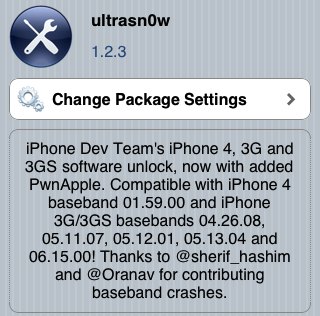
ultrasn0w 1.2.3 for iOS 4.3.3 Ultrasn0w has been updated to version 1.2.3 with support for preserved baseband running iOS 4.3.3. In other words, ultrasn0w 1.2.3 does not unlock new baseband, but it does work to keep your unlock if you have been tugging along iPhone 4 with 1.59.00 or iPhone 3G & 3GS with 4.26.08, 5.11.07, 5.12.01, 5.13.04, and 6.15.00.

If this applies to you, you’ll want to use PwnageTool 4.3.3 (Mac) or Sn0wbreeze (Windows) to jailbreak while preserving your old baseband and updating to iOS 4.3.3.

Install Ultrasn0w Unlock for 4.3.3

After you are jailbroken, ultrasn0w is installed through Cydia. You can generally do this just by searching for “ultrasn0w” but if that fails:

  • Add http://repo666.ultrasn0w.com as a source repository to Cydia
  • Search for “Ultrasn0w 1.2.3″ and install
  • Reboot your iPhone

Assuming you have supported baseband and everything is done correctly, the iPhone will boot unlocked and ready for another SIM card. Remember that many unofficial carriers do not support 3G networks so you should disable that in network settings if things aren’t working as expected.

TinyUmbrella 4.3.2 Released with iOS 4.3.2 Support

Apr 18, 2011 - 1 Comment

TinyUmbrella 4.3.2 TinyUmbrella 4.3.2 has been released, the latest version allows you to save your existing iOS 4.3.1 and iOS 4.3.2 SHSH blobs from iOS 4.3.2 or iOS 4.2.7 for CDMA devices.

SHSH blobs are important to save for jailbreaking and iPhone unlocking because having them stored allows you to revert to previous firmware versions.

Download TinyUmbrella for iOS 4.3.2

Versions are available for both Mac OS X and Windows

If you’re not interested in carrier unlocks and jailbreaking, TinyUmbrella has little use to you.

Permanent iPhone Unlock Service Without Jailbreaking is Available but Questionable

Apr 12, 2011 - 5 Comments

A questionable sounding permanent iPhone unlock has appeared on the scene, the service claims to offer a permanent unlock solution for iPhone 4, iPhone 3GS, and iPhone 3G, without the need for jailbreaking.

How would this be possible? The $169 service apparently whitelists your iPhone IMEI number by manually adding them to Apple’s databases. How exactly they are doing that is in question, and that is precisely why this sounds like a questionable service. The potentially illicit method of unlocking your phone brings the legality into question, and we don’t recommend using it. Outside of the legal ambiguity, BGR notes that if someone is able to add an IMEI to a database, it would be just as easy to delete it and relock your iPhone. Furthermore, there is the looming question on how the service is accessing and editing Apple’s own databases.

If you’re unfamiliar, an iPhone unlock frees the device from the cellular carrier it was intended to be used on. Unlocking is a bit of a cat and mouse game, with holes being patched by Apple and the unlock community finding new methods around the carrier locks. Recently iOS 4.3.1 was unlocked with ultrasn0w 1.2.1 but it requires a user to jailbreak an iPhone with iOS 4.3.1 while preserving old baseband that remains compatible with prior versions of ultrasn0w. It’s not a particularly complex process, but it can be confusing to users who are less technically savvy.

If all of this sounds too complicated, the other alternative is to just buy an iPhone that comes unlocked to begin with, from a country like Canada. You’ll pay more upfront, but buying an unlocked phone prevents you from having to use software jailbreaks, carrier unlocks, or the (possibly unscrupulous) methods like CutYourSim’s offering. If you’re curious how the iPad fits into all of this, you’ll find the iPad 2 is sold unlocked as long as you purchase the 3G GSM model.

CutYourSim‘s service was verified to work by BGR, but again, we do not recommend using this service at this time. If more information comes available and the service is found to be legal, it may be a viable alternative to the jailbreak/ultrasnow method.

Jailbreak iPhone iOS 4.3.1 with PwnageTool

Apr 10, 2011 - 1 Comment

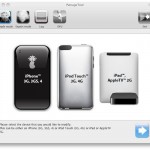
PwnageTool 4.3 provides an untethered jailbreak for iPhone 3GS, iPhone 4 GSM, iPod Touch 4G, iPod touch 3G, iPad, and Apple TV 2, all running iOS 4.3.1.

This guide is geared towards jailbreaking iOS 4.3.1 on iPhone 4 and iPhone 3GS because PwnageTool is able to preserve baseband for iPhone carrier unlocks. If you are simply looking for a jailbreak and do not need to use an unlock, you will find jailbreaking iOS 4.3.1 using redsn0w is easier.

How to Jailbreak iOS 4.3.1 using PwnageTool

PwnageTool 4.3 allows you to jailbreak iOS 4.3.1 while preserving unlocked iPhone baseband. This guide assumes you have not upgraded the iPhone to iOS 4.3.1 yet:

  1. Download PwnageTool 4.3
  2. Download iOS 4.3.1 firmware
  3. Launch PwnageTool 4.3
  4. Select the “Expert mode” button at the top
  5. Select “iPhone” from the PwnageTool menu
  6. Click the Next button, then browse and select the iOS 4.3.1 firmware you downloaded earlier, click Next again
  7. Click on “General”
  8. Important for unlockers: Check “Activate the phone” if you rely on iPhone unlock, this is not necessary for official carrier use
  9. For now, ignore the Cydia package installations and click next
  10. From “Custom package settings” select to install “Cydia” by checking it, click next, then click “Build” to create a custom IPSW file
  11. Save this custom IPSW file to your desktop or another place you can easily find it, this is what you will restore to for jailbreaking your iPhone
  12. After the custom IPSW is built, you will be asked to connect your iPhone to the computer to enter into DFU mode
  13. Plug in your iPhone and follow the instructions for DFU mode: Hold Power + Home for 10 seconds, release power but continue to hold Home for 10 seconds. PwnageTool will notify you when it has detected your iPhone in DFU mode
  14. Now launch iTunes
  15. iTunes will notify you that it has detected an iPhone in recovery mode. Option click on the “Restore” button within iTunes to bring up the firmware restoration option
  16. Select the custom IPSW file that you created with PwnageTool
  17. iTunes will now restore the iPhone to the PwnageTool jailbroken IPSW firmware, this may take a few minutes

When iTunes is finished, the iPhone will boot into a jailbroken iOS 4.3.1. You can verify the jailbreak worked by looking the Cydia icon on your iOS homescreen.

If you completed the jailbreak properly, your baseband will also have been preserved allowing you to unlock iPhone 4 or 3GS running iOS 4.3.1 using ultrasn0w 1.2.1. Installing the ultrasn0w carrier unlock is simple, but you must have iPhone 4 or iPhone 3GS on baseband 01.59.00, 04.26.08, 05.11.07, 05.12.01, 05.13.04, and 06.15.00 in order to work.

Unlock iPhone 4 & iPhone 3GS on iOS 4.3.1 using Ultrasn0w 1.2.1

Apr 10, 2011 - 3 Comments

A new version of the Ultrasn0w iPhone carrier unlock utility has been released with iOS 4.3.1 support.

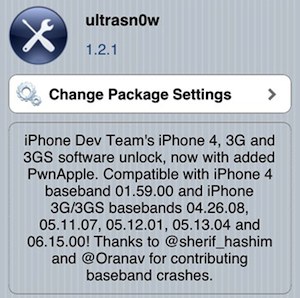
Note ultrasn0w 1.2.1 is not a new unlock and it will not unlock new baseband, but it does allow you to maintain your carrier unlock while upgrading to jailbroken iOS 4.3.1 using PwnageTool or Sn0wbreeze to preserve baseband.

UltraSn0w 1.2.1 will unlock iPhone 3GS or iPhone 4 on baseband 01.59.00, 04.26.08, 05.11.07, 05.12.01, 05.13.04, and 06.15.00, you can check your iPhone baseband from Settings > General > About. Any baseband outside of these versions is not currently unlockable.

Download & Install Ultrasn0w Unlock for iOS 4.3.1

Mac users will need to download PwnageTool 4.3.1, iOS 4.3.1 firmware, and jailbreak the iPhone iOS 4.3.1 using PwnageTool to preserve their existing baseband. Windows users can do this with Sn0wbreeze.

After you have upgraded to iOS 4.3.1 with preserved baseband, here’s how to download and install ultrasn0w 1.2.1:

  • Launch Cydia
  • Tap on “Manage”
  • Tap on “Sources”
  • Tap “Edit”
  • Select “Add”
  • Enter the following repository: http://repo666.ultrasn0w.com
  • Tap on “Add Source”
  • Cydia will add the source repo, now search for “ultrasn0w 1.2.1″ and download and install the unlock
  • After ultrasn0w 1.2.1 has been installed, restart your iPhone

Your iPhone 4 or iPhone 3GS with preserved baseband will now be unlocked with iOS 4.3.1.

iPad 2 is Unlocked – Swap in a New Micro SIM Card and Go

Mar 26, 2011 - 26 Comments

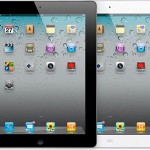
ipad-2-unlocked

We’ve received a few questions from those outside of the USA asking if the iPad 2 3G model from the USA will work in their home country. The answer is generally yes, assuming your local cell provider is a GSM compatible network and that you have a micro-SIM card that will fit into the iPad 2 3G (you can also carefully cut down normal SIMs to fit, see link at the bottom of article).

This is also great news for international travelers, since you can just swap in a new sim in a new country and you’ll be online. Of course just because you can use elsewhere doesn’t solve the problem of actually finding an iPad 2 in stock somewhere, and you must buy the 3G AT&T model which is one of the most popular versions.

Unlocked iPad 2 works in the USA with T-Mobile
The iPad 2 being sold unlocked is not just useful to those outside of the USA though, being unlocked means the device can also be used with T-Mobile in the United States. This is just a matter of plugging in a T-Mobile compatible micro-SIM with a data plan and activating it on the TMO network. That said, the number of users activating iPad 2′s on US Tmobile is probably small since the data plan that AT&T offers with the 3G model is a pay-as-you-go plan.

What about the iPad 2 CDMA model?
As of now, the CDMA iPad 2 is not unlocked. It’s possible that someone will figure out how to do this in the future like Cricket and ChinaTelecom have with the CDMA iPhone 4, but for now you should get an iPad 2 3G model if you want to use it outside of the USA on a cellular network.

What’s the deal with locked hardware anyway?
Unlocked cell hardware is somewhat unusual in the United States, which goes partially to explain the popularity of the jailbreak and unlock movements, and those who setup iPhones as pay-go phones. Carriers here typically like to lock devices to their network to prevent people from leaving their service with the same hardware. The thought goes that since you’d have to buy a new phone for a new network, you’re more likely to stay on your existing one. The plus side to this is the locked carrier will usually subsidize the hardware price in the USA, which is why you can get a new iPhone for $199 with a 2 year contract. Carrier unlocking is rare elsewhere in the world, with many countries in Asia, the EU, and elsewhere in North America allowing users to go to whatever network they want.
Read more »