Tips & Tricks

Tips and tricks for all things Apple! Whether you want to learn tips for a Mac, iPhone, iPad, Apple Watch, or much more, you will find many tricks, tips, tutorials, and excellent walkthroughs for Apple devices and software here.

Search Tips & Tricks

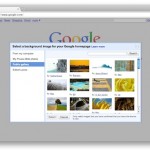
How to Use Google Chrome Full Screen on Mac

May 28, 2010 - 16 Comments
Chrome

The Google Chrome browser is an excellent choice, because not only is it fast and powerful, but it sandboxes Flash to prevent the plugin from going totally nuts, and it offers tons of customization options. If you’re an avid Chrome user, you likely would appreciate using Chrome in full screen mode, and fortunately, you can … Read More

Stop iTunes Web Links from Opening iTunes

May 28, 2010 - 4 Comments

I’m kind of annoyed when I click a web link and it happens to be an iTunes Store link… iTunes then opens and it takes me out of my browser. I searched around for an easy solution and came across a method that reliably stops iTunes from launching when an iTunes App Store or Music … Read More

Open Quick Look in Full Screen: Command+Option+Y

May 26, 2010 - 7 Comments

You can instantly open anything in fullscreen Quick Look mode by selecting the item and then hitting the Command+Option+Y keys. If you select multiple files and enter into fullscreen mode, it’s easy to navigate between them by using the arrow keys. You can then exit full screen mode by hitting the escape key. As a … Read More

Let iTunes Automatically Adjust Sound Volume to Play Songs at the Same Level

May 25, 2010 - 10 Comments
Sound volume indicator icon

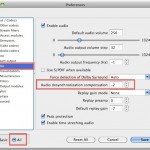
iTunes can adjust the volume levels of your music for you, so that each song is closer to one another in volume output. This is a great feature, and it has always peeved me that some songs will play louder than others, and a playlist can quickly go from one moderately loud song to one … Read More

Disable Growl popup notifications in Cyberduck

May 24, 2010 - 5 Comments

Cyberduck is a great free FTP client for Mac OS X, but on my portable Mac’s 13″ screen the Growl popup notifications really drive me crazy as they appear on each server connection and transfer completion. Oddly enough, if you look around in the Cyberduck preferences, you won’t find an option to disable the Growl … Read More

Where is the ambient light sensor on a MacBook Pro?

May 22, 2010 - 4 Comments

The ambient light sensor on the newer Unibody MacBook Pro (all models: 13″, 15″, 17″) is located directly next to the iSight camera at the top of the display. You can verify the location by holding your hand over the area to the left of the iSight camera and watch as your screen dims and … Read More

How to Print to PDF in Mac OS X

May 21, 2010 - 34 Comments
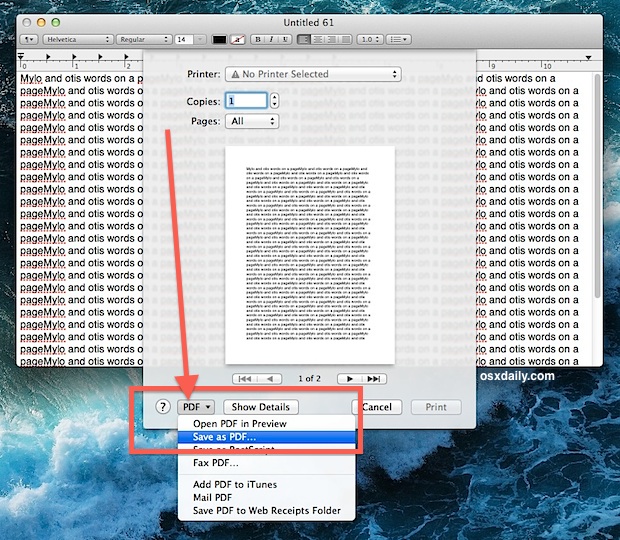
Print as PDF in Mac OS X

Want to save a document or web page as a PDF file, but you don’t own Adobe Acrobat? No problem, you can print documents, webpages, or nearly anything as a PDF, this means it creates a PDF file directly in Mac OS X using a built-in feature, without the need for any additional software or … Read More

Easily Add Line Numbers to a Text File with the Command Line

May 20, 2010 - 7 Comments

Brian asks: “I need to add line numbers to a text file. I don’t mean line numbers in the text editor, I mean adding a number next to each item inside a text file. Is this possible to automate or do I have to manually edit the file typing 1, 2, 3 and going insane?” … Read More

Change the Gmail Notifier mail check frequency

May 19, 2010 - 4 Comments

You can adjust Gmail Notifier’s mail checking frequency interval by accessing an advanced preference in the application. In this example we will change the email check interval to 3 minutes. * Click the Gmail Notifier menubar icon * Hold down Command+Option keys and click on “Preferences” in the drop down menu * Enter the following … Read More

Disable Growl Notifications

May 17, 2010 - 15 Comments

Growl is a desktop notification system that allows applications to publish updates and items to floating windows on your desktop. This allows you to see things like updates, information, and status changes to whatever application is publishing the Growl notification. The advantage to Growl is that regardless of what application has the focus, you’ll see … Read More

Watch AVI Video on a Mac

May 17, 2010 - 10 Comments

You can watch many AVI movies without any additional software on a Mac just by playing them in the included QuickTime Player (located in the Applications folder). Just double click the file and it should work, as modern versions of QuickTime in Mac OS X support a wide variety of video files and video codecs, … Read More

Re-Run the Last Used Command Exactly With or Without Super User Privileges

May 17, 2010 - Leave a Comment
Terminal

Want to re-run the last executed command? Or what about re-running the last used command but running it as root? You can do both! Ever typed a nice fancy string command into the terminal and been frustrated to discover that you need to run it all over again? Or perhaps you discovered that the aforementioned … Read More

Stop the MacBook Pro and MacBook Screen from Dimming

May 15, 2010 - 26 Comments

The MacBook, MacBook Air, and MacBook Pro screen backlighting is set to automatically dim and adjust in different situations. For the MacBook, it will adjust based on the power source and based on how long the computer is not in use. For the MacBook Pro and MacBook Air, the same is also true, in addition … Read More

How to Download Web & Flash Videos to a Mac with the Safari Activity Monitor Trick

May 14, 2010 - 81 Comments

If you want to save and watch many web-based movies and Flash files directly to your Mac for later offline viewing try this neat reader provided tip out. Sent in by Robert Warner, he writes this handy trick to download just about any videos directly to your Mac using only Safari and the little-used Activity … Read More

Use Property List Editor to Edit plist Files in Mac OS X for Free

May 12, 2010 - 15 Comments

Property List files, or more commonly known as plist files, are basically Mac application specific preference files. They contain information and settings for various applications and are usually in the easily identifiable format of com.developer.Application.plist and located within the /Library/Preferences/ directories at the system and user level. If you simply want to view a plist … Read More

How to Make Applications Minimize Into Their Dock Icon in Mac OS X

May 11, 2010 - 5 Comments

You can make save a lot of clutter from showing in the Dock of Mac OS X by making applications minimize into their own Dock icon. What this means is that if you minimize an app, rather than having the little thumbnail stay on the right side of the Mac Dock, it will minimize directly … Read More

Create a Hidden Folder in Mac OS X

May 10, 2010 - 18 Comments

You can create a folder that is hidden from the default Finder GUI view by taking advantage of Mac OS X’s unix underpinnings. That probably sounds a lot more complex than it is however, and it turns out it’s actually really easy to make a completely hidden folder on the Mac. This walkthrough details how … Read More

How to Manually Switch Graphics Cards on MacBook Pro

May 8, 2010 - 2 Comments

Would you like to manually choose which graphics card is in use on a MacBook Pro? You can now keep track of which GPU is in use and then manually switch between the two graphics cards included within the MacBook Pro series, thanks to a third party utility called gfxCardStatus. It’s a free app and … Read More

Subscribe to OSXDaily

Subscribe to RSS Subscribe to Twitter Feed Follow on Facebook Subscribe to eMail Updates

Tips & Tricks

News

iPhone / iPad

Mac

Troubleshooting

Shop on Amazon to help support this site