Tips & Tricks

Tips and tricks for all things Apple! Whether you want to learn tips for a Mac, iPhone, iPad, Apple Watch, or much more, you will find many tricks, tips, tutorials, and excellent walkthroughs for Apple devices and software here.

Search Tips & Tricks

Setup Older OS X Mail to Use a Gmail Account

Aug 9, 2009 - 2 Comments

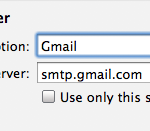
Got an older version of Mac OS X that you want to use Gmail with? While newer versions of Mac OS and Mac OS X allow for simple integration of using Google accounts with a Mac, older versions of Mac OS X don’t necessarily have these capabilities. But not to worry, you can still use … Read More

Make Your Own Custom iPhone Ringtone For Free

Aug 8, 2009 - 105 Comments
Convert just about any Video or Audio to an iPhone Ringtone

The iPhone, iPhone accessories, and iPhone ringtones are all the rage right now, so why not make your own iPhone ringtone? With a Mac or Windows PC it’s pretty straightforward using iTunes, follow these 10 steps and you can easily create your own iPhone Ringtone from whatever song you want. Note that songs with DRM … Read More

Virtually Scale Window Size to Increase or Decrease Desktop Screen Workspace

Aug 8, 2009 - 5 Comments

This is a particularly handy trick for when you have limited screen real estate and want to fit more of a windows display on screen. A perfect example of this are the Hackintosh owners out there that are working with small netbook screen resolutions and some windows just don’t display properly, or won’t even fit … Read More

Get All DHCP Info with ipconfig Quickly

Aug 6, 2009 - 3 Comments

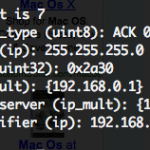
If you’ve ever needed to troubleshoot a network or internet connection, you know how frustrating it can be (particularly when you’re on techsupport with various broadband providers). This quick tip can make the job a little easier on yourself by retrieving all relevant DHCP information, like DHCP server IP, client, subnet mask, router, DNS servers, … Read More

View PDF’s inside Firefox with the Firefox-Mac-PDF browser extension

Aug 6, 2009 - 1 Comment

I like Safari but find myself in Firefox nearly always because of a multitude of reasons. One thing I’ve long missed though is the ability to view PDF’s within the browser within Firefox, which Safari does wonderfully. If you’re tired of Firefox launching the Preview app (or even worse if you’re settings are different: Acrobat), … Read More

How to Create an IP Alias in Mac OS X using ifconfig

Aug 5, 2009 - 8 Comments

In some trickier network situations, your computer may be assigned an IP but need an entirely different IP address to access certain network resources. You might be wondering, how on earth do you have two IP addresses at once on the same Mac? The answer; Create an IP Alias! Using an IP alias allows your … Read More

Get Immediate Dictionary Definitions Using Spotlight

Aug 5, 2009 - 1 Comment

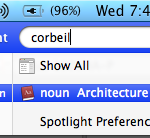
Using your Mac, iPhone, or iPad, and you need to know the meaning of a word, and quick? That’s easy. Just bust open Spotlight with Command + Spacebar on the Mac or iPad, or pulling down from the Home Screen on iPhone, and type in the word you want to get the definition for. One … Read More

Require a Password on Waking from Sleep, but Not When Screensaver is Active

Apr 26, 2009 - 9 Comments
Screen saver with no password

Have you ever wanted to have your Mac require a password on waking from system sleep, but not ask for a password when the screensaver is on or the screen was locked? Well, me neither, but someone out there might and it’s kind of a nifty customization tip that has some valid uses in some … Read More

Fix iChat Video Chat Freezes

Apr 23, 2009 - 3 Comments

I really enjoy videochatting with friends and family using iChat, so I was pretty frustrated when seemingly out of nowhere iChat video started freezing completely after a video chat session was initiated. I searched around a bit and noticed other people having the same problem and symptoms – iChat video freezes but iChat audio still … Read More

How to Scan a Windows Network for Conficker Virus from Mac OS X

Mar 31, 2009 - 5 Comments

Mac users are largely immune to the world of virus and trojans, but it’s not uncommon for you to be a Mac user in a LAN sea of Windows PC’s. The Conficker Virus is Windows only but it’s garnering a lot of attention, so if you’re on a Windows LAN at home, work, or school, … Read More

How to Easily Mirror an Entire Web Site Locally

Mar 19, 2009 - 15 Comments

It’s very easy to mirror an entire web site on your local machine thanks to the terminal command wget, this tutorial will show you how to do it via the command line. wget is available for Mac OS X, Linux, Unix, and many other popular operating system platforms, thus this is universally applicable assuming you … Read More

Show Hidden Files in Mac OS X

Feb 25, 2009 - 48 Comments
Finder of Mac OS X

Need to show hidden files on a Mac? This is pretty common if you find yourself needing to access hidden files on your Mac, like an .htaccess file you downloaded, a .bash_profile, a .svn directory, – literally anything preceded with a ‘.’ indicating it is invisible by default – you can run the below command … Read More

How to Password Lock Your Desktop with Fast User Log Out in Mac OS X

Feb 21, 2009 - 28 Comments

A quick way to lock your Mac desktop is to hit Shift-Command-Option-Q to do a fast user log out. This logs the current user out of Mac OS X, which is one way to initiate a login screen when the Mac needs to be used again. Another method is brought to us by inaminit who … Read More

Mac OS X: Change your User ID

Feb 19, 2009 - 14 Comments

Recently I connected my Mac to my linux based NFS server at home. I use NFS to access files from two other Linux boxes and on each server my UID (unique id) is set to 1000. In order for me to easily have full access to my NFS shares from OS X I changed my … Read More

Make Back Ups from the Command Line in Mac OS X with These 4 Tricks

Feb 19, 2009 - 6 Comments

These days there are no shortage of ways to backup your Macintosh. Probably the most popular method available to an end-user is Apple’s Time Machine which is handled automatically after a simple setup through the GUI, or can be triggered to start at any time. Personally, I was very impressed with the ease of use … Read More

How to Disable Flash or Countdown in Photo Booth

Jan 22, 2009 - 21 Comments
Photo Booth icon

Photo Booth is a really fun app that comes with all macs that have a built in iSight / FaceTime front facing camera. Here are a couple tips that make using Photo Booth on your mac even more enjoyable; the ability to disable the ‘white screen’ flash and the ability to disable the 3 second … Read More

Free SMS Text Messaging on iPhone with AIM

Jul 17, 2008 - 16 Comments

This post references software that no longer exists, notably the AIM (AOL Instant Messager) service, and cellular plans that are no longer relevant. Nonetheless we are keeping this post up for posterity sake. Long live AIM! The iPhone 3G is awesome, we all know that, but the rate plans are not necessarily awesome for everyone, … Read More

Easy and Useful Tips to Help Secure Your Mac

Jun 29, 2008 - 1 Comment
Secure a Mac

It’s a good idea to secure your Mac from prying eyes, and it doesn’t take a lot of work to set some basic security to Mac OS X. This will help protect a Mac and the important files you have on it, and I consider the following three tips to be 100% necessary for almost … Read More

Subscribe to OSXDaily

Subscribe to RSS Subscribe to Twitter Feed Follow on Facebook Subscribe to eMail Updates

Tips & Tricks

News

iPhone / iPad

Mac

Troubleshooting

Shop on Amazon to help support this site