Tips & Tricks

Tips and tricks for all things Apple! Whether you want to learn tips for a Mac, iPhone, iPad, Apple Watch, or much more, you will find many tricks, tips, tutorials, and excellent walkthroughs for Apple devices and software here.

Search Tips & Tricks

List all Open Internet Connections on a Mac from Terminal to Track Down Bandwidth Issues

Sep 29, 2009 - 5 Comments
Network Utility in Mac OS

Recently the LAN at my office had been running slower than usual, and I couldn’t pinpoint what was using up all the extra bandwidth. I had a suspicion that P2P traffic was to blame but I just couldn’t see anything obvious on the offending machine. So the question of course, is how do you see … Read More

Enable root User in Mac OS X 10.6 Snow Leopard

Sep 28, 2009 - 4 Comments

There are two ways to enable the root super user account in Snow Leopard, the first is probably the quickest. Launch the Terminal and type the following command: sudo passwd root You’ll be asked for the admin password, then you’ll have to set a password for the root account. When you’re finished, the root account … Read More

Change Sound Input Source on Mac with Option-Click on Sound Menu

Sep 28, 2009 - 3 Comments
Changing the sound input source on a Mac the easy way

If you want to quickly change your sound input device on a Mac, by far the fastest and simplest way to do so is to Option-Click the Sound menu icon at the top of your screen. Option-clicking the sound icon menu bar item enables an alternate pull-down menu including a list of clearly labeled and … Read More

Backup iPhone Text Messages with Syphone

Sep 27, 2009 - 12 Comments

Backing up your iPhone text messages is made extremely easy thanks to a freeware utility called Syphone. Since the iPhone has a limited number of text messages it can store at any one time, Syphone allows you to backup all the text messages and read through the archived text messages yourself on your Mac in … Read More

Quickly Sleep Your Mac from an External Keyboard

Sep 26, 2009 - Leave a Comment
Quick sleep a Mac

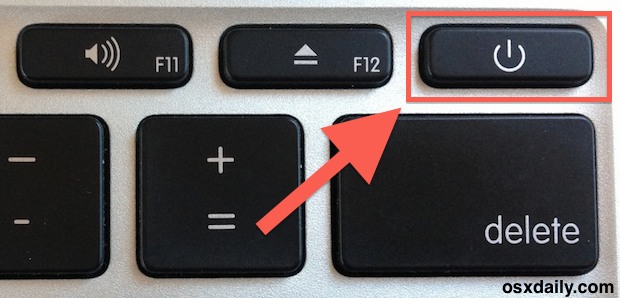
Want to almost instantaneously put a Mac to sleep from your external keyboard? It’s much easier than you’d think, and you don’t need to pull down the  Apple menu to accomplish this task. Instead, to quickly sleep your Mac just hold down Command + Option + Eject for about two seconds, and the computer … Read More

Convert a Nero Image File to ISO

Sep 25, 2009 - 8 Comments

Someone recently sent me a Nero Image File and I had no idea what to do with it, but after some looking around I discovered you can easily convert a Nero image File to ISO format. Apparently the only difference between a Nero Image File and a typical ISO is that Nero adds a 300k … Read More

Stop Flash from Automatically Loading in Safari with ClickToFlash

Sep 24, 2009 - 8 Comments

I love the web, I hate Flash. I know this isn’t always a popular opinion, but for me it causes a lot of problems. It’s a slow bloated resource hog that makes browsing the web painful, loud, and obnoxious. Really the only time I actually want to use it is on video sharing sites like … Read More

Access and Mount an SMB Share via Command Line

Sep 24, 2009 - 4 Comments
Mac Terminal icon

Do you need to access and mount an SMB share from the command line on a Mac? You may be used to connecting to Windows PC from the Mac networking features to mount a Windows share on Mac, but you can also connect to Samba shares from the Terminal too. This article will show several … Read More

How to Hide All Desktop Icons in Mac OS X

Sep 23, 2009 - 58 Comments
Desktop icons disabled in OS X

Want to hide all desktop icons on a Mac? Desktop icon clutter can really impact workflow by overwhelming you with files and just too much stuff to look at. Inevitably, it can be hard to avoid since a lot of apps download things to the Desktop by default, we save things there, screenshots go there, … Read More

Get Gmail Push Notifications on the iPhone

Sep 22, 2009 - 3 Comments

Want Gmail Push Notifications on your iPhone? In a crafty workaround, you can get Gmail to push notifications to your iPhone by setting up Gmail as a Microsoft Exchange account. The downside to this method is that you can only have one Microsoft Exchange account setup on your iPhone at a time, so if you … Read More

Check a Macs Uptime and Reboot History

Sep 22, 2009 - 19 Comments

The “uptime” of a computer is how long it has been since it was last rebooted or started up. Since Macs are very stable and generally OS X users rarely have to reboot their machines, the uptime of Macs can reach impressive numbers. You can check the uptime and reboot history of any Mac if … Read More

Disable Spotlight in Mac OS X 10.6 Snow Leopard

Sep 20, 2009 - 42 Comments

Disabling Spotlight in Snow Leopard is pretty easy, launch the Terminal and type the following command: sudo mdutil -a -i off This tells the Spotlight manager to disable all indexing on all volumes, the command will require your administrative password to execute. Re-enabling Spotlight in Mac OS X 10.6 Snow Leopard is just as easy, … Read More

Force Quit a Stuck Application on iPhone, iPad, iPod Touch

Sep 17, 2009 - 7 Comments

The iPhone and iPad are amazingly stable, but every once in a while you may run into an app that misbehaves itself and seems to become stuck in some infinite loop of iPhone-frozen madness. Thankfully, if you find yourself in that situation you can force quit a frozen application on your iPhone, iPad, or iPod … Read More

Use a Quick and Dirty Stopwatch via the Mac Terminal

Sep 12, 2009 - 2 Comments
terminal

Need a super easy and simple Stopwatch on the Mac, but don’t want to download anything like a third party app or utility? Look no further than the command line. You can create an instant quick and dirty stopwatch via the Mac OS X (or linux) command line by launching the Terminal app and typing … Read More

How to Burn an ISO on your Mac

Sep 11, 2009 - 8 Comments

Burning an ISO in Mac OS X is very easy thanks to the built-in Disk Utility application that is included from Apple on every Mac. With Disk Utility being bundled with Macs directly from Apple, it also has the huge added bonus of being free, and although there are plenty of paid options out there, … Read More

iTunesHelper – What does iTunes Helper do?

Sep 10, 2009 - 16 Comments

iTunesHelper or iTunes Helper, is a program from Apple that runs in the background and monitors for the connection of any iPod or iPhone to the computer, if an iPod or iPhone is detected it will automatically launch the iTunes application. The functionality is the same on both Mac OS X and Windows PC’s, and … Read More

How to Convert a DMG to ISO on Mac, & Convert ISO to DMG on Mac

Sep 9, 2009 - 20 Comments

Have you ever needed to convert a DMG file to ISO in Mac OS, or wanted to convert an ISO file to DMG on your Mac? Converting image files on your Mac is easy thanks to a command line utility included in Mac OS X called hdiutil.

How to Ignore Mac Software Update Packages in Snow Leopard

Sep 8, 2009 - 5 Comments

Apple certainly means well with the Software Updates, but sometimes I get update notifications I just don’t care about, or just don’t want to install for whatever reason. If you’re in this situation and you have a version of OS X before the App Store that ran exclusively in a native Software Update window, like … Read More

Subscribe to OSXDaily

Subscribe to RSS Subscribe to Twitter Feed Follow on Facebook Subscribe to eMail Updates

Tips & Tricks

News

iPhone / iPad

Mac

Troubleshooting

Shop on Amazon to help support this site