Sometimes you may need to forcibly restart an iPad Pro, usually because of some freezing software or buggy behavior, but sometimes just as a general troubleshooting step. Initiating a forced reboot on iPad Pro models with Face ID and without a Home button is different from the process was on earlier iPad devices. This article aims to show you how to force restart a new model iPad Pro.
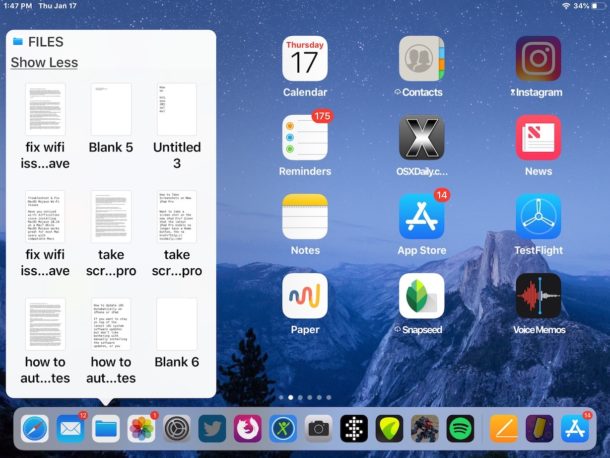
If you interact with the Files app frequently in iOS, you might be pleased to discover that the Files app offers a quick and easy way to see recent files, right from the Home screen of iPhone or iPad. Even better, you can launch recent documents directly from this quick Files access feature in iOS.
The recent files trick works on all modern iOS devices, but it’s slightly different with the iPad and non-3D Touch iPhone than from 3D Touch iPhone models.
If you want to see multiple pages of a Pages app document open at the same time on iPad, you can use the “Two Pages” view to place a multipage document into a side-by-side view, sort of like a split screen mode but for viewing the same document. This allows you to see two pages of any open document on the same screen, without having to scroll around on the iPad like you would with the normal single page document view.
The Two Pages view is an option specific to Pages app on iPad, it’s not part of Split View or any of the other multitasking options on the iPad.
If you have recorded voice memos on the Mac you may have then decided you’d like to save a voice memo as an audio file. The “File” menu on the Mac has contained the various save and export options since the beginning of the Mac platform, but for whatever reason the Voice Memos app on Mac currently does not have any “Save” or “Export” options within the Voice Memos app. So how do you save a file in Voice Memos for Mac? We’ll show you a few different ways.
Some 2018 MacBook Air (and possibly 2018 MacBook Pro) computers may exhibit seemingly random screen flickering, where the entire display backlight blinks and flickers. This can be alarming, since often screen flickering indicates a hardware issue.
But in this case, the MacBook Air screen flickering may actually be software related, and after some investigation it appears the issue relates some specific settings on these new Macs.
While this is likely an uncommon issue, we’ll discuss how to reproduce the screen flickering issue on impacted 2018 MacBook Air hardware, and also a few workarounds that appear to stop it from happening.
You can capture Live Photos of FaceTime video calls at any time during a FaceTime video chat on iPhone or iPad. This offers a fun way to capture moments of a video chat, and just like any other Live Photo, the resulting image will be a short video clip with audio that is saved and able to be shared as usual.
Resetting the SMC on newer model MacBook Air and MacBook Pro computers from the 2018 & 2019 model year onward is a different process than resetting the Mac SMC on prior Macs, this is because of the T2 security chip that controls Touch ID and secure boot functionality on the latest Intel Mac laptops. Despite being a different procedure, resetting the SMC on the 2019 MacBook Air, 2019 MacBook Pro, 2018 MacBook Air, 2018 MacBook Pro can still be a necessary troubleshooting procedure to resolve some particular issues.
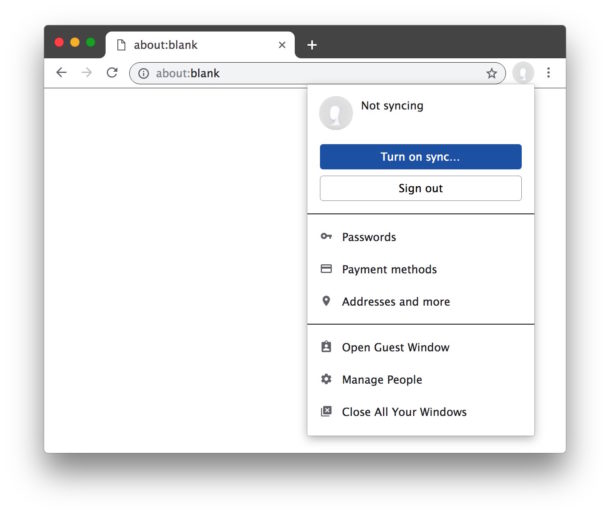
The latest versions of Google Chrome have a feature called Chrome sign-in that causes the Chrome web browser to login to itself when you login to another Google web service like Gmail or YouTube. In practice this means you’ll have your Google profile picture tucked into the upper right corner of every Chrome window which is linked to your Google account.
Some Chrome users find Chrome sign-in to be great, while others may not like it. If you fall into the latter camp and don’t like automatic Chrome Google sign-in, then fortunately the latest versions of Chrome make it easier to disable the Chrome automatic sign-in feature. We’ll show you how to turn this capability off.
Want to quit apps on your new iPhone? If you have an iPhone 12, iPhone 12 Pro, iPhon 12 Pro Max, iPhone 12 mini, iPhone 11, iPhone 11 Pro, iPhone 11 Pro Max, iPhone XS, iPhone XR, or iPhone XS Max, you might be wondering how to quit apps and access the multitasking App Switcher, since there is no Home button.
Instead, all modern iPhones and iPads without a Home button have the ability to access the App Switcher and to quit apps by using a swipe gesture instead. This article details how that works.
Sci-fi movie fans have undoubtedly seen countless scenes where a character is interacting with some unique looking computer interface, making a mundane task like issuing a shutdown command appear far cooler than it would otherwise be. But have you ever thought, gee that looks cool, what if I could make my computer look like that crazy looking thing in the movies? eDEX-UI allows for that with what is basically a terminal emulator that is masked in a snazzy sci-fi stylized interface.
Recording voice notes on the Mac is now easier than ever thanks to the appropriately named Voice Memos application in Mac OS. While Mac users have long been able to record sound and audio with QuickTime Player, the latest versions of MacOS system software include a built-in Voice Memos app that aims to make voice memo recording a bit easier and more centralized within a dedicated app for that purpose.
Conveniently, the Voice Memos app for Mac also syncs through iCloud with the accompanying iOS app, so Voice Memos that have been recorded on iPhone or iPad that are using the same Apple ID will also find the recordings available to them. This is particularly great if you have multiple devices within the Apple ecosystem, since all voice memos will be accessible from any of your other Mac, iPhone, or iPad devices too.
Apple has released the fourth beta versions of iOS 12.1.3 and macOS Mojave 10.14.3 for users engaged in the beta testing programs.
The fourth beta builds of iOS 12.1.3 and macOS 10.14.3 arrive just a few days after Apple released beta 3 of the same system software versions, which could indicate an acceleration towards final releases of stable system software builds to the general public, or perhaps an urgent issue was discovered in beta 3 that has been addressed in the beta 4 builds.
Knowing the exact size of an available App Store update before beginning the app update and download process can be helpful for many iPhone or iPad users. The iOS App Store offers the size of available app updates, but you must know where to look to find that download size information.
This trick is probably most relevant for iPhone or iPad users with slower internet connections or who are in limited bandwidth situations, but it’s obviously useful to anyone else who simply finds it helpful to know the size of something before they begin to download it.
Some iPhone and iPad users may rarely discover the Photos app freezes up when attempting to use it, or the Photos app crashes repeatedly or is unusable when trying to open the app. Typically this is associated with an unresponsive screen as well, and the only thing you can do is exit out of the Photos app, being unable to view any pictures, videos, or anything else within Photos app of iOS. Sometimes you can open Photos app, but all of the pictures and videos are blank white thumbnails, and trying to access any of that media freezes the app.
If you’re experiencing the Photos app continuously freezing or crashing on an iPhone or iPad, and just generally not working as expected, the troubleshooting steps below may help to resolve the problem for you.
Apple has released MacOS Mojave 10.14.3 beta 3 for users enrolled in the beta testing programs for Mac system software. A developer build is usually available first, soon followed by the same build for public beta testers.
Separately, Apple also released iOS 12.1.3 beta 3 along with new betas for tvOS and watchOS.
Apple has released iOS 12.1.3 beta 3 to developers and public beta testers who are running beta system software on their compatible iPhone or iPad.
The newest iOS beta likely focuses on various bug fixes and security updates, and is unlikely to include any major new features or sweeping changes.
Separately, Apple has also release the third beta version of tvOS 12.1.2 and watchOS 5.1.3. Currently absent from the beta updates is any update to macOS Mojave 10.14.3, which is still at beta 2.
If you’re a frequent WhatsApp user, you may find that WhatsApp data and cache can take up a considerable amount of storage space on an iPhone, iPad, or Android phones, and thus it’s reasonable if some users will want to clear out WhatsApp cache and data to free up storage space on their device. Separately, some users may want to delete WhatsApp data for privacy purposes.
One way to clear WhatsApp data is to to quite literally delete message threads and conversations completely from the app, but you can also be more specific and see more information including the storage size of each type of data you plan on removing. Deleting WhatsApp data storage and caches is not without consequence however, and by doing a full cleaning you’ll be deleting message threads and all of their contained photos, gifs, videos, voice messages, documents, stickers, and other information contained within WhatsApp and various conversations you’ve had. Fortunately WhatsApp gives you some level of granular controls on what data you can remove, so if you only want to delete photos or videos from a specific thread with a particular contact, you can do that.
Happy New Year week continues with yet another roundup guide! This roundup collection focuses on some of the most helpful troubleshooting guides from 2018, tackling a variety of potential problems that people may have encountered with a Mac, iPhone, or iPad.