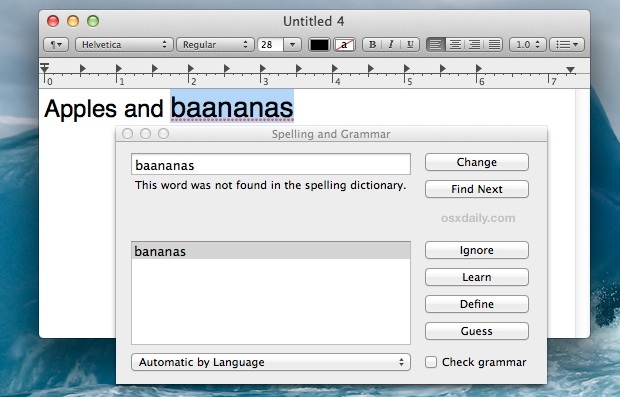
Mac OS X includes a powerful built-in spelling and grammar tool that runs automatically when you type in many apps, but a separate panel can be summoned from just about any text entry point or app that provides additional support for the feature.
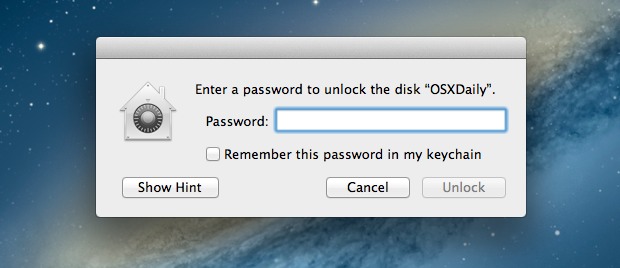
It’s now easier than ever to quickly encrypt external disks and hard drives from Mac OS X, whether they are USB drives, Firewire, flash drives, or even SD cards.
While you can still use the traditional route to encrypt disks through Disk Utility, from modern versions of MacOS and Mac OS X the process is streamlined directly into the Finder and desktop, making it easier and faster.
We’re all very excited about the iPhone 5 around here, but that doesn’t mean we can’t have a good laugh at the expense of ourselves and the device itself. We already shared a pretty funny video of people who think an old iPhone 4S is an iPhone 5, but here’s a collection of iPhone 5 related humor that’s been circling the web recently. If you follow us on Facebook you’ve probably already seen a few of these, here’s a roundup for those who haven’t:
How Apple Made iPhone 5
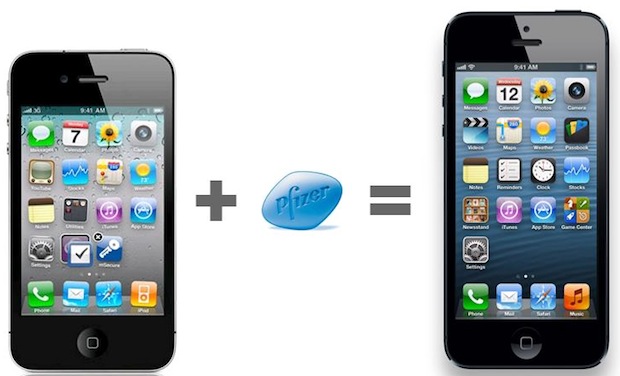
Take an iPhone 4… add a popular little blue pill that you see advertised constantly during football games… and you have iPhone 5!
Banned iPhone 5 Promo Video
These are always funny and totally stupid, watch it embedded below for a quick laugh:
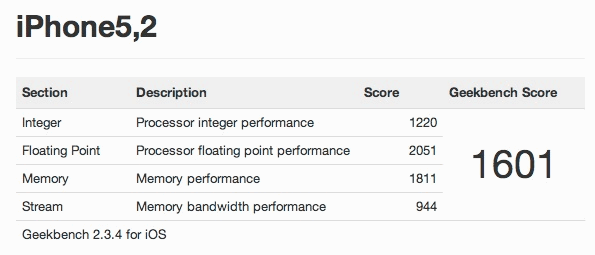
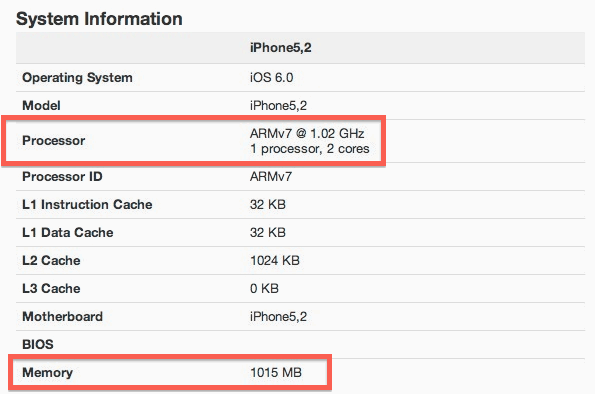
The first benchmarks for iPhone 5 have appeared and show a processor that is nearly twice as fast in GeekBench scores as it’s predecessor, the iPhone 4S.
In the preliminary GeekBench score found by MacRumors the new iPhone 5 scores a 1601, while the previous model iPhone 4S scored a high of 851. This should translate into a very noticeable speed increase for just about everything, be it launching apps, editing photos and video, or even something as simple as taking a picture. For those who are upgrading from an iPhone 4 to the iPhone 5, they can expect a significant speed boost, as the iPhone 4’s GeekBench score averages around 380. No more deleting pictures to speed up that slow iPhone camera, the new processor and RAM will speed right through any actions.
To put this number into further perspective, a 1601 GeekBench score is about the same as a 6 year old Power Mac G5 tower, except obviously the iPhone 5 fits in the palm of your hand rather than taking up an entire desk.
The GeekBench entry reveals how the speed boosts are possible by giving us the first information about the iPhone 5’s A6 processor, it’s memory, and L2 cache. Apple isn’t one to traditionally boast about specs, but the hardware on the iPhone 5 is impressive:
Dual-Core 1.02 Ghz ARMv7 Processor (A6)
1GB RAM
1MB L2 Cache
The iPhone 4S had 512MB RAM and a dual-core 800MHz A5 processor, while the iPhone 4 also had 512MB RAM but only a single core 800MHz A4 CPU.
Want to initiate Text to Speech with a keyboard shortcut on the Mac?
The excellent Mac OS text to speech function can be activated with a simple keystroke, but first you have to enable the feature. This is a great trick because it allows you to quickly speak what is in on the Mac screen like a document, PDF file, ebook, or web page, and all it takes is a keyboard shortcut to speak the text that is selected or in the active document.
This article will show you how to enable the Speak Selected Text keyboard shortcut on the Mac.
AutoFill is a great feature that saves credentials to Safari to prevent you from having to enter a bunch of login details every time you browse around the web on your favorite sites. If you ever decide you don’t want to have an autofill password saved however, you’ll find that Safari for Mac OS X makes it easier than ever to manage and remove passwords stored for the various websites you visit from the Mac.
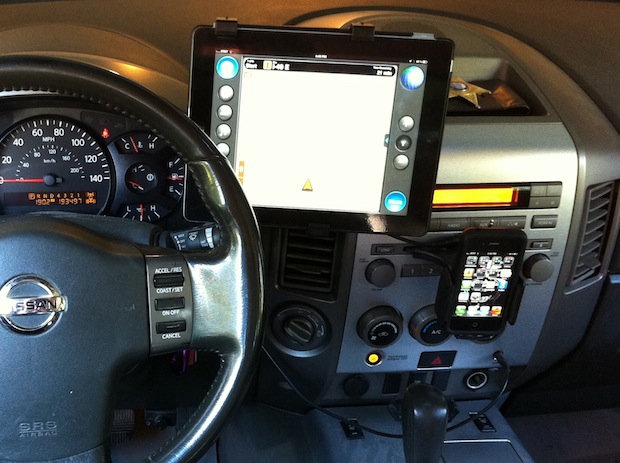
This weeks featured setup is a really great two-for-one arrangement from Tim N., an investigator who was able to replace a bunch of different gadgets and hardware with some killer Apple gear both in the office and on the road.
First up is his office setup, which includes some great Mac gear:
iMac 27″ (2011)
24″ Dell monitor
Apple Wireless Keyboard and Magic Trackpad
iPad 3 64GB
iPhone 4S 64GB
Creative Labs 2.1 speakers
But now things get even more interesting, because that iPad 3 and iPhone 4S also go on the road into a customized Nissan Titan truck setup to help Tim with his job:
The iPad alone now carries the mobile tech burden and allowed or consolidating a bunch of old separate hardware and gadgets, eliminating clutter and costing less by replacing a Garmin Nuvi GPS unit, ExpressRC XM receiver, Motorola Q, Parrot 6100 Bluetooth, Blackberry, and an iPod Classic for music. So what replaced all those physical gadgets? Apps on the iPad of course! Critical apps include Motion X GPS Drive, Pandora, Spotify, CalenGoo, Skype, and the standard iOS app suite for email and messaging.
How great is it that just an iPad can do all that?
Do you have an interesting Mac/Apple setup you want featured? Send in a list of hardware and what you use it for to osxdailycom@gmail.com
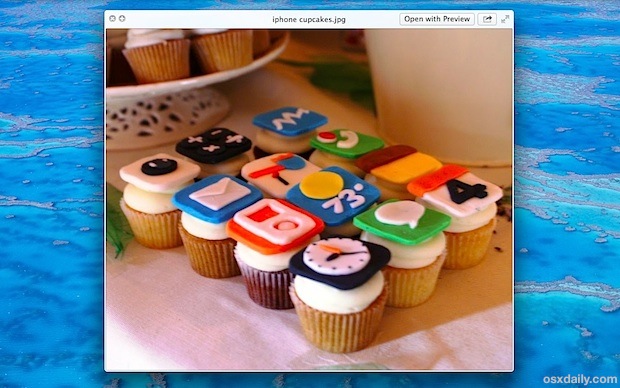
Did you know you can instantly open any file into Quick Look with just a simple gesture?
From the Finder in Mac OS (from OS X Mountain Lion onward), all you need to do is hover the cursor over the file in question, then do a three-fingered single tap on the file to immediately launch the document into Quick Look’s Finder preview.
This tap gesture even works to launch Quick Look from the Open and Save dialogs, just like the traditional spacebar command.
If you want to go further than Quick Look, once the file is previewed just right-click on the “Open With” menu to launch the file into any compatible app.
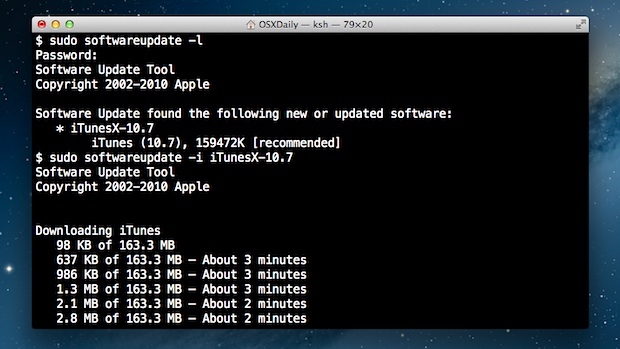
Using the command line softwareupdate tool you can update Mac OS X system software without using the App Store.
This is particularly useful for Mac users running later versions of Mac OS X where the software update system is primarily handled through the Mac App Store, but can occasionally either go awry or be inaccessible in situations of remote administration.
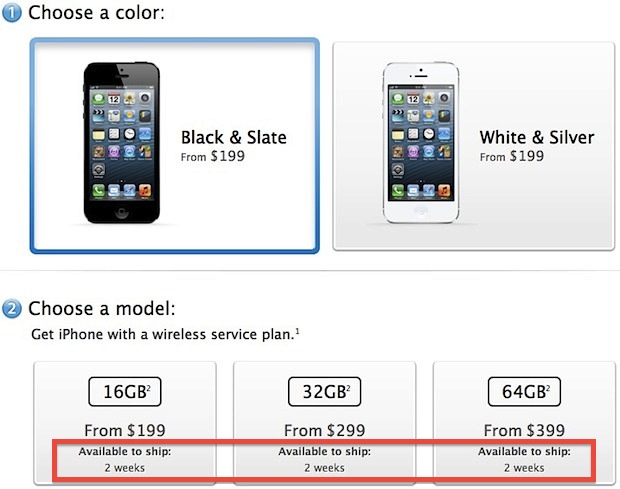
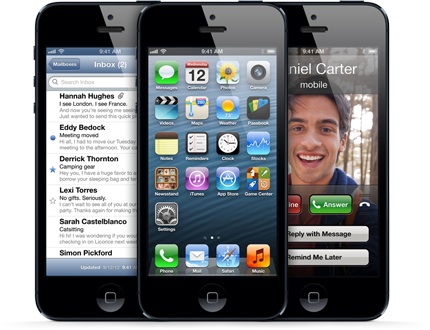
If you didn’t stay up until midnight (or 3AM for those on the east coast) and pre-order right away, you already missed the opportunity to get an iPhone 5 shipped to you on launch day through Apple. In an impressive display of demand, the iPhone 5 pre-orders sold out in an hour, and by 1AM PST the shipping window was moved back 2 weeks on every model color, size, and provider.
For those who decided a full nights sleep was worth more than getting the iPhone 5 as soon as possible, you may still be able to get the hottest phone directly through the carrier websites listed below:
Though some of the carrier websites still list September 21 as the ship date, it’s quite possible they haven’t updated yet and your device could arrive later than expected.
Of course, you can always still wait in line at an Apple Store or mobile provider on the morning of September 21 and get your hands on one right away too.
Want a contract-free iPhone 5? Buying an unlocked iPhone 5 doesn’t come cheap, but the good news is the price hasn’t gone up and the cost has remained the same as the prior unlocked iPhone 4S model.
Unlocked iPhone 5 Prices
iPhone 5 16GB – $649
iPhone 5 32GB – $749
iPhone 5 64GB – $849
These prices come from directly from Apple’s Online Store. Both black and white colors are the same price, as are the out-of-contract prices on any carrier network.
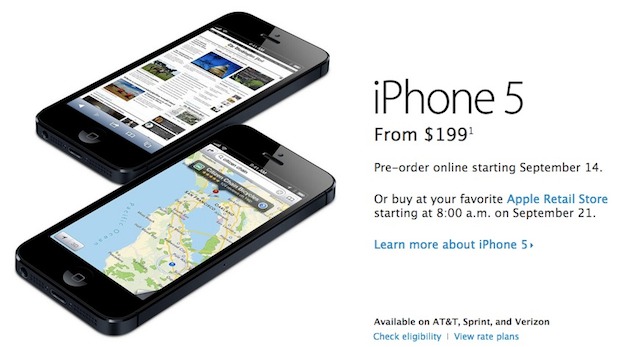
Obviously with the hefty prices, it’s much more economical to pay the in-contract prices which start at just $199. Whether you’re going contract-free or signing an agreement, we still recommend buying the iPhone 5 16GB for most users,.
One important thing to remember is iPhone 5 uses an all new nano-SIM card, so it won’t be a matter of just cutting an existing sim and popping it in there to work on a different network. Because of the new nano-SIM requirement you’ll need to find a carrier that offers compatible sim cards.
Wondering which iPhone 5 to buy? We’ll help you answer that question with some common sense, featuring two use cases that will cover the vast majority of iPhone owners.
Average iPhone User – iPhone 5 16GB
The average iPhone user and anyone on the standard upgrade cycle should go with the base-model iPhone 5. Why? It’s the most reasonably priced at $199 with a two-year contract, it holds it’s resale value the best for when you go to upgrade again at the next release cycle, and with iCloud, 16GB is a more than adequate amount of storage for the vast majority of users needs. For just about every average iPhone 5 user, the base model 16GB iPhone is the way to go.
iPhone Photographer – iPhone 5 32GB
Planning on using your iPhone as your primary camera? You should get the 32GB model. Even with iCloud and Photo Stream to help relieve the space burden, the iPhone 5 has a 8MP camera and that means file sizes are often 4MB per picture, which will quickly take up space. Add in a handful of great apps, a music collection, and the occasional 1080p movie recorded from the iPhone 5, and you’ll max out the base models 16GB capacity quick once you start snapping lots of photos. The 32GB model is the most reasonable solution you won’t have to constantly delete photos to free up space, and it doesn’t cost too much more at $299 with a contract. Yes if you’re on the rapid-upgrade cycle, you will lose most of that $100 price difference, but if your iPhone 5 is going replace your point-and-shoot camera, it’s well worth the difference and sure beats cluttering your pockets with a separate digital camera.
What Color?
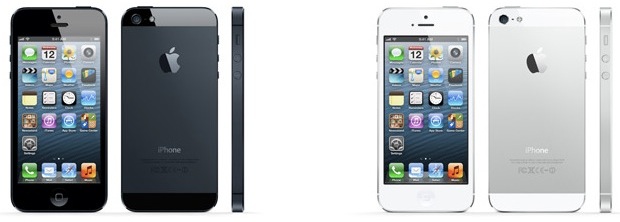
Which color is entirely personal preference. The black model is extremely sleek with it’s slate back, and a black screen border tends to make colors pop. Meanwhile, the white model has a beautiful aluminum backing that matches the iPads and MacBooks, and looks extremely clean. You’re on your own here!
Which Cellular Carrier is Best for iPhone 5?
This is the hardest question to answer because it largely depends on where you live, where you go, and your monthly budget. The iPhone 5 supports true LTE networking, which is much faster than 3G, but not all areas have LTE coverage yet. Your best bet is to use the carriers coverage maps, find the areas you most often visit, and check coverage based on those requirements, and then use Apple’s excellent iPhone plan comparison tool to determine the best plan for your budget.
Currently, Verizon has the most LTE covered areas, but AT&T and Sprint are rapidly catching up and expanding their networks. If you live in a major US city and spend most of your time in that city, Verizon very well could be the best bet for consistent LTE speeds, but Verizon plans often cost a bit more than AT&T. Meanwhile, Sprint offers true unlimited data – even on LTE – and the cheapest plans. An important thing to remember when checking coverage also is the distinction between what AT&T calls 4G and LTE, LTE is the superfast network that the iPhone 5 is designed to take advantage of, while 4G is just a slightly faster 3G. Ultimately, LTE is what you’re looking for to take advantage of the crazy mobile broadband speeds that will forever change mobile usage.
For me, I live in an area without LTE coverage on any carrier, and I still have an ancient grandfathered unlimited data plan on AT&T. For that reason, plus the eventual SIM card unlock, I’ll be sticking with AT&T for iPhone 5. That said, if I lived in a major city with LTE coverage, I’d probably go with Verizon because their LTE is very fast, you usually get the Personal HotSpot feature bundled with their data plans, and because you can use FaceTime over the VZ cell network. Meanwhile, if I wanted the cheapest monthly bill for using huge amounts of data, Sprint would be the obvious winner. As you can see the decision will vary based on your needs, and that’s why spending a few minutes looking at each option is worthwhile.
What happens when you give someone the now old iPhone 4S and tell them it’s a brand new iPhone 5? Late-night talkshow host Jimmy Kimmel finds out, and the results are pretty funny. With people commenting on the supposedly bigger screen, being sturdier, and feeling lighter, perhaps Apple doesn’t need to redesign the iPhones often after all? Just tell them it’s all new and that’s good enough for some!
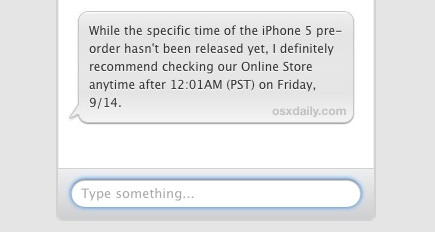
iPhone 5 pre-orders are starting at 12:01AM Pacific Standard Time (3:01 Eastern) on September 14 – midnight tonight. The pre-order date was previously announced for Friday, September 14, but the beginning time was uncertain until now. Since then, MacRumors notes that both Verizon and Sprint have come forward to announce the midnight ordering, and presumably AT&T will follow suit.
Apple has now confirmed the midnight pre-order time, and earlier they were previously suggesting the 12:01AM PST time when asked through online representatives and phone sales reps:
You may want to set an alarm clock or reminder for your appropriate time-zone if you’re interested in pre-ordering an iPhone 5 for arrival on release day on September 21. Typically the initial batches of pre-orders sell out fairly quickly, and shipping times slip a few days once this occurs.
Alternately, waiting in line at any Apple Store or reseller remains a perfectly viable option on release day as well, and is almost always a guaranteed way to get your hands on any hot Apple device right away. Sprint, Verizon, and AT&T each will offer iPhone 5 immediately on release day.
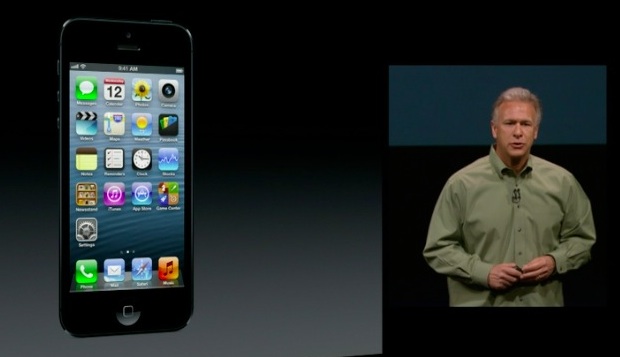
Apple has posted the keynote video to the iPhone 5 launch event. If you’re a fan of Apple’s event videos it’s well worth watching, you’ll see the usual cast of Apple all-stars unveiling the iPhone 5, new iPod touch, iPod nano, review iOS 6 and some great new apps and features, a discussion of iTunes 11, and even get a bit of a State-of-the-Apple-Union type overview from CEO Tim Cook.
If you’re having trouble viewing the video in your browser, try loading it with Safari rather than Chrome or Firefox, or you can download the keynote video as a video podcast from iTunes.
Don’t want to spend an hour watching the keynote video? Here’s a quick overview of everything launched today.
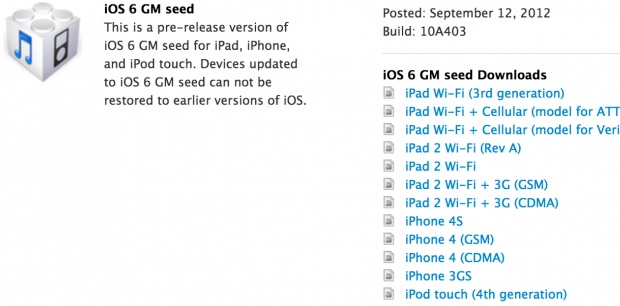
The Golden Master build of iOS 6 is now available for registered developers to download through the Apple Dev Center. Device compatibility is the same as the final version, with firmware files being available for the iPhone 4, iPhone 4S, iPhone 3GS, iPod touch 4th gen, iPad 2, and iPad 3rd gen.
Xcode 4.5 GM is also available alongside iOS 6 GM, and the new version of Xcode includes an updated iOS simulator to accommodate for the larger iPhone 5 display. iOS 6 requires the recently released iTunes 10.7 update to install by firmware and to sync devices properly.
For those who are not developers, iOS 6 will be available to download on September 19.
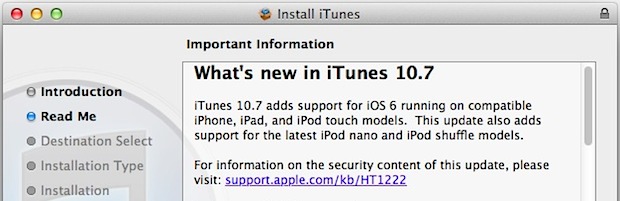
Apple released a minor update to iTunes today for both Mac OS X and Windows. Versioned as iTunes 10.7, the update is intended as a compatibility release for the upcoming iOS 6, and devices that will run iOS 6 such as the new iPhone 5 and iPod touches.
Unchecking the boxes and clicking the giant blue Download button is sufficient to get the update, you do not need to enter an email address.
iTunes 10.7 will also appear as an update to existing iTunes users through the app itself as well as from Software Update, those should appear shortly if you do not see them yet.
A complete redesign of iTunes is expected in October as iTunes 11, note that iTunes 10.7 is not the release with a redesign and is a minor update.


 AutoFill is a great feature that saves credentials to Safari to prevent you from having to enter a bunch of login details every time you browse around the web on your favorite sites. If you ever decide you don’t want to have an autofill password saved however, you’ll find that Safari for Mac OS X makes it easier than ever to manage and remove passwords stored for the various websites you visit from the Mac.