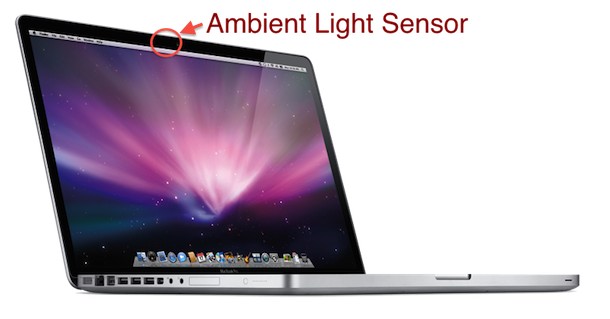
The ambient light sensor on the newer Unibody MacBook Pro (all models: 13″, 15″, 17″) is located directly next to the iSight camera at the top of the display. You can verify the location by holding your hand over the area to the left of the iSight camera and watch as your screen dims and the keyboard lights brighten.
The location of the ambient light sensor on the pre-unibody older MacBook Pro’s (all models: 15″ and 17″) is located inside the grills of the speakers near the keyboard. Again you can verify this by holding your hands over the speaker grills and watch as the screen backlighting adjusts based on the change in the ambient lighting.
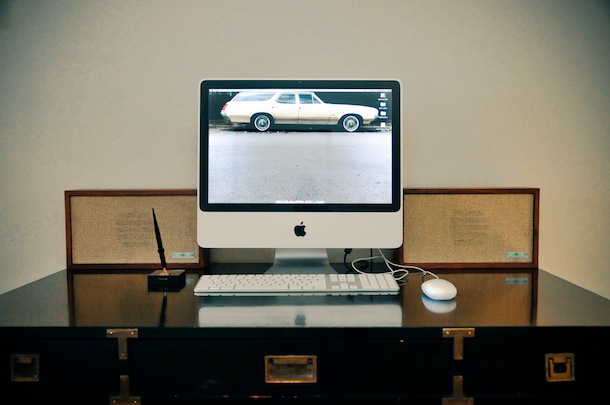
From the vintage speakers to the beautiful iMac, something about this setup just speaks to me. I don’t know of any other computer hardware that actually accents a room into something more beautiful, rather than just “oh, there’s a computer” – or maybe I just love Macs?
Want to save a document or web page as a PDF file, but you don’t own Adobe Acrobat? No problem, you can print documents, webpages, or nearly anything as a PDF, this means it creates a PDF file directly in Mac OS X using a built-in feature, without the need for any additional software or apps. In fact, this trick works with almost any Mac app, and basically if you can print a document or file through the normal “Print” functions, then that means you can also turn that into a PDF document through this method.
Some pretty big news today on the iPad front, two reports on AppleInsider indicate that the iPad is already a wild success. The first report states that Apple is now selling over 200,000 iPads a week in the United States alone, which is almost twice the number of 110,000 Macs sold every week in the USA. Analysts are revising sales estimates, and also predict some product cannibalization:
…Abramsky believes Apple will sell 8 million iPads in calendar year 2010. That’s up from his previous prediction of 5 million iPads in calendar 2010. The analyst believes the product will result in 25 percent cannibalization, but increase revenue to $59.7 billion…
If that’s not impressive enough, the findings of this second report might be. The iPad has an amazingly high consumer satisfaction rating of 91%
Only 2% of iPad owners say they are unsatisfied with their purchase, and I’m really not too surprised by this. Having used an iPad a fair amount myself, I have to say I am thoroughly impressed.
I truly believe the iPad is the consumer level computing device of the future – except that it’s here now. Of course, buying an iPad right now is a different story. Apple Stores are continuously sold out of the device and trying to buy it online from Apple reports a 7 to 10 day wait time. You can still purchase the iPad on Amazon but many sellers are attempting to fetch prices higher than the MSRP, and the situation on eBay and Craigslist is even worse. So if you’re in the market for an iPad, you might have to wait a little while.
I recently bought this Mini DisplayPort to DVI Adapter from Amazon for my MacBook Pro. It cost less than $8 including shipping, and it arrived at my house in about four days (for comparison Apple’s official adapter is $29 + shipping).
So how does a cheap third party MiniDisplayPort to DVI adapter work compared to Apple’s official adapter? Identically. A coworker has the Apple model and other than some graphic printed on the adapter itself I can’t tell a difference in either the build quality or the performance, even the packaging is really similar (see picture below). Setup is as easy as it gets, plug the device into your MacBook Pro and connect it to your monitors DVI cable, it’ll instantly work.
Brian asks: “I need to add line numbers to a text file. I don’t mean line numbers in the text editor, I mean adding a number next to each item inside a text file. Is this possible to automate or do I have to manually edit the file typing 1, 2, 3 and going insane?”
Yes, you can easily hardcode line numbers into a text file… we’ll show you exactly how to do it! To be completely clear, what this is going to do is add a counting line number to the left side of each new line of text, prefixing each line with the appropriate corresponding number. This hard codes it into the text file, which means it’s different from simply showing line numbers in an app like TextWrangler, VIM, or BBEdit. Read more »
You can remove the surface scratches on the back of an iPhone case by using a mildly abrasive rub or fine sandpaper. The anti-scratch coating is actually where many of the smaller finer scratches on iPhones are shown, which makes them relatively easy to buff out with some care. Whether you are using the toothpaste or sandpaper method to repair the scratches, you will want to be careful as to not rub the anti-scratch coating off of the iPhone case.
Warning: Try these methods at your own risk! We are not responsible for you damaging your iPhone in any way, and if you are not confident in your ability to do it right, you should probably avoid the techniques altogether! Read more »
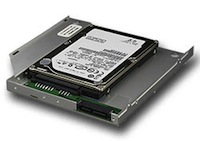
I find myself never using the MacBook Pro’s optical drive, the only time I have used it was to boot Mac OS from a DVD to reformat and reinstall Mac OS X. Now that it’s so easy to install Mac OS using an external drive though, is having a DVD drive really a good usage of limited hardware real estate on your MacBook/Pro?
If you’re like me, you might consider repurposing the optical drive slot to accommodate another hard drive, like a really fast SSD drive. You can do this using a great product from MCE called the OptiBay, and any internal 2.5″ drive (not just SSD’s). LifeHacker just wrote up a complete walkthrough on the hardware installation process, and it’s really motivated me to do this install myself.
What you’ll need to install a hard drive or SSD into the Optical Bay of a MacBook / MacBook Pro:
You can adjust Gmail Notifier’s mail checking frequency interval by accessing an advanced preference in the application. In this example we will change the email check interval to 3 minutes.
* Click the Gmail Notifier menubar icon
* Hold down Command+Option keys and click on “Preferences” in the drop down menu
* Enter the following information exactly in the Key and Value boxes:
Key: AutocheckInterval
Value: 3
* Note that AutocheckInterval is case-sensitive, the second number value is the minutes between checking.
* Click the “Set” button
* Quit and re-open Gmail Notifier
By default Gmail Notifier does not have a value set for AutocheckInterval, which can lead to extended lengths of time between email checking (hours if you’re away from your computer, and regularly 30+ minutes while at your Mac). You can also just manually adjust this setting by adding the value in a Plist editor.
If you’re like me, you store a lot of information on your iPhone that you want to keep private. Accordingly, you might be interested to know that, by default, the backups made from an iOS device to iTunes are not encrypted, and can be dug through rather freely if someone was interested in doing so. Furthermore, restoring the device and seeing all your data live on another iOS device is just a matter of clicking the restore button. While this is very convenient for restoration purposes, it also could potentially pose a security and privacy risk for some individuals and situations, particularly for users who aren’t using broader password protection on their Macs and computers.
If you’d like more security with your iPhone, iPod, and iPad backups, be sure to enable the encryption feature in iTunes. This effectively locks your iOS backups made to local Mac and Windows PC’s through iTunes with a password (note that iCloud backups are protected by the iCloud Apple ID security, and thus you don’t need to individually enable passwords for them). Read more »
If you’re a writer, developer, designer, musician, anyone that needs to have complete concentration to create freely, this app just might be your saving grace. Freedom forces you to pull away from the ubiquitous distractions of the online world by disabling your Mac’s network interface for a set amount of time, up to 8 hours. When the time is up, Freedom automatically reenables your Mac’s networking capabilities and you’ll be back online again as usual. How’s that for serious concentration?
You’d be amazed to find out how easy it is to concentrate on something when you can’t really do much else. As a student I used to unplug my computers ethernet cable when I had to really focus on a project, which is proof of concept really.
Freedom is a great app and is now an essential part of my Mac productivity arsenal, highly recommended.
Growl is a desktop notification system that allows applications to publish updates and items to floating windows on your desktop. This allows you to see things like updates, information, and status changes to whatever application is publishing the Growl notification.
The advantage to Growl is that regardless of what application has the focus, you’ll see the published status update. This is also the disadvantage, there are many times when you are using an application and you simply don’t care to see updates from another application printing to your desktop. I find Growl updates to be of a particular nuisance when you are using a Mac with a smaller screen resolution, when display real estate is valuable any additional clutter can really get in the way.
With all this in mind, here are a few ways to disable Growl notifications, both on an application specific basis, and on a system wide basis by disabling Growl completely.
Disable Growl Notifications for specific applications
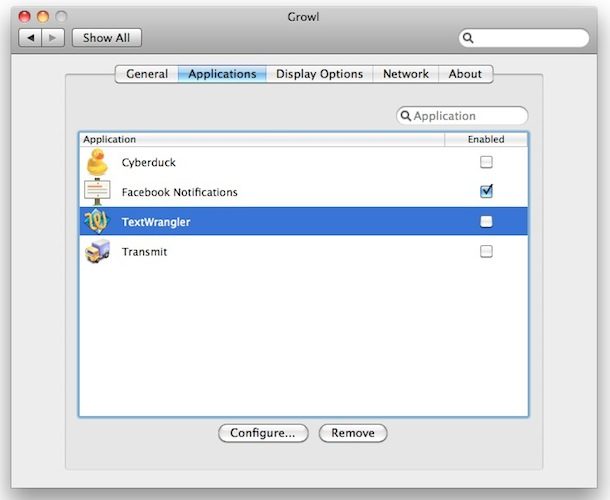
You can specify applications to disable Growl notifications for by using the Growl control panel, here’s how:
* Open System Preferenecs
* Click on the “Growl” icon
* Click on the Applications tab
* Select each application you want to disable Growl support for by unchecking the checkbox next to the application name.
In this screenshot example, Cyberduck, TextWrangler, and Transmit have had Growl support disabled but Facebook Notifier for Mac is still allowed to publish Growl notifications to the desktop.
* Once you have unchecked the ‘Enabled’ checkboxes next to the application names, close the Growl system prefs and your changes will take effect immediately for those applications.
Disable Growl Notifications completely
OK so you’ve determined that there is no app worthy of dumping status updates all over your desktop, I can relate. Here is how to completely disable Growl notifications from appearing on your Mac:
* Launch System Preferences
* Click on the Growl icon
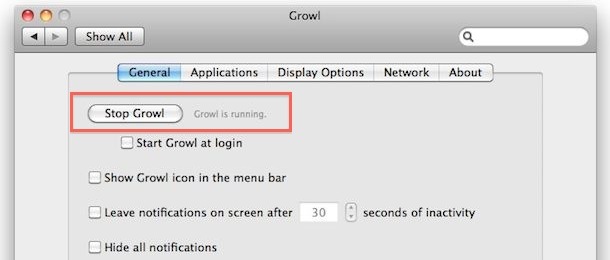
* Under the ‘General’ tab, click on the ‘Stop Growl’ button
* Disable the ‘Start Growl at login’ item
* Close System Preferences, changes take effect immediately.
Now it doesn’t matter what application has Growl support, the notifications won’t popup on your desktop. If for whatever reason you want to leave Growl running but you don’t want to see any notifications, you can hide all the Growl notifications by going to the same menu as above, and instead of stopping Growl, just click the checkbox next to ‘Hide all notifications’. This leaves Growl running but you won’t see any of the status updates.
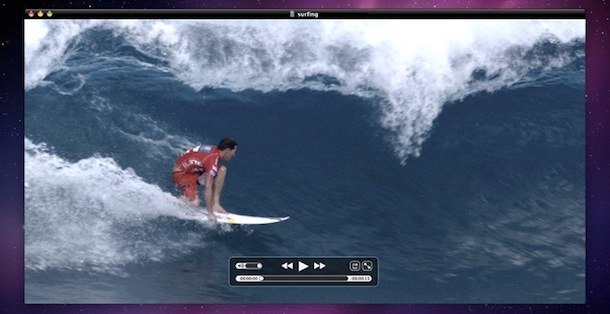
You can watch many AVI movies without any additional software on a Mac just by playing them in the included QuickTime Player (located in the Applications folder). Just double click the file and it should work, as modern versions of QuickTime in Mac OS X support a wide variety of video files and video codecs, including most AVI.
But what if it doesn’t? There are situations when AVI movies won’t play at all, this is usually a video codec issue, and you might get an error message like the following:
Want to re-run the last executed command? Or what about re-running the last used command but running it as root? You can do both!
Ever typed a nice fancy string command into the terminal and been frustrated to discover that you need to run it all over again? Or perhaps you discovered that the aforementioned run command must be run again, but this time as a super user? You too? I do it all the time, but if you do this in the future, there’s no problem and no need to re-enter command sequences, because once you learn this nifty trick with the excellent !! commands you can just quickly re-run the prior command strings.
There’s really two parts to this: running the last command again just as it was, and running the last command again but with super user privileges, aka as root. Read more »
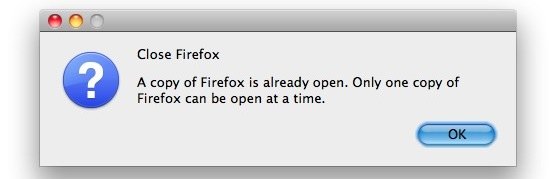
“Close Firefox – A copy of Firefox is already open. Only one copy of Firefox can be open at a time.”
You may have gotten this message if Firefox has recently crashed or you killed the process. The reason this error is appearing is likely because there is a lock file on your Firefox profile.
The easiest fix to resolve this “Close Firefox” error message is to remove the lock file from your profile, here is how to do this:
* Open the Terminal, you will need to navigate to your FireFox profile directory: cd ~/Library/Application\ Support/Firefox/Profiles/
Now there will be a randomly generated name in here attached with a .default extension, like aioruajc.default or groeakc.default, once you’re in the Firefox Profiles directory you can find out what the randomly generated name is by typing: ls
then type the cd command with whatever the random .default directory name is: cd alaklrac.default
Once inside the .default Profiles directory, you can remove the lock file: rm -rf .parentlock
You should now be able to relaunch Firefox without the error message.
Note: an alternate method to get to the proper Firefox Profiles directory is to type the following command: cd ~/Library/Application\ Support/Firefox/Profiles/*.default
The * is a wildcard and will enter whatever directory ends with .default, this only works if you are using a single Firefox profile though. You can then remove the .parentlock file and relaunch Firefox as usual.
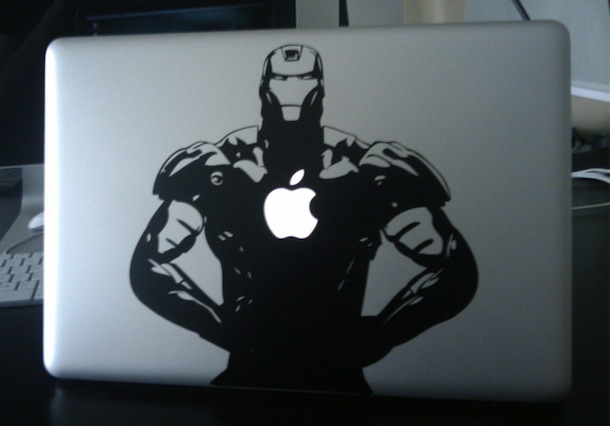
This is a pretty cool decal for a MacBook Pro featuring Iron Man. Thanks to Andrew for the submission! If you are interested, you can buy the iRon Man Decal for MacBook Pro’s at Etsy
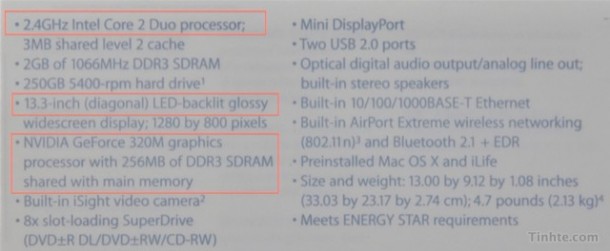
It looks like there will be an update to the plastic Unibody MacBook lineup soon. A very authentic looking refreshed unit has shown up in some video and images out of Vietnam, which is a popular source of Apple product leaks at the moment. Assuming this is legitimate, the specs on the revised MacBook are practically identical to the base model 13″ MacBook Pro, except that the refreshed MacBook will only ship with 2GB of RAM (as opposed to the 4GB in the MBP). Expect a 2.4GHz Core 2 Duo processor, 2GB of RAM, a 250GB hard disk, and the same Nvidia 320m GPU.
This is kind of frustrating to me. I’ve always wondered why Apple makes the consumer MacBook so close to the more expensive and supposedly “Pro” model, especially since the 13″ MacBook Pro really underperforms with its C2D chip in benchmarks next to the new MacBook Pro Core i5/i7 models. This refreshed MacBook with identical specs really suggests that the MacBook Pro 13″ is just a MacBook in a much fancier case. For the record I have a 13″ MacBook Pro and love it, the small form factor is perfect for me, which I guess proves that regardless of the frustration on the specs people still buy the otherwise beautiful machines.
The MacBook, MacBook Air, and MacBook Pro screen backlighting is set to automatically dim and adjust in different situations. For the MacBook, it will adjust based on the power source and based on how long the computer is not in use. For the MacBook Pro and MacBook Air, the same is also true, in addition to the screen adjusting it’s brightness level based upon ambient light differences and power source changes.
If you’re not happy with these automatic brightness adjustments, here is how to disable auto-brightness features on Mac to stop the MacBook, MacBook Air, and MacBook Pro screens from dimming themselves without user input.

 Want to save a document or web page as a PDF file, but you don’t own Adobe Acrobat? No problem, you can print documents, webpages, or nearly anything as a PDF, this means it creates a PDF file directly in Mac OS X using a built-in feature, without the need for any additional software or apps. In fact, this trick works with almost any Mac app, and basically if you can print a document or file through the normal “Print” functions, then that means you can also turn that into a PDF document through this method.
  Some pretty big news today on the iPad front, two reports on AppleInsider indicate that the iPad is already a wild success. The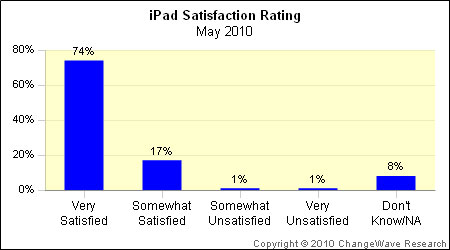
 but many sellers are attempting to fetch prices higher than the MSRP, and the situation on eBay and Craigslist is even worse. So if you’re in the market for an iPad, you might have to wait a little while.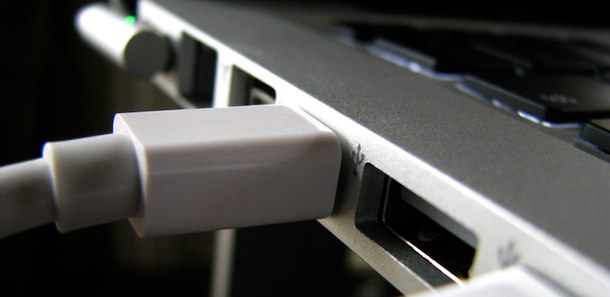
 from Amazon for my MacBook Pro. It cost less than $8 including shipping, and it arrived at my house in about four days (for comparison Apple’s official adapter is $29 + shipping).
 (be sure your
  Brian asks: “I need to add line numbers to a text file. I don’t mean line numbers in the text editor, I mean adding a number next to each item inside a text file. Is this possible to automate or do I have to manually edit the file typing 1, 2, 3 and going insane?”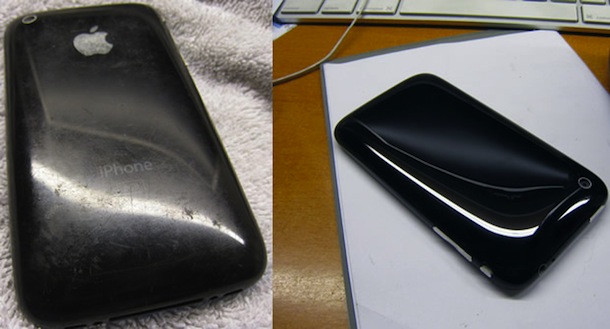
 I find myself never using the MacBook Pro’s optical drive, the only time I have used it was to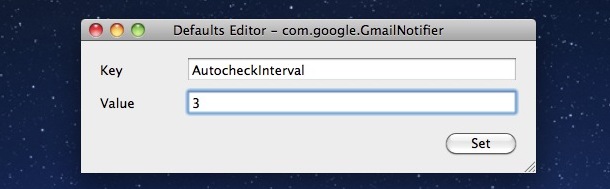
 If you’re like me, you store a lot of information on your iPhone that you want to keep private. Accordingly, you might be interested to know that, by default, the backups made from an iOS device to iTunes are not encrypted, and can be dug through rather freely if someone was interested in doing so. Furthermore, restoring the device and seeing all your data live on another iOS device is just a matter of clicking the restore button. While this is very convenient for restoration purposes, it also could potentially pose a security and privacy risk for some individuals and situations, particularly for users who aren’t using broader password protection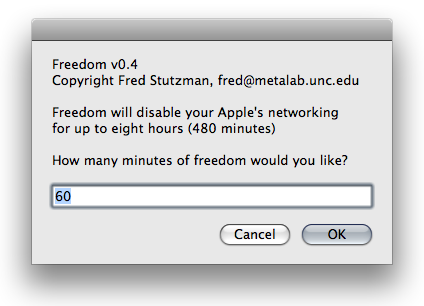
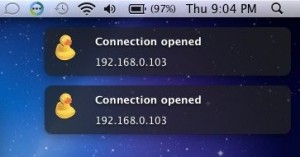 Growl is a desktop notification system that allows applications to publish updates and items to floating windows on your desktop. This allows you to see things like updates, information, and status changes to whatever application is publishing the Growl notification.