There are two ways to enable the root super user account in Snow Leopard, the first is probably the quickest. Launch the Terminal and type the following command:
sudo passwd root
You’ll be asked for the admin password, then you’ll have to set a password for the root account. When you’re finished, the root account is now enabled.
The other way is through the GUI, which has changed for Snow Leopard because the “Directory Utility” application moved from the /Applications/Utilities folder to /System/Library/CoreServices
* Navigate to /System/Library/CoreServices
* Unlock the application by entering the admin password and clicking the padlock icon
* Go to the Edit menu and scroll down to “Enable root user”
* Now choose Edit and select “Change Root Password” , and set a password for the root user
* All done! root user is now enabled
Note that enabling the root account can potentially leave your Mac vulnerable to some security attacks, so it’s best to keep disabled unless you know what you’re doing.






 Recently the LAN at my office had been running slower than usual, and I couldn’t pinpoint what was using up all the extra bandwidth. I had a suspicion that P2P traffic was to blame but I just couldn’t see anything obvious on the offending machine. So the question of course, is how do you see what processes are connecting to the internet or the outside world from Mac OS X?
 After reading all the bad press for iPhone OS 3.1, I decided to hold out on upgrading, which means that I also can’t get MMS working, right? Wrong! The only thing you need to enable MMS on iPhone 3.0 (or 3.01) is the updated carrier file, which you can

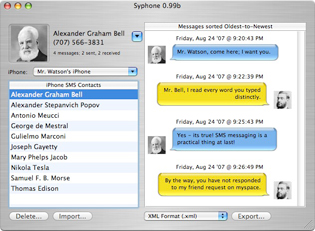 Backing up your iPhone text messages is made extremely easy thanks to a freeware utility called Syphone. Since the iPhone has a limited number of text messages it can store at any one time, Syphone allows you to backup all the text messages and read through the archived text messages yourself on your Mac in an easy to read iChat-like interface.
  iTunes 9.0 removed the ability to click the green ‘minimize/maximize’ button to get into iTunes Mini Player mode, you had to hold down Option to get the Mini Player. iTunes 9.0.1 Update fixed this problem (as if it was a bug, but I imagine it was changed back due to user confusion and complaints), but if you happened to like the way the iTunes 9.0 green widget button behaved, then you can get that quirky maximize behavior (and option-click for Mini Player) back with the following Terminal command:
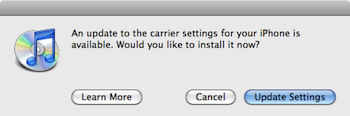 AT&T iPhone users of 2009 can now officially join the cellular world of 2002, with the ability to finally send and receive MMS messages. You have to upgrade to iPhone 3.1 and download a new carrier file to enable MMS on your AT&T iPhone. After reading so many



