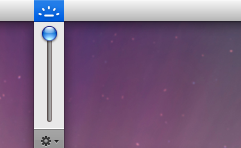
One of my favorite add-ons for MacBook and MacBook Pro’s with the keyboard backlight is this awesome app from Lab Tick that allows you to manually control the keyboard backlighting via a menubar item that drops down with a little slider, kind of like how the sound menu item works.
Additionally, you can control the MacBook Backlit keyboard illumination via the function keys as well, but having the menubar item is very handy too, try it out yourself!
Labtick has been updated and works perfectly in Mac OS X 10.6 Snow Leopard.
Simply launch Labtick and you’ll find the menu bar item available, it’s a little slider that can adjust brightness of backlit keyboards up or down.
Control backlight via MacBook / Pro keyboard function keys:
* F8 turns off backlighting completely
* F9 dims keyboard backlighting
* F10 brightens keyboard backlight
If you have an older MacBook Pro with a backlit keyboard, and you’re running Mac OS X Snow Leopard, then give Labtick a try. It’s pretty cool to have backlight controls right in the menu bar!
The Polaroid film effect is a fun and retro look for digital images, and now you can make Polaroid style pictures without Photoshop! The nifty app called Poladroid is cross-platform compatible and works exactly as advertised: simply drag any image onto the Poladroid app and out comes a Polaroid style image.
Poladroid allows you to easily create digital versions of Polaroid style images, right from Mac OS, Mac OS X, or Windows. It’s super easy to use and quite fun, and the productions look even more Polaroid-ish than Instagram filters does.
The app itself is a little quirky and sort of slow, but that’s partially because the developer built in a virtual ‘development’ process much like the real Polaroids, you can even shake them around (by moving the image around the screen) to develop quicker. If you’re impatient, simply right-click on the image within the app and select to have the image saved now. By default the Polaroid images are dumped into ~/Pictures but you can adjust the setting in the preferences.
You can easily reveal the Finder location of any recently used item from the Apple “Recent Items” menu by holding down the Command key as you access the Apple menu of OS X.
It’s Sunday, also known as Funday, so why not share some Mac loving cats! I know some of our readers strongly disliked the dogs love macs post from a couple weeks ago, so if you didn’t like that post then you probably won’t like this one, so just ignore it.
There is now a Photoshop app for the iPhone / iPod Touch and it’s called… Photoshop.com Mobile. The best part? It’s free! Free Photoshop?? For the iPhone?? Well, don’t go expecting a full version of Photoshop on your iPhone, it’s a relatively limited and simple image editor, but for quick photo edits on the go, it works just fine and has a nice clean interface. I imagine over time the functionality will increase and I wouldn’t be surprised if there was a feature rich paid option either, but until then here’s what you’ll get with the free iPhone version of Photoshop Mobile:
Image editing features of iPhone Photoshop include:
* Crop, Rotate, Flip
* Adjust Exposure, Saturation, Tint, Black & White
* Simple Filters including Sketch & Soft Focus
* Effects include: Vibrant, Pop (Andy Warhol style), Border, Vignette Blur, Warm Vintage, Rainbow, White Glow, Soft Black & White
There are some additional publishing features so that you can easily share and upload images to Photoshop.com after you have signed up for an account, but you’ll need to sign up for that login outside of the app itself which is kind of annoying. Instead of signing up for yet another photo sharing service, I’ll just stick to saving images to my iPhone Photo Gallery so I can share them myself via Flickr or Facebook.
I’ve been playing around with Photoshop on my iPhone 3G and it’s not the quickest app in the world (a friend with an iPhone 3GS reports it’s a lot faster on the 3GS model) but it definitely does what it advertises, and it’s more than adequate for the simple functions it includes.
It’s definitely nice to finally have Photoshop on the iPhone, although I’m not sure if this app warrants the “Adobe Photoshop” name, but it’s certainly a step in the right direction!
Here’s a comprehensive list of budgeting software for Mac, I originally created this list for a family member who is a recent switcher and was looking for some personal budgeting software for their new Mac, and I figured it was useful enough to share with everyone else.
Quicken – $69.99 – almost everyone has heard of Quicken, it’s basically the industry standard for consumer budgeting software. It works very well as long as you’re willing to keep the data recent, and it’ll hook up to some online bank accounts (or you can import data). It’s cross-platform compatible which is also a bonus if you’re a recent switcher.
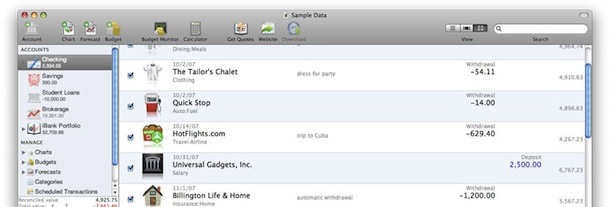
iBank – $59.99 – iBank is very much a Mac app, it’s very attractive, easy to use, has an intuitive interface, and, well, it just plain looks good. You can easily import banking and finance data to help create a budget and track your finances and has a pretty cool feature that lets you visit online bank accounts through the app to import any data that otherwise wouldn’t be accessible. As an added bonus, it syncs with your iPhone so you can see all your budgets and finances on the road. From appearances alone, this app takes the cake (the screenshot above is iBank) and it’s also pretty feature rich. The main downside that I see is that it’s not really cross-platform compatible since it’s Mac only.
MoneyWell – $49.99 – MoneyWell is a lot like iBank, it’s feature rich and looks very attractive, it’s just a bit less well known. The ‘envelope budgeting’ feature looks pretty nice and would certainly be useful. Priced a bit cheaper than iBank, it’s definitely a good alternative, but again it’s Mac only.
Budget – $39.95 – I have smart friends that swear by Budget, so apparently it’s a great app. It’s certainly feature rich and full of stellar reviews, competitively priced, and has been around a while, but at a risk of sounding shallow, I just don’t think it LOOKS that good, especially compared to the some of the alternatives. If you can put the appearance aside, then Budget could be a great software option for managing your finances.
Squirrel – €14.99 – Free beta test – Squirrel won an Apple Design Award in 2008 for the best Mac OS X Leopard Student Product, which is no small feat. If it has Apple’s stamp of approval, it’s probably a pretty great app although I have yet to test it myself. It’s currently in development but looks pretty stable and has a lot of personal budgeting features, you can also try it before you buy it with a free download, so definitely check this one out. There’s also an iPhone version available for free! And yes that’s €14.99 – Euro’s not Dollars, which is about $22 at current exchange rates.
ChaChing – Free beta – Since it’s in Beta it’s hard to know much about this app, but it looks like it’s developing into a promising contender. It has an iPhone version that it syncs with too so that you can budget on the go. It has been recommended rather highly by friends that use it, and you can’t beat the free beta either, but nonetheless it is still beta software, so YMMV.
Best Budgeting Software for Mac is…
Mint – Free – Enter all your accounts into Mint and it’ll pull as much financial data as it can, back more years than you remembered, creating a pretty comprehensive list of personal financing trends and budgeting information. Completely web-based means it’s fully cross platform compatible and easily accessible from virtually anywhere with internet access, there’s also a pretty great iPhone app, and it’s all for free? Put all this together, and this takes the cake for the best Mac budgeting software.
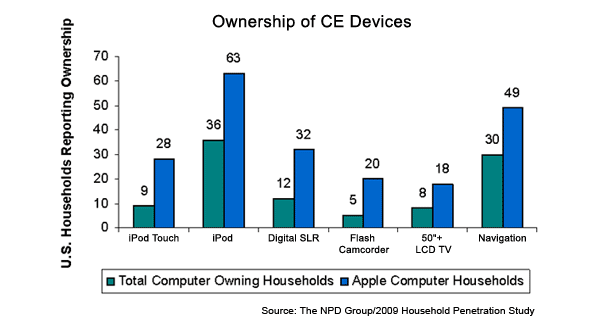
A study from NPD tells us some interesting facts about Mac owners in the USA, highlights include:
* 85% of Mac owners also own a PC
* 72% of Mac owners use a notebook / laptop
* 66% of Mac owners own three or more computers
* 63% of Mac owners own an iPod
* 49% of Mac owners own a navigation device (GPS, but is iPhone included?)
* 36% of Mac owning households report incomes over $100,000
* 32% of Mac owners have a Digital SLR camera
* 28% of Mac owners have an iPod Touch
* 20% of Mac owners have a Flash-Memory Camcorder
* 18% of Mac owners have a 50″ or greater LCD TV
* Average Mac owners have 48 consumer electronic devices, vs 24 for the average Windows PC user
* Mac ownership/marketshare is up to 12% in the USA, from 8% last year
NPD goes on to surmise that the purchasing decisions of Apple / Mac owners are a significant indicator of trending popular products and adoption trends.
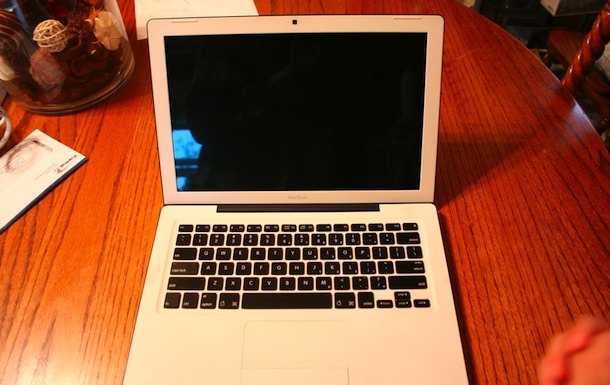
You may remember the Oreo MacBook mod from a while back, this is pretty similar except that they swapped out the external case for a black enclosure, and then installed the black MacBook keyboard onto a white MacBook internal case. Looks awesome!
The creators of this MacBook mod apparently pieced the machine together from two half-working MacBooks, creating a rather attractive frankenstein in the process:
This basically involved grafting the white inside with the black outside, and then popping off each white key on the keyboard and replacing them with black keys.
If it was me I would have swapped on the black bezel as well, but either way it’s a great mod.
A much anticipated feature of Mac OS X Snow Leopard for corporate users is Microsoft Exchange support being built-in, and a coworker just asked me how to setup Microsoft Exchange to work on their new iMac sporting 10.6. I was about to write up a how-to guide when I came across a nice and easy to follow one on MakeMacWork.com, complete with tons of screenshots. If you need to setup Microsoft Exchange on your Mac in Snow Leopard, I highly recommend checking out this guide:
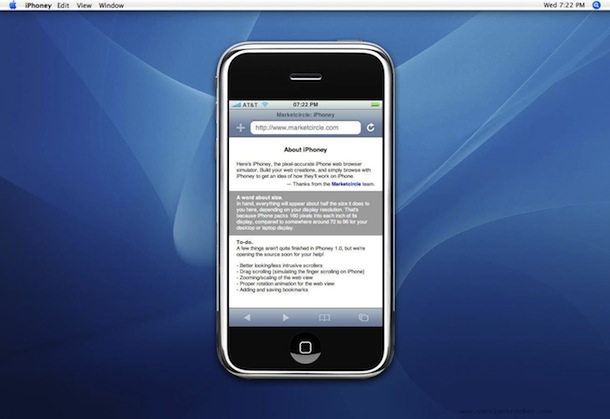
iPhoney is a nice iPhone Simulator that works to replicate the web browsing experience of iPhone users. This is very helpful to web developers that need to test if a web site or application works on the iPhone, and also how the user experiences the site. It’s not a traditional iPhone Simulator in the sense that it emulates the entire iPhone user experience, instead it just simulates the web as seen through the iPhone browser. It’s also got a handy feature that gives you the ability to change the user-agent to whatever you want.
My only complaint about the iPhoney app is that it won’t quit normally, I have to force-quit the application whenever I’m done with it (this is on Mac OS X Snow Leopard, could be a 10.6 specific bug). If you can work with that minor annoyance, then I don’t know of a more simple and free iPhone web simulator for the Mac.
If you’re serious about iPhone Development it’s probably best to get the Apple iPhone Development Kit which also includes an iPhone simulator, but will set you back $99 for an Apple Development Center Membership.
Safari is really settling it’s spot as my preferred web browser. Sure, I miss the plugins in Firefox, but it just can’t beat the speed of Safari. You can make your Safari web browsing experience even better by using Command-Option-F to jump to the Search box, nice!
There are several different ways to rip dvd’s on your Mac, we’ll cover ripping DVD’s with HandBrake and with VLC here.
HandBrake is probably the best choice for ripping a DVD in Mac OS, and it makes DVD rips very easy to create in a variety of file formats. Basically the steps are this easy:
Insert a DVD into your drive
Launch HandBrake
Handbrake will then scan the DVD disk and read all the chapters and titles. Tip: be sure to select the proper title because if there’s any special features or extras on the DVD you could inadvertently rip that instead of the actual movie.
If HandBrake doesn’t automatically find the DVD just click on File > Open Source and manually select the DVD
Select the file format you want to export to and the destination (default is mp4 to desktop), and rip!
It will take a while to rip the DVD depending on the speed of your Mac but the ripped DVD will appear on your Desktop when it’s done.
Another option is VLC. VLC includes a simple DVD ripper, it’s not ideal simply because there are better ones out there (think handbrake) but if you’re in a bind VLC works. Here’s how to rip a DVD with VLC on your Mac: with a DVD in the drive, launch VLC, go to the File menu and select “Open Disc”, from there you can select “Convert” and adjust the starting positions to the right chapter, click ‘save’ and wait a while for it to rip! You can also get VLC from the Developer home.
Note that some versions of Handbrake require VLC to preview the rip, so download both of them!
Have you ever received a movie or video file where the audio and video isn’t synced correctly? This is most obvious when you’re watching people talk, where the lip movements don’t match up with the audio track.
Thanks to a handy capability in VLC, you can quickly sync audio to video in VLC by using key presses. This is incredibly useful to offset the audio on a video or movie if you find the audio and video tracks are not aligned correctly.
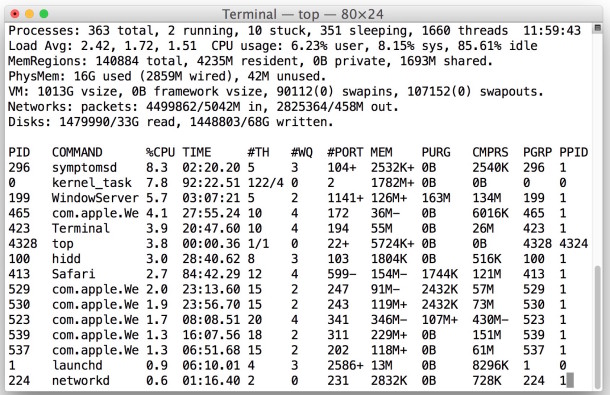
Following the CPU usage on my Mac is a mild obsession, and I usually use the Mac terminal command ‘top’ to do this but I noticed that top itself takes up a fair amount of CPU usage (5% or more). I made this complaint to a friend of mine and they told me to try this variation of the top command instead, which actually causes the top command to use less CPU, making it a bit more helpful and less of an impact on the overall system. This is great if you run top all the time like me.
DeSmuME is the best Nintendo DS Emulator for Mac OS X that I have found, it’s pretty full featured with save states, touchscreen emulation, movie creation, and more. My only complaint is the layout of the emulator being vertical, which is true to the DS, but it makes playing games sort of obnoxious particularly when you increase the screen size. If they enabled side-by-side screens for this DS emulator so I could play it fullscreen, I’d be even more enthralled with an already good app. If you’re looking for a Nintendo DS Emulator for your Mac, look no further.
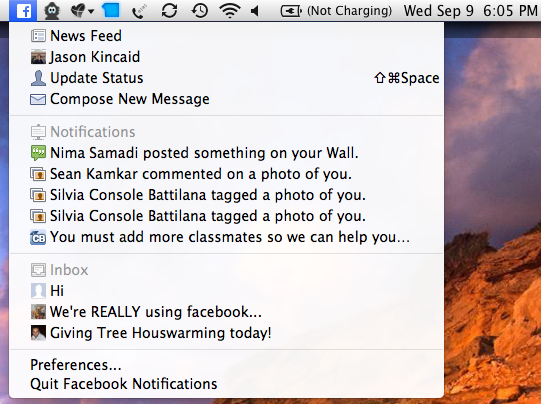
Finally, a Facebook Notifier for Mac! I have long been a fan of Google Notifier for Mac, which sits in the menubar and notifies you if you get any incoming mail. Naturally I was excited to hear about Facebook Desktop Notifications, a new app that basically does the same thing but for Facebook. With this Facebook Notifier, items posted to your wall and messages sent directly to you will be published by Growl notifications to your Mac desktop.
For me, Facebook can be a huge distraction and time waster, anytime I log into the site it’s easy to let 30 minutes pass just keeping up to date with all your friends statuses and picture uploads. Facebook Desktop Notifications cuts down on this wasted time by notifying me of incoming messages and notifications, so basically I can waste less time on the actual site by logging into it less often!
Anything that helps me stay in touch and be more productive is a win-win in my book, so I’m pleased to have the Desktop Notification app installed. The app is beta but so far seems promising and I haven’t had any problems with it, you can download it from Facebook if you are interested.
Above image from TechCrunch, where I also learned of this little utility. There have been a few updates to the app and each one seems to be better and better.
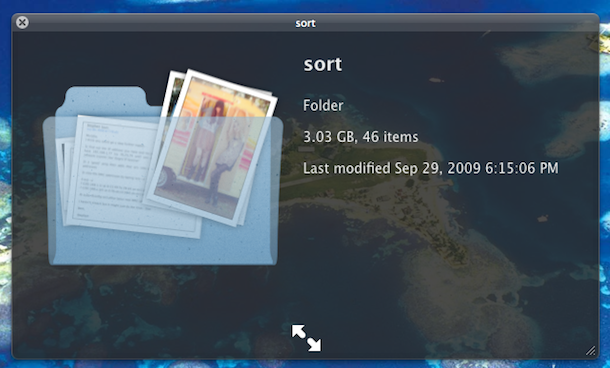
You can see a visual preview of a folders contents by enabling a hidden Quick Look feature. This is a rather nice eye candy improvement but I’m not sure that it’s use goes much further beyond that, see the above screenshot and try it out yourself to judge. To enable the Quick Look X-Ray folders, launch the Terminal and type:
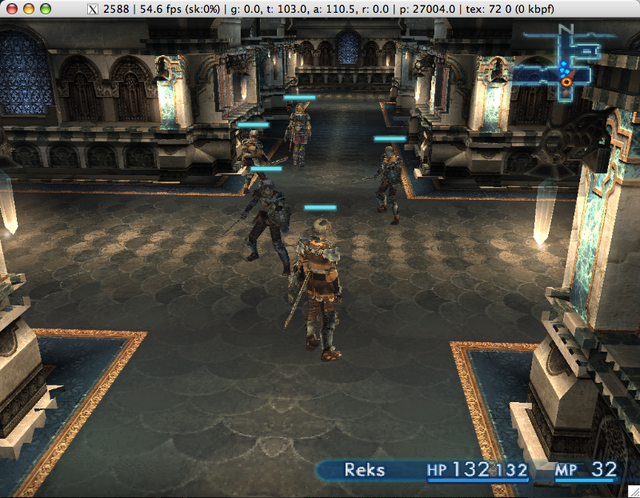
Looking for a PS2 Emulator for Mac OS X? Look no further then PCSX2, a full blown PS2 emulator for Mac OS X that works surprisingly well. I say surprising because it seems development work is a little infrequent and there are some features left to be desired, but it certainly works and the frame rate is pretty high on my MacBook. Finally, I can play all my favorite PS2 RPG’s right in Mac OS X! You can download it for free at the Developer home or just jump to Download now. You may want to check to see if newer versions are available, but as I mentioned, development is seemingly sparse. Enjoy!

 The Polaroid film effect is a fun and retro look for digital images, and now you can make Polaroid style pictures without Photoshop! The nifty app called Poladroid is cross-platform compatible and works exactly as advertised: simply drag any image onto the Poladroid app and out comes a Polaroid style image.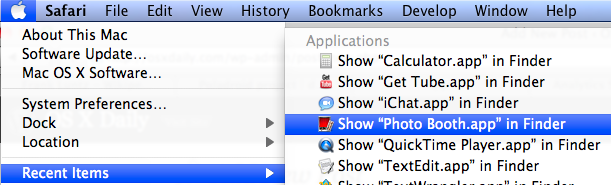
 It’s Sunday, also known as Funday, so why not share some Mac loving cats! I know some of our readers strongly disliked the
  There is now a Photoshop app for the iPhone / iPod Touch and it’s called… Photoshop.com Mobile. The best part? It’s free! Free Photoshop?? For the iPhone?? Well, don’t go expecting a full version of Photoshop on your iPhone, it’s a relatively limited and simple image editor, but for quick photo edits on the go, it works just fine and has a nice clean interface. I imagine over time the functionality will increase and I wouldn’t be surprised if there was a feature rich paid option either, but until then here’s what you’ll get with the free iPhone version of Photoshop Mobile: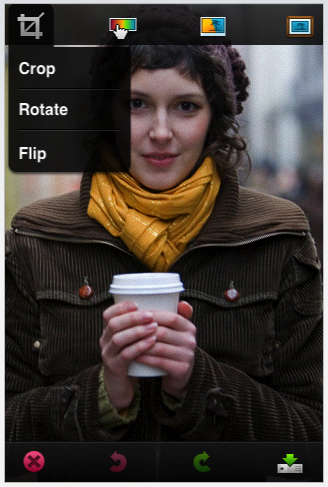

 Safari is really settling it’s spot as my preferred web browser. Sure, I miss the plugins in Firefox, but it just can’t beat the speed of Safari. You can make your Safari web browsing experience even better by using Command-Option-F to jump to the Search box, nice!
  There are several different ways to rip dvd’s on your Mac, we’ll cover ripping DVD’s with HandBrake and with VLC here.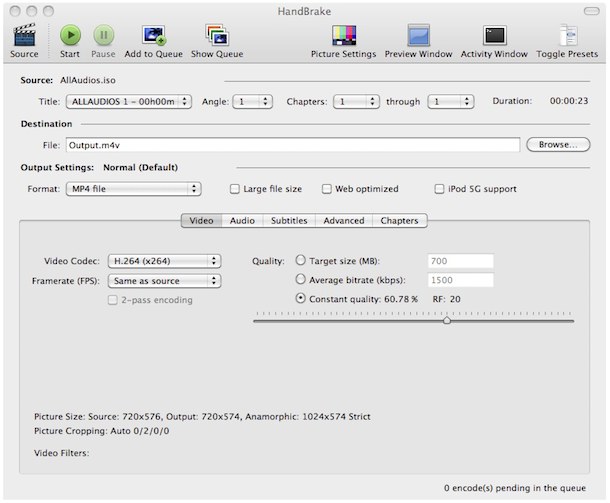

 DeSmuME is the best Nintendo DS Emulator for Mac OS X that I have found, it’s pretty full featured with save states, touchscreen emulation, movie creation, and more. My only complaint is the layout of the emulator being vertical, which is true to the DS, but it makes playing games sort of obnoxious particularly when you increase the screen size. If they enabled side-by-side screens for this DS emulator so I could play it fullscreen, I’d be even more enthralled with an already good app. If you’re looking for a Nintendo DS Emulator for your Mac, look no further.
 Finally, a Facebook Notifier for Mac! I have long been a fan of