Have you ever gotten emails from someone that you really don’t want to get? Be it just plain spam or annoying messages from people you’d rather not hear from, you can reduce this unwanted email by using the Bounce feature of Apple’s Mail app. Bounce tells the message sender that your email address isn’t valid, which is very effective when dealing with real people, but less so when dealing with spammers.
You can restore the original location of a file that has been sent to the Trash very easily. This quite literally sends a file that is within the Trash back to where it was originally stored on the Mac OS X file system.
Using the “Restore to Previous Location” feature is really easy, you’ll need to open the Trash can and then do one of the following (one is a keystroke, the other is a right-click option, both work the same however): Read more »
If you’ve ever accidentally deleted pictures from your digital cameras memory card, you’re not alone. That feeling of dread when you forever lose photographic evidence of memories and experiences in digital form can sometimes be resolved though – so don’t freak out quite yet!
Using an excellent free tool called Exif UnTrasher, Mac OS X users can attempt to recover deleted images from memory cards, USB drives, and other volumes, and it works pretty well as long as you can mount the volume, card, or drive that the pictures were deleted from.
You can easily sync your Mac Contact list or Address Book contacts with your Google Contacts. This is quite easy to set up, we’ll show you how to do so in all versions of OS X.
So, you want to connect to your Mac remotely from your iPhone? It’s possible, and it’s easier than you might think. and though you may have heard of people controlling their Mac’s via their iPhone but assumed it was something just for the jailbreak crowd, well that’s assumed wrong, because it turns out that iOS has VNC clients that allow you to remotely control a Mac that is setup for remote control.
It’s actually really easy to control your Mac from the iPhone, iPad, or iPod touch, we’ll run through a look at how it works. Read more »
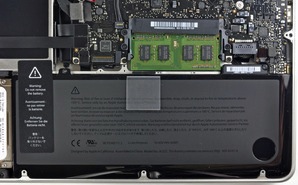
Looking to repair your Mac? Troubleshooting hardware problems on your Mac? Planning a do-it-yourself battery replacement with a Unibody MacBook Pro? How do you change the harddrive on a 20″ aluminum iMac? If it involves dissembling a Mac and putting it back together, there is no better resource than iFixIt, who has the single most comprehensive list of free guides to take apart and rebuild nearly any Mac that is still in use. Every screw, tab, connector, and cable has been covered, if you follow these guides carefully you really can’t go wrong.
This site is absolutely fantastic and a must bookmark for any techy Mac user, Mac IT professional, or general enthusiasts who aren’t afraid to get their hands a little dirty. Do not miss it!
Need to quickly boot from Mac OS X to Windows? Don’t want to fiddle around in System Preferences or hold down the Option key during the Mac restart to access the Boot Loader? QuickBoot to the rescue!
QuickBoot is a great little tool that sits in your menubar and lets you easily select boot volumes from Mac OS X to Windows and vice versa. Simply click the menu, select the volume, reboot your Mac, and you’ll be in Windows.
Mac’s are amazingly reliable and have few problems, but it’s not incredibly unusual to run into problems connecting to a wireless network. If you’re having problems connecting your Mac wirelessly to an Airport or other WiFi router, check out this guide and try out these troubleshooting tips to fix your wireless internet connection.
Mac Wireless & Airport Connection Problem Troubleshooting: The Basics
* Turn Airport on & off – You can do this via the Airport menu bar or from the Network Preferences. This is the first thing you should try when troubleshooting Mac wireless problems.
* Reset your router – This is the second thing you should try doing. You can fix a surprising amount of wireless problems just by resetting the airport/router. All you need to do is turn the thing off for a few seconds and turn it back on.
* Reset your Cable/DSL modem – You’ll usually want to reset this in combination with your wireless router. Reset this first so the DHCP information will be pulled to the wireless router properly.
* Change Wireless Channels – sometimes your router’s wireless broadcast channel will interfere with a neighbors, be sure you have your router set to a unique channel. Even if it’s a weak signal there can still be interference.
* Make sure Wireless/Airport card software & firmware is up to date – This is usually done just by going to the Software Update menu, if there are any updates available for your Mac or Airport, install them.
Mac Wireless Troubleshooting: Intermediate
* Change wireless security protocol – You shouldn’t be using WEP anyway for security reasons, but sometimes changing from WEP to WPA/WPA2 or WPA to WPA2 can resolve wireless connection difficulties.
* Make sure router firmware is up to date – Check your router manufacturers website for firmware updates, if there are any available, install them.
* Delete and recreate connection – Try deleting and recreating/reestablishing the wireless connection, sometimes a setting can be corrupted and this may fix it.
* Create a new Network Location – Similar to the above suggestion, try creating a new and different wireless network location to see if it resolves the connection problems.
* Change DHCP auto settings to manual – sometimes there is a problem with the DHCP server, and if you manually set an IP address on the network you can be fine. Remember to set the IP to a high number so it wouldn’t interfere with other DHCP machines. As long as you have the subnet mask, router, and DNS settings configured manually as well, this shouldn’t be a problem.
* Disable “Wireless G/N/B only” mode – Sometimes a setting is selected that only broadcasts your wireless signal in Wireless B, G, or N mode (depending on the routers abilities). If this is set, try disabling it.
* Flush the DNS cache – Launch the Terminal and enter the following command onto one full line within the Terminal: dscacheutil -flushcache
Mac Wireless Connection Problem Troubleshooting: Advanced
* Zap the PRAM – Reboot your Mac and hold Command+Option+P+R during restart until you hear another chime, let the Mac boot as usual.
* Delete Wireless Config files – Delete com.apple.internetconfigpriv.plist and com.apple.internetconfig.plist files from ~/Library/Preferences and reboot
* Trash your home directories SystemConfiguration – Remove all files within ~/Library/Preferences/SystemConfiguration/ and then reboot your Mac.
* Reset your Mac’s System Management Controller (SMC) – For MacBook and MacBook Pro’s: Shutdown the MacBook/Pro, remove the battery, disconnect the power, hold the Power Key for 15 seconds. Replace the battery, reconnect power, and zap the PRAM and wait for 2 chimes before letting the keys go. Let boot as usual.
“You are opening the application ScreenSaverEngine.app for the first time. Are you sure you want to open this application?”
My Mac’s screensaver was officially not working. That’s the odd message I got out of the blue today, which is rather peculiar since ScreenSaverEngine.app has been activated many times considering it is what drives the screensaver in Mac OS X! I set out to resolve this peculiar problem and found a solution (note this was only tested in Mac OS X 10.6 Snow Leopard).
Fix problem with ScreenSaverEngine.app to get screensaver working again
* Launch the Terminal and enter the following command all onto one line: cd /System/Library/Frameworks/CoreServices.framework/Frameworks/LaunchServices.framework/Support
* Now enter the following at the command line: sudo ./lsregister -r -apps local,system,user
* You will be asked for your Admin password since you are using the sudo command to execute the lsregister command, enter it
* After a few seconds you will see: ThrottleProcessIO: throttling disk i/o and then you will be returned to the Terminal, which you can now close.
* Try initiating the ScreenSaver again, it should work (use a hot corner to test)
If you’re curious, the lsregister script that was executed rebuilt the LaunchServices database, and since ScreenSaverEngine.app is part of this functionality, it seems to do the trick. I found this solution by digging around in the Apple Discussion Forums but I realize that messing around in the Terminal can be perplexing for many Mac users, so you may want to just try a simple reboot beforehand.
I don’t have any explanation as to why my screensaver suddenly stopped working, I haven’t installed any updates or new apps recently, and my Mac hasn’t been rebooted in 9 days (you can check your Mac’s uptime with the terminal). It’s a bit of a mystery to me as to what caused it, but the above fix worked and my screensaver is working as usual, all without rebooting my Mac!
Have you ever noticed the Bluetooth menu bar icon on a Mac start flashing or blinking? The blinking Bluetooth icon on the Mac means one thing; the connected Bluetooth device has a low battery.
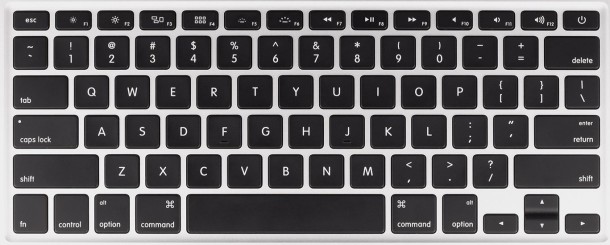
You can access and type foreign currency symbols in Mac OS X in much the same way that other special characters are typed out. That means you’ll use a keystroke combined with the “Option” key to type the respective character. A few common currency symbols are available on default keyboard layouts, including the $ dollar, € Euro, ¥ Yen, and £ Pound, but other foreign currencies can also be accessed through a special character panel. Let’s review each of these: Read more »
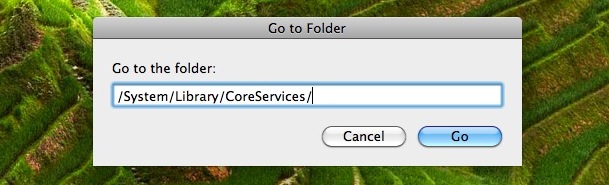
If you want to change the wallpaper that sits in the background of your Mac’s login screen in OS X Leopard and Snow Leopard, from the Finder hit Command+Shift+G to open the ‘Go to Folder’ screen. Type /System/Library/CoreServices/ and click ‘Go’:
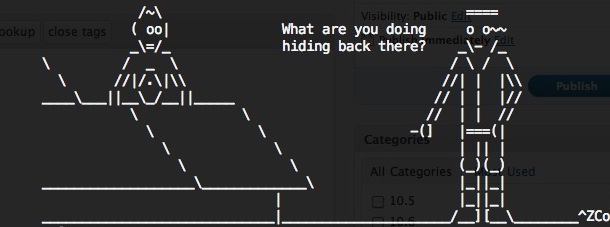
ASCII art is just one of those wonderful retro throwbacks to the earliest days of computing. So, if you’re looking for a nostalgic return to the the days of BBS, MUD, and IRC, and perhaps a little bored at school or work, why not watch the entirety of Star Wars Episode IV: A New Hope discretely thanks to being rendered entirely in ASCII art?
Yea seriously, you read that right, you can watch Star Wars in ASCII art, so live your wildest dreams because we’ve got you covered here, thanks to a fully rendered ASCII version of the movie that you can access with Telnet via your command line of just about any modern operating system with a command prompt. Read more »
Like many of us, I’m often busy and out of the home, leaving my Mac on a desk. I regularly use my home machine as a local fileserver though and other people in the household are dependent on it being up and running. Now here’s the situation I’m presented with: I leave town earlier than my housemates do, but I don’t want to have to rely on someone who is not particularly computer savvy to put my Mac to sleep, so what do I do? Schedule the sleeping and waking events, of course! And in this case, it’ll be done through the command line.
Update: VLC has posted this clarifying the state of the VLC for Mac project, stating ‘VLC for Mac death is “greatly exagerated”‘, and emphasizing that the majority of development issues are in regards to the GUI, apparently it’s not as perilous as the web has assumed.
VLC Player for Mac OS X may well be nearing the end of it’s life, unless some Mac developers can step in to take over support of the codebase. In a sobering reality check, VLC developer Rémi Denis-Courmont says the following:
“There are now effectively zero active developers for MacOS.
As an immediate consequence, the 64-bits releases for MacOS has already been put on hold.
I don’t need to mention the stale status of the MacOS user interface.
If it goes on like this, MacOS support may be discontinued as of VLC 1.1.0. There is nobody to make the necessary updates to the MacOS support code, for instance to support the new VLC video output architecture.
Taking into account the learning curve to VLC development, I think it is fair to say that the situation is now critical.”
VLC is my favorite video player by far, it’s cross platform compatible and works flawlessly with nearly every video type thrown at it. I really hope some capable developers step in to take over the Mac OS X division, it would be very sad indeed if Mac users lost out on any further VLC releases.
Ever wonder what Apple.com would look like in 1983? It would be promoting the Apple Lisa which ran at a blazing 5mhz, had 1mb of RAM, and cost $9,995 (which is $21,335 in inflation adjusted dollars!). Designer Dave Lawrence designed the mockup and it’s a good laugh, he’s also a huge fan of the Apple Newton and has managed to connect one to Snow Leopard… don’t ask why.
If you’re looking for a cool fire screensaver for your Mac look no further. Aurora Screensaver allows you to start fires all over your Mac desktop by the use of your multitouch trackpad! Each finger burns it’s own fire, it’s really quite fun to play around with. Since multitouch input is used, you just have to hit a key to exit the screensaver. This is Snow Leopard only and requires a trackpad.

 Have you ever gotten emails from someone that you really don’t want to get? Be it just plain spam or annoying messages from people you’d rather not hear from, you can reduce this unwanted email by using the Bounce feature of Apple’s Mail app. Bounce tells the message sender that your email address isn’t valid, which is very effective when dealing with real people, but less so when dealing with spammers.
 You can restore the original location of a file that has been sent to the Trash very easily. This quite literally sends a file that is within the Trash back to where it was originally stored on the Mac OS X file system.
 If you’ve ever accidentally deleted pictures from your digital cameras memory card, you’re not alone. That feeling of dread when you forever lose photographic evidence of memories and experiences in digital form can sometimes be resolved though – so don’t freak out quite yet!

 Looking to repair your Mac? Troubleshooting hardware problems on your Mac? Planning a do-it-yourself battery replacement with a Unibody MacBook Pro? How do you change the harddrive on a 20″ aluminum iMac? If it involves dissembling a Mac and putting it back together, there is no better resource than
  Need to quickly boot from Mac OS X to Windows? Don’t want to fiddle around in System Preferences or hold down the Option key during the Mac restart to access the Boot Loader? QuickBoot to the rescue!
  Mac’s are amazingly reliable and have few problems, but it’s not incredibly unusual to run into problems connecting to a wireless network. If you’re having problems connecting your Mac wirelessly to an Airport or other WiFi router, check out this guide and try out these troubleshooting tips to fix your wireless internet connection.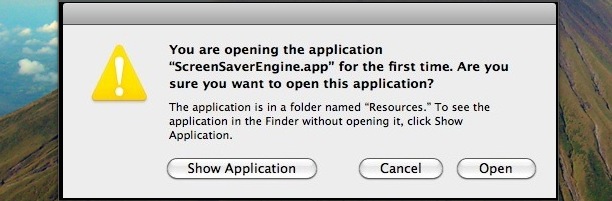


 Update: VLC has posted
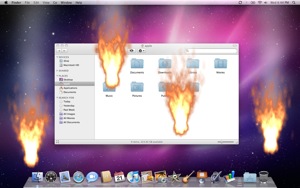 If you’re looking for a cool fire screensaver for your Mac look no further. Aurora Screensaver allows you to start fires all over your Mac desktop by the use of your multitouch trackpad! Each finger burns it’s own fire, it’s really quite fun to play around with. Since multitouch input is used, you just have to hit a key to exit the screensaver. This is Snow Leopard only and requires a trackpad.



