tips

Search tips

How to View All Running Apps & Processes in Mac OS X

May 17, 2013 - 20 Comments
See what apps are running by looking at the Mac Dock

There are a variety of ways to see all applications or programs which are running on a Mac, ranging from only seeing “windowed” apps running in the graphical front end, to revealing even the most obscure system-level processes and tasks running at the core of Mac OS. We’ll cover five different ways to view these … Read More

How to Add Text to Photos Easily Using Preview in Mac OS X

May 16, 2013 - 26 Comments
Add text to photos in Preview

Adding text to images is a fairly simple process to begin with that is made even easier with Preview, the basic image viewing app that is bundled on all Macs. Most people don’t think of Preview when they think of making adjustments and edits to pictures like this, but it works just fine, and because … Read More

Get a New iTunes MiniPlayer & Show Album Artwork with Songs in iTunes

May 16, 2013 - Leave a Comment
The new iTunes MiniPlayer

Apple introduced some new features to an update to iTunes versioned as 11.0.3 which adds a few user interface refinements and some minor features. The update can be downloaded from the  Apple menu by selecting “Software Update”, or by going directly to the App Store or iTunes to update. The two most notable changes … Read More

Stylize Contacts & Names on the iPhone By Adding Emoji Characters

May 15, 2013 - Leave a Comment
Emoji icons added to contacts names on an iPhone

Adding Emoji to contacts names on the iPhone is a fun way to stylize individual contacts and to bring an additional layer of customization to iOS. Other than being fun looking, it can also help to quickly identify names in the contacts list, get an additional visual indicator of who sent a text message, and … Read More

Turn Pixelmator Into a Vector Graphics App with an Amazing Easter Egg on Mac

May 15, 2013 - 1 Comment
Pixelmator turned into Vectormator for creating vector graphics

We already know that Pixelmator is the best Photoshop alternative out there at a tiny fraction of the price, but newer versions of Pixelmator at 2.2+ and beyond include an incredible easter egg that turns Pixelmator into a full-fledged vector art app, a la Illustrator. Seriously, an entire vector graphics application is hidden within Pixelmator … Read More

How to Remove Services from the Contextual Menu in Mac OS X

May 14, 2013 - 6 Comments
Services menu shown in the contextual menus of Mac OS X

Services and the service menu appears at the bottom of the contextual menu actions when you right-click (or control+click) any item in the Mac OS X Finder. These typically perform various actions, ranging from launching the selected file or folder in a specific app, to conversions that you’ve created yourself through Automator actions. Here is … Read More

Generate Random Passwords on the iPhone with Siri

May 14, 2013 - 8 Comments
Generate a random strong password on the iPhone with Siri

The next time you need a new randomly generated strong password, pull out an iPhone and ask Siri. Yes, the voice assistant that lives in iOS. You won’t find this trick in Siri’s own listing of commands list, but it’s a piece of cake to use and quite powerful.

Mount & Unmount Drives from the Command Line in Mac OS X

May 13, 2013 - 66 Comments
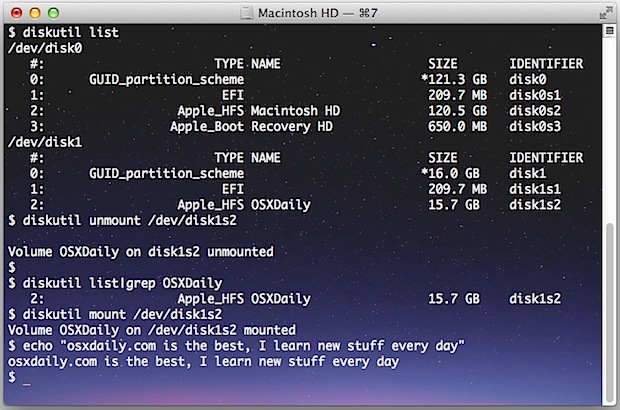
Mount and unmount drives from the command line in Mac OS X

You can mount and unmount drives, volumes, and disks from the command line of MacOS and Mac OS X. For many users, the easiest way to unmount a drive in Mac is to either just drag a volume into the Trash, use the eject keys, disconnect the drive, or use one of the force eject … Read More

How to Open Zip Files & Extract Archives on iPhone & iPad with iOS 12 or Earlier

May 13, 2013 - 15 Comments
Working with Zip files in iOS

If you’ve ever run into a .zip file on an iPhone, iPod touch, or iPad you will probably have discovered it’s a bit of a dead-end initially, because by default there isn’t much you can do with zips or any other archive format. That doesn’t mean you can’t open ZIP files though, and in fact … Read More

How to Share an Android Internet Connection with Wi-Fi Hotspot or USB Tethering

May 12, 2013 - 4 Comments
Android Wi-Fi Hotspot and internet connection sharing

Nearly every Android smartphone can share it’s cellular data connections and turn itself into an internet hotspot, an infinitely valuable feature that lets you connect Macs, PC’s, iPad, or Nexus tablets get online through the cell connection. Of course the iPhone has the Hotspot ability too, but we’re going to focus on getting this feature … Read More

5 Helpful iPhone Tips That Can Make a Big Difference in Usability

May 11, 2013 - 1 Comment
Swipe to delete in Calculator app

The iPhone is easily one of the best gadgets ever made, but it’s not perfect, and there are a few things that are just kind of annoying. We’re aiming to address a few of those frustrations here, with these five fairly minor iPhone tips that can have a big impact, offering nice improvements to usability … Read More

7 Advanced Tricks to Reclaim Disk Space for Pro Users of Mac OS X

May 10, 2013 - 14 Comments
Hard drive icon

Running out of disk space is never fun, and drive space comes at a premium for those of us with smaller SSD drives like the MacBook Air with a 64GB or 128GB drive. These tricks are fairly advanced and thus aimed at the pro segment of SSD users who are comfortable modifying system functions and … Read More

Stop Images Loading Automatically in Mail for iOS to Reduce Data Usage & Speed Up Email

May 9, 2013 - Leave a Comment
Toggle Load Remote Images in Mail app to OFF (or ON)

Emails opened in Mail app for iOS default to loading all images attached to that message. This makes emails format and arrange themselves as the sender intended, often with nice little header graphics and signature files, but it has a potentially serious downside: increased bandwidth usage. On a wi-fi connection that bandwidth usage hardly matters, … Read More

How to Turn Off Phone Calls on the iPhone but Keep Data & iMessage

May 8, 2013 - 34 Comments
Turn off phone calls but keep iPhone data working

Ever wished you could turn off the phone call portion of your iPhone, while still retaining the ability to use data, access the internet, even send iMessages? You can do that with a funky workaround we’ll cover here, and it’s an amazing solution if you’re looking for some peace and quiet but in a situation … Read More

A Quick Fix for “No Batteries Available” & Fans Running Constantly on a MacBook Air

May 7, 2013 - 253 Comments
Key sequences to reset the SMC controller on a MacBook Air and MacBook Pro Retina

If you’ve ever had a MacBook Air or MacBook Pro’s battery disappear at random it can be a disconcerting feeling. This is often accompanied with the battery menu having an “X” through it and saying “No Batteries Available”, a very sluggish Mac, and even after a reboot or not the Mac will often have fans … Read More

Close Windows When Quitting Apps in Mac OS X Selectively or Always

May 7, 2013 - Leave a Comment
Close windows on application quit

Mac OS X defaults to automatically re-opening windows when an application is quit and relaunched later. This feature is borrowed from iOS and it’s incredibly useful, and once you become dependent on it you’ll find that it can really increase your productivity by allowing you to get back to work quickly. This is especially true … Read More

How to Fix Randomly Disconnecting Bluetooth Keyboards & Devices on Mac

May 6, 2013 - 50 Comments
Bluetooth logo

Bluetooth devices are usually extremely reliable, but every once in a while something can start acting up and either lose it’s connection with the Mac completely, or suddenly develop a flaky connection. With something like the Apple Wireless Keyboard, a Magic Trackpad, or a Magic Mouse, it’s fairly obvious when something is going wrong; clicks … Read More

9 Tricks to Ease a Cluttered Mac Desktop & Maintain Focus

May 6, 2013 - Leave a Comment
Full Screen mode icon for OS X

Desktop clutter happens to the best of us, even if we try our hardest to maintain a remarkably simplified virtual workspace. Whether it’s way too many icons thrown all over the desktop from working with files, or just a million and one windows open for various apps, documents, and browser tabs, there are some simple … Read More

Subscribe to OSXDaily

Subscribe to RSS Subscribe to Twitter Feed Follow on Facebook Subscribe to eMail Updates

Tips & Tricks

News

iPhone / iPad

Mac

Troubleshooting

Shop on Amazon to help support this site