
How to Control the Fan Speed of your Mac Laptop with SMCFanControl
 If you have a MacBook or MacBook Pro you’ve probably noticed that it can get a bit warm, no surprise considering the tremendous amount of processing power stuffed into their respective cases. The cooling system is simple to understand; when your CPU load goes up, your fans will kick in. Well, not all users think their fans kick in soon enough, so a third party application called smcFanControl allows you to adjust the fans on your own, which can be really nice for those warm days when a hot laptop on your lap isn’t the most comfortable.
SMCFanControl has been updated to version 2.4, which supports the latest versions of Mac OS X, from El Capitan, Sierra, Mountain Lion, and Snow Leopard. The app continues to work great in Mac OS X, you can get the newest version here from the developer
Features of SMCFanControl include:
- Simple and clean interface
- Set the minimum RPM speed for fans
- Adjust fan speed manually to cool down a warm laptop, allowing for comfort
- Auto-apply option to set the new fan speeds after restart
- Simple menu based control mechanism
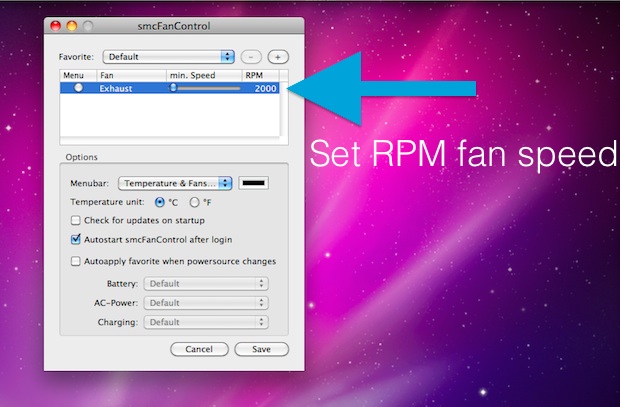
As already mentioned, SMC Fan Control supports nearly every version of Mac OS X, so whether you’re on an old or new version you’ll find the app works on the Mac.
smcFanControl was created by a small company called Eidac, and it allows you to set the minimum fan speed that your MacBook or MacBook Pro will run at. There’s actually two versions, version 1 and version 2. I prefer version 1 because it is more simple, so that’s what I’ll feature here, but version 2 is just as capable and even adds a menu to quickly adjust your fans settings.






Will this work on the latest macbook pros?
@MurphyM
From what I have read, the changes that smcFanControl makes are deeper than the operating system. Normal settings are restored when your computer is shut down or put in sleep mode. If you shut down and then boot to bootcamp, you’ll find your fan to be at normal speeds once again.
Asks for admin name and password which I gave and it does not recognize. Good idea, but cannot get it to work
awesome post thank you so much i turned my fan speed all the way up and it cooled everything of in a hurry !
powerbook support? none.. meh. cool idea though, would like to stop burning my legs. :)
I just tried the program and it works great.
Does Fan Control work under Windows? From what I understand, smcFanControl settings carry over to Windows when you have it running and then reboot into Boot Camp.
I second Fan Control, its really quite nice.
I rather recommend Fan Control ( http://www.lobotomo.com/products/FanControl/ ) because it’s a simple System Preference, instead of a stand-alone application. That way it takes less resources.