
Type the British Pound Symbol in Mac OS X
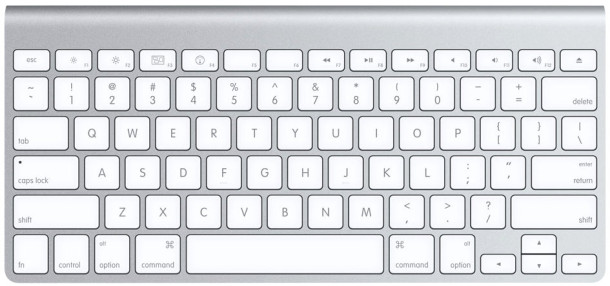
£ – Typing the symbol for the British Pound is done by hitting Option+3 in Mac OS X.
The keystrokes for typing the pound symbol (or quid symbol) are standard on all Mac keyboards from the USA, though in another nation with another keyboard layout the keyboard shortcut may differ slightly, or the pound symbol may even appear on the keyboard like the dollar sign does in the USA with a US keyboard layout for OS X.
£ – Hit Option+3 to type the British Pound symbol on a Mac keyboard, here’s what the quid sign looks like – £
For Mac users with a US keyboard layout, this is easy to remember because the 3 key is the # POUND symbol, so with the same name as the British Pound currency symbol, that should be simple to recall. For the other keyboard layouts out there, are they differ per country and per region, check our the comments below this article to find out the exact keystrokes to type the Pound currency sign on those keyboard layouts too.
This should come in handy the next time you’re in the UK with your Mac! Most Mac system fonts will have the ability to type the British Pound symbol but some of the fancier aftermarket fonts will not be able to render the £ pound symbol properly.
For access to more currency symbols in OS X, you can use the special character viewer on the Mac and easily type out just about any currency symbol. There are also keyboard shortcuts for other common currencies though, like the Yen, Euro, Dollar, and as in this case, the Pound.






Thank you Bill for taking the time to find that out and let us know.
That’s brilliant. I have never been able to remember that. But because you pointed out that # is the “pound” symbol, I think I’ll finally be able to remember it. Thanks!
This £ symbol is found on the USA/AUS mac keyboard that has the # symbol above the 3 by hitting SHIFT 3 and NOT option 3. Took me two hours trying all combo’s but this is the one!!!
Shift +3 worked for me
If you are based in the UK, its Alt 3 for the £ sign guys
Thank you so much for this!
None of the above suggestions worked on my wife’s Macbook Pro keyboard. She got euro, dollar, etc signs but no British pound. So she just wrote GBP…
Thanks for the tip! But what I’d really like is an updated version of the old KeyKaps program, which had a picture of a keyboard. The letters changed depending on the font you selected, then you could press modifiers (shift, alt, etc.) alone or in combinations, to see what you’d get. It doesn’t work in current OS—I don’t remember which OS it was written for. Does anyone know of something like that? (I don’t have time to search it out.)
I have tried all above. It didn’t work for me either. Then it work after change in language&text, tick British-pc instead of British. It works with shift+3
Thank you
British-pc worked for me, I have been pulling my hair out over this.
like Oktawson I can’t get any of the suggestions here working for me! help!
Why on earth do you call it ‘option’ when on my keyboard it says ‘alt’ for the key that does that.
It is confusing and pointless.
Well different version of Mac keyboards show different keys and ‘option’ is the newer version of Mac keyboard (mine shows ‘option’.) Which is why we are trying to keep up to date here. But ‘option’ and ‘alt’ are technically the same thing. Just keep that in mind and you’ll be all right.
I press Option(Alt) + Shift + R on my Mac and I get ‘£’ sign. Voila!
I got my mac from Thailand and I live in the UK, there was a Thai and American language setting already on there but the when i set it to British and i did the option+3 i only get a # and i’ve tried all the stuff suggested above but still i can’t get a pound sign :( Is there something i haven’t tried or do i have to switch between British and American to get the pound sign?
Phileas you are awesome! I just got a Macbook Air 11″ with Western-Spanish Keyboard because with this keyboard I can type in so many languages without using any layout through software. One thing was pending though until you helped telling us how to get the pound sterling symbol. I did Option+Shift+4 and it worked just as in your German Keyboard. ¡GRACIAS! Regards from Chile.
Neither option+3 nor shift+3 worked for me, that only gave me this:™ Thanks to Phileas´comment I figured out that I needed to press Option+shift+3 to get £.
On a German Layout you have to press Option+Shift+4 to get £.
Auf einem Deutschen-Layout musst du alt+Umschalt+4 drücken.
Vielen Dank. Habe lange danach gesucht.
THANK YOU. I’d be reading the comments and everyone was saying control 3 or shift 3 and I was SOOOO frustrated but when you said you were German I knew that it was going to work equally for both of us (I’m Spanish). Thank you a lotttt
Wow! Thanks for that. I’ve been looking for the £ symbol for ages on my MacBook with a Spanish keyboard and thanks to you I’ve found it. It’s just the same as the German layout. Woo hoo £££!
That doesn’t work for me…
Option+Shift+4 is what I use to take a selective screenshot with my German keyboard.
Still can’t find the pound sign though :(
I take it all back, was confusing myself!! ;)
Option or Alt+Shift+4 gives me: £ tadaaa! :)
Whereas Cmd+Shift+4 is obviously used for a screenshot….
Sorry for the confusion and thanks for the solution!!!
superb i got it option +3 and u get it £, thank you….
Yes – have to use HTML codes & l t ; for < and so on. Good to know.
Aaaarghh – it was not obvious, but text enclosed here in angle brackets < > disappear. My previous comment should read
Unless you are using a British keyboard layout, in which case <SHIFT-3>gives the pound sterling (£) symbol, and <OPTION-3>gives the # symbol. I’m not sure how many of the other suggested key strokes in this series for non-US-ASCII characters are valid on any other than US keyboard layouts. Apple has done a great job of internationalisation, but it means that keystroke combinations are not universal.
Thanks…..I know this post was from a long time ago but it’s saved a lot of hassle for me so thank you very much. I reset my keyboard when I moved from UK to Aus. Still dealing in GBP sometimes I was frustrated not being able to use the £ sign….but look there it is thanks to you!! :o)
P.S. By the way, instead of “option 3” it is “alt 3” on my iMac keyboard.
@Sam, the “option” and “alt” key on Macbook Pro’s and newer Mac keyboards (I have a 2 iMacs, Mac Pro, MacBook Pro, and MacBook for my small business) are on the same key in the U.S. It’s interesting that it differs for you.
I found that ‘Shift 3’ works for me. E.G. Hold the Shift key down and then at the same time press the number 3.
Yep worked for me too. Shift 3
On my keyboard:
Shift 3 = £
Option 3 =#
On my keyboard the Option and alt are on the same key.
This £ symbol is found on the USA/AUS mac keyboard that has the # symbol above the 3 by hitting SHIFT 3 and NOT option 3. Took me two hours trying all combo’s but this is the one!!!
Unless you are using a British keyboard layout, in which case gives the pound sterling (£) symbol, and gives the # symbol. I’m not sure how many of the other suggested key strokes in this series for non-US-ASCII characters are valid on any other than US keyboard layouts. Apple has done a great job of internationalisation, but it means that keystroke combinations are not universal.
You hit option 3
Shift 3 works for me. Thank you to the person who mentioned this. None of the other options worked for me.
thanks! didnt see anyone say shift 3 but working for me two!
Nice two there