
Convert AVI to MOV

There are multiple ways to convert AVI video files to MOV video format on the Mac. Perhaps the easiest free ways to convert video from an AVI file to MOV format in Mac OS X is bt using an external app like Miro, VLC, or by using the Perian plugin for QuickTime.
Here’s a step by step guide of what you’ll need to do using one of these apps:
Convert AVI files to MOV within Mac OS X
Converting AVI to MOV with MIRO
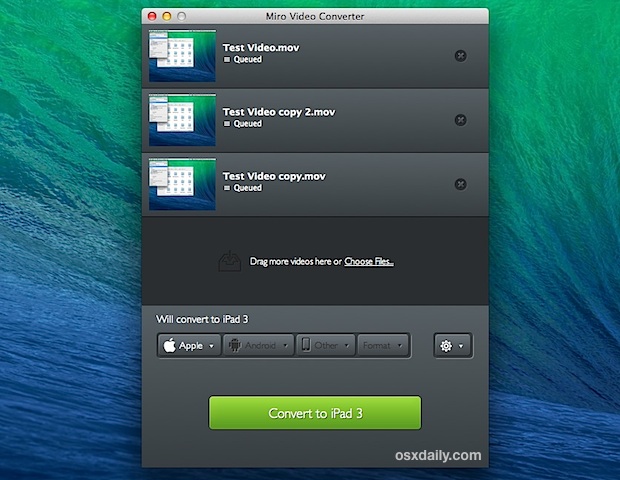
- Get Miro Converter and decompress the app, then launch Miro Converter
- Drag & drop the AVI video you wish to convert into the Miro app
- Select the parameters (Apple format) to convert and the export movie format to MOV
Using Perian to Convert AVI to MOV
First you’ll need to get Perian, it is a free open source QuickTime component that adds support for many popular video formats.
* Download Perian and install it
After you have installed Perian, you’ll use Apple’s own QuickTime Player (we’re using the Snow Leopard version in this walkthrough)
* Open the AVI movie you want converted to MOV within QuickTime
* From the File menu, select “Save As”
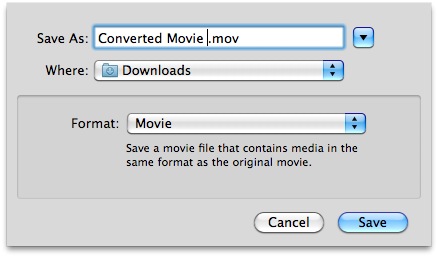
* In the pop-up save menu, select ‘movie’ and as you can see the file type will be .mov
* Click “Save”
* Now just wait until the AVI is converted to MOV, the time it takes will depend on the file size, but for most files it is pretty fast.
That’s it! You have just converted an AVI file to MOV format!
Want more movie tools for adjusting formats? Here are some of the best free video conversion apps for Mac OS X.
If anyone knows any easier ways to convert avi to mov than this (that are also free), please post them in the comments!






You can use Avdshare Video Converter to convert MOV to AVI, MP4, WMV, Apple ProRes, AVCHD, DV, MKV, VOB, RMVB, FLV, WebM, etc.
Yup, great download. Very quick and small file (3.6mb), Takes seconds to install and quite recognises AVI files right away.
Genius!
Thank You,
oh so much!
This is a Miracle!!! Thank you so much very fast. very easy.
Hello,
It’s not working. QT refuse to start because it doesn’t reconnize the AVI codec.
you are king!! you helped me alottt
It didn’t work. I tried opening the avi files using QuickTime and it says the movie is not in a format that Quicktime can open.
Is it because I don’t have Quicktime Pro?
If that is the reason, you should specify that. Please don’t leave out useful information in order to point out how easy this product is to use.
I do not recommend your site for others to use. The product might be good, but you don’t give good instructions on how to use it. I just wasted a lot of time.
I recommend you re-work your web site. Git rid of those obnoxious ads and then work out the instructions carefully, making sure to tell people what is required for this to work (such as Quicktime Pro – if that is the case).
-j
There is an ad at the top of your page that is really really confusing. It has a huge DOWNLOAD button, and it looks like that is what I am downloading. Can you get rid of this ad? It almost made me quit and try something else. Or put the ad at the bottom of the screen. I already hate ads, and it’s worse when the ad disguises itself as the thing I’m trying to download. That is so annoying, and I think it should be illegal. The internet is turning into a Las Vegas nightmare.
Thanks,
-j
This didn’t work at all for me, it got the AVI to work, but with no sound so when i converted it to MOV it had no sound which is completely useless to me..
Fun fact:
Perian also allows Final Cut to use AVIs by converting them to MOV automatically. Bonus points!
Non-Quicktime Pro user here: worked fine for me (didn’t have file extension type listed, so I typed it in (but didn’t have to)), converted a 9.12gig .avi file to a 9.13gig .mov file in about 3 minutes. Thanks for the help and discussion y’all~
[…] Convert AVI to MOV Komputer: MacBook Pro 17" C2D 2.93 GHz, 4GB RAM Cytuj […]
[…] Dodam tylko, iż posiadam już MacX Video Converter Pro i Toast Titanium. Pozdrawiam zobacz tu Convert AVI to MOV Komputer: MacBook Pro 17" C2D 2.93 GHz, 4GB RAM Cytuj […]
[…] thing about Perian is that it doubles as a video conversion utility, which lets you do things like convert an AVI to MOV amongst other […]
Thank you so much. I tried using MediaStream, but the output files didn’t work. I tried twice and waited 3 hours in total. This took 5 minutes and it worked amazingly. Thank you!
[…] najprościej za pomocą QuickTime + perian ( za free) Convert AVI to MOV Cytuj + Odpowiedz na ten […]
It also doesn’t mention that you have to have QuickTime PRO, which you have to buy for $30.
I don’t think that’s the case. Non-pro user here. Just “save as”. In my case, there was no extension name in the save menu, but it came out as a .mov on the desktop. Did indeed double the size though.
Non-pro here as well, but “save as” remains grayed out, with a big “PRO” next to it. So….?
I have the same problem. It should be easy and fast BUT ITS NOT. I downloaded the program. But When I go to SAVE AS it is still grayed out and tells me I have to buy something from Mac.
Is there a way around this? Does this work or not?
Perian…Wow so easy. I have looked for a converter for a long time that was automatic, and Perian does the job
Can’t get quicktime to open any AVI files with Perian installed.
Thank you so much for this, I searched high and low for an avi to mov converter that was easy to use and so simple!! thanks for keeping it real, open source, and free!
[…] video should now play trouble free within QuickTime Player. You could always convert the AVI to MOV as well but you’d still need to download Perian for […]
Thank You! So freaking much. I have been SOOOOO stressed out about watching these .avi files I downloaded and you just solved it. Very easy to use and saved the day. Thanks again!!!!! -Matt
[…] Convert AVI to MOV […]
Well I was looking for this simple and fast converted and now found it, thanks.
Evom rocks!!!! I have tried a million apps, but this is THE best!
http://thelittleappfactory.com/evom/
Perian would not work for me, no matter what I did (it’s usually great, but I had a few .avi files that would not play audio and video – I’d get either/or. Evom fixed this perfectly and quickly!
Thanks for bringing it up!
bro, evom saved my ass, you have no idea how gratefull i am with you now =)
2 years later and a few days b4 the end of the world your comment made my day, many many thanx!
indeed!!!great!!
Ive downloaded Evom and its taking ages to convert an .avi movie. Am I doing something wrong?
MPEG Streamclip: http://www.squared5.com/
Handbrake (http://handbrake.fr/) is a great free converter tool. Not sure if it is much faster or easier than Quicktime, but it works very well (for many formats).
MPEG Streamclip and Handbrake are both great video converting software that run on OS X.
You Forgot to mention this will double the size of the file
thank you ever so much. so much easier than all other ways …how is Perian free OMG