
Convert Images in Mac OS X: JPG to GIF, PSD to JPG, GIF to JPG, BMP to JPG, PNG to PDF, and more
 You can convert many different image file formats in Mac OS X for free using the included Preview application, there’s no need to download additional tools or do anything overly complex.
As of any somewhat modern version of Mac OS X, the Mac Preview app supports the following file types and will convert between any of them: GIF, ICNS, JPEG, JPG, JPEG-2000, Microsoft BMP, Microsoft Icon, OpenEXR, PDF, Photoshop (PSD), PICT, PNG, SGI, TGA, TIFF. Some of those image formats will be hidden from your default view when saving, requiring the usage of the “Option” key when saving to reveal them. In any event, converting from one image type to another is simple.
How to Convert Image File Formats in Mac OS X with Preview
Image conversion with Preview is a simple process:
- Open the image file you want converted within Preview
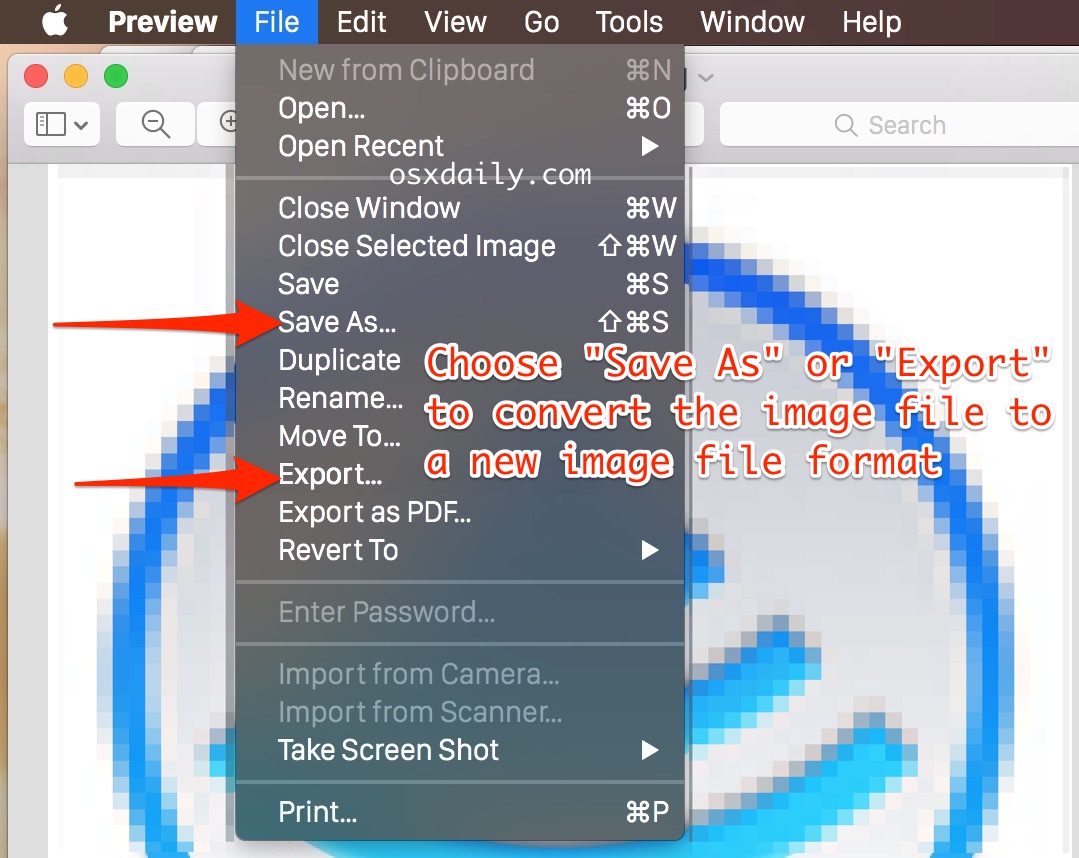
- From the File menu navigate down to “Save As” (or choose Export)
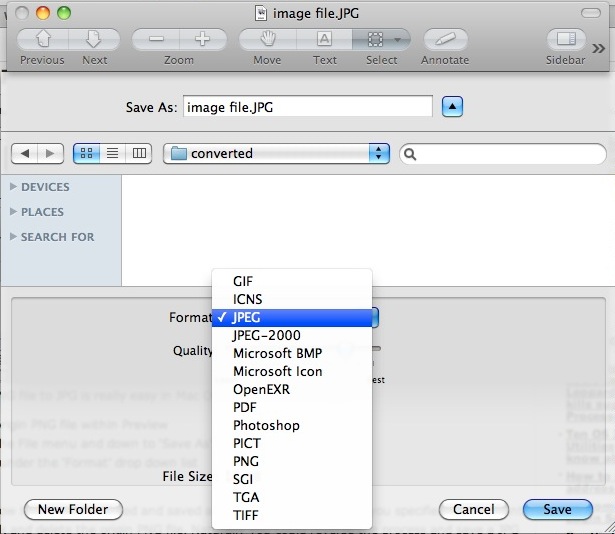
- Select the new file format you want the image converted to from the “Format” drop down list
- Optionally: change the save destination, or pick somewhere easy to find like the Desktop for the newly converted image file to appear
- Click “Save” to save and convert the image to the new format
You can repeat this process with other image files as necessary.
The above process will hold true regardless of the origin images file format and the desired file format.
Preview.app supports a wide range of image conversions: GIF to JPG, JPG to GIF, PSD to JPG, JPG to PDF, JPG to BMP, BMP to JPG, BMP to GIF, PNG to GIF, JPG to PNG, TIFF to JPG, and just about every other variation between these and more. As long as the image format is supported by Preview, it will convert it to any other supported file format.
Converting Images in MacOS Mojave, High Sierra, Sierra, Mac OS X Lion, Mountain Lion, Mavericks, Yosemite onward
Preview still maintains the ability to convert pictures, but macOS Mojave, Catalina, High Sierra, El Capitan, Sierra, OS X Lion, Mountain Lion, OS X Mavericks, and OS X Yosemite, are slightly different in a few ways regarding how this procedure is handled:
- Open the image to convert into Preview as usual
- From the File menu, you will notice “Save As” is hidden by default, so you can choose “Export” instead
- Select the file format to change the image file to, to see different image file formats in Preview, hold the Option key when selecting the Format menu and you will see additional options for file type
- Save the file as usual to discover the newly converted version in the destination you chose
It’s a good idea to save your files to somewhere easy to find. Easy as pie. Happy converting!
One thing to keep in mind is that if you’re going to be performing an image file conversion of many files to the same file type, let’s say a large group of PNG files that all need to become JPEG, you can perform a batch image format conversion as described here, which is a much faster and more efficient way to handle a large selection of images.
Whether you’re converting a single image file or multiple, the feature exists in all versions of Mac OS X, the only difference other than superficial appearance of the Preview app itself, is whether you will be using the “Export” feature or the “Save As” feature. Modern versions of Mac OS X will have both, which means you can pick either to convert the image to a new format as desired.






thank you for help – had no idea how to save gif graphic into jpg. As my mother once told me – it’s easy when you know how. Many thanks. nate
I am able to convert tiff files to bmp on my Mac. However, I need to convert them specifically to Monochrome bitmap files which so far as I can tell is not an option. Does anyone know how to do this?
Thanks!
[…] “linen.tiff” to the desktop – this is important because the replaced file must be converted to a tiff file with the same file name in order to work […]
[…] thanks to a variety of tools built directly into OS X (and most Linux distributions). Though the easiest method uses Preview for converting images, there’s a command line option that uses the same sips tool we’ve […]
Super infos.
merci.
thanks so much for your explaination !
@ASKE
I have gone through all of your steps, is it normal to be waiting a long period of time for the items to be converted during the last step? I have been waiting a good 15 minutes.
i want to convert a large file that is in photoshop to a jpeg file. How do you do it??????
hey.
i did all that in preview but it just come out blank when i export it to pdf so can you please help me
You probably got the answer straight over 4 years ago, but here it is anyway.
It’s just as Luis L said: “You have to hold alt (option) key when you click on the file type to expose hidden types like gif, icns, etc.”
That’s WHEN YOU CLICK ON THE FILE TYPE! Not when you click “File” in the Preview control bar. Not when you click “Export File”. When you click ON THE DROPDOWN MENU TO CHOOSE A FILE TYPE TO EXPORT TO. Sheeeeeesh!
You have to hold alt (option) key when you click on the file type to expose hidden types like gif, icns, etc.
Thank you Luis L… I was desperate and you gave me what I was looking for : an ANSWER :) Couldn’t understand why some file type had disappear. Now they’re back thanks to you.
Still doesn’t work. The same list of formats still shows up:
JPEG
JPEG-2000
Open-EXR
PDF
PNG
TIFF
(See previous reply.) My mistake, it does work, just as you said:
You have to hold alt (option) key when you click on the file type to expose hidden types like gif, icns, etc.
WHEN YOU CLICK ON THE FILE TYPE! Not when you click “File” in the Preview control bar. Not when you click “Export File”. When you click ON THE DROPDOWN MENU TO CHOOSE A FILE TYPE TO EXPORT TO. Sheeeeeesh!
[…] is an often underused Mac OS X app that can handle a lot of file and image conversion tasks without the need for downloading any third party tools. Preview also happens to be the […]
Would anyone venture to say this app is as good or better in some things than Gimp. I researched it and it looks like there were no issues for OS X 10.6 or later.
Re: OS X Lion – yes, use ‘export’ instead of ‘Save As’
Gari, do you have an option for .gif in yours? My older versions of Mac had that extension, but Lion doesn’t seem to. If not, is there a way to add extension options?
Does it work with Lion too?
I can’t export my png as gif…
Neither can I, despite what the page promises under “Converting Images in OS X Lion, Mountain Lion, Mavericks, Yosemite onward
Preview still maintains the ability to convert pictures, but OS X Lion, Mountain Lion, OS X Mavericks, and OS X Yosemite, are slightly different in a few ways regarding how this procedure is handled:”
It doesn’t say squat about not providing all formats.
Great tip, must see if we can add recursion to this.
It will not let me save the files. I don’t know what’s going on.
How about a way to batch change to png AND change the resolution of the files? I don’t see that option in the Automator tasks even though it can be done in Preview.
You can use the ‘sips’ command-line tool, which I personally find easier than firing up Automator. Check out http://straylink.wordpress.com/2009/01/24/os-x-command-line-image-manipulation/ for examples.
To convert a bunch of TIFs to JPGs, I just did something like:
for x (*.tif)
sips -s format jpeg $x –out outdir/$(basename $x .tif).jpg
[…] from Safari, and go straight to Preview to create a new file which can instantly be edited or converted. stLight.options({ publisher:'fe5e0a84-1fac-40de-8014-9f89fc1cbe6a' […]
This is what i am doing, but i have to do around 100 files, its quite tedious doing it one by one, and highlighting all the files and doing this doesnt seem to work!
Any suggestion?
Run automator.app, it´s in Applications folder. When it asks, select “workflow”.
1. Click “files & folders” on left. From right column drag & drop “ask for finder items” into the left window. Select the folder where your images are, tick “allow multiple selections”.
2. Drag & drop “copy finder items” and select the folder where you want to copy.
3. Select “Photos”, and drag “change type of images”. Select the output format.
Save the workflow for possible future use (File, save as).
Click run, select the photos to be converted. After a period, You have all the images in the output folder, in another format.
http://img43.imagevenue.com/img.php?image=434307207_Untitled_122_398lo.jpg
Absolutely fantastic advice!!
5 years a mac user and didn’t have the slightest idea that you can do that!
Many thanks Aske!
THANK YOU!!! You saved me a LOT of time!!!
Thanks a LOOOOOOOOOOt, Mac friend! I didn’t know either what Automator was for, you save me time and money and I’m definitely going to dive into this great App! Thanks again!
Thank you so much! You saved me an incredible amount of time! : )
Thank you Aske. Automator worked perfectly. Only thing is, I recently installed Photoshop CS6 and under “Change type of images” I can only choose from BMP, JPEG, JPEG 2000, PNG & TIFF. I need to change the format to PSD. Can you suggest how I might do this?
Thanks
Doesn’t work at all on Yosemite trying to convert PCT to Jpeg. The destination folder is empty…
All this is meaningless if you use OSX10.4.11, like me.
Any suggestions for this ‘ancient’ OS?
I tried this but a program that accepts only 24 bit depth BMP’s does not like the 32 bit depth put out by Preview or in slides saved as BMP from Powerpoint. How to change the bit depth from 32 to 24 bits?
This doesn’t work. All I get is four target file types: .pdf, .png, Photoshop, and .tif.
Thank you for the advice. i was able to convert my file easily. I did not even know about the preview app.
Hello,
With Mac OS X Preview: 8Kb bmp image -> 12Kb gif
With Windows Paint: same 8Kb bmp -> 202b gif
Is there a better Macs OS X app to convert from bmp to gif?
Thanks,
Olivier
Odds are, the actual file is about the same size. They’re reporting a different measure of space used: Even a one byte file occupies an entire block on the hard drive. Windows is reporting how big the data in the file is, while Mac OS is reporting how much of the hard drive space (one block) the file is using. Also, Mac OS will include the space required for the thumbnail Finder displays along with the image; Windows will hide that space in a different, hidden file.
What does that have to do with anything?
Useful tip. Preview might be a bit unweildy for batch work but gets the jobs done.
HI:
I have a whole bunch of images (an album of about 1,000 images) that I need to convert from png to jpg. Is there an easy way to do a large batch like that on a Mac?
I know I can open each png image and convert it to a jpg. Do I have to do them all one by one?
Any advice would be appreciated.
Lorne