
How to Enable the Firewall in Mac OS X
 If you want to beef up the security on your Mac with a simple settings adjustment, you can enable the built-in software firewall. This offers a layer of protection by blocking many ports for common protocols, incoming connections, and other potential attack vectors. Generally, the Mac OS X Firewall is not necessary to use for the average Mac user who only uses their device at home behind a network firewall (like a router, for example), but it does offer a layer of security for users who are frequently on the go or using their Macs on shared networks with many other machines.
Turning on the firewall is simple, and you can also easily make configuration adjustments to control what apps, sharing protocols, and services respond and allow network access.
Enabling the Firewall in Mac OS X
- Open “System Preferences” from the Apple menu
- Click on the “Security & Privacy” panel
- Click on the “Firewall” tab
- In the corner of this window, you’ll see a lock icon, click on that and enter the administrator password to gain permission to make adjustments to firewall settings
- Now click on the “Turn On Firewall” button to activate the firewall
That’s it, the firewall is instantly started and will begin blocking network connections.
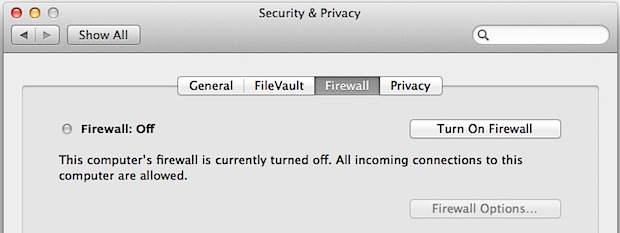
Customizing Firewall Options in Mac OS X
If you want to allow certain ports, applications, or network connections, first enable the firewall following the instructions above, and then you can choose the “Firewall Options” button to adjust the settings as necessary. The Mac OS X firewall is quite secure by default and will block nearly all incoming connections unless specified otherwise. There is quite a bit of control in the settings, and if you require the usage of certain network protocols you can fine tune which sharing services allow incoming connections by adjusting items int he block and allow list, or by manually adding new apps to the allowed connection list.
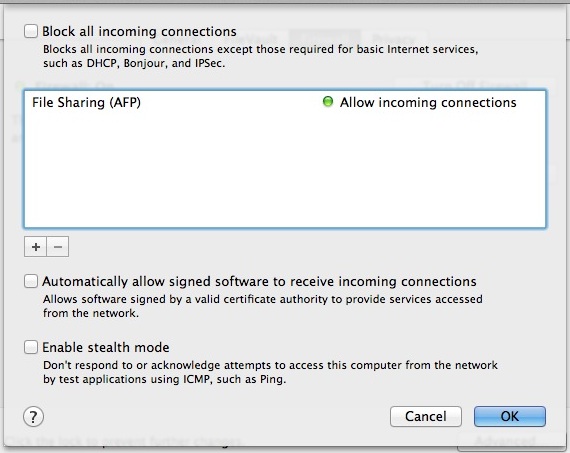
Tune your settings as necessary for your network situation. Keep in mind that “blocking all connections” is extremely strict, and not only will it block unwanted connections, but it will also prevent legitimate network connection attempts including all forms of file sharing in Mac OS X, remote access connections with SSH or SFTP, and any other similar network service that allows for Mac network connections from trusted logins and peers.
It’s my opinion that if you’re behind a router with it’s own firewall, and on a trusted network, you probably don’t need to use the Mac firewall at all. For small home networks you should be fine as well, but for larger, untrusted, or exposed networks where many peers are active on the same network, using the firewall may be a prudent idea, even if the likelihood of an attack on your Mac is extremely low in comparison to a Windows machine. As always, be sure to have a password enabled on your user account and have it be complex enough that it would not be easy to guess, as strong passwords are often the simplest line of defense against attacks.
–
Firewall has been around in Mac OS X since the beginning, but the settings location has changed a few times. The “Security & Privacy” system preference panel is where the Firewall options reside in the newest versions of Mac OS X, from OS X 10.7, 10.8, 10.9 Mavericks, 10.10 Yosemite, mac OS X 10.11 El Capitan, macOS 10.12 Sierra, macOS 10.13 High Sierra, macOS 10.14 Mojave, macos 10.15 Catalina, and presumably beyond.
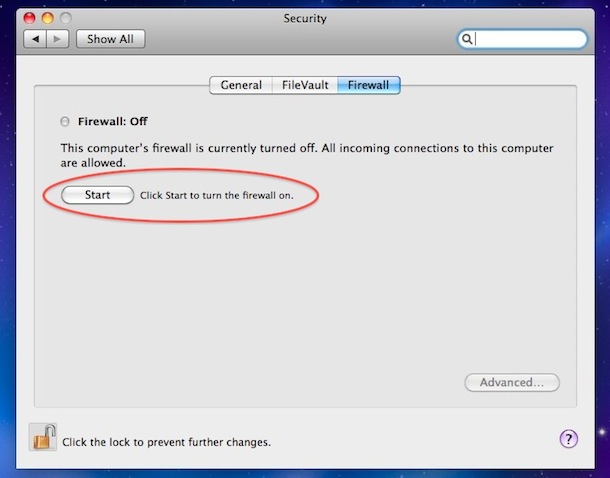
In Mac OS X 10.6, the Firewall service was placed under the “Security” systems preference as opposed to ‘Sharing’ as it was in prior versions of Mac OS X before the 10.6 release. Accordingly, the “Turn ON Firewall” option was named “Start” in earlier Mac OS X versions, as shown in the screen shot above. Nonetheless, the feature set remains the same, and the firewall is just as effective at blocking network connections.
If you have any thoughts or opinions about the MacOS firewall, share with us in the comments below.






I want to turn on a firewall
[…] A firewall gives you an additional layer of security against viruses and trojans. A firewall is not necessary i you run antivirus software, but recommended if you do a lot of online banking or want an extra layer of security. This article explains nicely how to configure your firewall. […]
[…] a security suite on yr Mac if you’re not an experienced user, or at least an antivirus + the built in firewall. If you choose to install a security suite, then pick one from here (Sophos or BiDefender would be […]
Thanks guys, very helpful this topic
Or use the ipfw GUI front-end Waterroof: http://www.hanynet.com/waterroof/
Mac OS X comes with an even more powerful Firewall than the one in the system preferences. Open up the Terminal and type “man ipfw” to learn more about it.