
iTunes Won’t Play a Song or Add MP3? Here’s a Simple Fix
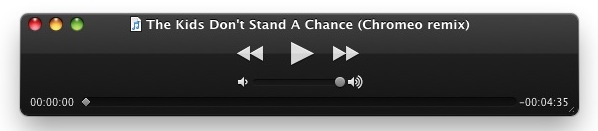
I recently encountered a strange bug where iTunes refused to add a song to it’s playlist and wouldn’t play the original source MP3 file either. Interestingly enough, the mp3 file played fine with Quick Look and even was able to play within the Finder preview, but no matter what I did I could not add or import the mp3 file to my iTunes playlist.
Fix for iTunes Not Playing / Adding Songs and MP3s
I came up with a fix that involves opening the song with QuickTime Player and then re-saving it as an iTunes compatible format to play as usual, here are the steps:
- Launch QuickTime Player
- Drag or Open the MP3 file into QuickTime Player
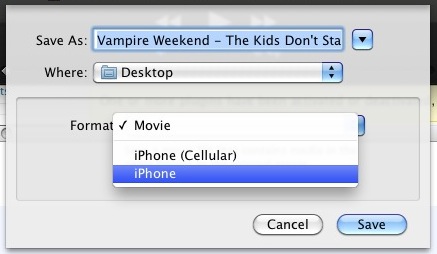
- From the File menu select “Save As”
- Select “iPhone” as the Format
- Click “Save” and let the mp3 file convert to an .m4v iPhone movie file
- Locate the newly created .m4v file and rename the .m4v extension to .m4a to ensure iTunes treats it as audio, and drag that file into iTunes
- Play the song in iTunes as usual
At this point the song should play and add to iTunes just fine.
If you want, you can take this a step further and then select the song and convert it to AAC or MP3 with iTunes from the “Advanced” menu. Likewise you can use a third party utility like All2Mp3 and convert the song to MP3 that way as well.
If all else fails, you might want to learn to repair MP3 files, it’s not complicated and it will fix most other problems.






With the patience of a Rottweiler I finally converted the mp3’s on Somona via quick-time as “audio only files”. That’s always the problem: if you have a closed system, you get used to the bugs. But it works to convert MP3s converted from MP4 to m4a. Maybe AI will make it all much easier
Hello I just want to say that your websites have helped many times so I owe you a big thank you ! Bless
That is so stupid this was a bug fix 10 years ago and still exists… talk about improvement mate. Btw, thanks :)
Holy cow that worked! Thank you so much!
What if QuickPlay says that the mp3 is not a file that it understands? What does that mean?
Or, there was a much simpler way for me. I opened the file in QuickTime, clicked File>Export>iTunes. Done, there it is! There was no quality lost.
What this worked for: I had m4a files sent to me through email. They would play in google preview (only on Chrome) but when I downloaded it and opened it in iTunes, it was a file of 0.00 minutes. But I opened it in QuickTime, where the full file played, (it also opened in VLC) and exported to iTunes. Thank for this articles, I wouldn’t have thought to do that.
This seems great for a song or two .. but I have hundreds of MP3’s. Is there a way to easily convert a group of songs rather than one by one?
You may try use Avdshare Audio Converter to Convert all RA files to iTunes supported MP3, AAC, M4A, WAV, AIFF, etc.
Absolute saviour! Thank you so much! Cant thank you enough :D
Hi there I have tried this fix but it only seems to work for Macs. I have a PC that runs on Windows 10 and QuickTime is no longer supported for Windows. QuickTime tells me when I go to save the file in a different format that I need to have QuickTime Pro, which no longer exists. Does anyone know how to fix this problem in Windows? Thanks!
Well although it’s an older thread, the comments here helped me find a solution to this annoying problem. I had created some m4a files and when I loaded them into iTunes(12.3.0.44) on OS 10.10.5, 5 out of 25 files just didn’t load into iTunes (via Add to Library…). Changed formats to MP3 and a few others, still no good. Finally I dragged the m4a file onto QuickTime and did an ‘Export iTunes’. Joy, it finally placed the songs into the Library for happy me to find. Hope this helps someone else! Cheers.
Stupid bug. Here is how you upload the fix.
1) Upload less than 100 mp3 at a time
2) If the last batch of mp3 that you tried did not upload, then just pick one new mp3 file and upload again. This will trigger an upload event to load the last batch of mp3s that did upload.
Just google search Step by Step Guide on How to Solve “can’t add music to iTunes” Problem?
you will find a simple solution on “iTunes won’t add music” issue which helps to import all kinds of music like FLAC, OGG, WMA, CAF, MP2, SHN, QCP, MPC, PCM, APE, AMR, AWB, AC3, AUD, RA and etc to iTunes!
[…] mentioned this briefly when describing a problem when iTunes won’t play a song but it would play in Quick Look, and realized that many people might now know that Quick Look can […]
The only problem is it lowers the bit rate to 128kbps which sucks.
No one realizes that this is not a fix but simply a way to perform a lossy transcode? The audio quality is horribly degraded. You can’t take a compressed audio file and further compress it. For people who care about audio fidelity this is a cardinal sin.
My ears are cringing.
Thanks a lot! This really works! I had trouble playing a certain .mp3 in iTunes and this was simple and fast!
it works, but i lose a lot of quality the bitrate drops from 320kbps to 128kbps.
Thank you so much! I have tried so many things to get my MP3’s to play and this worked (and was ten times easier and free) Thank you!
-Kinsey
Man thanks so much bro, this worked for me and i have tryed some other bs, thanks for the advice man, it really helped, i will refer my friends to you if they have the same problem. Thanks again bro ur a saviour – Mitch
um… only works if you have quicktime pro…
[…] software you can try some other methods. I’ve found creative workarounds in the past when iTunes won’t play a song that involves importing the file into QuickTime and exporting it as a movie track before […]
[…] a program like this is helpful when iTunes won’t play a song, it’s usually because the format is incompatible with iTunes or because the file is […]
Es un buen tip.
Pero vamos, iTunes esta hecho para tocar files mp3. que arreglen el bug!!
But the resulting m4v file is often treated as an video file. You’d want to rename the file to m4a at least to make iTunes treat it as an audio file.
Good suggestion, article updated. Thanks!
-Will
Great tip, worked well in Mavericks Jan 2015.