
Remove an Agent from launchd
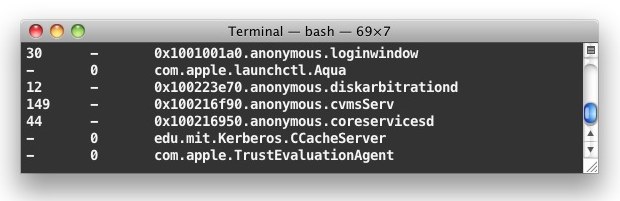
The vast majority of Mac users won’t need to manually tweak launchd and launchctl, but there are times when you uninstall or stop using an app in Mac OS X and a service agent continues to needlessly load in launchd. This is annoying, but these rogue agents are easy to remove via the command line, so launch Terminal and away we go. Additionally, there are situations where advanced users may want to tweak agents loaded into launchd for whatever reason. In any case, we’ll detail how to list items in launchd, how to remove them from launchd in OS X, and also how to re-load agents into launchd on the Mac.
You’ll need to have some understanding and comfort of using the command line and Terminal to use this properly, making this ideal for more advanced users who have knowledge of launch daemons and how to track them down, which, sometimes, is just a matter of finding one in the Activity Monitor of Mac OS X, or by using the launchctl command we’ll discuss shortly. If you decide to reverse the modification, you can also load the service or daemon back into launchd using another command, which effectively undoes the initial removal step. Let’s get to it:
Removing Launch Agents & Services from launchd in OS X
Here is how to remove a service from launchd. Launch Terminal and then use the following syntax with the launchctl command:
launchctl remove name
For example, if I want to remove a service named “com.annoying.service” the syntax would be:
launchctl remove com.annoying.service
You may need to prefix the command with sudo in order to remove the service, in this case the command would be:
sudo launchctl remove com.annoying.service
With the sudo prefix you’ll have to enter an administrator password before the command will execute.
How to See What is Loaded in launchd
You can also check what’s loaded into launchd by using the following command string:
launchctl list
This command lists all agents and jobs loaded into launchd, allowing you to easily manipulate the agents that are running. Because it dumps a ton of information onto the screen at once, you may want to pipe it through the more or less commands like so:
launchctl list |more
This lets you hit the return key to more slowly navigate through the list.
If you know generally the service you’re looking for, you can also use “grep” to find the precise agents service, let’s use ‘mdworker’ as an example::
launchctl list |grep mdworker
This would report back only the following launchagents:
-	0	com.apple.mdworker.sizing

-	0	com.apple.mdworker.single

-	0	com.apple.mdworker.shared

-	0	com.apple.mdworker.mail

-	0	com.apple.mdworker.lsb

-	0	com.apple.mdworker.isolation

-	0	com.apple.mdworker.bundles

-	0	com.apple.mdworker.32bit
For some services, dumping the list may also show the PID (process ID) of the active service as well.
Loading an Agent Back into launchd
If you decide you want to reenable and reload a service back into launchd, use the ‘load’ flag like so:
launchctl load com.example.service.to.load
Some agents will load instantly without issue. For others, you may need to reboot the Mac before the loaded service will function as intended again, though sometimes logging out and back in is sufficient as well.






This was absolute magic. Splashtop was refusing hard at being uninstalled in all the normal ways.
Once I stopped the service from running, it completely disappeared from my activity monitor. (OSX 15.1)
Thank you!
List non-apple services only:
“`
list | grep -v com.apple
“`
I had MacPerformance Malware loaded into launchd and this works!! Thank you guys!
I tried launchctl remove with no effect on VOX agent (V 3.2.1-build 3210.1), so went in Activity Monitor to find out files that it uses. Turned out there’s a piece of software called /Applications/VOX.app/Contents/Library/LoginItems/VOXAgent.app/Contents/MacOS/VOXAgent. Moved it out ~/.Trash, rerun launchctl remove, and it did not come back. The audio player still works without the agent. There’s an advice by Vox Support to uncheck a box in its Preferences, but the location of the box has changed, and in any case that did not work (as I did not sign on to Vox Cloud).
I would like to stop SpotlightNetHelper from launching. I do not need my Mac reporting to Apple and slowing down my gaming Ping(when I force quit it in Activity Monitor, my ping goes down drastically, then, like spyware for a PC, it finds another PID and relaunches ad-infinity). I know someone is going to “lecture” me on how super awesomely important SpotlightNetHelper is. But, I know its essentially Manufacturer Spyware for a Mac. Eff, that. The problem is, it shows under launchd (1)<— seems suspicious , and will not show up on launchctl list. I have disabled all the spotlight features on the web and all over the place and yet SpotlightNetHelper tends to pop back up and send data packets to apple. Is there a guru, or straight up HACKER that can tell me how to disable this FOREVER?
To stop SpotlightNetHelper, you can do the following:
– Apple menu > System Preferences > Spotlight – then Disable “Spotlight Suggestions” and “Bing Web Searches” and turn off “Allow Spotlight suggestions”
– Next in Safari, go to Safari > Preferences > Search > and uncheck “Include Spotlight Suggestions”
That should do the trick. You can watch Activity Monitor but it should go away with all of that turned off.
You can also disable any other Spotlight web or internet functionality (dictionary, wikipedia, movies, events, mail, conversions, etc) if you don’t want any communication to Apple from Spotlight. Or just disable the feature entirely except for local files and documents by unchecking accordingly.
The other option is to locate the process itself, and rename it or move it (don’t delete it, just in case). It would be wise to backup the Mac before attempting this, because it is a system level process and function. The executable is located at:
/System/Library/PrivateFrameworks/ParsecUI.framework/Versions/A/Support/SpotlightNetHelper.app/Contents/MacOS/SpotlightNetHelper
While the general SpotlightNetHelper package is located at:
/System/Library/PrivateFrameworks/ParsecUI.framework/Versions/A/Support/SpotlightNetHelper.app/
Depending on your settings, you may need to disable SIP to access or modify that file. Disabling SIP is described here:
https://osxdaily.com/2015/10/05/disable-rootless-system-integrity-protection-mac-os-x/
Turning off SIP is generally not recommended because it can lead to security breaches on the Mac. If you do this, disable it, change the file name of SpotlightNetHelper so it stops launching, then re-enable SIP.
Let us know how that works for you.
Hi, MegaBakcupAgent is back after removed it using launchctl. How do I permanently remove it? Thanks.
Thanks!
“launchctl remove com.megabackup.MegaBackupAgent” worked for me after Force Quit fails.
Worked for me to remove com.logmein.CubbyHelper – was trying to spawn every 10 seconds after the application had been removed. Very helpful, thanks!
Hi,
I’m trying to uninstall leftover from Mackeeper.
I couldn’t remove com.zeobit.Mackeeper.Helper
I tried both sudo and regular remove with the same result. “No such process”
Any Ideas?
Thanks,
Michael
Thanks worked like a charm.
Hi I know this thread is old, but…
I am no Terminal guru, but I have seen different ways to unload/remove agents before.
What is the difference between these two commands:
launchctl remove com.apple.bookstoreagent
launchctl unload -w com.apple.bookstoreagent
I know that “launchctl remove [agent]” removes the job from launchd, whereas “launchctl unload [agent]” will be reverted when you restart, however I don’t know how this plays into the -w flag at all.
I’m not sure if you know, but you can access more information with the command “man launchctl”. Perhaps it is a bit more clear to you than it is to me.
Any idea what launch puppies with “..anonymous..” in name are? See examples below (I’ve changed codes in case they’re revealing something about my system I don’t want known).
Rather uncomfortable seeing such, like a virus or so.
Some have process ID of launchd. There are several such in both sudo and user launchctl list.
0x7f936fc058b0.anonymous.bash
0x7f936ed2de90.anonymous.login
Some have process IDs that aren’t listed in Activity Monitor.
Several are attached to obvious processes, like
0x7h035bd031d5.anonymous.WindowServer
Thanks in advance
exactly the sort of answer that i absolutely hate about some Mac users below ..
“What are some of the services that we should remove? Any service that would be slowing down the computer?
None. If you don’t have a reason to, don’t mess around with launchd”
– what a smug, unhelpful, narrow-minded and insulting answer.. that is exactly the sort of mindset that real tech’s hate. LaunchD is there to tweak, the whole OS is tweakable, so shitty answers like ‘apple knows best’ is exactly the type of blinkered and philistine answer that makes my blood boil.
There is even a app called ‘Lingon’ – which lets you tweak, add, remove, respawn and generally mess around with Launchd.. there are many services n OS X that you can do without, consume RAM, CPU and thus battery life and with running additional unwanted ‘services’ or ‘daemons for example which can expose vulnerabilities on an network level.
For example addressbook, podcast uploader, pictd, quicklook, remote desktop, screen reader, samba, cups, spindump, backupd, applespell, spindump and postfix are just some of the stuff not running on my MacbookPro .. i dont need, want or use them, so they can go.
Just Google carefully the service you’re interested in, AND
be prepared to reinstall if the Mac doesn’t start up after removing / disabling these, and obviously back up all your data BEFORE you do thid, or before you reinstall.
Some you can remove easily and will never notice, some you may never use, and yes, some will kill the OS, making it unbootable again, requiring you to reinstall OSX again over the top of your broken OS.. warning over.
Anti-intellectual, paternal and insulting comments llke
‘dont touch it’ are a disease in the Apple community and should be stamped out and these people should actually learn about computer operating systems themselves before opening their mouths.
The info is out there,
try it,
reinstall it,
learn it,
understand it,
and pass it on.
Not sure why you should feel so entitled to vitriol, but I suggest the likes of you are better off just leaving launchd alone =P
Thanks Helper for the tip!
Had the same MacKeeper launching services console problem;
com.apple.launchd[1] com.apple.launchd (com.zeobit.MacKeeper.plugin.AntiTheft.daemon[65237]) posix_spawn(“/Library/Application Support/MacKeeper/MacKeeperATd”, …)
deleted the .plst file under my user/Library/ LaunchAgents and finally got rid of the pesky issue!
amazing!, but I still have a problem,
I uninstalled long ago MacKeeper, but I think I did it the wrong way, so, at the console still displaying this:
25/03/12 14:30:51 com.apple.launchd[1] com.apple.launchd (com.zeobit.MacKeeper.plugin.AntiTheft.daemon[65237]) posix_spawn(“/Library/Application Support/MacKeeper/MacKeeperATd”, …): No such file or directory
I want to get rid of this, i tried with all those comand lines, but nothing happens, what should i do?
You’ll have to track down the “com.zeobit.MacKeeper.plugin.AntiTheft.daemon” file, it’s probably in the /Library/LaunchDaemons/ directory
sudo sudo find // -iname *MacKeeper*.* will find all files on your machine using mackeeper.
Thanks for the tip but I am having a similar experience as Albinoz.
I have services that start with my computer that are also found in the launchctl list but I get the error message ” launchctl remove error: No such process”
Anybody got a clue?
I even tried sudo with my password.
I have multiple accounts on my computer but after a new start none have run. Besides I am the only admin!
questions, question
hope someone hears these late on comments
This worked perfectly removing Xquartz from the list. I use the open source opennx client and one day I decided to try Xquarts instead of X11.app and suddenly my NX client stopped working. When I tried this to remove Xquartz, my NX started working again. You’re a lifesaver.
OMG Thank You! I was finally able to remove this MYSQL service.
Hmm. No files in LaunchAgents. And I don’t have either of the other folders :(
Tim : Look in /Library/LaunchAgent and /Library/LaunchDeamon or maybe in /Library/StartupItems. SomeTimes they are in your Home library… have more speed ;)
OK, this has come at the perfect time for me. At least, I thought it had.
Every time I rouse my Macbook from sleep, I get an annoying process named ‘rastertobrother3’. This seems to be a process related to the CUPS driver for Brother peripherals (which I don’t use).
I kill the process manually because it uses 100MB of RAM which I can’t afford to lose. But doing it manually every time is a MASSIVE PAIN.
Here’s where it gets weird: the process doesn’t show up in launchctd list. The process ID is simply not there.
What the hell? How do I kill this process once and for all?!
i had this problem when my printer port was open. i closed 4080. i don’t know if that’s the answer, but it worked for me.
NIce tips thanks but remove result ” launchctl remove error: No such process” ?
It might be running as normal user not sudo user.
Try both launchctl remove if that fails also try sudo launchctl remove
What are some of the services that we should remove? Any service that would be slowing down the computer?
None. If you don’t have a reason to, don’t mess around with launchd.
what a completely lousy answer to someone asking for information.
thank you. i get that too often. when i ask a question, please don’t answer unless you have something to add to the conversation.
there are reasons to remove a service, other than them slowing down your computer.
some of these apps are used for loading malware.
Hey Justin, check out this piece of software. http://www.etresoft.com/etrecheck_story
It only does diagnostics, (and doesn’t need administrator privileges to run) but it will give you a list of potential problem areas in your computer, particularly relevant are the Launch Daemons etc.
I love the terminal tips, keep em comin