
Boot into Mac OS X Verbose Mode
 Booting a Mac with Verbose Mode can be a helpful troubleshooting trick for some obscure situations where users are trying to determine what is going wrong with a Mac during the system boot process. Just as it sounds, verbose mode is verbose, meaning it lists everything going on behind the scenes, and you’ll watch as items and extensions are loaded into the kernel and Mac OS X proceeds with the boot process.
How to Boot a Mac with Verbose Mode
You can boot into Mac OS X verbose mode just once, meaning on that specific boot, by holding down Command+V immediately after powering on a Mac (or immediately after reboot).
The exact steps to boot a Mac in Verbose Mode are as follows:
- Boot the Mac as usual by pressing the Power key (or restart the Mac)
- Immediately start holding down Command + V keys as soon as the Mac boots or when you hear the boot chime
- Continue holding Command + V on boot until you see white text against a black background appear on screen, signifying Verbose Mode is active on that system start
You’ll know you’re in verbose mode because you’ll see lots of text reminiscent of the command line rather than your standard Mac OS X boot screen. Verbose Mode should look something like this:
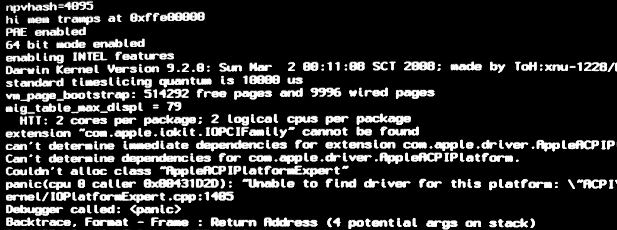
Verbose mode can be very useful when troubleshooting Macs and developers often use it too. Aside from practical applications of Verbose Mode, some Mac users also just think it looks interesting and like it because it reveals additional boot details, sort of like booting a PC or unix machine – and don’t forget that MacOS / Mac OS X is based on Unix after all!
Aside from troubleshooting, which Safe Boot mode is often better suited for, the standard user probably has no need to be in verbose boot, but it can still be fun to look at the underpinnings of Mac OS X as they go on during the starting process.
Finally, if you just hold down the key combination, your next reboot of the Mac will be normal again. The key combination approach just boots Verbose Mode on a one-off basis, but you can also set your Mac to always boot in verbose mode if you wanted to always see the text that way or consistently boot with Verbose Mode without having to hold down the key combination.
Do you know of any other interesting tricks or tips involving verbose mode in Mac OS? Share with us in the comments below!






Verbose Mode is primarily used for debugging or gaining insight into the macOS startup process.
I like how the screenshot is of a kernel panic.
LOL!! If you are getting kernel panics on boot, you are in bad shape!
Hello Unix