
Disable Safari Spelling Auto-Correct in Mac OS X
 If you disabled spelling auto-correct in Mac OS X but find yourself still being autocorrected as you type various words in Safari, that’s because the new versions of Safari has a separate spelling and grammar engine than the core OS. Admittedly, that’s a little confusing to have an app use it’s own unique spelling correction functionality, but fortunately you can control the feature independently if it’s bothering you.
Done with Safari’s auto-correct function? This is how to turn it off on the Mac:
How to Turn Off Safari Spell Check on Mac
- Open the Safari app on the Mac
- Open a new Safari window and select a text-input box by clicking into it (here’s a quick link to our comments if you want to use that)
- Pull down the Edit menu and scroll down to “Spelling and Grammar”
- Select “Correct Spelling Automatically” so that the check no longer appears next to it
This is what you’re looking for in the menu item:
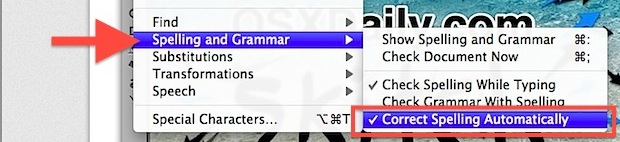
The setting takes effect immediately but you are welcome to test this out and confirm it yourself. You should not need to relaunch Safari on the Mac for any change to become acknowledged, the autocorrection should just cease.
You can disable Safaris spell checking here too, but the autocorrect feature is what actually causes your words to change themselves rather than just be highlighted by the checking feature.






I can not deselect the check mark in front of Correct Spelling Automatically. It is shaded and can’t be altered. Can’t find anyway to stop Correct Spelling Automatically. It changes a whole bunch of words already sealed correctly to totally other words I have to proof everything and manually correct errors made by Correct Spelling Automatically. THIS IS RIDICULOUS!
Turn off autocorrect in MacOS to stop the auto-correct of spelling errors.
Some apps like Safari have their own additional auto correct you can disable too.
https://osxdaily.com/2011/07/28/turn-off-auto-correct-in-mac-os-x-lion/
This is SOOOOOOO seven years ago. 30 in computer years. Total waste of your time to read.
This fix still works, was not a waste of my time at all.
Nope. High Sierra. Safari browser. Facebook will not stop autocorrect. Nothing is checked in Keyboard, Text, OS … to correct. Maddening. Awesome. So simple and easy and great.
There is no such thing as a text-input box. Explain yourself.
They mean a comment box like you get an newspaper websites or even a Facebook post. I took me a while to work it out but it works a treat.
Auto-correct is so very annoying. It ought to be outlawed forever! Are people becoming so lazy that they don’t bother to prove read what they wrote?
What is the point of Auto-“correct” while you spell a special work and it “correct” you with the word you intend? You have to make sure it doesn’t “correct” you anyways.
Yeah, good tip this one :-)
THANK YOU!!! :-)
I have needed this!
…will make my life so much easier…I have failed to notice some autocorrects previously (when what I had typed was “correct”) and it has led to some problems.
Thanks! Couldn’t figure this out
Thanks for these helpful comments.
Does any one know how to get into the local dictionary to change a word it has wrongly stored? (ie it keeps autocorrecting WOULD to WOUDL.
TRhaks for these helful comments. Does any one know how to get into the local dictionary to change a word it has wrongly stored? (ie it keeps autocorrecting WOULD to WOUDL.
Thanks, what a stupid “feature” from Apple -_-
Hell yeah!
Thanks so muhc, sorry, so much!
When I want to write something including ‘a it immediately bocomes á !! The same thing happens with all these:
‘o -> ó
‘e -> é
“a -> ä
“e -> ë
etc…
How can I avoid that??? Please help…. :)
Thank you!!
Yes, you have to have clicked into a field where you can input text, then it becomes available to adjust.
Anyone know what to do if you go to Spelling & Grammar and “Correct Spelling Automatically” is grey and will not allow you to click/uncheck it?
Thanks. This was starting to get really annoying.
[…] you do want to disable autocorrect you can do that too, but remember that autocorrect must be disabled separately in Safari. stLight.options({ publisher:'fe5e0a84-1fac-40de-8014-9f89fc1cbe6a' […]
Interesting site and your tip seems to work. However, after a restart both Safari and Stickies have to have the spelling checker disabled yet again. Very annoying!
I often use Pages in two languages and need the spell-checker to insert accents (French). However, the spell-checker always reverts back to English. I can even see it change the language in the inspector/text/more tab. Any ideas on how to correct this?
Ray it reverts back to American NOT English which, as an Englishman, I find bloody annoying to have my English ‘corrected’ to American.
System Preferences menu, Language & Text, Text tab. Spelling: British English. Done.
Still won’t work for me, please help as have Lit review to hand in to Uni and it’s really doing my head in now.
Maybe you should buy a English brand of computer then! Haha! ;)
tHanks for tha raelly graet tip!
Good one, I figured the defaults write command just didn’t work
damn you autocorrect!