
Internet Explorer for Mac the Easy Way: Run IE 7, IE8, & IE9 Free in a Virtual Machine
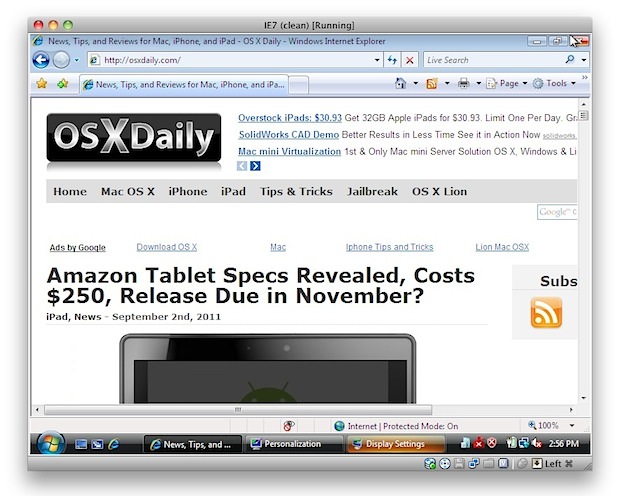
If you’re a Mac user that requires the usage of Internet Explorer under Mac OS X, you’ll find your choices are generally as follows: run IE on top of Mac OS X with Wine which can be slow and buggy, dual boot Windows and Mac OS X which is a nuisance because it requites rebooting, or use virtualization with something like Parallels, VMWare, or VirtualBox. Virtualization is generally the best method because you can run IE and other Windows apps directly atop OS X, but some of the VM software is expensive and you still need a Windows license key, right? Wrong!
Run Internet Explorer 7, 8, 10, & 11 in Mac OS X the Easy & Free Way
We’re going to walk you through how to install Internet Explorer 7, 8, 9, 10, and 11 in a virtual machine running Windows, directly in Mac OS X – for free. This is achieved by using the freely available VirtualBox software from Oracle, and combining that with free Internet Explorer testing virtual machines from Microsoft, the trick is converting these free IE vm’s so that they work flawlessly under OS X (or Linux, technically), and that is all handled automatically with this method.
Notes: the admin password for all of the IE VMs is “Password1” without the quotes. This has been tested and confirmed to work with all modern versions of Mac system software including OS X 10.10 Yosemite, OS X 10.9 Mavericks, 10.8 Mountain Lion, OS X 10.7 Lion, and Mac OS X 10.6 Snow Leopard.
Installation size per IE Virtual Machine is about 11GB, to install all Windows VM’s it will take about 48GB of disk space.
- Download & Install VirtualBox – Download Now (direct .dmg download link) – or visit VirtualBox Downloads page
- Launch the Terminal (located in /Applications/Utilities/)
- Decide which versions of Internet Explorer you want to download and install – each version of Internet Explorer is contained within a separate virtual machine that runs within VirtualBox. In other words, if you want to run Internet Explorer 7, 8, and 9, you will need to download three separate VM’s, which may take a while so keep that in mind. Select the text below and copy it:
-
Install ALL versions of Internet Explorer: IE7, IE 8, IE 9, IE10, IE11
-
Install Internet Explorer 11 Only
-
Install Internet Explorer 10 Only
-
Install Internet Explorer 7 Only
-
Install Internet Explorer 8 Only
-
Install Internet Explorer 9 Only
- Copy and paste the selected command from above into the Terminal and hit return, this will start the download and conversion process. How long this takes depends on your internet connection and how many versions of Internet Explorer you chose to install
- Launch VirtualBox and boot Windows & Internet Explorer – select the virtual machine corresponding to the version of Internet Explorer you intend to use: IE7, IE8, IE9, then click on the “Start” button to boot that Windows machine with that version of Internet Explorer.
curl -s https://raw.githubusercontent.com/xdissent/ievms/master/ievms.sh | bash
curl -s https://raw.githubusercontent.com/xdissent/ievms/master/ievms.sh | IEVMS_VERSIONS="11" bash
curl -s https://raw.githubusercontent.com/xdissent/ievms/master/ievms.sh | IEVMS_VERSIONS="10" bash
curl -s https://raw.github.com/xdissent/ievms/master/ievms.sh | IEVMS_VERSIONS="7" bash
curl -s https://raw.github.com/xdissent/ievms/master/ievms.sh | IEVMS_VERSIONS="8" bash
curl -s https://raw.githubusercontent.com/xdissent/ievms/master/ievms.sh | IEVMS_VERSIONS="9" bash
Remember that the default Windows admin password is “Password1”, it’s also the password hint within the VM should you forget it.
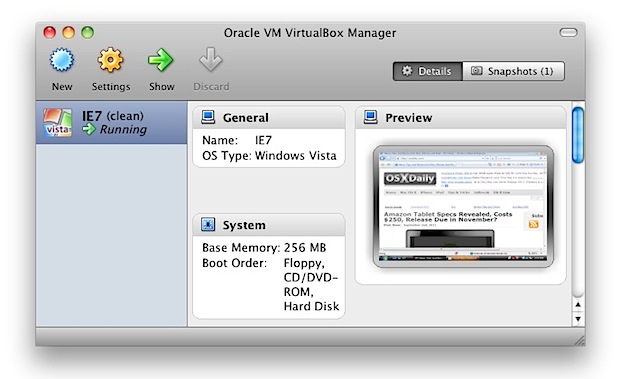
That’s really all there is to it. These commands are part of the ievsms script from xdissent and it manages the entire download, conversion, and installation procedure, it doesn’t get much easier.
Note: if you’re having trouble with the above URL or commands not working, it may be because github changed the URL structure of their source from github.com to githubusercontent, like the following:
curl -s https://raw.github.com/xdissent/ievms/master/ievms.sh | bash
Turns into:
curl -s https://raw.githubusercontent.com/xdissent/ievms/master/ievms.sh | bash
Note the URL change from github to githubusercontent, otherwise everything else is the same. (Thanks Blair!)
VM Snapshots Circumvent Microsofts 30 Day Limitation
The other great thing about this method is that it circumvents Microsofts 30 day limitation by utilizing snapshots, a feature built into VirtualBox. This preserves the original Windows VM state and allows you to continuously use the IE virtual machine without any time limitation simply by reverting to the original snapshot once the 30 day lock occurs.
To use a snapshot after the 30 day Windows expiration, just open VirtualBox, select the IE VM, and click on the “Snapshots” button. From here you can boot from the original snapshot that was created and use IE again for another 30 days. You can do this indefinitely, effectively having a clean IE test environment forever.
What about IE 6?
IE6 is being rapidly abandoned as usage dies, but if you need to use it then you can follow this guide to get IE6 running in Mac OS X. Getting it working isn’t quite as easy as the virtual machine methods above and it utilizes a wine based emulator so your mileage may vary.
Why Use Internet Explorer on a Mac?
This has been a common question, but the primary reasons that Mac users need Internet Explorer are either for web development and web app compatibility purposes, or to access certain web sites or apps that require the use of IE to gain access. If you’re not in either of those groups, there isn’t much benefit to getting IE in Mac OS X, since Safari, Chrome, and Firefox are all excellent browser choices with significantly better performance on the Mac.






Not work.
Forked this https://github.com/amichaelparker/ievms here and fixed the download links and md5 information. All of the VM installs should work.
I also refactored a separate version of the script that uses Node to hit Microsoft’s API to grab both the most current download link and MD5. Hopefully that version will be a little more futureproof, as the normal version has everything hard-coded (which is why this repo hasn’t been working).
I’ve only tested it on my Macbook, but theoretically it should work on anything the original script would have worked on.
Anyone still using IE now ?
as many people prefer chrome, firefox …
Also, does this work if we’ve already have run Windows via VirtualBox in the past? Can we still install all the IE versions?
Does this still work in 2017, anybody? Just need to make sure before I start downloading.
Thanks,
Josiah
Thanks! This is exactly what I was looking for. I’ve been using Parallels for years now, but it takes up a lot of room and CPU. This is alot cleaner way to debug sites on my mac.
Seems like all roads lead to.. Everything else appears to have been pulled off line if I had to make my best guess. Almost as if they had DNC orders (or whatever they call it, for taking down content)
Mircosoft direct offers a handful of VM’s for different containers be it VMWare, Virtualbox or something else. Found at the link below.
https://developer.microsoft.com/en-us/microsoft-edge/tools/vms/
Now the above workaround fails too :-(
Looks like this is now a dead path to IE happiness.
Workaround for unarchiver that’s been removed/relocated.
curl -s https://raw.githubusercontent.com/sergionsz/ievms/40d676952b9fe42e73ae87600fa267975c2ececa/ievms.sh | bash
Should work with the specific IE versions as well as all versions.
Years ago I used these instructions without issue, but nowadays it doesn’t seem to work exactly as described.
When installing individual VMs, I have to delete the hidden ~/.ievms/ directory in between each install, otherwise it just doesn’t seem to work.
When I try to install the VirtualBox, it says that it failed – any help with this? It’s saying it’s not compatible…
Any tips on getting any of the IE versions to download with Windows 8 instead of Windows 7?
Can someone update this page to add the instructions for MS Edge? Looking at the file fetched by curl, it would appear as though curl -s https://raw.githubusercontent.com/xdissent/ievms/master/ievms.sh | IEVMS_VERSIONS=”EDGE” bash should work, except that the link in the bash file (https://az792536.vo.msecnd.net/vms/VMBuild_20150801/VirtualBox/MSEdge/Mac/Microsoft%20Edge.Win10.For.Mac.VirtualBox.zip) is not correct.
See https://github.com/xdissent/ievms/issues/274#issuecomment-159412949
This is awesome for designers using mac. Doesn’t even take long to setup if you do them individually – Finally I can see my sites on the trusty old whack rubbish old chuggy Internet Explorer.
And it does work on mountain lion – it’s just ie7 that it doesn’t seem to like on mine – but surely no one actually using ie7 any more do they? I mean c’mon now seriously? Get with the times yo
curl -sL https://raw.github.com/xdissent/ievms/master/ievms.sh | IEVMS_VERSIONS=”8″ bash
Works great!
ievms is an amazing thing, except:
curl … | bash
(Would be even more amazing if run as root :-D )
Hello, could someone help me?
In the terminal, the curl instruction doesn’t do anything:
Alexs-MacBook-Pro-ForceTouch:~ alexandregonzalo$ curl -s https://raw.github.com/xdissent/ievms/master/ievms.sh | bash
Alexs-MacBook-Pro-ForceTouch:~ alexandregonzalo$
works perfectly well, many thanks!
as I was not sure which IE version I had to use for my specific need, I intakes them all.
IE11 is working very well for my need, so I would like to disentail the others IE versions.
Is there a specific disentail script available for VirtualBox?
greetings from Switzerland
i have got a problem:
curl: (7) Failed to connect to theunarchiver.googlecode.com port 80: Operation timed out
ERROR: Failed to download http://theunarchiver.googlecode.com/files/unar1.5.zip to /Users/elee/.ievms/unar1.5.zip using ‘curl’, error code (7)
Guys,
!E6 7 & 8 installed fine but 9 and up it gets to 674mb download received then stops and the download rate goes right down to nothing.
Anybody encountered this?
Thanks.
it’s working perfectly for me, thanks :)
Thanks! This is exactly what I was looking for. I’ve been using Parallels for years now, but it takes up a lot of room and CPU. This is alot cleaner way to debug sites on my mac.
Thank you for leading me to this very convenient way to enable IE-testing on mac!
(Funny to hear windows startup/shutdown sounds during the installation…)
What has to be done, if I want to share the VMs with a colleague? (The download has quite a size. So maybe multiple downloads in one company are predictable?)
I love virtual machine but it makes my MacBook Pro very slow. Anyone knows why. Thank you
Awesome instructions and end result!
For me, I modified the instructions as follows:
added -L to the curl command (to force it to follow web server response redirects ala status code 302).
Thank you!
So good. So easy. Thanks!
Very helpful!!! Have to use IE for work :( Just got a new Mac for Christmas, thought I would have to dual boot but this site ROCKED the house and now I can work from my Mac book and still not have to resort to using full windows!
Great instructions and the replies on this thread really helped pull things together.
Hi,
Thanks for the tutorial.
What I found most cool about this tutorial is that I learned you can remotely run bash scripts using curl! :)
Ste,
I am trying to type in the commands and, no matter if I try with a redirect, or github or githubusercontent, I get the same response. “IEVMS_VERSIONS=”8” is not recognized as an internal or external command. I’ve tried different versions and it always does the same with the respective number. What can I do?
Please note that GITHUB has a redirect in place which means the above commands will silently fail. You need to tell CURL to follow the redirect. In my case, this worked:
curl -sL https://raw.github.com/xdissent/ievms/master/ievms.sh | IEVMS_VERSIONS=”8″ bash
If you need to debug the curl, just pass in “-v” to figure out why it’s not working:
curl -sLv https://raw.github.com/xdissent/ievms/master/ievms.sh | IEVMS_VERSIONS=”8″ bash
Hey guys!
This is just awesome!!!
I thought that I will have to get used to the idea that I will never be able to use IE on my Mac. And the configuration it was so easy…i barely had to make some clicks…Thank you so much! I really appreciate your work!
Question: On my virtual destop it appears that my windows will expire in 90 days. Does this mean that after 90 days I will not be able to use this magic anymore? What is the clue here?
Thank you so much!
This means in 90 days you use the recall function to start the VM over on day 1, you just have to repeat that process every 90 days to be able to re-activate the Windows virtual machine and Internet Explorer 10 or IE 11 VM
Hello ,
The question no one is answering is HOW to do this ? For a non technical person like me , how do I use the explorer since when ever I load the VB , I get the message of license of xp has expired ?
Thanks
There is a button on the right top side of virtual box window that says snapshots. take a snapshot of whatever is there. if you want to reset it, click the camera button with the bendy arrow. then youre set
You can install Internet Explorer 11 in a Virtual Machine using this trick with the following command:
curl -sk https://raw.githubusercontent.com/xdissent/ievms/master/ievms.sh | IEVMS_VERSIONS=”11″ bash
Installation of the IE11 Windows 7 VM requires 11GB of space and you need VirtualBox as well.
Installing Internet Explorer 10 is the same, just specify “10” as the IEVMS_VERSIONS number. Works great in Mac OS X and Linux, have fun!
I used command
curl -sk https://raw.githubusercontent.com/xdissent/ievms/master/ievms.sh | IEVMS_VERSIONS=”11″ bash
without the “|”, not knowing whether it was a pipe or a line continuation symbol, and it ran a bunch of code without an error message, but there was no IE virtual machine in VirtualBox.
Then I ran the command with the “|”, and it failed with an “MD5 check failed” message, then a “Failed to download” message.
Can anyone tell me what’s wrong and how to fix it?
P.S. I’m on OS-X El Capitan.
Terry, there is an alternate approach to running Internet Explorer 11 on a Mac and I think it is easier to implement than the virtual machine method. It uses a free service from Microsoft and works quite well, you can use it with Microsoft Edge browser too.
https://osxdaily.com/2015/10/19/use-internet-explorer-11-mac-os-x-easy/ for Internet Explorer 11 on Mac
https://osxdaily.com/2015/12/01/run-microsoft-edge-in-mac-os-x-virtual-machine/ for Microsoft Edge on Mac
Give it a try.
It will lot help full If IE 11 is provided.
Thanks for the script job made simple..
Hello:
Can any of you write a “step by step” procedure related to this paragraph? “To use a snapshot after the 30 day Windows expiration, just open VirtualBox, select the IE VM, and click on the “Snapshots” button. From here you can boot from the original snapshot that was created and use IE again for another 30 days. You can do this indefinitely, effectively having a clean IE test environment forever.”
Unfortunately, I am unable to use this program because it has expired. Thank you!
@Ankil and @Peter.
https://osxdaily.com/2011/09/15/how-to-install-run-windows-8-in-virtualbox/
Been using this for a while and its great – however, just today noticed that the links aren’t working. When I paste into Terminal, nothing happens. Before it executed the code and installed the VM for me.
I have the same issue! Any solutions?
the github url changed from raw.github.com to raw.githubusercontent.com, it’s now
“curl -s https://raw.githubusercontent.com/xdissent/ievms/master/ievms.sh | bash”
working fine for me.
seems to be working fine like this, thanks!
Is this legal ?
How is the XP or Win7 licensing handled ?
FYI: the sh file moved to:
https://raw.githubusercontent.com/xdissent/ievms/master/ievms.sh
This resulted in an error when i was trying to execute the curl statement in the terminal on OSX. This one should work:
curl -s https://raw.githubusercontent.com/xdissent/ievms/master/ievms.sh | bash
I was trying to download the curl for IE8 and this doesn’t work. Looking for info in the web some devs advice me to use this resource to download VM images.
http://www.modern.ie/en-us/virtualization-tools#downloads
I love this, but I noticed one thing.
When using the commandline to get all 3 VM’s at once, it downloads IE6, IE7 and IE8 instead of 7, 8 and 9.
This is what I wanted though, so no complaints here, but you might wanna update the website.
in Terminal stuck a about a million lines of this:
Waiting for IE6 – WinXP to shutdown…
What next?
How do I open the actual IE screen…all I can see is the preview screen running in virtualbox. A little help here would be nice before I chuck this computer out the window! Thanks!
Thanks for this tip, invaluable for compatibility testing!
Has anyone got this to work on 10.9.1 Mavericks?
Yes, it works fine in OS X Mavericks. Get the newest version of Virtualbox to run the Internet Explorer VM in and good to go.
I was installing IE 10. I pasted this script in the terminal
curl -s https://raw.github.com/xdissent/ievms/master/ievms.sh | IEVMS_VERSIONS=”10″ bash
Everything was happening smoothly when the internet conked off.
So now the error that i am facing after re-pasting the script in the terminal is this:
Checking for VirtualBox
Checking for Oracle VM VirtualBox Extension Pack
Pack no. 0: Oracle VM VirtualBox Extension Pack
Found unar at unar1.5.zip – skipping download
Archive: unar1.5.zip
End-of-central-directory signature not found. Either this file is not
a zipfile, or it constitutes one disk of a multi-part archive. In the
latter case the central directory and zipfile comment will be found on
the last disk(s) of this archive.
unzip: cannot find zipfile directory in one of unar1.5.zip or
unar1.5.zip.zip, and cannot find unar1.5.zip.ZIP, period.
ERROR: Failed to extract /Users/****/.ievms/unar1.5.zip to /Users/****/.ievms/, unzip command returned error code 9
Any solutions will be highly appreciated as i really need IE.
My OSX version is 10.8.5
On a Mac 10.7 tried all 3. Failed 3 times.
In case anyone else ran into the same “VT-x not available” error when trying to boot IE, use this method: http://goclowner.com/software/vt-x-is-not-available-verr_vmx_no_vmx/#comment-2898
Not likely many other people are installing this trick (IE with XP) on Mac OS X in a virtual machine on a windows 7 host, but in case there are any others, that did the trick for me.
Gotta love being able to run XP in a VM running on a Mac OS X VM on a Windows 7 host.
For people having issues with the password, try this one instead:
Passw0rd!
I finally tracked this down
Will someone please put this comment from Luke at the top of the article, or at least in the article somewhere. This is the only password that works! Thank you Luke!
Seriously Passw0rd! works!!! thanks Luke!
Does anybody know when a Windows 8/8.1 VirtualBox image with Internet Explorer 11 will be available?
Alright so what am I missing. VM shows IE8 ‘running’, but all I see is a little preview black box. How to I actually open up IE?
What a great resource, only thing is my internet was cut during the IE9 download and now all i get when i try to restart the process is error messages.
Does anybody have answers to how to kick start this again, or where was the file downloaded to, so i can hunt it out and delete it.
I had the same problem. The files are hidden with the .filename protocol on the mac under your username directory. Enter “defaults write com.apple.Finder AppleShowAllFiles TRUE” in Terminal. Restart the finder. Locate the offending IE9 download (look at the path it’s showing in Terminal). Delete it. Then enter the above in terminal again only use FALSE to hide the hidden files again (restart finder too). Then try running the install again.
Thanks man! That was exactly what I was looking for. This instruction worked fine for me and finally i can debug html/css on my iMac … bye bye Win Notebook :)
Worked perfectly! Thanks so much!
Hi, I downloaded and installed all 3 version of IE. I need to start and stop IE from the command line as part of my automated testing process, via ant, maven, node.js. To be specific I am trying to have my Testacular Server start and stop IE. So my question is how can I start up these IE browsers from my mac via the command line?
Thank you.
Tonté
Works perfectly with os 10.8.3 on my brand new iMac. Followed instructions above (went to the downloads links for the most current version) and it work flawlessly with no lag. I have a vendor portal that I have to log into for my business and the portal only works with IE8. This solved my problem for free!
HAHAHA, sweet. Thanks, many times over. Been searching for this all my life.
Hi,
I am down loading VirtualBox on my computer and following your instruction. I was able to get the Oracle VM VirtualBox Manager to pop up. I also selected the version of IE I want to use. After I select the version of my choice I got complete lost on the next step. In your direction you stated once you select the version of your choice hit “Start”. I don’t see the “Start” button..Please help me get past this step..Thks!!!!!
Jay
I love you guys. I love you so much! I’m a developer, and this solution is the best – except to ignore explorers totally – for testing. Thank you ;)
Sorry, I may be very slow I open applications – virtual box – terminal but where exactly do I enter the link to download IE7??
Worked great. Extremely painless way to get IE to access corporate sites that aren’t maintained to work with newer browsers!
I ran the command below and in the middle of the process I had to kill it to reboot for something else. So then when I run it again I am getting an error message. I probably just need to clear out some folders that were created but I just don’t know enough about this.
Below is the command and the error message. Thanks for the help!
Here is the web page that I was following:
https://osxdaily.com/2011/09/04/internet-explorer-for-mac-ie7-ie8-ie-9-free/
Here is the command that I was running:
curl -s https://raw.github.com/xdissent/ievms/master/ievms.sh | IEVMS_VERSIONS=”9″ bash
Here is the error message that I’m getting:
Brads-MacBook-Pro:~ bradgood$ curl -s https://raw.github.com/xdissent/ievms/master/ievms.sh | IEVMS_VERSIONS=”9″ bash
Checking for VirtualBox
Checking for Oracle VM VirtualBox Extension Pack
Pack no. 0: Oracle VM VirtualBox Extension Pack
Building IE9 VM
Checking for existing OVA at /Users/bradgood/.ievms/IE9 – Win7.ova
Checking for existing IE9 – Win7 VM
Creating IE9 – Win7 VM (disk: /Users/bradgood/.ievms/IE9 – Win7-disk1.vmdk)
0%…10%…20%…30%…40%…50%…60%…70%…80%…90%…100%
Interpreting /Users/bradgood/.ievms/IE9 – Win7.ova…
OK.
Disks: vmdisk1 135291469824 -1 http://www.vmware.com/interfaces/specifications/vmdk.html#streamOptimized IE9 – Win7-disk1.vmdk -1 -1
Virtual system 0:
0: Suggested OS type: “Windows7”
(change with “–vsys 0 –ostype “; use “list ostypes” to list all possible values)
1: VM name specified with –vmname: “IE9 – Win7”
2: Number of CPUs: 2
(change with “–vsys 0 –cpus “)
3: Guest memory: 1024 MB
(change with “–vsys 0 –memory “)
4: Sound card (appliance expects “”, can change on import)
(disable with “–vsys 0 –unit 4 –ignore”)
5: USB controller
(disable with “–vsys 0 –unit 5 –ignore”)
6: Network adapter: orig NAT, config 3, extra slot=0;type=NAT
7: CD-ROM
(disable with “–vsys 0 –unit 7 –ignore”)
8: IDE controller, type PIIX4
(disable with “–vsys 0 –unit 8 –ignore”)
9: IDE controller, type PIIX4
(disable with “–vsys 0 –unit 9 –ignore”)
10: SATA controller, type AHCI
(disable with “–vsys 0 –unit 10 –ignore”)
11: Hard disk image: source image=IE9 – Win7-disk1.vmdk, target path=/Users/bradgood/.ievms/IE9 – Win7-disk1.vmdk, controller=10;channel=0
0%…
Progress state: VBOX_E_FILE_ERROR
VBoxManage: error: Appliance import failed
VBoxManage: error: Could not create the clone medium ‘/Users/bradgood/.ievms/IE9 – Win7-disk1.vmdk’ (VERR_VD_VMDK_INVALID_FORMAT)
VBoxManage: error: Details: code VBOX_E_FILE_ERROR (0x80bb0004), component Appliance, interface IAppliance
VBoxManage: error: Context: “int handleImportAppliance(HandlerArg*)” at line 781 of file VBoxManageAppliance.cpp
Brads-MacBook-Pro:~ bradgood$
My guess is that without allowing the script to complete you have put the script in a state that is not resumable.
Try renaming (for safety) /Users/bradgood/.ievms to /Users/bradgood/.ievms-1
Then try running the script again.
If that works for you, then delete the renamed folder (.ievms-1)
After deleting my previous virtual machines and wasting a considerable amount of time trying to install the new virtual machines available for download from Microsoft’s new modern.IE site only to find the files corrupt and incapable of running (big surprise, something from Microsoft that doesn’t work), I came back to this site which I had bookmarked long ago, just in case. Imagine my surprise when the combo command in step 3, above, gave me IE6, IE7, IE8, IE9, and IE10 all in one easy command line. Thanks for keeping this page relevant and up-to-date.
I had the process of downloading to the terminal interrupted and now I have gone back in to try and download IE 9 again and it just comes up with an error. Any ideas?
It’s worth noting that the direct link to virtual box isn’t compatible with Mountain Lion. You need the visit the Virtual Box site to select the correct version.
I’m using a MBA 64GB and having some trouble extracting a downloaded VM. My available disk space is too low. Can someone tell me how I can modify the script to let it download, extract and install a certain VM to my external HDD? In VirtualBox I’ve set the default location to my external HDD already. Thanks in advance for your reply.
just realized that all these VMs take about 50GB. i’m not really interested in sacrificing 50 gigs just for IE.
you should probably mentioned about the size. i will probably install this on my dedicated testing machine instead of my personal computer.
try ‘play on mac’ or wine instead
[…] a need often mandatory for web developers. For that you will need to actually take the time to run Internet Explorer in a virtual machine on top of Mac OS X, that is free and fairly easy to set […]
You are my lord and savior
Can one use a different VM than VirtualBox? Like Parallels or VMWare? If so, how would I go about installing IE on those? Thanks!
Worked perfectly … connection good. Just need to tweak window size … but all is good. Thanks for the post.
I can’t get it to connect to the internet…What am I missing?
Thanks,
DncrNY1
It asys it will not work with virtualbox 4.1.2. ????????
go to the downloads link at the top of this page and download the latest version.
Hi Just ran everything ,It Will Not Open The Virtual Box In The Applications Folder ???????? then realized this may not work on 10.8.2 Can You Please clarify , Thanks All
Just Trying To Operate with Out Using Parallels
When I get to the step of pasting into terminal it says “permission denied”. How do I grant permission? Thanks!
…It’s perfect… …Thanks ‘s a lot… :))
are you using 10.8.2 ??????
I tried to install IE8, no problem until launching the virtual machine, where I get the following error :
UUID {0613e44a-43dd-3149-b5b9-ed3324a26165} of the medium ‘/Users/***/.ievms/vhd/IE8/Win7_IE8.vhd’ does not match the value {21c2f146-f360-46b2-9311-2dd390da2336} stored in the media registry (‘/Users/***/Library/VirtualBox/VirtualBox.xml’).
Code d’erreur : NS_ERROR_FAILURE (0x80004005)
Composant : Medium
Interface : IMedium {53f9cc0c-e0fd-40a5-a404-a7a5272082cd}
Any idea?
Thanks
Hello:
Can any of you write a “step by step” procedure related to this paragraph? “To use a snapshot after the 30 day Windows expiration, just open VirtualBox, select the IE VM, and click on the “Snapshots” button. From here you can boot from the original snapshot that was created and use IE again for another 30 days. You can do this indefinitely, effectively having a clean IE test environment forever.”
Unfortunately, I am unable to use this program because it has expired. Thank you!
Bravo, Awesome, thank you a million times over plus infinity!!
One thing I might mention in response to the posts where the password didn’t work, try using capital P…
Also, i did have a failure on the license. In the options, select ‘other activation options’, and you’ll be all set.
At the moment I open Virtual Bow with xp version of IE’s, Firefox and Chrome. Is it possible to use this method to view FF and Chrome in the same way?
Hello, still problem with thw pass.
Password1 for admin account doesnt work.
Need help.
many thanks
i am so frustrated ! i’ve done everything you said and keep getting this -‘there is not bootable medium found’ im really not smart when it comes to figuring this stuff out so i follow directions well… but i can’t get this going. somebody please help me… i’ve been working this for 3 hours! and am so behind in what i need to do.
Are there any security implications associated with this process considering it’s not a genuine copy of Windows and Security Essentials won’t activate, etc? I need IE7 to log into a site that I use daily that is only compatible with IE (yuck!), but have never been impressed with Microsoft and Windows security.
It is a genuine copy of Windows, it just has an expiration because of the VM. You are downloading a virtual image from Microsoft in this process.
I think you’re OK. I’ve run the IE8 vm today and Windows Update (or Microsoft Update) will not let me view and download updates because it does not pass validation. However, in trying to run Windows Update, it did install about 6 updates, then I rebooted the VM and it did some normal shutdown installation. The ‘update history’ then showed 8 installs today, 5 of which could be considered security updates. While messing around with ‘Windows Update Downloader’ to see if I could force updates onto the machine, I installed .NET manually and rebooted, and to my surprise there were 113 updates ready to install during the shutdown. So it seems Windows Update is happy to install a large number of updates automatically, despite the update tool itself denying you because you don’t pass validation.
Hope that sets some minds at rest :)
I did this and it all worked fine, until I got to the website that I needed to use. It still won’t load? Am i missing something obvious?
P.S. I should add that I am also getting this message saying that I need to put in the activation key for windows, but if i just cancel that and go on to internet explorer anyway I can go on the internet fine… except for the IE only website. I really don’t understand what’s going on well enough to see how to fix it. Do I need to validate the copy of windows?
Thanks for notes on how to set this up.
Question: When downloading files where can they be found on my Mac?
You can locate all files in this folder ~/.ievms
for people who say the password “Password1” is false,
the problem is the azerty keyboard,
try typing the password like this “Pqsszord&”
Can i delete the install files Windows_7_IE9.part06.rar after setting up the system? i guess the “Windows_7_IE9.part01.exe” are essential vor the VM? or can i delete them?
Is it possible to locate the machines somewhere other than
~/.ievms ?
I tried this in the bash script, and it didn’t work.
INSTALL_PATH=/Volumes/H300/virts
def_ievms_home=”${HOME}/.ievms”
ievms_home=${INSTALL_PATH:-$def_ievms_home}
The VM started but had an immediate error referencing
~/.ievmc
H300 is a partition on the internal disk.
Just typing “THING=foo” is not enough to set the variable $THING so that scripts you run can see it. It only sets $THING for the current shell, not processes forked from it. Try it yourself:
$ cat > test.sh
echo $THING
$ THING=foo
$ bash ./test.sh
You should see nothing printed, because $THING is not set inside test.sh. Now try:
$ export THING=foo
$ bash ./test.sh
You should see ‘foo’ printed, because you have now exported $THING and it is visible to scripts you run.
The ievms.sh examples listed above use another approach of settings the variable within the command line that runs ievms.sh. Try:
$ THING=bar bash ./test.sh
You should see ‘bar’ printed, yet if you now “echo $THING” you’ll see ‘foo’ because you only set $THING for that single execution of test.sh and didn’t change its value in the current shell (or its exported value).
So, either use “export INSTALL_PATH=/Volumes/H300/virts” and then run ievms.sh, or run ievms.sh with “INSTALL_PATH=/Volumes/H300/virts bash ~/.ievms.sh”.
HI!, I really need to use IE on my MAC, because we have an online data base in our enterprise that can only be entered by IE.
I have MAC os x Mountain Lion the newest one (ive just bought this mac) and Ive have installed the latest version of VIRTUAL BOX.
The thing is that when I go on to the terminal and copy the links for either one of the 3 options. They all return the same error message:
Last login: Wed Oct 31 23:04:24 on ttys000
MacBook-Pro-de-Francisco:~ franciscosmejkal$ curl -s https://raw.github.com/xdissent/ievms/master/ievms.sh | bash
Checking for VirtualBox
Checking for Oracle VM VirtualBox Extension Pack
Virtualbox version 4.2.4 found.
Downloading Oracle VM VirtualBox Extension Pack from http://download.virtualbox.org/virtualbox/4.2.4/Oracle_VM_VirtualBox_Extension_Pack-4.2.4.vbox-extpack to /Users/franciscosmejkal/.ievms/Oracle_VM_VirtualBox_Extension_Pack-4.2.4.vbox-extpack
% Total % Received % Xferd Average Speed Time Time Time Current
Dload Upload Total Spent Left Speed
0 0 0 0 0 0 0 0 –:–:– –:–:– –:–:– 0
100 10.5M 100 10.5M 0 0 910k 0 0:00:11 0:00:11 –:–:– 1204k
Installing Oracle VM VirtualBox Extension Pack from /Users/franciscosmejkal/.ievms/Oracle_VM_VirtualBox_Extension_Pack-4.2.4.vbox-extpack
0%…
Progress state: NS_ERROR_FAILURE
VBoxManage: error: Failed to install “/Users/franciscosmejkal/.ievms/Oracle_VM_VirtualBox_Extension_Pack-4.2.4.vbox-extpack”
VBoxManage: error: The installer failed with exit code 1: VBoxExtPackHelperApp: error: The owner is not root: ‘/Applications’
VBoxManage: error: Details: code NS_ERROR_FAILURE (0x80004005), component ExtPackManager, interface IExtPackManager
VBoxManage: error: Context: “int handleExtPack(HandlerArg*)” at line 1112 of file VBoxManageMisc.cpp
ERROR: Failed to install Oracle VM VirtualBox Extension Pack from /Users/franciscosmejkal/.ievms/Oracle_VM_VirtualBox_Extension_Pack-4.2.4.vbox-extpack, error code (0)
If anyone could help me, I would be really grateful.
Sorry for my english.
Bye.
Its asking for product key. Help!
I missed the doesn’t work with Mountain Lion comment at the very end and now need to delete VirtualBox as well as all of the IE versions. Deleting VirtualBox is easy, but any advice on where I can find and remove all the iterations of IE? Thanks in advance.
How many parts is ie9? I am on part 4…also do you need to create a new virtual machine in virtual box?
Unfortunately, this solution does not work with Mountain Lion. Otherwise, would have been really convenient for us web developers!
@Tony Zeoli
Same problem for me on OSX 10.7.4 – Windows 7 is expired. Don’t have any solutions though.
The VM for Vista works fine however, so it sounds like a problem with the ISO they are using for the Win 7 install.
Basemi,
Currently, when you use the instructions provided and install via Terminal using CURL for the first time, then launch IE 8 and enter the password “Password1”, Windows tries to boot and once the booting screen completes, you get a blank screen with a message at the bottom right that says it’s expired.
Because it was your first install, it’s impossible to go back to a previous snapshot.
Does anyone have a solution to this problem, please?
I’m running Mac OSX 10.7.5.
Really need to get this started today so I can do some testing.
This worked – awesome! Thanks for sharing. I installed IE9 and it worked perfectly.
Dante,
I got that this version of Windows is expired.
Did you do something different then the instructions?
When I open the Terminal I can’t paste into it. Is it because my wireless keyboard isn’t supported by the Virtual PC?
Ahmm.. note the original Microsoft page says (about all images) …
“This image will shutdown and become completely unusable on November 13, 2012.”
They will replace them with new ones, don’t worry. Typical Microsoft putting arbitrary limits on things.
My first attempt to log into Windows 7, it told me the copy of Windows 7 was not genuine and the screen has blacked out. There seems to be no clean version for me to go back to…
Hello,
Like others, I have the password issuer : Password1 is refused for Admin and for Administrator users, even though the password hint is well that password.
Did someone find another password ?
PS : i downloaded the IE9 package
Thank you
Gaëtan
will installing windows 7 service pack 1 on the already installed windows system on virtual box solve the non-genuine problem?
This is a great post, but I’m having trouble. I’m running 10.8.2
Ran the terminal command to install 7/8/9 and ended up with this error:
ERROR: Failed to install Oracle VM VirtualBox Extension Pack from /Users/christopherclark/.ievms/Oracle_VM_VirtualBox_Extension_Pack-4.2.1-80871.vbox-extpack, error code (0)
Thoughts, anyone?
TIA!
Are you running OSX snow leopard? because OSX Lion may have a different command. if you are running lion you may want to dig more. im no expert but its just a guess.
I went back on to the Virtual Box home page and downloaded version 4.1.2. It has installed just fine but I’m struggling to paste the IE line into the Terminal. Any help past this point?
[…] way the browsers open and immediately start listening for tests. I also use VirtualBox with IE9 on a Windows 7 VM which I have to start manually and connect via IP address. Leave it to IE to be the biggest pain […]
THX FOR THIS GREAT POST! NOW I CAN TEST OUR WEBPAGE ON ALL IE’S ON A MAC!!! THX THX THX!!!!!!!!!!
Thanx for this tutorial :) Everything seems to work perfectly… except the password :( “Password1” (without the quotes) doesn’t work… it keeps telling me I got the weong password… Did I miss something ? Thx for your help
I am getting an error trying to use the above method using OS X 10.8 Mountain Lion
When I try to open VirtualBox, it says
“You can’t open the application VirtualBox because it is not supported on this type of Mac.”
Any suggestions?
yes, you have to go to the virtualbox page and download the last version of it. The one from the link here is an old one.
Although you get to install the VMb, the links for IE 7,8,9 are not working I think. If someone knows about new ones for mountain lion, it would be great.
Further to previous comment, the Microsoft download page is located at:
http://www.microsoft.com/en-us/download/details.aspx?id=11575
I got IE8 and IE9 downloaded and installed. Part 3 of IE9 was missing but if you go to the Microsoft website, you can download this part directly and manually place in the /.ievms/vhd/IE9 folder and restart the download script (the command line code) – the script detects an existing file and continues on.
Despite both copies saying the License has expired, the VMs continued to work fine and I was able to use IE without any problems.
[…] me the best part of a bank holiday weekend to download but got there in the end. Useful guide on how to get virtual Internet Explorers running on your Mac for development purposes, although I’ve only 59GB remaining on my rMBP as a result now. […]
THANK YOU! My work also requires I run IE9 and I do not want to use my old laptop, which would require a new battery and power cord.
Downloaded this to the macbook air and works perfectly. Download time was worth it.
What a bunch of crap!!!!!!!!!! Spent all this time downloading and get a message that says Windows license is expired! AAARGH
That happened to me too and no one seems to be posting a solution to this problem.
worked like a charm for me… installing on MacBook Air
only difference is I had to use “-k” (instead of “-s”) in the curl command while downloading IE7/8…
and the Audio did not install by default while running windows I had to manually activate Audio from “VBox Manager” => Settings =Audio
Windows is asking for an activation key, is there a way around this?
This is the command I used
curl -# -k https://raw.github.com/xdissent/ievms/master/ievms.sh | IEVMS_VERSIONS=”9″ bash
And this is the error message I received. I’ve been trying for two days now…no luck :(
Why do I need IE9 on a Mac? Because that’s the only way I can upload with complete functionality onto a Korean news portal. It’s not set up to work fully with any other browser…sigh
Downloading cabextract from http://rudix.googlecode.com/files/cabextract-1.4-3.pkg to /Users/liddicoat/.ievms/cabextract.pkg
** Resuming transfer from byte position 123504
% Total % Received % Xferd Average Speed Time Time Time Current
Dload Upload Total Spent Left Speed
0 120k 0 0 0 0 0 0 –:–:– –:–:– –:–:– 0
curl: (33) HTTP server doesn’t seem to support byte ranges. Cannot resume.
ERROR: Failed to download http://rudix.googlecode.com/files/cabextract-1.4-3.pkg to /Users/liddicoat/.ievms/cabextract.pkg using ‘curl’, error code (0)
I recently upgraded my VirtualBox to version 4.1.18 and the IE9 box I downloaded stopped working. I forgot to copy down the error code, but I proceeded to remove IE9.vbox and all related files and re-download the version.
Now, IE9.vbox exists in my VirtualBox VMs folder, but is not showing up at all when I boot up VirtualBox Manager.
Anyone happen to run into similar problems or know how to troubleshoot?
Thank you, this worked perfectly. The virtual image seems to have found its way out to the Internet, and furthermore I was able to direct it to one of my printers using a raw TCP/IP address. Thank you very much for finding/making this package.
It was really useful, I managed to install IE7 & IE9 without any issues even though I am not familiar with Mac.
Thanks for everyone who had contributed.
Thanks, finally I can run windows on my Mac. But I have a question. How could I copy files from my Mac to the VM. I have to test some pages and I haven’t found the way to do that. It also, how connect it to Internet, because it doesn’t have network settings.
After my hard drive space runnning out, I cleaned up some stuff and tried to install IE8, but get an error:
curl: (33) HTTP server doesn’t seem to support byte ranges. Cannot resume.
ERROR: Failed to download http://download.virtualbox.org/virtualbox/4.1.18/Oracle_VM_VirtualBox_Extension_Pack-4.1.18-78361.vbox-extpack to /Users/Gina/.ievms/Oracle_VM_VirtualBox_Extension_Pack-4.1.18-78361.vbox-extpack using ‘curl’, error code (0)
What should I do? Thanks.
You weren’t kidding about the download and install time for all versions! While I’m still waiting, is there a proper way to uninstall a version? I wasn’t aware of the file size, so now my hard drive has nearly run out of memory ;/
I have Verizon Fios (25mbps). Downloading the IE 9. Been going for three hours now. Still not done. Does this sound right?
Thanks! my work website requires IE and i am NOT willing to download an entire version of windows to use the browser! thanks a lot!
(I would consider myself a novice when it come to computers and code – I know just enough to get myself in trouble. With that in mind…)
I am running OSX 10.5 and I was having problems running the curl command in terminal, so here is the solution if anyone else is interested…
the -s input is telling terminal to run a “silent” install, so changing from -s to -# tells terminal to show progress of the install. In my case, after changing to -#, I discovered terminal was unable to verify the certificate of the url. Therefore I added an input of -k, which tells terminal to ignore the certificates. My final input into terminal was:
curl -# -k https://raw.github.com/xdissent/ievms/master/ievms.sh | IEVMS_VERSIONS=”7″ bash
(note: that link is for the IE 7 version only)
For more info on curl options: http://curl.haxx.se/docs/manpage.html
Thank you very much for these scripts. If you have problem with the download, try to download it manually and save it inside the vm folder.
Thanks this is helpful – I used the terminal directions, but the download and extract filled my drive!
How do I uninstall so I can start again on a different drive?
regards,
Geoff
Yesterday I installed the VM on a MacBook per these instructions and all went well. I’m able to access IE8 via W7 with no problem. What I’m experiencing however is that the Windows display is centered on my Mac screen as a 5-1/2×7″ window. I’ve attempted the “Full Screen” mode but there is no change to the Windows screen size. Makes working a bit tricky with these ol’ eyes. How can I get the Windows7 screen to FILL my Mac screen? Thank you.
To make it work now, you need to add the -k switch to the command line. I recommend also removing the -s switch, so you can see if there are errors, so it would be:
curl -k https://raw.github.com/xdissent/ievms/master/ievms.sh | bash
You need IE to log into your bank accounts in many Asian countries, like The Bank of China, IN CHINA (not the one in the US or outside China).
in the army. everyone talked me into converting to macbook; it’s been a painful transition. many army sites require i.e.; so mandatory training becomes difficult. this is my last hope before either me or this macbook doesn’t survive the night.
if this works, i owe someone here a drink… actually, if this works, i owe someone a night of drinking.
fingers crossed, thanks in advance.
Did it work? I’m about to throw this macbook against the wall :( or cry…
This isn’t working for me! I’m new at Mac and when I run the VM app and put in the copied line shown above for I.E. 7, 8, etc., the VM runs a ‘script window’ that shows “No Installs Available” (or something like that). I’ve tried changing the VM’s initial setup from “Linux/Ubuntu” to “Mac OS X” and even “Windows.” Any help would be greatly appreciated.
Correction: The ‘script window’ that appears says “No Bootable Medium”
you have past the provided lines into the terminal app (found in your applications folder). be warned, the downloads are pretty large, so free up some space.
Excellent solution, thank you! It took all day to download and set up all 4 versions, but it’s working great. Be sure to install the Guest Additions on each VM so you can adjust display size, etc.
How do i uninstall this virtual machine from my MAC OS ??
Honestly, the people who say why do you need IE on a mac need to leave this page now if you’re not a web developer.
I cannot seem to figure out how to get a network connection through my wireless network. Any instructions?
Thank you! Installed IE9 flawlessly first try via script. Now I can enter client bills through the client’s IE-only website without having to borrow someone’s Windows machine.
How do I uninstall versions of IE I’ve installed through the terminal?
Doing it without Terminal
I struggled to get the steps in Terminal working, couldn’t get anything to download, so I downloaded Windows 7/IE 9 from the Microsoft website:
http://www.microsoft.com/en-us/download/details.aspx?displaylang=en&id=11575
Then unrar the files using the free Rar Expander:
http://download.cnet.com/RAR-Expander/3000-2072_4-55074.html?tag=pwd;listScroller
(Windows 7/IE 9 expands to an 12.8Gb .vhd file)
Then create a new virtual machine in Virtual Box – select “use existing hard disk” and select the .vhd file. For Windows 7 I had to attach to IDE Controller, not SATA.
All is great. I now have the pleasure of seeing how badly my sites are rendered by IE.
Thanks John, will give that a try!
Hi John,
The first file in that series is actually a .EXE. Is that right???
Thanks,
Robbie
Hi,
Been trying and failing with this on and off for a few weeks. Virutal Box seems to download, but then I never get the ability to launch Windows/IE.
Do I need to have the Windows system discs to do this?
Thanks for your help,
Robbie
I am no computer expert and I am stuck. I have successfully installed Virtual Box and thought I have fully downloaded the IE9 from the terminal. I left my mac to continue downloading as it appears that it would take a few hours. However, it downloaded all the rar2-7s fully but the first rar01.exe
What do I do now? I uninstalled Virtual Box using MacKeeper thinking that all of VB would fully uninstall and to download IE9 for laboriously long hours again… but after reinstallation of VB, all the incomplete IE9 components are still on the system.
What comment do I type onto the terminal for just the first rar file of IE9?
THank you!
it worked immediately! (realtors using MLS will love this!)
what if download stops in the middle …….. i reached part 3 of the download… and then it stopped… idk… showed ” download speed as 0″
what should i do ?
[…] https://osxdaily.com/2011/09/04/internet-explorer-for-mac-ie7-ie8-ie-9-free/ […]
hey i just got a cd from college but it is an exec file and will not work on my mac i have tried a vpc emulator but it wont except it on my mac osx 10.6.8 can anyone please help me
hey i just got a cd from college but it is an exec file and will not work on my mac i have tried vpc emulator but it wont except it on my mac osx 10.6.8 can anyone help me
[…] Excellent tip here using free virtual box software. This entry was posted in Uncategorized by Mark. Bookmark the permalink. […]
Thank you for posting this article – a very promising solution. However, I can’t seem to get my VM to connect to the internet… I’m trying to use IE6 (which was the first download in the package – I stopped downloading after that was complete because I didn’t want to continue with the 6, 700MB parts of the IE7 package…) When I open IE6 on the VM there just isn’t an internet connection, and I can’t figure out what to do… Any ideas?
Thank you very much for any help!
Hi, I figured it out. Follow the step 6 and read the notes regarding IE6 here : https://github.com/xdissent/ievms
In a gist, you have, on your first boot, to install the VirtualBox additions AND the network drivers (automatically mounted). Then on the second boot, you will be able to validate your windows copy.
Ok, so everything went fine on the download but as others have said, when I try to start IE is says it is expired. I read that it is supposed to say that and I just need to start the snapshot over again. How do I do that exactly?
Thanks so much for posting this – I need to run IE to get to my company Internet and have been doing that by connecting to a local PC from my 27″ iMAC via Chicken of the VLC, then running IE from the old XP PC. This had lots of latency and the PC I used could only display at 1200 x 768. Now I’m running Win 7 must faster with VirtualBox and at 1600 x 1200 as well! Everything installed perfectly as described, thanks again!
How to begin downloading again, if my internet connection goes down in between
hi
It irks well. Thanks a lot.
One question. The windows frame is not as big as my laptop is. How can I get it as big as my own screen?
thanks.
Thanks for this guide guys. IE (specially ie9) is not so bad as many people think.
This is fantastic. I was so tired of having to jump on my old slow PC to test my dev sites for IE. This will help save a lot of back/forth time ensure all display well in the recent versions of IE (in my case, 8+). Great share. Thanks!
Everything worked like a charm, HOWEVER, Windows auto shut down after about an hour (maybe 30min I wasn’t counting). Is this because Windows isn’t activated/genuine? or is it something else?
Govt. of India’s sites work on Internet explorer only :(
Go buy an old PC for say $100 and save yourself a world of headaches trying to get this to work!
If all you want it for is testing IE6,7,8,9 then this is the best way by a long shot! Honestly, don’t waits your time with this. PLEASE
I second to Epic’s experience above. VMs don’t work. Expired.
They do work, the whole point of them expiring and running a saved state VM is so that they do work because you can roll back the VM date to before the expiration.
Basemi,
Currently, when you use the instructions provided and install via Terminal using CURL for the first time, then launch IE 8 and enter the password, Windows tries to boot and once the booting screen completes, you get a blank screen with a message at the bottom right that it’s expired.
Because it was your first install, it’s impossible to go back to a previous snapshot.
Is the audio compatible with Mac?
But sadly, an epic fail. I have an extremely fast connection – so the download took less than an hour, after which (at least) one of the .rar files was bad. This was based on the combined install of 7,8, and 9.
So what the hey – I ignored the errors – booted her up – she told me had IE6 – which I thought was kinda funny – and then nothing but a statement about it being expired.
Hoping you might look into it and see what’s new ’round them parts – as I ain’t no techie.
Thanks ahead of time if you ever get around to it. Also, there’s a newer version of ye olde Oracle box.
But if it had worked – AWESOME! ‘Til then, I’m still running VMWare Fusion XP with the combined IE test-solution installed (so pages render as they should in those horrific excuses for browsers) and Windows 7 running on 8, which pretty much renders CSS as it should for the most part :) Scared to death of what the Hell they’re gonna do to 9 or 10 eventually with Apple running all over their stock…
Client: “Will my site work on IE6?”
Answer: “We do work with a firm that specializes in handling outdated browsers. IE6 was probably one of the worst coded browsers ever – it literally took teams of developers to contend with all of the flaws. But yeah, for around $10,000, we can make sure your potential customers who are still using IE6 can see your site. I just don’t think you’ll see an ROI.”
OK so followed the instructions, downloaded the files, upgraded virtualbox…and everything works like a charm…thanks.
“That’s really all there is to it. These commands are part of the ievsms script from xdissent and it manages the entire download, conversion, and installation procedure, it doesn’t get much easier.”
I think I have to assume that something went wrong with my download, since the installation did not take place automatically. If I just do it again, I may have better luck. But without knowing why it went wrong I may be just futilely repeating hours of downloading over and over.
“http://download.microsoft.com/download/B/7/2/B72085AE-0F04-4C6F-9182-BF1EE90F5273/Windows_7_IE9.part01.exe –> Windows_7_IE9.part01.exe
–_curl_–http://download.microsoft.com/download/B/7/2/B72085AE-0F04-4C6F-9182-BF1EE90F5273/Windows_7_IE9.part01.exe
% Total % Received % Xferd Average Speed Time Time Time Current
Dload Upload Total Spent Left Speed
73 700M 73 513M 0 0 101k 0 1:58:00 1:26:32 0:31:28 0
curl: (18) transfer closed with 195747742 bytes remaining to read”
Transfer closed…. dang. This is almost definitely the problem. I don’t know why it did that. Is there a way to download just part1.exe? That could save me several hours.
I had the same “transfer closed” issue.
The URL for the download part is in the terminal message (in this case it’s http://download.microsoft.com/download/B/7/2/B72085AE-0F04-4C6F-9182-BF1EE90F5273/Windows_7_IE9.part01.exe ).
I entered that directly into the address bar of my web browser (Safari) to download it, then manually moved it from my Downloads folder to /USER_NAME/.ievms/vhd/IE9 using Transmit ( you will need to substitute in your USER_NAME and may need to change IE9 depending on which one you’re downloading).
Then I re-ran the original terminal command and it recognized all the files and skipped the download and then…
Hit another error, something about ‘Windows 7.vmc’ already existing in .ievms/vhd/IE9. I deleted the ‘Windows 7.vmc’ file then re-ran the original terminal command and it successfully completed and I had IE9 available in VirtualBox.
Hope that helps someone!
This is probably a stupid question, but can someone help me start the IE machine for the first time? I do not have bootable media, which I thought was part of the download? THe instructions seemed very simple but there is no step involving the setup of a VM. By reading the instructions, I come to the conclusion that once I start Virtual Box the machine will already be there. It’s not, so I clicked “New”. Then it takes me through a setup wizard, then an initial start wizard. During the initial use/start wizard, VB aborts the VM since I “do not have bootable media.”
[…] Run free Internet Explorer test VM’s […]
Ok, I have installed VirtualBox, but I cant get IE inside the application. You say to copy and paste, but I get an error message stating that i have an autocapture keyboard and then a black screen with a shell> prompt. I tried to type the IE address from above into the box, but it simply wont’ work perhaps I don’t know the correct commands. I tried “install”, “run”, “curl” (as stated in the directions), but none seem to work. Any thoughts?
Real dumb idea here… have you tried using a different keyboard?
I apologize if I’m misreading what you’re saying, but did you skip Step 2: Launch the Terminal (located in /Applications/Utilities)?
The curl commands listed in Step 3, create a Virtual Machine (VM) for each version of IE you choose to install.
But at Step 4, you run the curl command(s) in the Terminal, not in the VirtualBox. If you’re already doing that and can’t get the curl command to work, maybe you first need to type
sh
in the Terminal, before running the curl command(s).
That should create the IE(s) for the VirtualBox to use (Step 5).
How do I change some of the settings? I don’t seem to have audio abled…
My default Terminal shell is /bin/tcsh.
In order to run your curl (Install Internet Explorer) command line, I had to first type
sh
I have no experience whatsoever with Windows 7, but that’s what seems to be the Virtual Machine being built for IE 8. So to run Internet Explorer, I have to first become expert on something I have no experience with???
I’m running this on a 24″ iMac with Mac OS X 10.6.8.
How do I increase the size of the VM window?
After increasing the size of the application window the VM window is in, I tried using Scale Mode (host key + C, page 23 of the User Guide), thinking it would fill the application window with the VM window. Instead of doing that, it shrunk both. Hitting the host key + C again, returned the VM window to the old size, with the application window just big enough to hold it. It would be easier to explain if pictures could be posted here.
So, how do I increase the size?
Try running in full screen, or increasing the screen resolution within the running VM (Windows) itself.
Too dumb to figure out that after going to Scale Mode, the window can be resized like any Mac OS X window. Sorry for the dumb question.
Thanks..Installed per guidelines (in spite of people bitching and complaining as though you were paid support – the temerity of some!) and it worked the first time. The idea of having Windoze on my imac kills me, but when websites refuse to use any other browser other than IE, you gotta go what you gotta do.
Thanks,
JC
I thought I followed the guidelines exactly but I cannot create a new VM. It says I need a boot disc or other bootable media. I thought that was part of the download, but I do not know how to access it for the initial use wizard. Do you know what I am doing wrong?
Why is this download broken up into 6+ very large pieces and thats not mentioned? also, there is not mention of how to create a new VM…
[…] Amazingly, this is free for the first 2GB of virtual storage space on the cloud PC, though additional storage and paid plans are available. The paid plans start at $4.99 and include up to 50GB of storage, provide access to more Windows applications, add DropBox support, and also bring full Internet Explorer access with Flash (useful for web developers who don’t want to run IE in virtual machines). […]
Does this work for Mac OSX Leopard 10.5.8?
Wow, what a dream come true. Thanks for posting this super method. I normally trudge over to the PC to check my sites on windows before deployment. But yesterday my PC PSU died, leaving me stranded. I had no idea such a solution existed. Glad I found this.
Matth, did you get it to work?? I just can’t get the IE into VirtualBox and I am having the same issue- my PC died…..
I’ve installed the IE 7 but is not working, I know there is a way to make it work changing some Storage Settings but I don’t know how to do it. Does anyone have an idea? Thanks
This is so amazing! just finished designing a website to a client and wanted to test the project on IE. Thanks mate
thanks for this! works great. the only detail not mentioned: if you’re running websites locally on your mac and want to test them on the virtual pcs, use the address 10.0.2.2 on the PC, and it magically works.
this is the ONLY link that worked without any issues. I love Terminal. Thank you for sharing this! So appreciated.
Chris
I am new to mac. I am having the same error
“Unexpected end of archive
Windows 7.vhd : packed data CRC failed in volume Windows_7_IE9.part04.rar”
AND
“ERROR: Failed to extract Windows_7_IE9.part01.exe to /Users/zafarsaleem/.ievms/vhd/IE9/Windows 7.vhd, unrar command returned error code 0”
I downloaded part 4 manually but I cannot find ievm folder in my mac. Can someone tell me how can I find this folder so that I will copy downloaded file?
If you follow the Terminal commands, (copy and paste) it will do all of the work for you! Open Terminal and paste: curl -s https://raw.github.com/xdissent/ievms/master/ievms.sh | bash
done.
but with the curl -s, the whole thing all the way through bash
I will rather get a cheap pc to run explorer, without having to ruin my mac book pro with windows.
Thanks for the tutorial.
It worked perfectly for me and i’ve got my 3 IE virtual machines in VirtualBox.
But now i’m struggling with local networking.
I’m running VB in Snow Leopard and i’m developing a WordPress website locally using MAMP. And i can’t seem to connect to my MAMP server with my Windows VMs. Typing my host IP/colon/apache port (like 192.168.0.10:8888) in IE doesn’t work.
I’ve been searching the internet and usually find solutions this way but this time i’m pretty much lost.
Any thoughts on this?
Okay, i can’t believe i got stuck in such a stupid way… I had a brilliant idea: installing Firefox on my Vista VM and see if i could connect to my local MAMP project.
And i could.
In Firefox you don’t have to type http:// before [hostIP]:8888. In any IE version, you do. *facepalm*
If you go to the Sharing settings in preferences you can set your localhost name – Go Computer Name > Edit > Local Hostname – choose something easy to remember and you can access it like that.
For all MAC users! You don’t have to instal IE7 and IE8, just instal VM with IE9 and after installation is successful, run IE9 VM and find developer mode (f12) where you can switch between ie7-ie8-ie9, so you can test functionality of your website in 3 versions of Internet Explorer.
Actually, IE’s developer mode will not emulate older IE versions 100% accurately. Neither will IE tester, Multiple IE and such. Some actual IE bugs will never be rendered with this kind of solution. Reliable testing means one Windows installation for each version of IE.
If you are using OSx snow leopard, you have to combine instructions on this site with instructions on this blog (http://www.somebits.com/weblog/tech/testing-websites-with-ie-and-vm.html) . Especially for networking. After combining this two methods I got network work properly.
It did work for me, thanks so much. It became a journey of a dedicated Mac user in a Windows world, and as usually happens when I go on such a journey, I learned a lot, so thank you for that.
I downloaded IE8, it worked for me although it took a very long time, I have a High Speed Lite connection, it took almost 48 hours all told. Patience is a virtue.
I used Houdini to locate the hidden files, works great.
I tried IE7 VM first but it didn’t work because the site I am accessing to enter data does not work on Vista, and that’s the OS accompanying the IE7 VM. Also when IE7 VM launched, it took me to a Wizard which I had no idea what to do with.
When the IE8 VM opened, I entered as both Admin and IE User, the ‘Password 1’ worked on both, it even provided a hint about the password. No Wizard here with questions I had no clue how to answer.
The VM said the license was good for 90 days, not just 30 as written above. I am a bit unclear about the proper protocol to shut down the VM, it has been saved in “clean” Powered Off state, I assume that’s how it originally came to me, and that’s the snapshot I will click on should the license expire, correct?
I had some trouble with the display size but got help from the User Guide, was able to adjust it to full screen using the “Switch to Scale Mode” within IE8. Perfect. I made a few changes like background colour on the desktop, created a desktop icon for the one site I will be visiting using this system, and when I powered down and then re-booted in the IE8 (clean) Powered Off machine in VM, it seemed to have kept those changes I made. Not sure what will happen when the license expires.
Question about deleting files…….
From comment
Max says:
On September 6, 2011 at 5:35 am
I used the link for all versions and it worked fine.
I noticed after the installation that the downloaded rar-files was left on the harddrive.
There is a hidden folder in your user folder called .ievms where VirtualBox stores the WM-files. Delete the rar files in there and get back lots of space.
…
So in .ievms>vhd>IE8> there are these files which were downloaded to create the VM:
Windows_7_IE8.part01.exe – 734 MB
Windows_7_IE8.part02.rar – 734 MB
Windows_7_IE8.part03.rar – 734 MB
Windows_7_IE8.part04.rar – 580.8 MB
Can these files be deleted now if the VM is working properly? It would free up 2 GB of space.
Also within .ievms>vhd>IE8> is this file “Win7_IE8.vhd” – I am assuming that’s the guts of the operation, correct? So I CANNOT delete the .ievms folder because I would lose everything, is that correct?
If anyone can confirm my question about deleting those files, that would be great.
Any files I could safely remove to free up space would be good because it certainly used a lot of space on my little MacBook.
Thanks ever so much.
Yes you can delete the rar and .exe installer files once it has been installed, but do not delete the .vhd
One more question, how is this software uninstalled?
Thanks.
I have to use IE for a work related site, and let me tell you this is the bomb, It makes it so easy to be able to do stuff from home…I absolutely love it!
Terminal was downloading part 2 of the IE7 overnight, it was at 248 of 700 MB when I went to bed, working fine. I have a slower internet connection so I knew it would take hours, perhaps days. This morning, it had stopped.
Tried re-entering the script into Terminal, both into a new terminal window & the window which had downloaded part 1. It looked like it was unpacking part 1, software permissions appeared, then it said:
“Windows Vista.vhd – CRC failed
Unexpected end of archive
Windows Vista.vhd : packed data CRC failed in volume Windows_Vista_IE7.part02.rar
Cannot find volume Windows_Vista_IE7.part03.rar
Total errors: 3
ERROR: Failed to extract Windows_Vista_IE7.part01.exe to /Users/……../.ievms/vhd/IE7/Windows Vista.vhd, unrar command returned error code 0”
Tried several times. The only thing I can think to do now is close Terminal and open it again, when I go to close it, the message says “Closing this window will terminate the running processes: login, bash, bash, curl.” But of couse as far as this naked eye can see, nothing is happening, nothing is being downloaded.
From an earlier comment, I got the impression if the download broke, by re-entering the script, it would resume where it left off. That’s not what happened for me. So at this point, it was all a nice idea, but didn’t work. Suggestions welcome.
You should delete what you have already downloaded (found in ~/.ievms/ folder) and then re-run the script.
Thanks, tried deleting part 2 which is where the download stopped, got this message:
“Extracting Windows Vista.vhd 99%
Cannot find volume Windows_Vista_IE7.part02.rar
Windows Vista.vhd – CRC failed
Total errors: 1
ERROR: Failed to extract Windows_Vista_IE7.part01.exe to /Users/…/.ievms/vhd/IE7/Windows Vista.vhd, unrar command returned error code 0
Are you suggesting I should delete part 1 as well and basically start all over again?
Yes, chances are one of the rar files is incomplete and throwing the error. Remove them all and try again.
It works, I promise!
Okay, I have started the whole process again, I deleted the .ievms folder. The one difference from the first time is it DID NOT first download & install Oracle VM VirtualBox Extension Pack like it did the first time I tried this. Of course when I deleted the .ievms folder to start over, the Oracle VM VirtualBox Extension Pack was inside it, so it’s not on my machine now. I am hoping if all 6 parts of the IE7 VM install properly and the Oracle VM VirtualBox Extension Pack is required, it will find & download that as well.
Main issue for me is my internet connection is described as High Speed Lite so it’s taking a very long time. As a MAC user, I view these experiences as good learning opportunities, so hopefully this will work. If it doesn’t, it’s not the end of the world. Thanks for your help, will keep my fingers crossed.
I guess there isn’t any real human being reading these posts and providing advice, eh?
Why does the Windows program “TIME OUT” after about an hour of me working on it – is there a setting to change that because it is really frustrating as you can imagine!!!
i have to user account (default) admin and administrator. i need to enter password for logging, but i don’t know any password.
I’m having a problem that hopefully someone can comment on.
When I start VirtualBox up for the first time, the “First Time Wizard” runs, and after a while the “Select Installation Media” dialog box appears, with a selection box that says “Empty.” There’s a disk icon that allows me to browse to the VirtualBox folder, but all the files are grayed out.
While that’s sitting there doing nothing, another progress bar appears that says, “Creating process for virtual machine,” but it just hangs.
Any idea what I’m doing wrong?
I’m having the same issue. Anyone know what’s wrong? Any image I try to run with Virtual Box says ‘Creating process for Virtual Machine” but just hangs.
[…] and developers and designers should find some value in adding an Android VM alongside their Windows & Internet Explorer VM’s, giving this some practical use beyond the novelty […]
Downloaded, installed, started, launched IE (7, 8 & 9), and none of them could connect to the internet. I ran the diagnostics, they all came back saying my connections were fine, yet no web page. Waste of my time, unfortunately. Would have loved easy access to testing on IE.
Thanks anyway.
Hey Mark.
Same issue here. Have you got it working?
Thx.
Yes! My problem too! (Though I’m using IE6…) Has anyone figured this out! Clearly a MAJOR problem with something that otherwise seemed very promising! :/
I am getting the error “Build 7601, this copy of Windows is not genuine”
@ Gaurav- Were you able to get around this error? I’m getting the same one when loading IE 8 on Windows 7..
SOMEONE HELP!!! :)
I am getting the same error. Has anyone found a fix?
Does anybody know if this has access to my Macs installation of XAAMP and localhost for dev purposes?
yes — took me some googling but, with the default network settings for VirtualBox and the PC images, it should work if you browse to http://10.0.2.2 on the PC side.
Thanks It helps
Hi everyone! I have an issue and I was wondering if any one else is experiencing it as well. I have successfully downloaded the virtual box but when loading the internet explorer (any version) into my terminal, it does not give me a download time and although it says downloading its been “downloading” for at least 3 days with no changes. Is anyone else experiencing this? Is there a solution? Also, I would like to point out that I have a pretty fast internet connection. Help please!
Ok, mind it’s QWERTY default settings and not AZERTY
Hello and thx for this job.
Everything went fine for me using a Mac OS X V 10.6.8.
I launched IE9 on the virtual machine but I still can’t log in. “Password1” is rejected. Does anyone got the same issue?
Take care.
As a web developer all I can say is THANK YOU!
Everyone has forgotten another thing. Office computers. A lot of businesses operate on practically vintage versions od Windows with IE7/8 as the only available browser. Installing others isn’t allowed, and even if there are ways to circumvent them, not everyone is as technically adventurous as some of you.
My girlfriend is a prime example. Today she even did some IE testing for me and sent me a screenshot. But thanks to the ineptitude and laziness of some IT guys, these systems will only ever have shit software for rendering the internet. And if you value every person that wishes to view your site, you’ll do what you can to hack it together for them.
IE9 has Developer mode where you can switch between 7,8,9 IE versions.
Doesn’t ie8 (and ie9 I would hope) have a compatibility mode where it will render sites like ie6 & 7?
Wouldn’t that make it redundant to download all versions separately?
ie9 will render as ie8 and ie7 if you open the developer tools, so you don’t need to download those separately.
R.I.P. ie6. Even microsoft sent flowers to the funeral.
After all things of IE8 done, found the sound of the win7 system not work. How can i solve this issue or where can i download some driver for it?
But to my surprise, the sound with IE7 installed can work
Thanks for this solution. My 11″ Mac Air now allows access to our hospital’s medical imaging site (IE only, Active X downloads required). The resolution is only 800×600, but suggestions about scripting a change to 5 options are offered in the VirtualBox manual. Absent Parallels, this is the first success I’ve had in several attempts to run IE 8 on this little box, and it really seems to be free. No tricks or insights, just followed the 2-step instructions offered. The Win7 install indicated a 90 day trial, so we’ll see. Great stuff, and thanks again.
My Applications folder isn’t the root so it won’t install, apparently this is normal so I’m surprised no one else has this problem. Could someone guide me to switching it?
thanks
I am getting the same error as many of the folks above. The error code (0) one.
This happens only on my install of IE7.
I have IE6 and 8 running – how freakin cool! Saves me from purchasing an old windows laptop for browser testing.
Any help with the error code (0) would be helpful – I’d really like to test on ie7!
Thanks for sharing this!
I encountered the following problem, please help:Last login: Wed Feb 1 20:36:44 on console
Rons-MacBook-Pro:~ ines3001$ curl -s https://raw.github.com/xdissent/ievms/master/ievms.sh | bash
Checking for VirtualBox
ERROR: VirtualBox is not installed! (http://virtualbox.org)
Thanks.
You need to install Virtualbox first, then run the curl command
How huuuuuuuuuuge can these files be? Why did noone mention? Been downloading all day and now it stole the last 20GB of space on my disk and aborted while i was gone. This, imho, is quite ridiculous, soooooooooo much space for just IE testing? Why wasn’t this mentioned in the article?
Think about what you are doing: you are installing entire different virtual installations of the Windows operating system, that isn’t a small task. If you’re concerned about file size, just pick one of them.
Why is it so slow?
You can change the performance settings by clicking the settings icon. Just make sure you don’t have the VM running or it won’t let you alter the settings.
Mine is still a$$ slow though. Ramping up the values gave a “non optimal settings detected” warning so I haven’t tried it completely full throttle yet.
Excellent, really simplifies getting IE for web development testing purposes!
Thank you
I think my company network/proxy settings are preventing the download when I paste any of those lines into Terminal. I’ve tried manually downloading all of the Win7/IE9 files from MS, but while the first exe creates the .vhd, the following 6 all produce copies of the same .vmc, and I’m guessing they should combine to produce a single .vmc. Any ideas how I can unpackage all of the files together or get around the problem in terminal?
This was just what I have been looking for, because like it or not, you have to accommodate older IE versions. I found it
useful to install IE8, deal with the massive updates, then
clone IE8 to IE9 and do the update of IE in the IE9 clone.
The point is that VirtualBox recent versions make it very easy to create clones.
I went for the INSTALL ALL Version … which includes IE6..
I ran into the problem of ….
A rar parts failed to download?
so just thought I’d post what I did to fix the issue and continue the installation (for newbs like me)
All the rar part download links are listed in the terminal window as it downloads them. It will show you which parts failed.
So I copied the url of the fail rar part into my browser and downloaded them again.
I then located the hidden folder username/.ievms and replaced the failed rar parts.
Here’s a good articles on how to see all hidden files in Finder. https://osxdaily.com/2009/02/25/show-hidden-files-in-os-x/
To restart the install process I copied the original command line and hit enter to restart the install….
The install will skip to wherever the failure point was and continue on from there!!
That’s it!…. I have IE6 running on XP, IE7 & 8 running on Vista and IE9 running on Windows 7…
BRILLIANT!!!…
I’m a recent pc to mac convert… it’s true what they say..”Once you’ve gone Mac… you’ll never go back”
Thanks for this great article!!
Now I’m off to test my latest couple of projects in all those horrible browsers…. :-/
…slight amendment …. IE8 is running on Windows 7 not Vista
For anyone dealing with the “Must Activate” issue:
*Note: You may be required to activate the OS as the product key has been deactivated. This is the expected behavior. The VHDs will not pass genuine validation. Immediately after you start the Windows 7 or Windows Vista images they will request to be activated. You can cancel the request and it will login to the desktop. You can activate up to two “rearms” (type slmgr –rearm at the command prompt) which will extend the trial for another 30 days each time OR simply shutdown the VPC image and discard the changes you’ve made from undo disks to reset the image back to its initial state. By doing either of these methods, you can technically have a base image which never expires although you will never be able to permanently save any changes on these images for longer than 90 days.
I got this error messages trying to install the extension pack 4.1.8-75467:
Progress state: NS_ERROR_FAILURE
VBoxManage: error: Failed to install “/Users/TTT/.ievms/Oracle_VM_VirtualBox_Extension_Pack-4.1.8-75467.vbox-extpack”: The installer failed with exit code 1: VBoxExtPackHelperApp: error: World writable: ‘/Applications’
ERROR: Failed to install Oracle VM VirtualBox Extension Pack from /Users/TTT/.ievms/Oracle_VM_VirtualBox_Extension_Pack-4.1.8-75467.vbox-extpack, error code (0)
How can I fix that?
I got the same error message. Can you help? Thanks.
Also try: https://github.com/maxmanders/msie2vbox
This is great, thanks for such useful info. However there’s no sound on the Virtual Machine, I installed the one for IE8, I assume is a drivers issue, do you guys happen to know I place where I can download a whole bunch of drivers or any clue on how to solve it. I installed it because of a stupid course I have to take that only works on IE. Thanks again!
Currently downloading IE9 as I need this for work purposes…
It’s taken over 60 mins so far and I’m crossing my fingers it’ll finish extracting Windows 7 without any errors!
can somebody explain to me how to completely delete all files? i don’t seem to be able to get past the 4th part of downloading and i have no idea how to resume the 4th stuck part. thanks
As soon as I loaded it on the first time it says it has expired. Can’t reset to a snapshot if the first one is expired. Help?
Why do some of you ask the stupid question…”Why would anyone want to use IE?”
Well read you idiots…because there is no other way to access some sites!
good
thx
Nice work this is just what I needed and a lot simpler than other “solutions” I found. One thing I noticed though was that it takes a long time to download all of the files. Partly this is because there is heaps to download, partly MicroSoft’s site throttles you after a bit slowing the download up. I suggest running this overnight so you don’t feel like you’re waiting around.
I got the license expired message too, but just ignored it and ticked the “register later” option. I guess after the 30 days it will force us back to the “clean” snapshot to start again.
I haven’t tried it yet, but I’m thinking it would be a good idea to first set up the VM how you want (screen resolution, IE setting, etc) and then snapshot it again so you can go back to that one so you don’t have to go through your setup process again.
All this make you wonder how far ahead the world would be if IE had never existed.
Thanks for the info.
when i try to cut and paste ie7 iget this message
no bootable medium found? what happened
I’ve downloaded and installed the software. But when I try to login I’m told that the license has expired.
Any ideas?
I downloaded it yesterday, and everything worked fine. But, today I realized my overzealous need to clean off the leftover files let to the deletion of the vhd file… Not good, that one is needed. Today, I have started this shell`1 like 5 times, and every time, it starts very fast, like the first time, then slows to about 100K! That would be 12 hours of downloading. Not a good option, as the first time, I took about 45 min. I’ve checked the pipe (cable), and it’s running around 8Mps, and it’s not my computer cuz everything is running normal. Any ideas?
Just read your comment after adding one of my own: I found this slowing of download as well. I noticed that as the script downloaded subsequent files from MicroSoft’s site the speed would go back to normal (fast) for each one and then inevitably slow down again. I think that MicroSoft’s site is throttling the download after a time, perhaps detecting a non-browser agent is doing the download. I found a reduction to about 1/8 of the original speed. In my other comment I suggest doing this install overnight – it doesn’t make it faster, but it hurts less.
So this is perfectly legal? to run a demo version of Vista without a Windows license key?
This is a great resource and I’m rally glad you put it up Daily!
I’m having an issue though. I’ve tried the terminal command for ‘all versions’ twice now, and I think there was a corruption during download. The unpack fails consistently with part 3 of the archive. What would the terminal command be to redownload and overwrite the old archive? I’m not very familiar with curl.
Thanks!
It’s not curl. It’s that the script doesn’t delete half-downloaded files.
Check for the parts in the directory:
/Users/eduo/.ievms/vhd/IE7/ (or IE8 or whatever) and delete the one giving you the error. The script will redownload it.
You lose me at “2. Launch the terminal.” Once I launch Virtual Machine, I have to the new machine wizard and choose settings which is where I get totally lost. Where do i input the command, you mention to cut and paste into the Terminal, but i dont know what youre talking about because I am still in the start up wizard.
Hi David,
Terminal is an OS X application that provides a local shell (“command line” if you’re not a unix person). You can find Terminal in /Applications/Utilities. When you start this app, a window will open with a command prompt at your home directory. This is where you’ll cut and paste the commands listed in this article.
You don’t need to have VirtualBox running when you initiate the Terminal command, just have it installed. The download, unrar, and install will happen automagically.
was crap. Installed and couldn’t get anything to recognise a single key stroke. Uninstalled after ten minutes of frustration.
The IE7 VM is forcing me to activate windows… I thought these images didn’t need activation?
They don’t, that’s why you must use the saved states
hey so i’m a noob at all this computer stuff let alone hacking or even my computer being a mac… so i need a little how to remove everything i just did for dummy’s :P i put in the codes but then had to cancel them because of the fact that my internet disconnected and they stopped running so now every time i put in the code thing it says fail but not the good fail that is above someone help please :( asap need IE for some work stuff that i need to do tonight :(
I get this at the end in Terminal:
Windows Vista.vhd 90%
No space left on device
Write error in the file Windows Vista.vhd [R]etry, [A]bort
Write error in the file Windows Vista.vhd
Program aborted
No space left on device
ERROR: Failed to extract Windows_Vista_IE7.part01.exe to /Users/pro13/.ievms/vhd/IE7/Windows Vista.vhd, unrar command returned error code 0
How much space does IE7 need? I have 12GB!
I think somewhere around 20gb… idk, but I think it installs vist a as well as IE, which requires more s pace
i keep gettng an error code 0
ERROR: Failed to extract Windows_7_IE8.part01.exe to /Users/Ericfield/.ievms/vhd/IE8/Win7_IE8.vhd, unrar command returned error code 0
I started downloading then accidentaly quit terminal, and i cant find the ievms file. how do i do this?
I get that error as well.
Thanks for this! My employer uses a web application for employee time ticket tracking that is NOT web standards compliant. Thus, I NEED to use IE, but have no desire to buy windows.
This is a great tool to fight the non standards battle.
[…] but VirtualBox can not read/start these images. After much searching, I found a post that describes how to convert Virtual-PC images to VirtualBox ones. It does this via a shell script that does all of the heavy lifting for you. My testing has so […]
Can anyone tell me how to delete this thing and get my 20GB of space back? Much appreciated, thanks.
Oh, and I also can’t uninstall it because when it asks me for my password (during the uninstall) it won’t let me type anything.
Passwords don’t display in the Terminal when typing them, it’s a security precaution.
Then why does it ask me for my password? And I don’t mean “it doesn’t display” as in, dots/characters show up instead of letters, I literally mean nothing shows up when I type. Anyways, I typed my password for the heck of it, figuring maybe it recognizes it and just doesn’t show anything, and hit Enter…then it says wrong password. Because, for some reason, it recognizes the Enter key, but no others.
So how do I uninstall?
1st: It’s NOT as easy as download-copy-paste. Nice way to hook people and leave out all the inbetween stuff :P
2nd: I can’t copy&paste because it won’t let me paste! I hit “command + V” and nothing happens. I can’t click on it and select “paste” because it captures my mouse.
So wtf?
I needed this solution for a client and it took a very long time to get up and running and it sort of worked. I now want to get rid of the VM and get rid of the Windows 7 part of this. Is there a way to uninstall it cleanly?
Thanks
Yup, just delete the virtual machine image and the VirtualBox. The VM’s are stored in:
~/.ievms/
Since that is a hidden directory you’ll either want to use the Terminal or Command+Shift+G to get there. VirtualBox is in the Applications folder and can be removed as usual.
@ OSXDaily – Thanks. That’s exactly what I need.
how do we use Terminal do delete the directory? thanks
i was frustrated for a few days because i had lost 20G of memory, but just did the Command+Shift+G. pmce i got the window i pasted the folder’s name (~/.ievms/) and entered. I then deleted the folder which contained the IE files, dont remember the name but started with VS i think. Once you explore the folder you’ll see the IE files in there. I deleted them and cleaned my trash and i got my memory back. I dont have enough memory to install this so im considering buying a cheap laptop JUST to test the sites on internet explorer :/
Since the .ievms folder is huge (nearly 20GB on my machine, and that’s just the IE9_Win7 install), is anything in there deletable? I see “IE9-Win7-disk1.vmdk” (10GB), “IE9-Win7.ova” (4.7GB), and “IE9-Win7.zip” (4.7GB). Do I need all these?
And since the download is so slow, is there a way to use the zip image on another machine and what terminal command would do trigger all the nice scripted setup for that?
Have a client who has to deal with one terribly-old ActiveX/Crystal Reports-dependent site and this seems to be the only solution.
thanks!
ok i got the hidden files showing with a totaly different command, try … -boot true line for leopard. I cant open the file in vm because it keeps freezing when Im locating the file. I installed the update but now it freezes. Am I supose to add part 1 rar or 4 or 6? what do I out in there. this site doesn’t explain much.
I have downloaded the files, but it keeps stopping before I get all of them. Do I need all of these files? I still can’t find where it is putting the files? I search for ievms and cant find it. I have unhidden my files. Where is the file?
I actually have an issue with these. Cookies are not being set for some reason so I am unable to test certain sites.
Well, ok. Specifically it’s Magento sites that I’m having issues with, but then that’s probably not an issue with these VMs.
Installing the Oracle VM VirtualBox Guest Additions fixed the issue.
Nice tip for those who want to check IE compatibility without having to pay for windows or virtualization software.
If I were not a developer, I would never bother with IE.
I thought I’d document my issues and solutions for installing this on Ubuntu 11.10 (Oneiric Ocelot) AMD64.
1. Curl was not installed. Easy fix: sudo apt-get install curl
2. The script tried to download a nonexistent version of the Oracle Extension Pack, and failed almost immediately. I had to download it and install it manually. I used this:
http://download.virtualbox.org/virtualbox/4.1.2/Oracle_VM_VirtualBox_Extension_Pack-4.1.2-73507.vbox-extpack (as of this writing, Ubuntu 11.10 uses version 4.1.2 of virtualbox, if installed from apt-get)
I am downloading now. If I have more issues, I’ll reply to this comment. If I have no more issues, then these little solutions were all I needed.
Sorry, I works ! It’s because I’m a french guy on a french keyboard (Azerty) and forgot to switch my mind to Qwerty ! Great.
Great, thank you, it works. BUT the password ‘Password1’ doesn’t work. Windows Vista tells me that the user name or password is incorrect, both with ‘admin’ or ‘administrator’ username. How to fix that ?
Thanks
Same problem on my end, but for Windows XP. Installation went fine, however, I’m not given an Admin option, only Guest and my name. “Password1” does not work. Anyone with insight, please help us poor lost souls. Thx
Rather setting up all the vm’s and dont forget they keep expiring, you guys can use browserstack.com, an interactive cross browser testing solution.
Thanks for the tip. I ended up using browserstack.com because I needed IE7 to work without wasting my time, signed up and worked within seconds! I can now do my infrequent IE7 data entry work for my job – $44 for 25 hours over a 6 month period. To me, it’s worth it saving time and hassle.
Ditto, please help!
I am getting ERROR: Failed to extract Windows_7_IE8.part01.exe to /Users/ME/.ievms/vhd/IE8/Win7_IE8.vhd, unrar command returned error code 0
Any help will be appreciate. Thanks
I am getting the same error as Eduardo. I’m running OS X Lion. Any help would be appreciated.
Thanks,
C.
I had this problem & managed to fix it by replacing the file that failed.
Download it directly from http://www.microsoft.com/download/en/details.aspx?displaylang=en&id=11575 and overwrite the old one.
@Skullbunny
Once you replaced the file, what did you do to restart the installation in VirtualBox?
Just downloaded and tried this out. I can see why someone would want to use it cuz it’s free, but it is waaaayyyy slower than parallels (which is already sorta slow). It has weird keyboard capture UI – it took me a minute to figure out that I had to hold Left and hit Command twice. Also, it doesn’t seem to go to full screen, so my window is about 600×600 px.
Open to suggestions on the full screen piece, but for now I’m not sure I’m going to use this.
You can chance the display pref’s within the virtual machine, then you can go full screen.
Since I last posted, this error message appears:
curl: (56) Failure when receiving data from the peer
It has since downloaded part 4 and is now dl part 5.
Please help! This is taking forever to download – I left terminal chugging away after starting the download at 2pm EDT (U.S.) 10/11/11. Now, 9am 10/12/11, still on part 3, with 6d 12h to go!? Using a Macbook Pro (2010) OS x 10.6.6, just tested cable modem speed; it’s lousy, 1.45 mbps. Is there anything I can do – and even with this slow speed, should this take this long?
Please reply in newby terms, as I have no knowledge of this kind of thing.
Many thanks for any help or suggestions. I am leaving tomorrow on vacation, and had hoped to get this cleared up by today.
Thanks,
B.A.
Bonjour
je viens d’installer virtual box avec internet explorer 9
je rentre bien le mot de passe de la session admin et il me dit que l utilisateur ou le mot de passe sont incorrect
Avez vous la solution?
Le clavier est en QWERTY par défaut sur la virtual box windows, tu dois le prendre en compte au moment de taper le mot de passe.
can u guys let me know how to delete everything if its not working? Thanks in advance
see previous comment: https://osxdaily.com/2011/09/04/internet-explorer-for-mac-ie7-ie8-ie-9-free/#comment-232367
Hi,
My hotmail email address has been used for the last two days by spamers… I ve been very careful with my security hence I started to ask myself what I have done differently in the last 3 days.. As you have guessed it, I have installed this VirtualBox. I quick Avast scan has detected on of its files os a Trojan horse. File name is:
{7be7eed0-5001-4ff6-a923-5805f1522c53}.vhd
Not sure this is entirely correct as Avast has been incorrect before but be CAREFUL!
Clement
BTW, I got those errors too while installing. But like ZM said: it doesn’t impact performance, everything seems to work just fine.
Took a while to install (all 3 versions – couple hours), and to start up the Windows virtual machines (which reminded me of all the fun times me and Windows have had in the past) but after some quick testing it seems to do the job! And no problem running all 3 VM’s at the same time.
I’ve used Parallels for testing, too bad it was something I had to pay for, but it seemed to be the only solution at the time.
If only I found out about this sooner!
Thanks so much!! :)
Now I’ll just have to wait and see if those snapshots will work after 30 days *fingers crossed*
wendy i dont know where is the terminal to paste the command its not in the applications,could you plz tell me where is the terminal?
Try reading:
Step 2: Launch the Terminal (located in /Applications/Utilities/)
Found it!!!!!!!! Literally go into your applications folder and at the bottom you will see your Utilities folder. Inside of that at the bottom is the “Terminal”!!!!!!!!!
I use IE for to run financial reports and until about 10 minutes ago I had to use my bulky windows laptop, but no more. Works well once you get the hang of it!
I am getting this error, what can i do?
Extracting Windows Vista.vhd 16%
Extracting from Windows_Vista_IE7.part02.rar
… Windows Vista.vhd 33%
Extracting from Windows_Vista_IE7.part03.rar
… Windows Vista.vhd 50%
Extracting from Windows_Vista_IE7.part04.rar
… Windows Vista.vhd 66%
Extracting from Windows_Vista_IE7.part05.rar
… Windows Vista.vhd 83%
Extracting from Windows_Vista_IE7.part06.rar
… Windows Vista.vhd 99%
Windows Vista.vhd – CRC failed
Extracting Windows Vista.vmc OK
Total errors: 1
ERROR: Failed to extract Windows_Vista_IE7.part01.exe to /Users/ME/.ievms/vhd/IE7/Windows Vista.vhd, unrar command returned error code 0
Ditto – though with the IE9 Version – gets to 99% then fails, AND when I then launch the VM there’s no existing VM to start, so this ain’t working. I’m guessing that since you posted your problem on 10/02 and its now 10/24 and you’ve had no response, that we might be up a creek – unless somebody has a suggestion?!
You can take a peek at the script at:
https://raw.github.com/xdissent/ievms/master/ievms.sh
looking at the script its easy to see the addresses for each of the rar parts. something like:
http://download.microsoft.com/download/B/7/2/B72085AE-0F04-4C6F-9182-BF1EE90F5273/Windows_Vista_IE7.part0X
(note the x)
They are being stored in the temp file: USER_HOME/.ievms
If you show hidden files in osx (https://osxdaily.com/2009/02/25/show-hidden-files-in-os-x/) you’ll find that temporary directory.
re-download the incomplete part (Put the address in your browser)and when its done, replace the incompleete one in the temp directory.
Re-run the script from terminal just as you did in the beginning . It checks for the existence of all the part before re-downloading (and then sit back and relax).
Is anyone else getting these errors..? I have been wanting to ditch my full fledged win7 install for ages! this would be alot better.
VBoxManage: error: RTZipGzipDecompressIoStream failed: VERR_ZIP_BAD_HEADER
VBoxManage: error: Details: code NS_ERROR_FAILURE (0x80004005), component ExtPackFile, interface IExtPackFile, callee nsISupports
Context: “Install(fReplace, NULL, ptrProgress.asOutParam())” at line 872 of file VBoxManageMisc.cpp
ERROR: Failed to install Oracle VM VirtualBox Extension Pack from /Users/XXXXXXXXX/.ievms/Oracle_VM_VirtualBox_Extension_Pack-4.0.10-72479.vbox-extpack, error code (0)
Hi Jimmy,
I encountered the same issue on my linux machine. You need to add the Oracle VM VirtualBox Extension pack as the error mentions. Here are the directions on how to do that:
http://www.sysprobs.com/guide-download-install-oracle-vm-virtualbox-extension-pack-windows-host
Once I manually installed the package in VirtualBox, I ran the curl command and everything worked as it should.
Cheers!
Hi,
I am new to all thid and I am not a developper, so excuse me if my question sounds stupid.
In my oganisation we’ve implemented CRM microsoft dynamics, which only runs on IE7 or higher.
I’ve downloaded virtualbox, but when I open it, I have no idea where I have to paste the links that are given in the steps above. I never get passed step 2 in other words :S ( I really don’t know anything about computers and I need to have IE7 or higher on my mac, and going back to buying a PC is something I am not ready to do )
It does ask me to instal window XP or Vista or 7. But then I get an error message again.
Please help, thank you.
You have to open the TERMINAL (in your Applications folder) and insert the link there.
WHERE is the TERMINAL in the applications fold found??? I am unable to find it.
/Applications/Utilities
I’m trying to download IE7 – in the terminal i receive the following error – “check that the parent really exists and that you have permissions to create the machine folder” it is looking for a folder in the users folder…i tried to create the said folder but still get this error…thanks
how can i download part2? its broken
The script should automate the entire download, conversion, and installation automatically. Just run the script again if you had a download cancel.
I understand that people don’t like IE but sometimes you have no choice.
I have a job that requires authentic java and Five9.com does not like apples version of Java (even though Chrome can run it).
So I got a hold of virtual box and windows XP with a key and will see how that works. That way I can install IE and see what happens. If XP cant run these versions of IE, then I will try the method above.
Otherwise, I wouldn’t try IE. Sometimes you have no choice!
All developers should stop protesting programmed to stop seeing things in IE, while all browsers improve and evolve, ie maintaining their silly fool that do not serve d parameters emucho, including their own websites are not properly in their own browser!
It said the OS had expired… :(
For web developers looking to test on Internet Explorer, especially IE9, this is exactly what you need!
Thank you Oracle for being awesome.
Fatal: no bootable medium found! System halted.
What do I need to do? I Really just want to remove everything and use a pc to do the little bit of work that I require IE for. How can remove or undo this?
Exact same problem. No bootable medium found…
same here….
“If you’re not in either of those groups, there isn’t much benefit to getting IE in Mac OS X, since Safari, Chrome, and Firefox are all excellent browser choices with significantly better performance on the Mac.”
Everyone always forgets Opera… for shame.
The installation as explained here was very smooth.
HOwever, I cannot get the Windows VM to access the Internet. I am using the Airport in a very standard bridge mode.
Me too. Could you solve the problem? I have both possibilities – Airport and Ethernet. But nothing works….
Me too! I’m trying to use IE6 (it was in the download-all package), but it’s not connected to the internet, and I can’t figure out how to do it… Any help would be much appreciated!
This ended up complete debacle for me.
Installed easily enough, but went quickly downhill after I started the VM. Dog slow and a resource hog, no real surprise there. After finally getting the VM to a state where I could launch IE, it promptly crashed when I tried to use it for my intended purpose. Windows (7) apparently still can’t handle an application crash without puking on its own shoes, and after about 3 hours of this, I called it quits and sh*tcanned everything. Another virtual Windows solution, more of my life wasted. Someday I’ll learn…
Wow. This will definitely help me when connecting to my work IE optimized website. Thanks!
I have tried ie9 and there are no advantages compared with other virtual emulators. The windows running is a non genuine copy.
i have a question.. how many parts does it have?
How many parts?
I started downloading IE9. Stuck around til til the first part finished, and found out that there’s still loads of parts. Has anyone confirmed that IE9 works? If I’m worried about this not working, should I try IE8 or IE7 first?
I only say this because I’m letting it download overnight on my work computer, and if it’s not going to work, then I’d rather get an earlier version that does.
thanks, as a web developer, this is a nice package for testing. However, it’s also my first experience with VirtualBox, and it seems like a pig. Windows is pretty clunky, running on the latest macbook pro i7. Slower than parallels on my old core2duo macbook.
Runs fine on my Mac Pro (Dual Quad-Core Xeon Nehalem)
How much RAM do you have? I have 16GB installed. I’d max out my MacBook Pro’s RAM to 8GB from the stock 4GB. It’s a pity Apple won’t let you install 16GB.
I agree, its much slower than Parallels. I would not mind finding images to download and configure in a similar way as the above commands but for parallels…
I now get a “301 Moved Permanently” from curl.
Have the files been removed?
awesome! you rock! exactly what I need right now!! its such a pain to test my work on ie~~~ this will certainly speed up my testing process and ~~ for free! thx for sharing!
Good tip but honestly if I needed to use ie I prefer to install user agent switcher extension on mozilla firefox but if I nedeed to change it with other different browser I prefer to check the List of User Agent Strings on its main page =)
Changing the user agent in another browser will not have any effect on rendering/functionality. It will only affect the content which is delivered if specific IE content is targetted for the IE user agents.
You can’t test web dev or webapps rendering and functionality in IE using anything other than IE or that defeats the entire point of testing!
Honestly, I don’t know why Microsoft doesn’t just make a native port of IE9 to OSX. But it’s use of DirectX probably prevents that being viable.
Hmm, all works – but when I boot up the machine for IE8 I get a this is not a valid copy of windows message. Any ideas?
Whether it’s valid or not doesn’t matter for use, it just isn’t authenticated despite being from Microsoft.
I used the link for all versions and it worked fine.
I noticed after the installation that the downloaded rar-files was left on the harddrive.
There is a hidden folder in your user folder called .ievms where VirtualBox stores the WM-files. Delete the rar files in there and get back lots of space.
how do you go about finding/seeing these hidden folders that you speak of ??
thanks
a
There’s a great free app called Houdini that lets you toggle hidden files and folders on or off without hassle!
or use Transmit from Panic. If you use it to browse/delete files locally you can also see hidden files on your Mac if you set that in the apps preferences. Works great for me.
In terminal type: defaults write com.apple.finder AppleShowAllFiles -bool true
to turn back off: defaults write com.apple.finder AppleShowAllFiles -bool false
also, logout then log back in.
sorry I forgot to mention that in the first comment.
max,i have downloaded and installed IE9 but virtual box wansn’t running so now i cant find IE9 and i dont know how to find it in my mac,DO you know anything about this problem?
Doe anyone know anything i can do about it?
my mac has really slowed down and have no idea how to find IE9 now
is the certificats works with, and activex ?
I’ve followed the steps above but after doing the Terminal steps..I waited until the process had finished but then when I launch VirtualBox there wasn’t anything in the left pane.
Does anyone know how to solve this?
Thanks!
Why would anyone want to infect their Mac with IE? Awful just awful.
Some of us make a living at a real job doing web dev work on Mac’s and as much as the Mac super-faithful would like to just put their fingers in their ears and close their eyes and pretend that everyone uses Safari to use the web, that simply isn’t true. IE still makes up a large amount of traffic on a lot of sites and like it or not, “omg IE suxxxxxx gtfo lol” doesn’t really fly with clients.
Hahahah. I love this Michael!
“omg IE suxxxxxx gtfo lol” doesn’t really fly with clients.
I am going to try that next time I am working with a client who uses IE.
Developers, developers, developers!
Where does it download the files to? had the same error but i would like to delete them
All of the files are located in your home directory in a hidden folder called .ievms
~/.ievms/
thank you :)
where is my home directory?
Funny, I just wrote about this on a widely read blog post. In addition to the script method above, you can also set up the VMs by hand without too much work. There’s also a Windows XP with IE6 VM available, but it may take some more work to get running. More details on my blog at http://www.somebits.com/weblog/tech/testing-websites-with-ie-and-vm.html
same here, extraction fails at 99%, any tips to resume missing parts?
For those encountering errors, be sure that it’s actually a real error and not just saying that the IEVM didn’t exist! I was confused by that but it downloaded and installed, and you can then go into VirtualBox and it’s all available to run.
The error looks like this but it doesn’t impact performance!
Checking for existing IE7 VM
VBoxManage: error: Could not find a registered machine named ‘IE7’
VBoxManage: error: Details: code VBOX_E_OBJECT_NOT_FOUND (0x80bb0001), component VirtualBox, interface IVirtualBox, callee nsISupports
Context: “FindMachine(Bstr(VMNameOrUuid).raw(), machine.asOutParam())” at line 2322 of file VBoxManageInfo.cpp
Creating IE7 VM
I have a question.. some of my parts didn’t download completely so it’s not working when I input the same command code.. it just goes straight to extracting, but it always fails. How can I fix this?
@Costa : for people who makes website for people who don’t uninstall it :)
Why we would ever want IE on our macs? IE is probably the single most uninstalled application on Windows platforms.
Actually, for me, I need it for the sites that only work on IE.. like my work website and the real estate website for realtors in my city.
Me too! This is so tedious but I can only access my salary slip on Internet explorer (versions above 6), and I have a Mac. Very frustrating.
Same here. I can only access my pay stubs, benefits info, and other company information if I’m using IE7 or above. Having a Mac, and using Chrome I thought I would never have to subject myself to IE again……Shudders. But thanks for the hack/cheat/help!
You can’t uninstall IE. It’s a part of the OS.
IE holds more market share than any other browser. Any web developer who doesn’t test their code in IE is a fool.
Not to mention that there are many older sites that only work in IE, or have IE-specific functionality, such as various college VPNs and that sort of thing.
IE holds more market share?
http://www.w3schools.com/browsers/browsers_stats.asp
Someone begs to differ.
That is internationally, which includes Europe. back in 2010, Microsoft began using a ballot that required all new users of their operating system to pick their default web browser in the European Community in order to answer a lawsuit claiming breach of competition rules.
http://www.eweekeurope.co.uk/news/microsoft-to-offer-windows-browser-choice-5566
Here in the United States, Microsoft continues to hold dominance with a 38.9% median usage share among the various statistics counters.
http://en.wikipedia.org/wiki/Usage_share_of_web_browsers
So, although Austin is correct with respect to the globe, he may be incorrect with respect to the United States.
The W3Schools link is misleading because there’s huge selection bias going on. The data is culled from the W3Schools logs. People visiting W3Schools is not a fair representation of internet use at large: most likely, these visitors are knowledgable web users, likely developers, who long ago discovered IE’s inadequacies and switched to a different browser for their day-to-day use. The very page that is linked offers this disclaimer.
The more generalized picture is different, with IE usage decreasing, no longer holding onto a majority share that it had a couple years ago, but still holding onto a plurality share, and thus still the most prevalent browser in use.
Several sources of data are compiled here:
http://en.wikipedia.org/wiki/Usage_share_of_web_browsers
In short, if one is developing a site for general consumption and not a specific audience that is known not to use IE, then testing on IE is a no-brainer, in spite of the gnashing of teeth it may yield.
That little stat sheet is very nice but there’s a thing called analytics and based on most companies analytics IE is the most used browser due to most employees using the out of the box browser on their PC laptop.
While we all wish that graph and statistical information was valid I stand to ask if that’s THEIR own analytics as I’d venture to guess most people who are hitting W3 aren’t brain dead and using a proper browser.
Since IE still accounts for at least 50% of web users, anyone doing web design on a Mac needs a way to test their work in IE.
50% is incorrect. Sure, it used to be that way, but it’s been declining regularly for a number of years now. We still have to keep IE in mind, but it’s important to note that IE is becoming less of a driving factor in cross-browser support. And, in fact, I believe that some responsibility lies in web developers to continue to make an impact to change user habits, meaning there are things we can do to make users and companies aware of how problematic IE has proven itself to be, better ways of browsing, etc.
Absolutely. I just posted this above as well, this is an important statistic for web developers, so I’d like to support your statements with the following link:
http://www.w3schools.com/browsers/browsers_stats.asp
Thats a nice idea, leading users away from IE 6. However if your installed user base/client is, say a Fortune 500 corporation with a locked down user stack that defaults to IE 6, you have to take it into consideration.
To the author: Nice article, thanks
@Patrick, W3Schools is probably not the best source to pull numbers from when considering the average user, as their audience skews heavily towards folks that are interested in web technologies.
Just to support my response: http://arstechnica.com/information-technology/2012/07/firefox-fights-back-holds-on-to-second-place-in-world-browser-shares/
This chart is generated by Ars using data from Net Marketshare.
You can’t uninstall IE on Windows.
my work requires i use their vpn software which amazingly enough is buggy as heck on a mac (and requires several extra annoying steps for setup and use on a mac vs pc) and solid on a pc (juniper networks). otherwise i love my mac. people have plenty of reasons. open your mind quaid, start the reactor
and requires IE
VPN in general sucks. Laggy and such. Used it for years until my company finally moved into the 21st century….
u can’t uninstal i.e. on windows
Actually, IE is integrated into Wimdow OS and I’m not sure you can delete it. Its definitely not recommended.
This answer is reverberated throughout the comments. As an interactive designer in a MAC OS environment, I need to see what my designs look like in all browsers. IE is crap but its still the most used browser for our users. If I can’t see IE, I can’t see what they are seeing. I would be a crappy designer if I didn’t test my sites in IE.
What is the meaning to use Exploder on a Mac? ;)
Yeah! why should I use the worst browser in the world in the worst way possible?
Because we have to check to see if our customers can see their websites after we make them as we do. There is very little difference between Google’s Chrome and Apple’s Safari. There are occasional differences in Firefox. But Internet Exploder causes major issues so, unless we want to have a computer running Windoze laying around, we need a way to run Microsloth’s incompatible browsers on our Macs.
This is a great solution to quickly check websites we design to make sure that we’re handing the problems associated with the various flavors of Internet Exploiter.
There’s another purpose for this hack: At some companies, the intranet is built for the Microsoft browser and no other browser will work correctly. So, to dial in to one’s corporate intranet from one’s home Macintosh, one may need to use this.
Amen brother
Great Reply! Although many users do not understand why someone would want to instal internet explored on their mac, but as web designers and testers, this one is a must. I am going to try to download as you specified above! Thank you for the post!
There are some sites and programs that will only work with Internet Explorer. That’s why I need it
As a teacher, I have no choice but to use IE in order to access the reporting and IEP systems of my school board from home. I spend a lot of time writing report cards….. staying at school and sitting in an uncomfortable chair staring at an ancient monitor is just not an option!
I loved this response and it’s so true for me as a Marketing Director.
We built a new website and I see it different on Safari because it was created in Windows, the alignment of the page shows kind of screwed up and at first I thought it was my MAC who had the problem, it wasn’t refreshing after the changes I requested. I thought I would log on from another MAC just to see…. and it was then that I realized that something built in Windows won’t completely adapt to Safari.
Any suggestions?
The site was built in WP and I think it should have something that can be done on the backend?! I hope….
Thank you very much for sharing knowledge!
@Karina: The problem is not that the code was wirtten on a Windows machine. The Safari rendering engine is identical across both Windows and Mac OS. The problem is: something was not developed and checked and corrected against multiple browsers. Any front-end developer who is worth their salt can write code in a Windows environment and deploy code that works consistently across all major browsers in both Windows and Mac OS, and vice-versa.
It’s scary that you’re a Marketing Director and have an involvement in website design/development with uninformed and just plain wrong statements like:
“I see it different on Safari because it was created in Windows”
I hope for the sake of your web team that you learn very quickly! The fact that your site isn’t the same on Safari as opposed to lets say, IE or Chrome, is that it probably wasn’t sufficiently tested in all required browsers.
Do your team a favour and learn about web design and web development. Websites are not in the remit of marketing and never will be, despite some companies thinking otherwise.
perhaps its time to start writing the code that works for 95% of browsers and forget about coding for a defunct browser that needs to catch up with the rest of society. Perhaps then we would be able to view other’s websites without having to use IE…ever! I fear that would be the only way for Microsoft to change their ways when enough customers say that websites do not work properly.
@Charles, while you present a welcome, and an idealistic standpoint, it’s unrealistic. Many enterprise users are locked into Internet Explorer due to heavy-handed IT restrictions. Plus, most folks who didn’t grow up with a keyboard on their desks (which is most folks) don’t really understand the differences between their OS’s default browser and something like Chrome or Firefox. In other words, you’re only doing yourself and these users a disservice by “forget[ting] about coding for a defunct browser”.
“There’s another purpose for this hack: At some companies, the intranet is built for the Microsoft browser and no other browser will work correctly. So, to dial in to one’s corporate intranet from one’s home Macintosh, one may need to use this.”
EXACTLY the reason I came here looking for a way to use ie on my lovely Mac and loathing that I have to do it.
How do I get it to download though. All it is downloading is the MacKeeper
Me to Carlo. Our time tracking tool only works with IE. This allows me to work from home on my Mac and not lug my PC laptop home just to do time tracking.
Because there are still stubborn service providers (like my bank) that only offer online functions compatible to IE. My pride of being mac and iOS user (which is anyway not fully justified apart from being religiously blind) has to yield to the switching cost of my bank service. I can complain the worst of worse for all day but at the end of month I need to see my pay slip. Simple as that…
If you are a web developer. It matters a lot to test web applications across on all major browsers. (IE, Safari, FF, Chrome, etc..). You don’t have to use IE in mac if you are just an end user.
to fix Z-index layer problems, Margin and Padding differences, and many many other reasons.
If your are not a developer, and just a casual user of the internet you could never understand the importance of having access to the worst browser in the world.
But don’t worry this page is not for you.
lmao
Web and app developers have to use IE all the time, plus some schools and corps only allow IE access to websites.
Sometimes you need it to login to certain routers to change settings etc.
Alberto – for me, it saves having to run Paralells or a dual boot to access IE. I have a need to access some secure military sites with my job, and I cannot access them without IE. This is actually the perfect solution for me.
Because Safari is the worst web browsing program in existence. Internet Explorer may not be great but it is 100% better than Safari. Get your act together Apple then I can ditch my windows PC
Seriously, sun dog? Obviously, you are not a dev, and think that the only reason you would ditch your winders is a bigger, better faster Safari? You have your choice of Chrome, Opera, Firefox. If you had 4 FREE cars in your garage, would you always only drive one? I can see you driving a BMW 7 series off-road and wondering why it always bottoms out.
Erm…eww, thats all i have to say ;D
Us developers have a different degree of tolerance towards all the “dumb bastards” in the world! :)
FYI: Although it doesn’t activate with MS, these are full fledged versions of Windows Vista. You can do many other things with them outside of running the dreaded IE dev tests :)
i’m new at this. where is the Terminal that I copy the script for IE9 into?
yes! where is it? please oh learned ones…
Applications -> Utilities -> Terminal
I follwed the intsructions and got this message ERROR: VirtualBox command line utilities are not installed, please reinstall! (http://virtualbox.org). I uninstalled virtual box, rebooted, tried again, same thing. Any suggestions?
Add a file called “.bash_profile” in $HOME
Populate with the following content:
export PATH=”$PATH:/Applications/VirtualBox.app/Contents/MacOS”
et voilà
the password doesn’t work for me… it’s Password1 correct?
Connie, you may be asking about the password within the Terminal. This would be your regular user password, used to login to your account on your Mac. We wouldn’t know what that is, because it’s unique to your computer and user account.
Password1 is meant for the Windows accounts within VirtualBox, once you get that running.
This worked perfectly! I used the download site to get the version of the vm that works with OS 10.8
thanks!
or you can simply press Command + Space (shortcut for Spotlight search) and then type Terminal. It will be the top result.
Hi
Somebody tell me please ¿how long is gonna take this? It´s been many hours!!
Thank´s
I think it is finished now. Better check
It’s WINDOWS, you didn’t expect it to be fast, did you?
Come on it is an IE not some wee software
This works incredibly for me! As a web developer an mac user I need to be able to test on IE. I installed on my work and home mac and am loving it.
By the way, was that the real Bill Gates who left the first comment?