
How to Jailbreak iOS 5.0.1 Untethered with Redsn0w
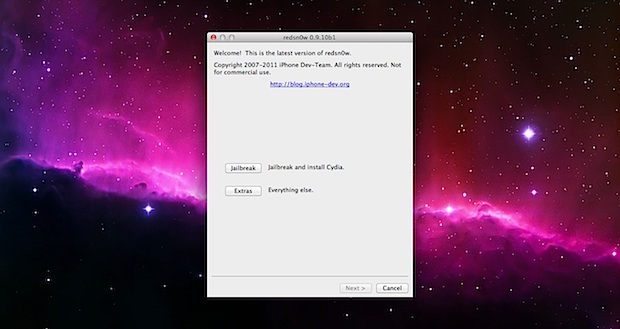
The untethered iOS 5.0.1 jailbreak has finally arrived, and it’s extremely easy to use. We’ll walk you through the process, but before proceeding make sure you meet the following requirements:
- Compatible device: iPhone 4, iPhone 3GS, iPad 1, iPod touch 3rd gen, iPod touch 4th gen
- iOS 5.0.1 installed
- Download Redsn0w 0.9.10b (Direct: Mac OS X or Windows)
iPad 2 and iPhone 4S are not yet compatible due to their use of the A5 CPU, that is a currently a work in progress.
How to Jailbreak iOS 5.0.1 Untethered Using Redsn0w
This walkthrough is intended for those who are currently unjailbroken and using a stock iOS 5.0.1 installation. The instructions are the same for both Mac and Windows and for all iOS hardware:
- Launch Redsn0w
- Connect the iOS device to the computer and then turn it off
- Launch Redsn0w and click on “Jailbreak”
- Put your iPhone, iPad, or iPod touch into DFU mode: Hold the power button for 3 seconds, continue holding Power button and additionally hold the Home button for 10 seconds, release the Power button but continue to hold the Home button for another 15 seconds
- Let redsn0w do it’s thing, make sure “Install Cydia” is checked, and let the jailbreak install
The iPhone, iPad, iPod touch will reboot and be jailbroken, find and launch Cydia to verify the jailbreak worked. The untethered solution is obviously much easier than the tethered options, there is no redsn0w boot assistance needed after the device turns on and off, and the installation is simplified as well. Enjoy the jailbreak.
Note for Windows users: be sure to run Redsn0w in Administrator mode, this can be done with a right-click.
Already jailbroken? Here is how to convert a tethered iOS 5.0.1 jailbreak into untethered with Corona, it’s very easy and doesn’t require redsn0w.






tryin to jailbreak my iPhone 4.I followed all steps tothe finish, now ther is just an appe showing on the phone screen… where did i go wrong? it won’t rebot
actually i’m at 4.3 (ipod4g) already jailbroken using redsn0w. how do i upgrade the firmware to 5 using redsn0w as well??
So, this is my first time jailbreaking anything. I own a 4th gen with 5.0.1 and the jailbreak was going fine until the process switched to my Ipod. It did all the command actions on the black screen, and the pineapple showed up, and at approximately 1/6th of the bar in, it said “moving applications.” It sat there for a while not doing anything, so i pressed the home button to see what would happen. Eventually it rebooted, but without Cydia, and now im missing like half my applications. For example Safari, Mail, YouTube, Settings, Notes, and I have no idea what the F to do.
i did it wow…
also i dun knw which version is it.i updated the latest version and my phone stopped.how can i check my iOS?
go to general and check ur ios version it works at 5.0.1
takes 5 mins
how long will it takes to identify the built..mine taking too longer :(
lol reading those comments about jailbreaking your device i stick 2 fingers up to those critics and installed absinthe truly awsome jailbreak for devices running the new ios 5.1.1 works a treat also downloads cydia and winterboard where i have downloaded an app called installous from cydia allows you to download any app for free so thats that lol
you will have to unplug it from your pc or device your running it off and do the hard reset a few times
ok i jailbroke my iPhone 4 with the newer redsn0w for 5.1 … now its stuck with the apple logo i cant restore it on itunes and dont know what to do now ….Help
put in DFU mode, restore, try again
One more thing I forgot to mention above. I went into Redsn0w and was trying to try to recover or anything and all the “next” button’s where grayed out and wasn’t an option, as if my device was not hooked up. Although it was. I am pretty stupid at this stuff so don’t be too hard on me.
Hey I am a newbie and need help. Idk if this is an easy fix or not. I got everything to work FINALLY. Cydia was installed and everything was fine. Me being the dumbass I am, I was curious and tried an app… Like I said I am a NEWBIE LOL!! Well I went into a reboot stage and then NOTHING!! Now my iPhone 4 won’t turn on. Now I am doing a restore from iTunes. Should I have done that? Whats the problem with it? It took me a few to understand how to get through the fingerprint error and finally got that down and it went smooth and pretty easy, but now I think I screwed myself!! :-( Thx in advance for any info!
i tryed to jailbreak my ipod.
but when i was doing that thing when you click power off button, then home button, then realese power button.
my ipod turned off. and it wont turn on any more what do i do?
this is a common problem leads to hardware failure if done incorrectly simply do a hard reset holding home and power and also volume buttons all together for 30 seconds should solve any errors if not your hardware has been damaged
Yay, finally my Ipod Touch 4th gen is jailbroken for the 3rd time :) I go back and forth alot lol
hi there, i have an iPhone 4 (verizon ). would that jb work on it .
HI, i have preserved my bb,2.10.04 and upgraded to ios 5.0.1, but i didnt jailbreak it , and i want to jailbreak it now, can i follow steps above to jailbreak it and preserve my baseband?
thanks,
Um i cant find Cydia!!
Um i cant find Cydia!!
i have the same problem too, i cannot find cydia
What would you do if you have just bought a ferrari with the hoods welded so you cant see or customise the engine??? Well it seems like the same for APPLE boys like us!!!
Hey! I am trying to update my ipod to 5.0 or 5.0.1 but the 5.1 is available and i dont know how to update it to just 5.0.1 and need to for all my cydia downloading.
hey guys help me asap.. i jst jailbroke my fone n after everythng iz done it iz stuck on a window with usb sign waitin to b plugged into itunes az it comes on activating it..plz reply asap
thanks for the instructions.. this post saved my iphone :D
I am stuck on a screen that says, “Please wait while your build is being identified.” and then below that “Waiting for iPhone 4VZW.”
There is also a status bar at the bottom that does not register any progress.
This is the first time I’ve attempted to jailbreak my phone, so I don’t know what to expect. Should this screen stay up for more than 15 mins?
Never mind, I got tired of waiting for a response, cancelled the dialog box, and re-started redsn0w.
It worked beautifully! I am psyched to have a jailbroken iPhone! Thanks for writing this installation guide. Although redsn0w had a guide within their install dialog box, reading this beforehand made me much more comfortable taking the leap.
hey i used this website to jailbreak my ipod this website worked now i have it jailbroken now its greatttt thanks!!!
[…] jailbroken yet, backup the iPhone and then proceed with Absinthe for iPhone 4S on iOS 5.0.1 or Redsn0w for iOS 5.0.1 on other iPhones and iPods. Dreamboard is then found as a free download in Cydia, so search for it and […]
Is it possible to jailbreak my 4.3.1 ipod 2g with the 5.0.1 software? if not, please tell me some softwares that i can use. Thanks
Please help me
it dosen’s detect my ipod ios 5.0.1
Hey evry1 when i click on extras like ur supposed 2 i want to select my ipsw or watever but int the redsn0w folder there is notin 2 select can any1 tell me what 2 select?
tanx
I was having problems getting redsn0w to jailbreak my iPhone 4, I finally found the solution in some of the earlier comments above. I’ll re-post the info here for anyone having trouble. I am using Windows 7, by the way.
Apple released the official 5.0.1 IPSW some time ago. Find it and download it. A Google search for [your iphone/ipod/ipad model] 5.0.1 IPSW should do the trick.
Probably a good idea to make sure iTunes has backed up your phone before you do this, just in case.
Once you have the 5.0.1 IPSW downloaded, open redsn0w and click on Extras. You need to “point” the program to the IPSW file by clicking Select IPSW. A browse window should open. Simply find wherever you downloaded it and select Open.
Using the back button, navigate back to the previous screen where you can select the Jailbreak option. From there, let it do its thing and you should be good to go. Worked for me on the first try.
hey keeps saying it has a weird fingerprint?
I have a Verizon iPhone 5.0.1 firmware and wanting to jailbreak with redsnow and it keeps freezing at the waiting for reboot screen can anyone help plz?!?
Having the same problem, would love to know how to fix it.
[…] Remember that retro iOS ’86 concept theme for iPhone that popped up recently? We were hoping it would become an iOS theme, and it has. To use the iOS 86 theme you’ll need to jailbreak your iPhone or iPod touch running iOS 5.0.1, here is how to do that with absinthe for iPhone 4S, or use redsn0w for jailbreaking other iOS 5 devices. […]
redsnow 0.9.10B5 will do this perfectly with any problem.
https://osxdaily.com/2012/01/16/redsn0w-0-9-10-b4-ibooks-fix-download/
Jailbreaking is the smartest ting u could do for ur iOS device the problem I think I have is putting the iPod in DFU mode …
For the Iphone 3gs it works great
had to download the ipsw here
https://osxdaily.com/2010/10/25/download-iphone-firmware-ipsw/
click on Extras then Select ipsw
when asked if you phone is newer make sure you check this.
Hey guys.. The jailbreak thingy isn’t working.. It’s giving me ‘unexpected error’ after I release the power button .. What should I do? Help please..
hey i followed all the steps at the end it said that the phone is jailbroken but cydia is white and i cant get on safari can someone help please and thank you
Try these 3 choices to fix the white Cydia icon after jailbreak:
Open Redsn0w again and click on “Extras” then click on the “Just Boot” option to load Cydia
OR
Open CYDIA and tap Manage then tap Cydia installer, tap Modify, then tap Re-install
OR
Open CYDIA and tap on Changes then tap Refresh to update all packages
Turn iPhone off then plug iPhone into the computer, open redsn0w, go to Extrasand Just boot. The iPhone will now boot, now launch Cydia and search for “corona” which is the untethered jailbreak and install it, then reboot again and Cydia is Brown again
Hello, I am trying to jailbreak a iTouch 4G 5.0.1 but when i try to do it it stops at waiting for reboot even though it already is, then I tried to do it with a Extras>IPSW and it says my IPSW for the Itouch 4G 5.0.1 is not compatible with this version of redsn0w. Ive tried redsn0w b3 and b5.
Please Help!!!!!
I have an older iPad 1 jailbroken untehered with redsnow, but can’t get iBooks to work.
Tried deleting and reinstalling.
Tried cydia ibooks2 fix.
I wanted to re-jailbreak …… but I have spent hours organizing folders etc and don’t won’t to lose them.
Any hep would be appreciated!
I am trying to jailbreak for the first time but for some reason when I run redsn0w it crashes. anyone have an idea on what I am not doing correctly.
BTW: it is a iPhone 3GS and just updated it to iOS 5.
My jb worked fine but cydia, ifiles and several other apps don’t show up on the springboard. I know they are their since they come up in a search.
Disregard my last got them visible using sbsettings.
hi! i have an ipod touch 4g and i want to know that when i jailbreak will all my apps&data be deleted ?????????//
Well, definitely not.. all your data and apps would be in ur pod… but do follow the steps carefully, I jailbroke my iPod 4g (iOS 4.3.3) using Limera1n successfully.. Just updated to iOS5 and planning to jailbreak again.. :)
Also download iFunbox for installing apps downloaded from apptrackr..
Happy Jailbreaking!
[…] available for your hardware. If you are determined to proceed on the cutting edge of jailbreaking, learn how to jailbreak iOS 5.0.1 with redsn0w, which is now untethered but took a while to be released. For future reference, most people are […]
Elo I try It to jail my Iphone, but it stops at reboot, it is possible tha my I4 is broken??
help…redsnow freezes at patching kernal..wat do i do…plzzzzzz help me
i have the ipod touch 4th gen with ios 5.0.1 everytime i try and jailbreak it using redsn0w it gets to the waiting for reboot step. my ipod turns on but the step dosent continue. can someone tell me whats wrong please and how i can continue to jailbreak my ipod. its getting really annoying
Well the phone works again….but still not reading my SIM card…
thnxz!!!
i am having iphone 4 in ios 5.0.1 and whenever i try to jailbreak it using redsn0w 0.9.10b2 it stucks on patching kernel and then suddenly a dialog box appears and it says redsn0w has stopped working ????
help me ??? what should i do
Run Redsn0w as Administrator
then restore and try again if it doesn’t work
i tried to download the jail break and the cydia app is on my phone but now the cydia app or safari wont come up on my iphone 4! help!
run redsnow again, or restore and do it again
Will this work with my very old ipod touch 2nd gen?
Does it run iOS 5.0.1? Yes. Doesn’t? No.
i jailbreaked my iphone 4 5.0.1 but wen i go into cydia
sources – edit – add it wount let me add installer and it wont get me search aswell why is that ???
I jailbreaked my iphone 4 cdma but i dont see cydia??
did u ticked cydia b4 jailbreakin?
Itunes says that the card inserted does not appears to be supported
After jailbreaking the phone works well with it original sim card (Telcel Mexico) but not with the sim that I have from telefonica Movistar Mexico. What should I dod?
Thanks,
Jailbreaking isn’t an unlock
Hi Maribel.
I successfully unlocked my Telcel iphone. You have already jailbreak it, now you have to unlockit.
I don’t remember the exact procedure, but visit unlockit.co.nz from your iphone using Safari or Cydia
(Mi iPhone es 3G de Telcel, y llevo casi un año usandolo en el extranjero)
Hi does anybody Knows if redsnow is working also for iphone 4s?
Thanks.
No not yet, use the Absinthe tool for now:
https://osxdaily.com/2012/01/20/jailbreak-iphone-4s-ios-5-0-1-absinthe/
[…] Again, this is for A5 CPU hardware only, other devices can jailbreak iOS 5.0.1 with Redsn0w. […]
People who say negative comments about Jailbreaking are those who don’t know how to Jailbreak or are just too afraid to Jailbreak because they are noobs..
[…] is simple enough, all that is required is to download and run Redsn0w 0.9.10b4 over an existing iOS 5.0.1 jailbreak to apply the […]
please you gotta help me, i have a iphone 4 ios 5.0.1 whenever i try using redsn0w 0.9.10b3 it keeps getting stuck at preparing jailbreak data and then redsn0w would say it has stopped working i tried using custom ipsw but no success also no activity goes on the iphone nothing shows on the scree when this problem happens
after i click install cydia and the application show up waiting for reboot. thn i stuck there d. its a auto reboot or manual reboot?
Ok I jail broke my iphone 4 but not sure how to down load android apps like mr numbers and things like that. I have a friend who has a jailbroke iphone 4 and he can get it when I go to the app store they want my apple info How do i get free stuff. Can some one please help. Thanks guys
When i enter DFU mode it just keeps saying unexpected error. I dont understand, i am doing everything right, my phones up to date, my computer has the right software. what am i doing wrong?
Ok, so i know you are probably really all getting sick to death of the questions, but, i have to ask… I just got an IPhone 4 today, and want to jailbreak it, i did everything the above said, and it seemed to work at first, but when it got to the waiting for boot it never did… Even after i did the manual IPSW, Please help?
I jail broke my iphone 4 and my sons 2nd gen touch. How do I get installous on them/ My son says we need it to down load games. Thanks for your help
You can download games from the App Store and through Cydia
Can i jailbreak iPhone4s with redsn0w?!?!?
No not yet, stay tuned we will let you know when you can.
http://twitter.com/osxdaily
it works with my iphone 4 os 5.0.1….. thnx man
help i got a problem when i use “redsn0w_win_0.9.10b2” and i click install jailbreak it just stops working and exits it goes to “Redsnow has stopped workng Windows is checking a solution” or something like that
Windows 7? Did you right mouse click the EXE and select “Run as administrator”?
i have problem when doing jb… when i pres select IPSW.. it says your os not supported with redsnow…
my os already 5.01..
can somebody help me.. thank u..
Hey all.
Need some help, Untether. JB ios 5.0.1 on iPhone 4 (gms), currently not JB…
Using redsnow 0.9.10b3 (currently latest version), and selecting the ipsw be4 trying 2 JB, when i get it 2 DFU mode and the “JB’ing starts”, it get stock on “exploiting with limerain” and the phone just turns on again (after being turned off for the JB and trying 2 enter DFU mode), and no JB on my phone…
Pls help some1, if u got some prob, or know whats wrong…
Thx.
I’ve now tried JB another iPhone4 gms 5.0.1, with same redsnow version and same ipsw, and this jailbreak’d fine… But then the phone-funktion is bugged… Can’t hear anything doing calls, and others can’t hear me…
Also sometimes when trying to end a call it just puts it in standby, (like if i hit the home-button) and even if i close it in multitasking it doesn’t end the call…
But it still can’t jailbreak the other phone…
Help pls, Thx!
remember guys if your stuck on the itunes logo when rebooting on rednow, just goto “extras” then “recovery fix” to get out of the restoring process.
Hey all, Just wanted to say two things. First with anything related to jailbreaking…. you have an issue? Stop searching Yahoo Answers and Googling knock-off sites. Go to the source, namely Cydia help for your answers. This jailbreak works fine for unbroken iPhone4, the problem is that most sites don’t tell you that the first step is to open redsn0w and click on “extras”, select your ipsw, and LOAD THE IPSW INTO redsn0w. THEN you continue with the instructions they give (which is clicking jailbreak, selecting Cydia, and continuing. Without that step, you will be stuck with the waiting to reboot issue and your phone will not be jailbroken.
Hi! I want to know if after Jailbreak I can return my iPhone 4 to previous state like it was not jail broken. This is just in case something went wrong or I don’t want to use anymore the jail broken OS. BIG BIG THANKS!
I also inform you that my iPhone is not LOCK PROVIDER; I can free use any GSM networks. The only thing I want to Jailbreak because I am angry to apple there are some previous software on Apps that are not anymore supported due to some insane reasons.
Yes
https://osxdaily.com/2010/08/03/unjailbreak-iphone/
hey whats up? tell me what i need to use when i want to jailbreak ipod touch IOS 5? please help me..! thank you!
I have an idea, how about your read the instructions!
go Adrian… you from Chicago?
nope .. im from Philippine
hey! i have the latest version of ipod touch. what i .IPSW i needed to use? please help! Thank you !!..
iPod touch 4th gen, iOS 5.0.1
i have ipod touch IOS 5 .. i need the .IPSW? when i jailbroken it or not at all?
hi went to jailbreak and when puting my phone in dfu mode it tuened off and it wont come back on can anyone help pleaseeeee
it wont come on because it is DFU mode. Do the same seps you put in DFU mode backwards. This should work
hey, im on 4.2.1 jb on iphone 4. if i update to 5.0.1 that unjailbreaks it, right?
restoring the iPhone will unjailbreak it
So how should i go about it? Install 5.0.1 over it or what? Just trying to make sure
Unjailbreak by restoring first, then update to iOS 5.0.1, then jailbreak again with this version of redsnow
Thanks, however stupid me made the mistake of hitting UPDATE instead of restore, ios 5 came up but it acted funny….. then it went to hell when i tried jb, semi-brick…. good news is that im not a techno noob znd im in the process of restoring my phone
Hi!, Can I use redsnow latest release to jailbreak IOS 4.3.5 or I need something else. Please help.
This redsn0w is for iOS 5.0.1 and this process will update you to iOS 5.0.1 in addition to jailbreaking it
My iPod is FROZEN on boot logos, I can try dfu , and then goes back to a logo , and never goes past it, I’ve tried hard resetting it, doesnt let me . Someone please help.. Redsn0w never failed me before, whats up ?
i have the same problem, i finish everystep and then i get to boot logo for redsnow, however as soon as it gets to it it stays there for easily a HOUR, then goes to normal boot mode, no cydia, not jailbreak just a regular dumb iphone
[…] is the same developer who uncovered the untethered jailbreak for iOS 5.0.1 that was released in a variety of popular jailbreak tools, including redsn0w, PwnageTool, and […]
Anyone has any ifo about unlocking 05.16.05-6.4_M3S2 ?
ios5.01 ?
Ultrasn0w won’t work at all.. phone keep searching …
thanks !!!!!
I’m facing d same problem too!!! I selected d ipsw but in d end it keep telling me exploit failed! Zzzz
I tried jailbreaking my 3gs and i get not identifying data fetched so i try pointing to the firmware and then i get exploit failed? any ideas ?
[…] Only need a jailbreak? If you don’t need a carrier unlock, use this guide to jailbreak iOS 5.0.1 untethered with redsn0w, it’s faster and doesn’t include the baseband […]
Looks like there are a few trolls on this site. The new jailbreak works just fine and is safe.
i think you guys shouldnt have itunes opened when you try to jailbreak it.
might help, also, can you unlock baseband 05.16.05-6.4_M3S2?
——->thanks in advance.
After I followed your procedures here for my friend’s iPod, it worked but when I was going to do this for my phone, the Cydia icon is just white. :|
iphone sim card invaled
redsn0w just stays at waiting for reboot.what do i do.Redsn0w 0.9.10b2
Restore and rejailbreak with redsn0w
what do you mean RESTORE AND REJAILBREAK WITH REDSNOW?
Please give instructions on how to “restore”. Do you mean enter the DSU mode and when ITunes comes up, click on the restore in ITunes??????
Then, enter DSU again, after ITunes opens, minimize it and click “Jailbreak” again????????
yes that is what he meant and its dfu not dsu
what do u mean by hybrid config?? i wanna clarify all dis b4 jailbreakin…
Will this work for the 3g?
The 3G doesn’t run iOS 5.0.1
I have successfully jailbroken my iPhone 4 5.0.1, my question is, i just bought a new iMac and the iTunes is to old to sync with 5.0.1 (10.4.1)will there be any problems if i update (10.5.2) the iTunes?
[…] Nothing else is different about this release, it continues to be an untethered jailbreak for iOS 5.0.1 on iPhone 4, iPhone 3GS, iPod touch 3rd & 4th gen, and iPad 1. If you’re not sure what to do, read our guide to jailbreak iOS 5.0.1 untethered using Redsn0w. […]
“If auto-detection fails and redsn0w tells you no identifying data was found, you can always pre-select the appropriate 5.0.1 IPSW using “Extras->Select IPSW”.”
From the dev team! it works if you hae the error
Where can I find the IPSW file from? Are you referring to one that’s already on my computer, or should I download it from somewhere?
Dear Techis,
I have Iphone 4G and installed tethered jail break IOS 5.0.1 from redsnow, now I am trying to install unteathered jail break but at the time of completing the first stage it gives error, could anyone please help me out.
Regards
Makuwala
why after updateing to iPhone3,1_5.0.1_9A405_Restore my iPhone say that i have IOS 5.0?
SalT right on!
it worked thanks a bunch!!
Yo must first go to extra select ipsw and them do the jailbreak
Well the jailbreak works great, the problem that I ran into is that after the jailbreak I download ultrasnow through cydia but it still won’t recognize that I have my T-mobile sim card in and in the “about” menu it says “no sim.” Any suggestions?
Can you give us a download link to (what looks to be) that beautiful wallpaper of yours? PLEASE!!
http://onlyhdwallpapers.com/space/outer-space-horsehead-nebula-desktop-1920×1200-wallpaper-211938
Hi… Is it posible to downgrade now an Iphone 4 with Baseband 04.11.08 to 04.10.01 with this jailbreak?
Thanks!
Hi! I have an iPhone 4 with Verizon running 5.0.1, everything works fine until I get to the step where it says “Waiting to Reboot”, it reboots fine, but doesn’t finish the jailbreak. Keeps getting stuck here. Any ideas?
Download and save the ipsw file. Then you must first go to extras and specify the ipsw file and then go back to start the jailbreak process. I too had a difficult time, as this was not included in the guide, but after multiple restores and I tried this and it worked out.
Hope this helps…
OMFG THANKYOU!!!!!!!!
my installous is giving api error permission dinied..
Hey guys, some help here? I just Jailbroken my iPhone4 with the untethered 5.0.1 version. But the Cydia app crashed when I try to search or add sources… HELP PLEASE!!!! THANKS!!
Do I still need to download ios 5.0.1? My iPhone 3gs is already at 5.0.1. Some sites are saying you need to download a stock firmwarer(ios 5.0.1) as a requirement. Thanks!
same problem here too.. Keep on restart with apple logo. Hope this problem can solve today. Luckily i kept my old nokia phone to save my life
Mine will not jailbreak, after uploading 2nd stage redsnow says waiting for reboot and my phone boots normal, same thing when I try tethered too. please help. Verizon Iphone 4
Same exact things is happening to me! I wonder whats going on!
Before clicking on Jailbreak in Redsn0w, click on ‘Extras’ first and click on ‘Select IPSW’ to manually select the 5.0.1 firmware. Once that is done, try to perform the jailbreak. It should work
Same problem for me. Keeps in apple logo loop.
I already manually selected IPSW 5.0.1
I am now trying to restore to Apple original 5.0.1 firmware but iTunes do not recognize iPhone 4.
The best way, in my opinion, is to download redsn0w, open the program, click extras, then just boot. Follow the instructions, and your iOS device should run fine. Hope this helps!
And from now on, don’t restart the iPod with sleep button, or let it run dry, if this happens, do these instructions again. If you must restart, Go to cydia, and download winter board. Now, if you need to restart, run application, turn summer board mode off then back on, and click respring in the top right corner. This will do the trick:)
Hope this helps.
I was having the same problem, but fixed it by ending all services/processes related to itunes (Bonjour and Ipod Service or something like that), downloading the 5.0.1 firmware (just google it), going to extras, and then manually selecting the downloaded firmware.
Thanks! This worked! Finally!
I was intensely looking for this for about a week now!
x1000 thanks!
after jailbreak my iphone4, i’m stuck on boot screen. apple logo keep refreshing there. few second showing apple logo and then black screen for a secong and back with apple logo.. help me!
I’m having the same problem. Anyone know how to fix this?
The best way, in my opinion, is to download redsn0w, open the program, click extras, then just boot. Follow the instructions, and your iOS device should run fine. Hope this helps!
And from now on, don’t restart the iPod with sleep button, or let it run dry, if this happens, do these instructions again. If you must restart, Go to cydia, and download winter board. Now, if you need to restart, run application, turn summer board mode off then back on, and click respring in the top right corner. This will do the trick:)
Hope this helps!
it didn’t work, my phone not jailbroken.. and i tried restoring to ipsw 4.3.3 using itunes i got error 3194 and i fix using tinyumbrella and editing the host but still i have this error.. need your help.. tnx! same problem..
I’m getting the “Exploit failed” error on my end, using 10.7 + iPad 1.
Finally got it to work, but I had to use Windows. :P
Mine 2 can anyone shine some light on this problem
[…] Update: An untethered version is now available, here is our guide: How to jailbreak iOS 5.0.1 untethered with redsn0w. […]
i can’t do it w/ my itouch4g everytime i try it.. an critical error always occurs :( can some one help me
Thank you, thank you, thank you! This worked like a charm.
Hi People
Can somebody help me with jailbreak
the redsnow just keeps staying on “waiting for reboot” part, even though my ipod touch 4g is already turn on.
I did everything by instruction couple of times but no luck.
Same problem. Even after reboot
me too with iphone 4. i’ve looked everywhere online and kind find anything about it. i’ve triple checked everystep and it will not work for me. it always stops at “waiting for reboot”
Same problem, said WAITING FOR REBOOT but phone is on and working.
IPhone4 5.0.1
I enter DSU mode and ITunes comes up saying im in DSU mode, I minimize ITunes, click on Jailbreak, it does a few things and stops on WAITING FOR REBOOT.
Anyone know how to fix this????????????
OK, just an update, i’ve used the b3 multiple times now, but when I’m jailbreaking it and it’s stuck on WAITING TO REBOOT the phone is turned back on and works fine.
Is the phone suppose to be on at this point??????
How long should it say WAITING TO REBOOT??????????
i got same problem dud!
HELP! :(
ive got also the same problem
HELP!!!!!!
Restore and try again
when it says extras, u need to manually find the correct ISPW. it fixed it for me!
Ya but how do you do that, There is no ISPW list or anything, it’s the “Finder” window that comes up?
search on google “ios 5.0.1 ISPW” and download it from one of the websites. its a big file like 750 mb
Thanks a lot nice tip
Can anyone help with this??? I just did a full RESTORE on the phone in ITunes, opened up a lot of space on my Mac by removing all my movies. I have 10.2 gb free space on my phone, and still stuck on “WAITING FOR REBOOT” but the phone is on and just sitting there.
I have again clicked on the EXTRAS tab, but the Finder window comes up, and I have looked in every folder that is available to me and there is no sign of the 5.0.1 ISPW file to select.
I have to be doing something wrong, but I follow the process to the tee.
i know. make sure it isn’t over a wifi connection. do it from a desktop
first download the IPSW from here
https://osxdaily.com/2010/10/30/download-ipod-touch-firmware-ipsw/
then click extra on redsn0w and select the ipsw you have downloaded
then click on jailbreak
it worked like a charm
awesome tip!!! thx
Worked for me too. Tnx!!
Awesome!!! Got everything working!
YESS!!!! THANK YOU!!!
finally works, was getting worried for a second
Thanks a lot!
Thanks man! I’ve been trying this for hours with no luck. After doing it using extra+IPSW it works like a charm! Thank you very much for sharing.
Thank you!!!!
It really worked!!!!
I’ve been stuck in “Waiting reboot ” for several days!
Unfortunately, my computer can’t even detect my ipod right now.. what do I do?
THANK YOU SOOOOOO MUCH! :D
is this method working on iOS5.1? which is the latest iOS, Thanks a lot
had the same problem with my ipod touch 4g. fixed it by going into extras and manually adding an IPSW :)
try using the newest redsn0w which is 0.9.10b5c
[…] Here is a guide on how to jailbreak iOS 5.0.1 untethered with redsn0w stLight.options({ publisher:'fe5e0a84-1fac-40de-8014-9f89fc1cbe6a' […]
Hmm good comment
hi,
will this work with iphone 3gs iOS 5.0.1 with the 05.16.05-6.4_M3S2 installed baseband?
tq
“Some of you are using a hybrid 5.0/5.0.1 configuration. If so, do not attempt to install this untether over that setup! You will most likely get into a reboot cycle. Do a sync and fresh restore to 5.0.1 then install the jailbreak + untether.”
That is from the Dev Teama
thanks…
i have an unactivated 3gs…how can i check whether it is on a hybrid config?
Hello, How do I know if my Firmware is a “Hybrid”? Thank you, for your time. Rob
If you have iPad baseband on an iPhone, it’s hybrid. If you have no idea what that means and you have never unlocked the iPhone 3GS, you probably don’t have hybrid firmware.
Jailbreaks are inherently unsafe. Look, folks, either you embrace open source software like Linux or you accept the limitations of closed source. Trying to jailbreak or pirate closed-source software is stupid. It’s a temporary cheat that does not win you anything, because you are putting trust in hackers who think you are a sucker.
Don’t you have a bridge or rock to crawl under? Do what you want to your equipment and let others do the same. Opinions are like bathrooms. Everybody has one.
^ [+1]
So you’re angry because somebody told you not to scam and steal? Wow, I had no idea this site was frequented by the criminal class.
Jailbreaking is not stealing fyi.
Look man, why the heck are you even on this site if you think jailbreaking is a scam? Go waste your time elsewhere.
Seriously, if you don’t know what Jailbreak is then why be on here?? The only thing Jailbreaking does is allow you to do all the things to your phone that Apple, for some crazy ass reason, doesn’t want you to be able to change, like font, font color, icons, themes, all that good stuff. You don’t use Jailbreak to steal credit card information or some crap you moron. You use it to customize your phone that you paid so much money for but are not allowed to change in any way for some retarded reason. Learn before you speak you freaking douche.
The “Some Retarded Reason” makes sense if you read Steve Jobs’ Biography. He certainly was a control freak, and he did lock it down for a great business reason. I’m not saying don’t pull the cover off, and make it your own, but if you read the book, you’ll understand the “Some retarded reason”. You certainly won’t agree with it, but will understand it.
Well you just must be pretty f’ing retarded, huh? Jailbreaking is not illegal, since it was made legal by a US court 2 years ago. It is not scam, because it doesn’t do any harm to anyone else (except yourself, if you do things wrong), and it is in no way “stealing”. You are confusing jailbreaking with PIRATING APPLICATIONS. Stupid motherf’er, do some research before embarrassing yourself.
spittin the truth!
dude just got iced..
My iPod touch just crashed when I tried to jailbreak and now my device won’t turn on
it might still be i dfu mode
I have the same prob :(
If its in dfu, hold the home button and the lock button at the same time for about 10-15 seconds (Untill you see apples logo).
That should put you back to normal.
wait a while and reboot your ipod. ive had the same problem before
Thanks very much for your opinion. Hey guess what, if you’re on this page you probably WANT to jb your device. And if you do, “caveat emptor” is always implied. So STFU and go on your way. If you want to post opinion, save it for FB.
I paid for the damn thing!
I will do what ever I want with the damn thing!
HELL YESS!!!
Either you’re quite a good troll (If so, congratulations) or just that you’re annoyed by people’s opinions. If the latter, it’s okay to have an opinion, but expressing it in such a matter is only making you look stupid.
Please just go hide in the closet. Jailbreaking is completely legal and safe.
nice well said
Just did it and LOOOOOOOOOOOVE the hell out of it!
i downloaded everything and got to the screen where it says waiting to reboot…well my ipod reboots and doesnt get cydia or anything what should i do about it??
I have this exact same problem… Anyone know what to do?
Same here but i hot 5.1 it came out on th seventh of march. I tried to jail break but when it reboots it doesn’t have cydia and on my pc it just says waiting to reboot while my f’ing iPod is already turned on
dont upgrade to 5.1 this is apple doing so you cant jailbreak your device. the only jailbreak available right now is upto 5.0.1 if you upgrade you have to wait couple of months for the jailbreak software. hope this helps.
i got the same prob. .except i got iOS 5.0.1 and i didn’t upgrade to iOS 5.1.. wtf? anyone could help me?
You have possibly jailbroke your appliance using tethered, you need to look for an untethered version. Hope the answer is of help.
do you know that Apple closed the ability to have Personal Hotspot via WiFi in iPhone 3GS and the only way to have is through an app that is blocked by Apple.
I jailbreak my itouch everytime a new ios comes out and have never had a problem… butthead. Let me guess that you have never jb a device and have no clue about the benefits.
then why do they continue to post it for free i can under stand if they tried to make people pay for the jail break then it could be a scamming project but my ipod has not had any problems with the jail breaks they post on redsn0w
Hello,
I am currently having troubles with my ipod touch. It got all the way past the jail breaking stage where the picture of the running pineapple shows and it is doing things there. Now it is trying to restart and it is stuck on the apple, what do I do?
Please help!
Just
Click the “just boot in tethered” option in redsn0w and follow step by step instructions. Hope that helped
whu cant i download redsnow? it doesnt want to load. what do i do?
Blimey… Joe I would advise you to go back to Apple and sit in the corner and shift paper around for the rest of your lonely life.
its funny how uneducated you are about this…how can sum1 be so damn stupid! research you stupid f*ck!
and it does win you sh*t…how does getting everything on the app store for free sound? (with installous) you could get a free gf app…trust me you my friend will need it! troll!
I agree Joe