
How to Resolve a “Partition Failed” Error in Mac OS X
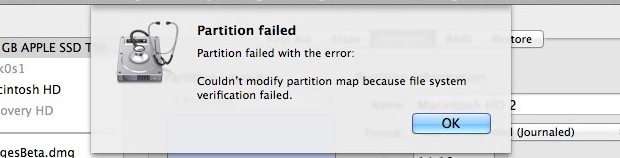
If you have attempted to partition a drive from Mac OS X and received a “Partition failed” message with the error “Couldn’t modify partition map because file system verification failed.” you can fix the problem with the file system check command line utility.
To issue the file system check and repair function properly, you’ll need to boot into Single User Mode as well. This walkthrough will demonstrate the necessary steps to resolve the partition failed error by running a file system command from Mac Single User mode.
Fixing “Partition Failed” Errors in Mac OS X
Be sure you back up your Mac before beginning.
- Reboot the Mac into Single User Mode by holding Command+S during boot
- At the command prompt, type:
- When fsck is complete, type “exit” or “reboot” to reboot
- Boot the Mac as usual, verify the disk again in Disk Utility, and partition as usual
/sbin/fsck -fy
Boot the Mac as usual and relaunch Disk Utility to verify the disk.
At this point, you can go ahead and partition the drive as usual, this time without any such “Partition Failed” error message appearing in Disk Utility.
Often users may see this error when attempting to partition a Mac boot drive for dual booting or for some similar purpose. I have encountered this error a few times when partitioning the boot drive from OS X Lion, most recently after a clean installation when setting up dual boot for OS X Lion and Mountain Lion. The cause of this remains to be seen, and repairing the disk from Disk Utility itself doesn’t work, even when in Single User Mode or when booting from another drive. But, fortunately fsck does work just fine for most situations where ‘partition failed’ error is showing up in Mac OS, so give it a try.
Do note that “fsck” can take a while to run and complete, depending on the size of the drive.
You can also use the ‘fsck_hfs’ command if desired.
If you have another solution to a partition failed error in Mac OS Disk Utility, share with us in the comments below.






You are my hero. It worked!!!
I did command R after and first aid the utility disk. The error was gone.
Amazing! I thought I lost all my photos. I will back up ASAP.
Thank you!
It’s working. Thanks
Thank you so much ur a life saver
Thank you so much
saviour! I already thought Bootcamp is the culprit. what a piece of crap that software is.
Thanks, works perfectly
Worked like magic✌
My mac is totally failing to boot after partitioning failure and reboot, and apple disc now appearing as image disc in disc utility. Looks like image already partitioned. Any one please to help?
When I hold the command +S, it’s not allowing me to type anything in the prompt window but just populating a lot of error message. Is there a step I’m missing because seems to be working to almost everyone?
That worked like a charm. It saved me a lot of time.
Thank you so much for the post.
When open the terminal and type /sbin/fsck -fy
It Says
‘Can’t open /dev/rdisk0s2: Permission denied’
how to fix somebody help me!
I just formatted my drive in exfat format now able to make partition.
This worked perfectly. Thank you so much. You are amazing.
I love u
This worked for me.
I erased my bootcamp win7, and I couldn’t merge it with Mikintach HD. Not even in safe mode. I also tried disk utility, didn’t work.
I don’t recommend this method. Only do it when you tried all the official resort as suggested on Apple community. Don’t forget to back up to external disk before you do this.
Thank you so very much. This worked perfectly!
In doing this, will my files delete?
No
Thanks!!! It worked pretty well!!! Just tried one time only :D
Worked like a charm! Thanks!
thank you. it worked like magic !!
And again, this came in handy today.
You sir are a genius, I had a dual boot partition, i never used windows so i erased it due to lack of space. I was never able to take advantage of the free space due to this error, and then you arrived! saving me 500$ in not having to buy a bigger ssd chip. Thanks man, you are awesome!
I received “Partition map check failed because no slices were found.” from Disk Utility but perhaps for different reasons.
I had to reMOUNT (either it’s a “right-click” or a button) the partition from Disk Utility and then REPAIR the partition.
Then it worked – heart attack / data loss averted.
Thank you soooo much!
Our IT specialist said that there were unrecoverable errors and recommended that I buy a new computer.
You are a champion, thank you for sharing your knowledge.
Thank you very much! It worked well.
whoever wrote this, i love you.
Thanking you very much its working
thanks its worked
Had the same problem… I used disk utility to erase the drive to Mac OS Extended (Journaled)and then ejected, unplugged it then plugged it back in. Now go to partition and all being well should work. I did set the ‘Options…’ to ‘GUID Partition Table’.
Hope that helps ;)
Sys OS X Yosemite 10.10
Tried this and after I typed reboot my Mac (as it was starting up) had a loading bar during the grey screen and now just turns off when the bar is about 20% full! Help me!
I got the same problem, but loved the solution you just gave here.
I would like to recommend all users to have their time machine backed up and use a Mac cloud backup just for making sure .
I have a time capsule that broke on me and an online backup from dupplica online backup
Thank you for the post. It helped me to resolve the issue.
Worked for me too. Had issues after installing Yosemite public beta on a partition. Worked to regain the space after I removed the Yosemite partition. Thank you.
Man, thank you so much for this tip. Worked like a charm. Now I have my HD to its maximum capacity again!
Thanks!!!!!!!!!!!!!!
Worked first time – many thanks!!
Thanks! Worked like a charm!
Can’t thank you enough!!! Apple support page was overwhelming and very time consuming. But I found you and all is right in my mac world again. Partition takes time, what an emotional roller coaster. When the screen went black for a minute, I lost hope, however, having a successful partition, priceless!!!! Thanks! !!!!
Many thanks.
Thanks im having this problem while partitioning for OSX Yosemite and now its done, thanks alot
THANKS A TON!
thanks, you’ve just saved my day !
Thank you! I got my 30GB back!
Wonderful write up, my hdd can be resized again :)
Could it be a part of directory structure corruption error? Seems like an early warning. However, a Mac can’t repair directory on its own. A tool like Tech tools pro or Stellar Volume repair may be needed to replace the bad dir structure.
It worked! Teach me master..
I tried this and now my machine won’t boot. Great.
I was attempting to partition my mac mini (currently been in use for over a year) in order to install windows via book camp.
I attempted your fix and did as you instructed and still had the same error message come up.
Is there anything I need to do to “reset” my mac to the way it was before I entered that short commands at the command prompt after pressing Command+S during startup?
thanks.
Thanks!
Thanks a million! Worked like a charm on my 2011 MBP running Mavericks.
Thx! Removing a bootcamp partition gave the error. All good now!
Hi, i need help.
after i type in the code.
it says that;
Incorrect block count for file SystemEntropyCache
(It should be 1 instead of 0)
Incorrect block fcount for file sqlindex-shm
(It should be 8 instead of 0)
Keys out of order
(4305)
what should i do?.
can email me the solution for it?.
Really appreciate a lot for your help.
Lot of thanks…it is working for me …
Am enormously grateful. My machine was all messed up with my attempts at partition. This cleared everything up beautifully, and I now have two handsome partitions. Thank you.
Thank you veeeeeery much, i am finally able to abandon annoying Mac OS
Great helped. Thank you very much!
[…] but if Disk Utility throws an error it’ll probably be either ”Couldn’t unmount disk” or a “Partition Failed” message, both will require a reboot and slightly different methods to resolve, and can be mitigated by […]
[…] when attempting to modify partitions on a drive, which came right along with a separate “partition failed” error, and again was triggered when attempting to format those partitions. The above steps […]
Thanks a lot! this worked like a charm!
Hi,
i had the same error,
just try the suggestion but still same error msg still occured.
need help.. thanks
Hi, I tried this and now Mac OS X 10.8 won’t boot. The grey Apple loading screen now has a loading bar on it, and when it gets to the end, the Mac shuts down.
Help anyone?
me too mac wont boot… what i should do now????
Hey man, you saved 20GB from my 128GB SSD. Thanks a lot!
If you have rEFIt installed, the startup commands (Cmd+S) won’t work. But this is simpler to do in rEFIt: just hold Option for the menu to come up, then hit F2 and select ‘Boot into single user mode’. Then run the command mentioned above and voila!
Thanks for clarifying Aalaap.
Thank you very much !! it fixed my problem and i installed windows normally :D thanks a lot !!! very good fix !!
sweeeeeeeeeeeeet worked like a charm….
THANK YOU!
This fixed a problem I had trying to recreate a bootcamp partition. Thanks!
I typed /sbin/fsck -fy exactly and it says it is not recognized. Not sure what I am doing wrong.
I had same problem. Type; sbin/fsck -fy. I removed the 1st (/)it worked for me.
Thanks. I love it when what I read online actually works.
Excellent article!!
While removing windows 7 boot camp partition via BCA tool on OS X Mountain Lion, it complained “failed to remove”.
However after rebooting MacBook Air noticed that Boot Camp was gone but was not able to merge the partition using Disk Utility. It gave the same message as in this article. Followed the steps in this article and after rebooting everything works perfectly.
Happy to recover the unused 50GB of Win7 on my 128GB MacBook Air.
Thank you so much!!
oops! sorry for the double post didnt realize i had already posted…my bad…
hi
for me the error msg is not this…instead –
“The disk cannot be partitioned because some files cannot be moved.”
so if its the same as the above then shall i do this process or what should i do…i have macbook pro with mountain lion 10.8.2
thx
ash
Finally fixed my problem partitioning. I took a screen shot of the process too. It was missing some blocks on the HDD:
** Checking volume information.
Invalid volume free block count
(It should be 63457968 instead of 47085599)
After that, it repaired it and checked it again. Then the employee (I work in IT) explained that he was missing 150-200GB’s of free space on his HDD. That showed up also. Finally able to partition after this. Tried many other ways of fixing it. He can finally dual boot to Windows 7 and Mountain Lion. Thanks!
I had the same problem: could not create a partition. Followed these instructions and voilá, it worked right afer that.
Thanks but just the restart worked for me
thanks that was big help for our Community
Hello,
I have a problem with this.
I have a ssd as my main drive for running mac and have a hdd instead of my superdrive. But I want to keep part of this secondary drive cause it has my photo/music/… library on it.
Is there a similar command that could fix this for the secondary hard drive? Just as easy as this so I don’t need to replace all files (250+gb) to an external and back?
Please send me a mail or something, would be much appreciated !!!
Many thanks. Much appreciated.
Thank you so much this help me a lot!!!
Fantastic! Worked perfectly!
Saved my day. Thanks!
Thanks for the tip! Got this error when trying to resize Bootcamp partition during the Winclone process. Your solution worked for me.
juste force quitting itunes
thank’s man it’s really worked, removing boot camp partition
yes, it worked right away. i’m new to mac so i wanted to do dual boot with windows and made my partitions with disk utility, when i tried boot camp it told me the disk should be one partition only…the problem arised when i deleted my previous partitions and trying to enlarge the main partition to full size.
I tried the fsck and it couldn’t be repaired after 3 attempts. What now?
Worked like a champ! Thanks!
really worked for me. Many thanks
Just I want to say thank you, really I spent two days to find any solution to this problem. Worked great
Thank you for posting this online it has saved me alot of time and prevents from reformatting disk and starting from scratch. You are a legend.
Help!!! I was trying to do a BootCamp so i can install windows 7. I found this as a solution to my problema, but after i did this, my hard drive is full and i just have 10 gb of free space, it says:
Audio: x.x GB
Movies: x.x GB (THE X’s are just examples, not real GB’s)
.
.
Other: 320.5 GB !!!! WTFFF, PLEASE HELP ME HOW CAN I FIX THAT
This is due to a miscalculation. THis tutorial should solve it.
Thank you! After searching all over the place, this finally did the trick. My Boot Camp partition succeeded immediately.
Thanks thanks. This saves me from hours trying to get a partition to install windows on my mac.
Thank you! I tried removing a Boot Camp partition on my File Vault encrypted drive and encountered this issue. Switching off File Vault didn’t resolve it but following these instructions did.
thank you man!!!! honestly, thank you so much. u have no idea how grateful i am!!!
Spot on. Worked like a charm. many thanks!
worked great – looking for this for a long time !
txs!!
[…] Via | OSXDaily […]
I had this same issue and fsck did not fix it for me. I ended up using super duper copy to make a backup image on a USB drive then booted from the backup drive and used super duper copy format the drive and copy the files back to my main hard drive. It worked great and I was able to make a 200gig windows 7 partition on my early 2009 iMac.
Before you bail into the command line… this error will occur depending on the sequence of your clicks and drags on the partition map. It seems to be, at least partially, a calculation error, programming parlance is “fence post.” The fsck (filesystem consistency check) utility should be used with some caution however. Please see http://support.apple.com/kb/TS1417?viewlocale=en_US&locale=en_US
-b
Thanks a lot. I was looking for something to fix that since ever !
Thanks for posting this… I had this exact error last week!