
How to Install Paramiko and PyCrypto in Mac OS X the Easy Way
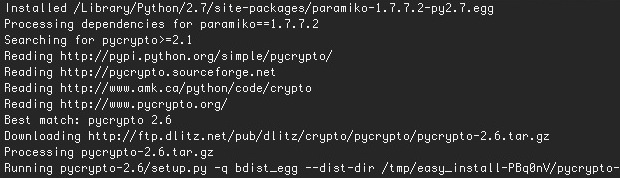
Paramiko is an SSH module for python that allows for secure connections to be made, and pycrypto is a cryptography toolkit for python.
Whether you need one or the other, or both, the easiest way to get them both installed through Mac OS X is through paramiko. No need to use HomeBrew, MacPorts, or any funky installers, you can do the entire thing yourself rather quickly. If you have no idea what I’m talking about, you probably don’t need any of this.
Requirements:
- Xcode 4.3 (App Store link) or later installed including Command Line Tools or install GCC and Command Line Tools without Xcode
- Get Paramiko 1.7.7.2+ (or whatever the newest version is), this package includes PyCrypto
It is absolutely critical that gcc and the OS X command line tools are installed before beginning the installation process. Trying to build and install paramiko and pycrypto will fail with a variety of errors ranging from “autoconf error” to “ImportError: No module named Crypto” – if you encounter either of those errors it’s because Xcode’s command line tools are not installed yet.
Installing paramiko and pycrypto
Assuming you have GCC and python installed in OS X now, here’s the incredibly simple installation process:
- Unzip the Paramiko archive and cd to that directory
- Type the following command:
sudo easy_install ./
That’s it. The process is extremely quick if you have the dependencies, so grab Xcode and install the optional command line tools before beginning and be on your way.
Remember, installing Xcode on it’s own from the App Store does not install the command line tools by default, they are optional. That’s new to the App Store installation method, and frankly it hung me up for a few minutes figuring out why builds were failing on a newly formatted Mac, so I’m sure this information will help out someone else too.






I followed the process described, but I got this error:
Installed /private/tmp/easy_install-ZBtDNp/cryptography-1.9/.eggs/pycparser-2.17-py2.7.egg
no previously-included directories found matching ‘docs/_build’
warning: no previously-included files matching ‘*’ found under directory ‘vectors’
build/temp.macosx-10.12-intel-2.7/_openssl.c:434:10: fatal error:
‘openssl/opensslv.h’ file not found
#include
^
1 error generated.
paramiko installation may fail on Mavericks (and possibly other)
version of OS X. The failure looks like this:
“clang: error: unknown argument: ‘-mno-fused-madd’ …”
To workaround this error install with option:
$ ARCHFLAGS=-Wno-error=unused-command-line-argument-hard-error-in-future \
pip install paramiko
Works fine on Mavericks for me. I’m running OS X 10.9.4 with Python 3.4.1. I installed from the Python website https://pypi.python.org/pypi/pycrypto
The commands:
Download pycrypto.2.6.1.tar.gz
cd to pycrypto.2.6.1
python setup.py build
python setup.py install
This is really just two commands that run pretty quickly, and it comes from the horse’s mouth itself :-) Oh yeah, and it is 100% Python. As I said, I’m running 3.4.1, but it is advertised as running on all python releases from 2.1 to 3.3 , except for 1.5.2.
I’m trying to install paramiko on my Mac to do some coding using SSH to interact with a number of devices. Having some real trouble interpreting the errors.
I downloaded paramiko. Extracted it, downloaded the command line tools using xcode-select –install and then used the easy_install ./ command. It bombed with this output:
Processing
Running setup.py -q bdist_egg –dist-dir /Users/promethea/Documents/Programming/paramiko-1.7.4/egg-dist-tmp-sj1UBG
zip_safe flag not set; analyzing archive contents…
paramiko 1.7.4 is already the active version in easy-install.pth
Installed /Library/Python/2.7/site-packages/paramiko-1.7.4-py2.7.egg
Processing dependencies for paramiko==1.7.4
Searching for pycrypto>=1.9
Reading http://pypi.python.org/simple/pycrypto/
Best match: pycrypto 2.6.1
Downloading https://pypi.python.org/packages/source/p/pycrypto/pycrypto-2.6.1.tar.gz#md5=55a61a054aa66812daf5161a0d5d7eda
Processing pycrypto-2.6.1.tar.gz
Running pycrypto-2.6.1/setup.py -q bdist_egg –dist-dir /tmp/easy_install-P3pzBv/pycrypto-2.6.1/egg-dist-tmp-70LgMm
warning: GMP or MPIR library not found; Not building Crypto.PublicKey._fastmath.
clang: error: unknown argument: ‘-mno-fused-madd’ [-Wunused-command-line-argument-hard-error-in-future]
clang: note: this will be a hard error (cannot be downgraded to a warning) in the future
error: Setup script exited with error: command ‘cc’ failed with exit status 1
This does not work for me, at all. I get a ton of compiler errors trying to install pycrypto. I have OSX Lion 10.7.5, and I recently installed Python 2.7.3 from python.org. This used to work, until the python upgrade. I have no idea how it broke.
The same for me… but solved… after i agree to XCODE License. (“sudo gcc”)
Worked like a charm, thanks!