
How to Use a 24 Hour Clock on iPhone & iPad

The iPhone and iPad default to use a 12 hour clock in the USA and Canada, but you can easily switch to 24 hour time (often called Military time) through a quick settings adjustment in iOS. The 24 hour clock can be desirable for many users, and even outside of military time it’s used widely in other parts of the world as well for international business, travelers, time scheduling, and much more. So it’s easy to see why many iPhone and iPad users may wish to use the 24 hour clock feature on their devices.
This walkthrough will show you how you can use a military time 24 hour clock on any iPhone or iPad.
How to Enable 24 Hour Clock on iPhone & iPad (Using Military Time)
If you wish to enable the 24 hour clock in iOS or iPadOS, just do the following:
- Open “Settings” on the iPhone or iPad, then tap on “General”
- Scroll down and choose “Date & Time”
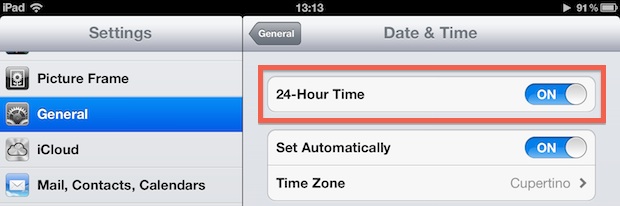
- Toggle the flip switch for “24-Hour Time” to ON position to enable the 24 hour clock / military time
- Close out of Settings as usual
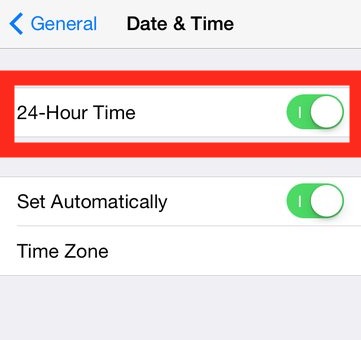
The settings change for the clock and time is immediately visible throughout iOS on the iPhone, iPad, or iPod touch.
You’ll see the 24 hour time on the devices lock screen, as well as at the top of the device on the screen clock, and anywhere else system time is displayed in iOS and iPadOS.
This can be helpful for many iPhone and iPad users, either for arranging international schedules, meetings across time zones, for military personnel, when traveling to other countries that don’t use the 12 hour notation, for people who are simply accustomed to 24 hour clocks, or if you just outright prefer to use the 24 hour clock.
If you wish to change the iPhone or iPad time back to a 12 hour clock, simply return to the same Date & Time settings section and toggle the switch again.
As before, adjusting this clock back to 12 hour time intervals setting will impact all iOS system clocks including the time show on the passcode lock screen, and no device reboot is required to change the clock format like this.
This settings change is the same on all iOS devices and all iOS and iPadOS versions, regardless of what system software the iPhone or iPad is running.
Note the 24 hour time setting screen may look a bit different on older iOS versions, as you can see below with a screenshot from those earlier releases saved for posterity:
Do you use 24 hour time on iPhone or iPad? Have any tips related to its use? Share with us in the comments below.






In Germany, the 24-hour clock is ubiquitous, so there is no way to choose a 12-hour clock in the German localization, which is as it should be. However, in many applications a fictitious 12-hour clock shows up in which the times are shown as 8:00 vorm, which is supposed to mean 8:00, and 8:00 nachm, which is supposed to be 20:00. It’s wrong and it takes a lot of space. These same applications show the 24-hour clock correctly when you choose the 24-hour clock in the US localization.
There’s no way to switch errant applications to the iPhone’s default, no way to make the applications use the standard 24-hour clock, and it is very, very weird. Who thunk this crap up? And why had no one fixed it?
I guess Apple has to stop hiring ex-Microsoft employees.
Military time? Its the time format the whole world is using.
Now if we can get a Caps Lock key and upper/lower case key labels on the keyboard iOS could almost become usable.
Double-click (touch) the blue up arrow. Ta-da!
Props on the Debussy. Have been listening to piano solos for the last week with awe.
Makes for a great Pandora station while you work, highly recommended!